
Fortinet FCSS_LED_AR-7.6 Fortinet NSE 6 - LAN Edge 7.6 Architect Exam Practice Test
Fortinet NSE 6 - LAN Edge 7.6 Architect Questions and Answers
When the MAC address of a device is placed in quarantine on FortiSwitch, what happens to its egress traffic?
Refer to the exhibits.
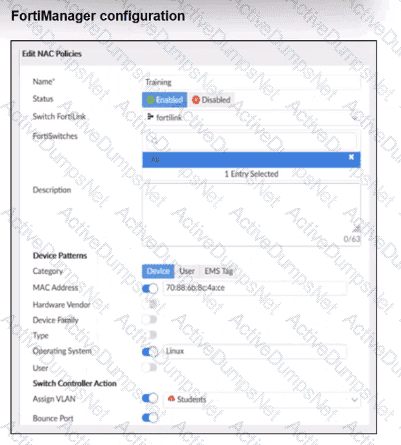
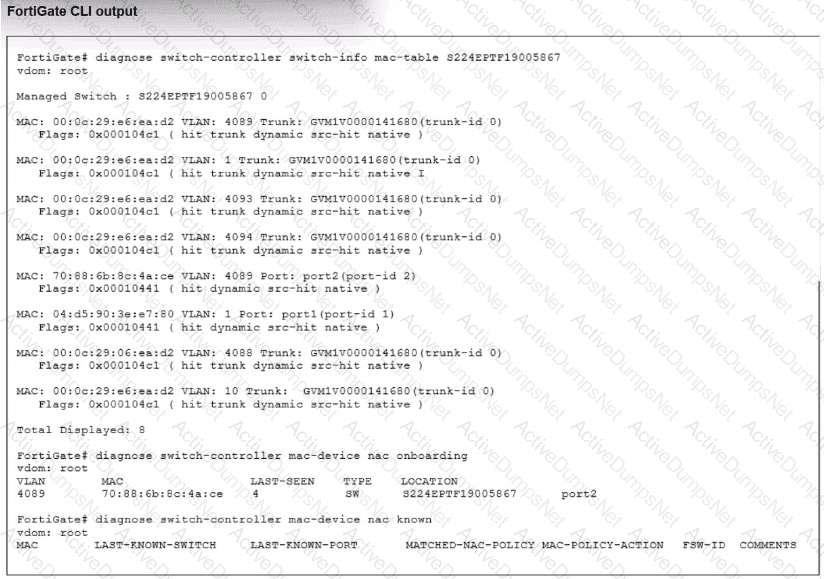
Examine the FortiManager configuration and FortiGate CLI output shown in the exhibit.
The NAC feature is being tested with a device connected to port2 on managed FortiSwitch S224SPTF19005867. The NAC policy has been applied to port2, and traffic was generated from the test device. However, the traffic from the test device does not match the NAC policy and remains in the onboarding VLAN.
What are two possible reasons why the test device is not being correctly classified by the NAC policy? (Choose two.)
How can FortiAIOps help optimize network performance in an SD-Branch deployment with FortiGate, FortiSwitch, and FortiAP?
Refer to the exhibits.
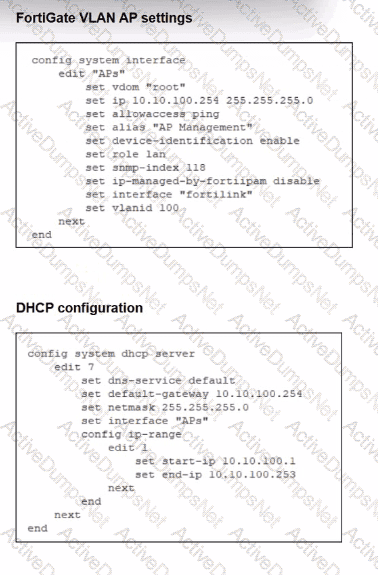
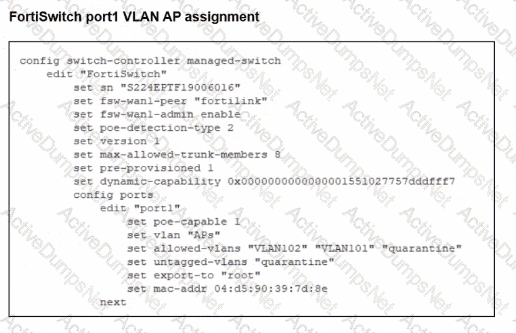
A FortiSwitch is successfully managed by a FortiGate. FortiAP is connected to port1 of the managed FortiSwitch. On FortiGate, the VLAN AP is configured to detect and manage FortiAP, along with a DHCP server for the VLAN AP. Additionally, the VLAN AP is assigned to port1 of FortiSwitch. However. FortiGate is unable to detect or manage FortiAP.
Which FortiGate misconfiguration is preventing the detection of FortiAP?
APs have been manually configured to connect to FortiGate over an IPsec network, and FortiGate successfully detects and authorizes them. However, the APs remain unmanaged because FortiGate is unable to establish a CAPWAP tunnel with them.
What configuration change can resolve this issue and enable FortiGate to establish the CAPWAP tunnel over the IPsec connection?
A network administrator connects a new FortiGate to the network, allowing it to automatically discover andI register with FortiManager.
What occurs after FortiGate retrieves the FortiManager address?
You are setting up a captive portal to provide Wi-Fi access for visitors. To simplify the process, your team wants visitors to authenticate using their existing social media accounts instead of creating new accounts or entering credentials manually.
Which two actions are required to enable this functionality? (Choose two.)
Refer to the exhibit.
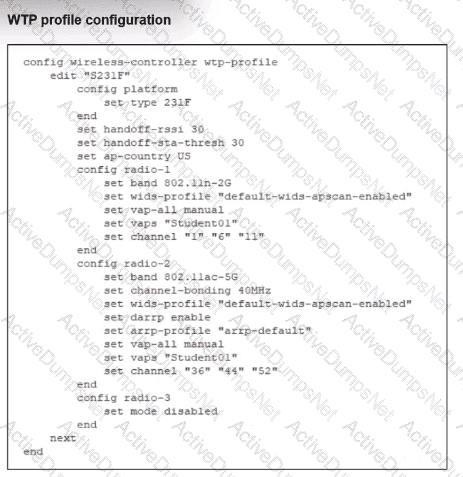
Which shows the WTP profile configuration.
The AP profile is assigned to two FAP-231F APs that are installed in an open plan area.
The first AP has 32 clients associated with the 5 GHz radios and 22 clients associated with the 2.4 GHz radio. The second AP has 12 clients associated with the 5 GHz radios and 20 clients associated with the 2.4 GHz radio.
A dual-band-capable client enters the area near the first AP and the first AP measures the new client at - 3 3 dBm signal strength. The second AP measures the new client at -43 dBm signal strength.
If the new client attempts to conned to the student 01 wireless network, which AP radio will the client be associated with?
Refer to the exhibits.
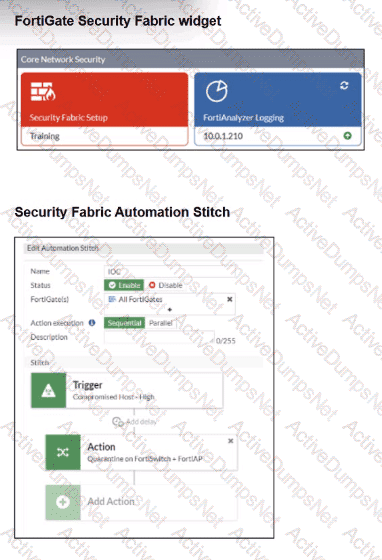
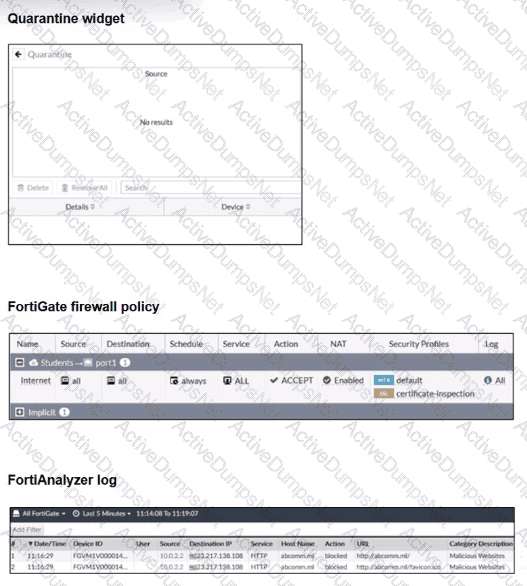
Examine the FortiGate configuration, FortiAnalyzer logs, and FortiGate widget shown in the exhibits.
Security Fabhc quarantine automation has been configured to isolate compromised devices automatically. FortiAnalyzer has been added to the Security Fabric, and an automation stitch has been configured to quarantine compromised devices.
To test the setup, a device with the IP address 10.0.2.1 that is connected through a managed FortiSwitch attempts to access a malicious website. The logs on FortiAnalyzer confirm that the event was recorded, but the device does not appear in the FortiGate quarantine widget.
Which two reasons could explain why FortiGate is not quarantining the device? (Choose two.)
Which statement about generating a certificate signing request (CSR) for a CER certificate is true?
Refer to the exhibits.
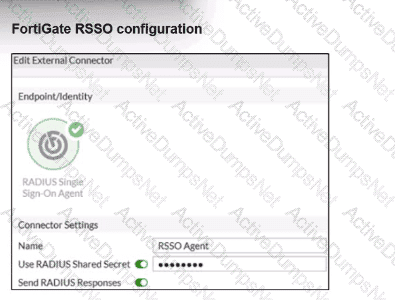
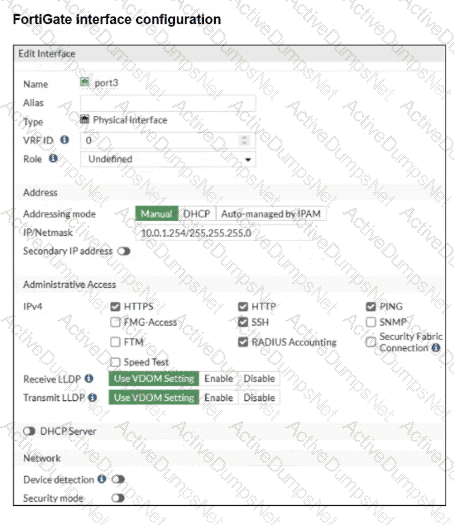
Examine the FortiGate RSSO configuration shown in the exhibit.
FortiGate is set up to use RSSO for user authentication. It is currently receiving RADIUS accounting messages through port3. The incoming RADIUS accounting messages contain the username in the User-Name attribute and group membership in the Class attribute. You must ensure that the users are authenticated through these RADIUS accounting messages and accurately mapped to their respective RSSO user groups.
Which three critical configurations must you implement on the FortiGate device? (Choose three.)
Refer to the exhibits to analyze a network topology and SSID settings.
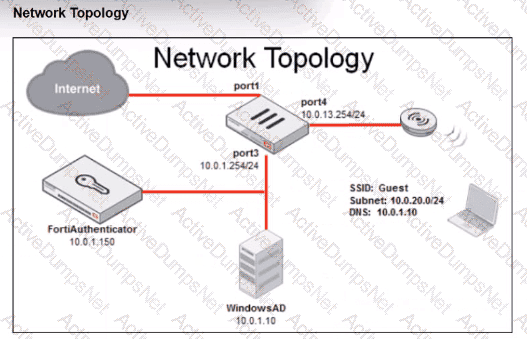
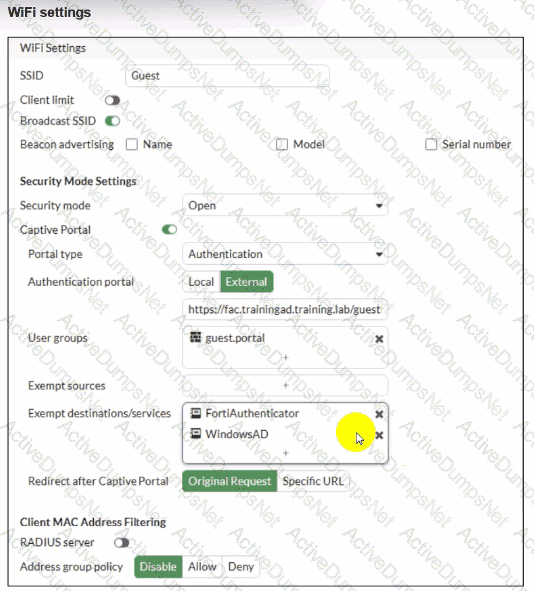
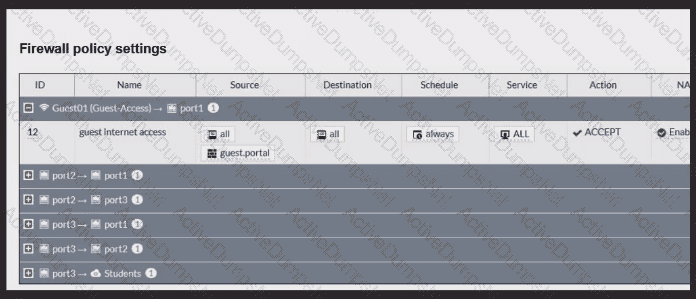
FortiGate is configured to use an external captive portal for authentication to grant access to a wireless network. Testing detected that users attempting to access the SSID are not able to access the captive portal login page. Which configuration change should fix this issue?
Refer to the exhibits.
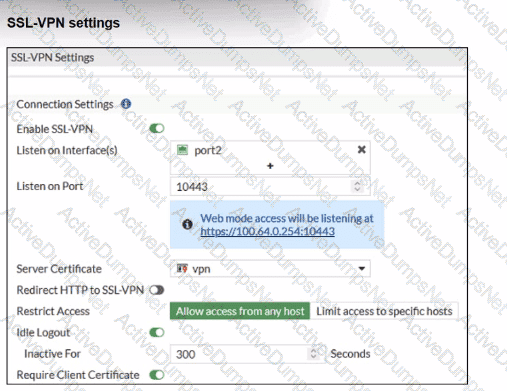
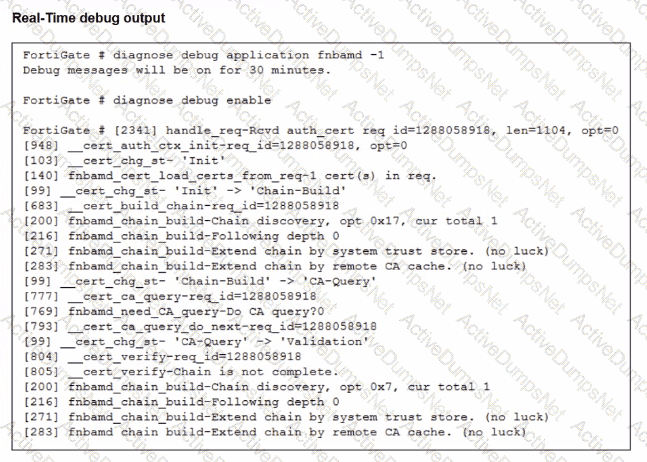
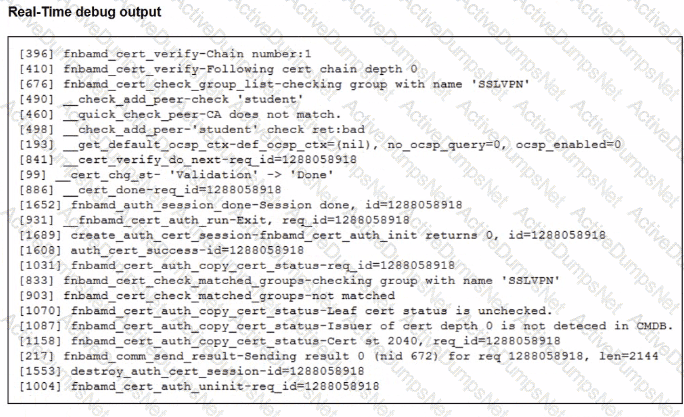
Which include debug output and SSL VPN configuration details.
An SSL VPN has been configured on FortiGate. To enhance security, the administrator enabled Required Client Certificate in the SSL VPN settings. However, when a user attempts to connect, authentication fails.
Which configuration change is needed to fix the issue and allow the user to connect?
Which VLAN is used by FortiGate to place devices that fail to match any configured NAC policies? CRSPAN