
- Home
- UiPath
- UiPath Certified Professional - Developer Track
- UiPath-ASAPv1
- UiPath-ASAPv1 - UiPath Automation Solution Architect Professional v1.0 Exam
UiPath UiPath-ASAPv1 UiPath Automation Solution Architect Professional v1.0 Exam Exam Practice Test
UiPath Automation Solution Architect Professional v1.0 Exam Questions and Answers
What is the primary purpose of using expressions in UiPath Apps?
Options:
To schedule and execute robotic processes.
To define and manage user permissions.
To manipulate, evaluate, and calculate data.
To design and edit user interfaces.
Answer:
CExplanation:
In UiPath Apps, expressions are primarily used to manipulate, evaluate, and calculate data within the app. This allows developers and users to create dynamic content, perform data transformations, and implement logic that can make decisions based on user input or other data sources. Expressions can be used in various parts of the app, such as in controls, data bindings, and actions, to create interactive and responsive applications. By using expressions, users can enhance the functionality of their apps, making them more powerful and adaptable to different scenarios.
References:
- UiPath Apps Guide: Expressions in UiPath Apps
- UiPath Forum: Using Expressions in UiPath Apps
Which are the main elements revolving around UiPath Automation Hub?
Options:
Digitization, Capture traces of the tasks and Automations, Reduce the time spend on understanding the process before building automations.
Automation ideas, Reusable components, Automation, Users, Roles, and Collaborator roles.
Identify Automation opportunities, Development of the automation, and Streamline communications access the teams.
Collect employee desktop data, Construct process maps, and Orchestrate your processes
Answer:
BExplanation:
UiPath Automation Hub is a cloud-based platform that enables organizations to discover, prioritize, and deliver automation solutions at scale. It provides a centralized place to manage the entire automation lifecycle, from ideation to deployment and maintenance. The main elements revolving around UiPath Automation Hub are:
- Automation ideas: These are the suggestions for automation opportunities submitted by employees, managers, or the Center of Excellence (CoE). Automation ideas can be created, reviewed, assessed, approved, and tracked in Automation Hub.
- Reusable components: These are the building blocks of automation solutions that can be shared and reused across different projects and processes. Reusable components include custom activities, snippets, workflow templates, connectors, dashboards, machine learning models, and solutions. Automation Hub allows users to upload, download, rate, and comment on reusable components.
- Automation: This is the final output of the automation development process, which consists of a UiPath project that automates a specific process or task. Automation Hub allows users to monitor the status, progress, and performance of automation projects and solutions.
- Users: These are the people who use Automation Hub to submit, review, assess, approve, develop, or consume automation ideas and components. Users can have different roles and permissions depending on their function and responsibility in the automation journey.
- Roles: These are the predefined sets of permissions that determine what actions users can perform in Automation Hub. Roles include Admin, CoE, Manager, Citizen Developer, RPA Developer, Business Analyst, and Automation User.
- Collaborator roles: These are the additional roles that users can have for a specific automation idea or component. Collaborator roles include Idea Owner, Idea Reviewer, Idea Approver, Component Owner, Component Reviewer, Component Approver, Automation Owner, Automation Reviewer, and Automation Approver.
References:
- Automation Hub - UiPath Documentation Portal
- Automation Hub 2022.4 release - partnerportal.uipath.com
- UiPath Automation Hub Deep Dive - UiPath Academy
- The Lifecycle of an Automation Idea in UiPath Automation Hub - UiPath Academy
Which of the options below represent tasks that are well-suited for automation?
Options:
Exceptions and rare tasks that require critical thinking.
High-volume repetitive tasks that are predictable and do not require creativity or critical thinking.
Tasks that rely heavily on emotional intelligence and human interaction.
High-volume tasks that require some creativity and critical thinking.
Answer:
BExplanation:
High-volume, repetitive tasks that are predictable and do not require creativity or critical thinking are well-suited for automation with RPA. These tasks often involve routine data entry, data extraction, and rule-based decision-making, which can be efficiently handled by robots. Automating such tasks can significantly improve efficiency, accuracy, and speed, while freeing up human workers to focus on more complex and value-added activities that require human judgment, creativity, and emotional intelligence.
References:
- UiPath RPA Guide: Identifying Processes for Automation
- UiPath Best Practices: Process Selection
Which feature of UiPath Apps allows a user to create forms and components for user interfaces in applications?
Options:
UiPath Studio
UiPath Orchestrator
Data Service
App Builder
Answer:
DExplanation:
According to the UiPath documentation1, App Builder is a feature of UiPath Apps that allows a user to create forms and components for user interfaces in applications. App Builder is a low-code app development tool that enables users to design and publish custom apps using drag-and-drop controls, data bindings, conditional logic, and automation workflows. App Builder also provides a preview mode to test the app functionality and appearance before publishing. Users can create apps for various form factors and devices, such as desktop, mobile, web, or sidebar. App Builder also integrates with UiPath Studio, UiPath Orchestrator, and Data Service to leverage the power of automation and data management in the apps. References: 1: App Builder - UiPath Documentation Portal
Invoices from various clients require processing Why would the "Unique Key" properly be used in the Orchestrator Queue configuration?
Options:
To uniquely identify the queue in Orchestrator
To display processed invoices in a report
To ensure that each invoice is only processed once and to ovoid duplication
To prioritize the processing of specific queue items over others
Answer:
CExplanation:
The Unique Key property in the Orchestrator Queue configuration allows you to specify whether the queue items should have unique references or not. A reference is a string value that can be used to identify a queue item. If the Unique Key property is set to Yes, then Orchestrator checks if the reference of the new queue item already exists in the queue, and rejects the item if it does. This way, you can prevent adding duplicate items to the queue and ensure that each invoice is processed only once. If the Unique Key property is set to No, then Orchestrator does not perform this check and allows adding items with the same reference to the queue. This option can be useful if you want to process the same invoice multiple times for different purposes or scenarios. References: Managing Queues in Orchestrator - UiPath Documentation Portal, Managing Queues in Orchestrator - UiPath Documentation Portal, Orchestrator Queue - “unique reference” is enforced - Help - UiPath Community Forum
In UiPath Data Service, what does an "Entity" represent?
Options:
A process orchestration component.
A data visualization tool.
A data transformation method.
A table or data structure.
Answer:
DExplanation:
In UiPath Data Service, an "Entity" represents a data model that defines the structure of data stored within the service, similar to a table in a relational database. Entities are used to model and manage business data in Data Service.
Given the blowing diagram how on the process be optimized from the steps perspective?
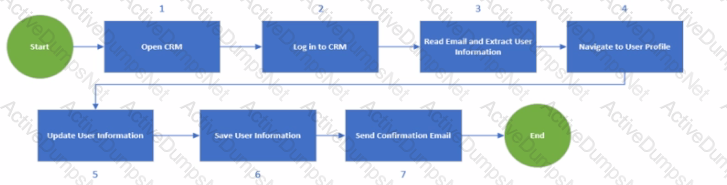
Options:
Read the email as a first step and open CRM and tog in only if there's an email.
Do not send a confirmation email as part of this process
Navigate to the User Profile directly after the login
Log out from CRM before login so the environment is ready lot automation
Answer:
AExplanation:
The process shown in the diagram can be optimized by reading the email as the first step and opening CRM and logging in only if there’s an email. This way, the process can avoid unnecessary steps and save time and resources. If there is no email, the process can end without opening CRM. If there is an email, the process can extract the user information from the email and use it to log in to CRM and navigate to the user profile. This can also reduce the risk of errors and exceptions due to invalid or missing user information. Reading the email as the first step can also help the process to prioritize the emails based on their importance or urgency and handle them accordingly. References:
- UiPath Process Mining: Use process monitoring and optimization to propel RPA
- Optimizing Processes with UiPath Process Mining
- Optimization maximum utilisation - UiPath Community Forum
What argument types can be used for a workflow that is invoked with the Isolated" option?
Options:
Simple types
Reference types
Serializable types
Class types
Answer:
CExplanation:
The Isolated option for the Invoke Workflow File activity allows the invoked workflow to run in a separate Windows process, which can help with isolating a faulty workflow from the main workflow. However, this option requires that the arguments passed to the invoked workflow are serializable, meaning that they can be converted into a binary format that can be transferred across processes. Simple types, such as integers, strings, booleans, etc., are serializable by default. Reference types, such as arrays, lists, dictionaries, etc., are serializable if they implement the ISerializable interface or have the [Serializable] attribute. Class types are serializable if they meet the same criteria as reference types. Data Row is an example of a non-serializable type that cannot be used as an argument for an isolated workflow. References: Invoke Workflow File, Using Arguments, What is the the use of “isolated” property of invoke workflow, How to pass arguments to Isolated Workflow.
What a true fact regarding test cases in UiPath test manager?
Options:
Test cases can be linked directly from Uipath Studio
Test cases can be linked directly from UiPath orchestrator.
Test cases can be linked only from UiPath test Manager.
An external application connection needs to be defined in order to link test cases.
Answer:
AExplanation:
According to the UiPath documentation and the UiPath Academy course, test cases can be linked directly from Uipath Studio to a correspondent test case and requirement in Test Manager. To complete this action, you need to integrate Studio to Test Manager. In Studio, you can right-click a test case and select Link to Test Manager. You can also use Ctrl + Click for multiple selections to link multiple test cases to a requirement. Test Manager might require you to sign in, using your credentials. Then, you can configure the test case information, such as the project, the requirement, and the test case name12.
References:
- Studio - Test Cases - UiPath Documentation Portal1
- UiPath Test Manager | UiPath Academy2
A user is designing a solution lot a business process that uses the following Personal Identifiable Information (Pll):
Employee Name and Employee Date of Birth
Taking into consideration that PH should not be accessible to Database Administrators how should the details be stored in UiPath Orchestrator Queues?
Options:
Store Employee Name and Date of Birth as Transaction item Reference and set "Store in encrypted format as True
Store Employee Name and Date of Birth in Transaction item Specific Content and set "Store in encrypted format" as True
Store the Employee Name and Date of Birth in Transaction Item Specific Content
Store Employee Name and Date of Birth as Transaction item Reference so the business users can search by name
Answer:
BExplanation:
Personal Identifiable Information (PII) is any data that potentially identifies a specific individual, allows for distinctions to be made between individuals, or could be used to de-anonymize anonymous data1. PII should be handled with care and protected from unauthorized access or disclosure. UiPath Orchestrator Queues are a way to store and process data items for automation projects. Queues have two types of data: Reference and Specific Content. Reference is a unique identifier for the data item, while Specific Content is a collection of key-value pairs that store the actual data2. To store PII in UiPath Orchestrator Queues, the best option is to use Specific Content and enable the “Store in encrypted format” option. This option encrypts the data using AES-256 encryption and prevents anyone, including database administrators, from viewing the data in plain text. Only the robots that have access to the queue can decrypt and process the data3. This ensures the security and privacy of the PII data.
References: About Queues and Transactions, Managing Queues in Studio, UiPath for Compliance, a GDPR Automation Solution
Consider the following high-level solution diagram:
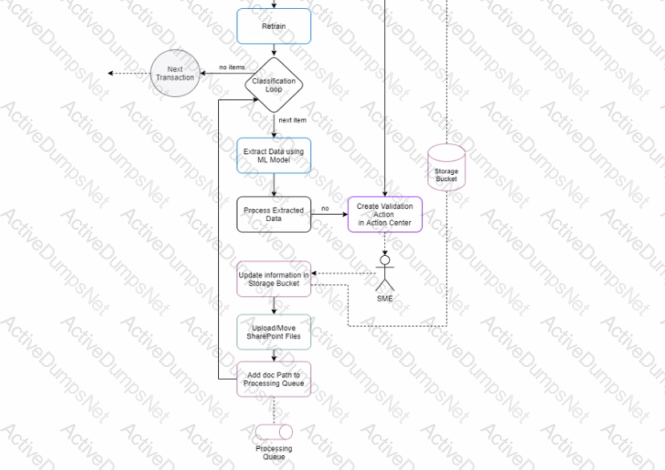
What activity should be used for implementing me Classification Loop according to UiPath Best Practices?
Options:
Which activity
Do While activity
For Each activity
Parallel For Each activity
Answer:
CExplanation:
According to UiPath Best Practices, the For Each activity should be used for implementing the Classification Loop in the high-level solution diagram. The For Each activity enables you to iterate through a collection of items and perform an action for each item. In this case, the collection of items would be the invoices from various clients that require processing. The action for each item would be to extract data using the ML model, process the extracted data, update the information in the storage bucket, upload or move the SharePoint files, and add the document path to the processing queue. Alternatively, if the extracted data is not processed, the action would be to create a validation in the Action Center and wait for the SME to review it. The For Each activity is suitable for this scenario because it allows you to process each invoice sequentially and handle any exceptions or validations that may occur. The For Each activity also has a Body property where you can add other activities or invoke workflows that are relevant to the Classification Loop logic. References: For Each - UiPath Activities, Design Best Practices - UiPath Documentation Portal, Automation Solution Architect - UiPath Academy
In regards to UiPath Automation Cloud licensing- what happens when the Trail plan’s evaluation period ends?
Options:
After the trial expires; your organization will be changed for the pro plan unless you downgrade manually.
You need to manually choose a plan, or your UiPath cloud account will be suspended.
After the trial expires; your organization is automatically downgraded to the free plan.
The pro Trial plan will automatically renew itself for another 60 days
Answer:
CExplanation:
The Pro Trial plan is a plan intended solely for internal non-production purposes, such as evaluation and testing, while fully complying with the Acceptable Use Policy outlined in the Terms of Use. It is available free of charge for a limited amount of time. You can upgrade to the Pro Trial plan if you want to experiment with more robotic power and premium services. With a Pro Trial plan, you can try the extended platform capabilities that come with a paid Pro plan. The evaluation period is limited to 60 days. After the trial expires, your organization is automatically downgraded to the Free plan1.
References:
- Automation Cloud - About licensing
How does scalability impact the design of a UiPath automaton flowchart and what strategies can ensure it handles increased process volume?
Options:
Scalability primarily focuses on reducing the number of steps in the flowchart to make it more efficient for smaller-scale processes
To achieve salacity flowchart design should be rigid and not allow for changes or adaptations to the process response lo evolving business needs.
Scalability is crucial in high-level flowchart design to handle larger volumes efficiently involving design adjustments and resource optimization if needed
Scalability is irrelevant in high-level flowchart design, as it is solely a concern for the deployment phase
Answer:
CExplanation:
Scalability is the ability of a system or a process to handle growing amounts of work or demand in a graceful manner. Scalability impacts the design of a UiPath automation flowchart because it determines how well the automation can cope with increased process volume, complexity, or variability. A scalable flowchart design should consider the following strategies:
- Modularization: Breaking down the process into smaller, reusable, and maintainable components that can be easily modified or replaced if needed. Modularization also facilitates testing, debugging, and error handling.
- Parameterization: Using variables, arguments, configuration files, assets, or queues to store and pass data that can change depending on the process execution. Parameterization allows for flexibility and adaptability of the automation to different scenarios or environments.
- Optimization: Reducing unnecessary or redundant steps, activities, or data in the flowchart to improve the performance, efficiency, and reliability of the automation. Optimization also involves choosing the best methods or techniques to achieve the desired outcome, such as using selectors, data scraping, or computer vision.
- Orchestration: Managing the resources, schedules, triggers, and dependencies of the automation to ensure that it runs smoothly and effectively. Orchestration also involves monitoring, logging, and reporting the status and results of the automation, as well as handling exceptions and alerts.
References: Enhancing UiPath Solutions’ Design Scalability, Roles of a Solution Architect in Automation, RPA Setting, Studio - Flowcharts.
Which of the following is an important principle to follow when designing an RPA solution?
Options:
Design the solution to be maintainable, modular, and scalable, with efficient exception handling and error reporting.
Focus on creating a complex solution with tightly coupled code to ensure the best results.
Discourage the use of established frameworks and create custom ones for each project.
Store environment settings within the code, making it easy to adapt the automation to testing and production environments.
Answer:
AExplanation:
When designing an RPA solution, it's important to focus on maintainability, modularity, scalability, efficient exception handling, and comprehensive error reporting. These principles ensure that the automation solution can be easily updated, extended, and maintained over time. Modularity allows for parts of the solution to be reused across different projects, while scalability ensures that the solution can handle increased workloads as necessary. Efficient exception handling and error reporting are crucial for identifying and resolving issues quickly, ensuring the reliability and stability of the automation.
References:
- UiPath Best Practices: Automation Best Practices
- UiPath Studio Guide: Project Organization
Deal guidance is a machine learning application of which industry?
Options:
Financial services
Healthcare
Professional services
Retail
Answer:
AExplanation:
Deal guidance is a machine learning application that helps financial services firms to optimize their deal pricing, terms, and risk assessment. It uses historical data, market trends, and customer preferences to generate insights and recommendations for the best deal outcomes. Deal guidance can also automate the deal approval process and generate reports and dashboards for performance monitoring and compliance. References: UiPath Automation Solution Architect Learning Plan, Module 6: Machine Learning and AI1; UiPath Automation Suite - Deal Guidance2; UiPath Academy - Roles of a Solution Architect in Automation, RPA Setting3.
What are the two primary stages m checking license utilization in UiPath projects?
Options:
Statement of Work and Technical Viability Review
Protected Start and Process Development
Solution Architect Review and UAT
Licensing Allocation and Development Testing
Answer:
DExplanation:
According to the UiPath Automation Solution Architect course, the two primary stages in checking license utilization in UiPath projects are:
- Licensing Allocation: This stage involves planning and allocating the required licenses for the project, such as Studio, Robot, Orchestrator, and Data Service licenses. This stage also involves estimating the cost and return on investment (ROI) of the project based on the license usage.
- Development Testing: This stage involves testing the project in different environments, such as development, testing, and production, and monitoring the license consumption and performance of the project. This stage also involves optimizing the license utilization and resolving any issues or errors related to licensing.
References:
- UiPath Automation Solution Architect course, Module 4: Project Delivery2
- Data Service - Checking the License Usage - UiPath Documentation Portal1
What are the characteristics of a semi-structured document?
Options:
Semi-structured documents are documents that do not follow a strict format and are not to specified data fields. They do not have a fixed form but follow a common enough format. They contain fixed and variable parts like tables and may contain paragraphs.
Semi-structure documents do not follow a clear and predefined structure. They have no fixed format. These files are all easily understood by humans, while it is more difficult for a robot to understand them.
Semi-structure documents have a fixed format and can contain handwriting, signatures, or checkboxes like forms, passports, and contracts.
Semi-structure documents have a fixed format and are generally called forms. They are generally use for collecting information in a precise format area where each piece of data needs to be entered.
Answer:
AExplanation:
Semi-structured documents are documents that have some degree of structure, but not enough to be easily processed by traditional data management systems. They usually have a common schema or layout, but the data fields may vary in number, position, or content. They may also contain unstructured elements such as text, images, or handwriting. Examples of semi-structured documents are invoices, receipts, purchase orders, utility bills, and contracts. These documents are often used in business processes and require data extraction and classification. UiPath Document Understanding provides out-of-the-box Machine Learning Models to handle semi-structured documents in a template-less approach12.
References:
- Introducing Document Understanding - UiPath
- Document Understanding - About ML Packages - UiPath Documentation Portal
What is the main advantage of creating a UiPath App?
Options:
To create a custom data types and data structure for automation projects.
To Automate software version control and deployment.
To store and manage digital files and content storage.
To develop and share custom applications using low-code development.
Answer:
DExplanation:
UiPath Apps is a low-code application development platform that enables you to build and share enterprise-grade custom applications that deliver engaging user experiences. Using UiPath Apps, you can quickly build custom business applications that connect to data in any underlying cloud or on-premises system using the power of automation. Apps built with UiPath App Studio provide rich controls for data access and update as well as conditional logic for complex business needs. The underlying UiPath RPA platform provides advanced workflow and business logic capabilities to automate your entire end to end business process.
References:
- Apps - Introduction - UiPath Documentation Portal
- Introducing UiPath Apps: A Robot-Powered Low-Code Platform
How can a user effectively store and query data using Entity Records in UiPath Data Service tor RPA projects?
Options:
Store data in fixed Entity Records and leverage cloud storage services to manage queries and data manipulation.
Utilize pre-defined entities and fields to store new data, while relying on queries for data retrieval
Create new Entity Records to store data while using suitable queries to retrieve and manipulate existing records as needed.
Employ a smote query tor all operators including storage and retrieval to avoid complexity n handing Entity Records
Answer:
CExplanation:
UiPath Data Service is a cloud-based data platform that enables users to store and manage structured and relational data for their RPA projects. Entity Records are the basic units of data in Data Service, which consist of fields and values that represent a specific object or concept. Users can create custom Entity Records to store data that is relevant to their automation scenarios, such as customer information, order details, invoice data, etc. Users can also use suitable queries to retrieve and manipulate existing Entity Records as needed, such as filtering, sorting, aggregating, updating, or deleting data. Users can also leverage the relationships between Entity Records to access related data across different entities, such as joining, expanding, or embedding data. References: Data Service - Entities - UiPath, Data Service - Queries - UiPath, Data Service - Relationships - UiPath
In a long-running context what is the status of a job waring for human valuation?
Options:
Stopping
Suspended
Running
Stopped
Answer:
BExplanation:
In a long-running context, a job can be suspended when it is waiting for human validation or intervention. This means that the job is paused until a human user performs an action, such as approving or rejecting a document, providing some input, or resolving an exception. A suspended job can be resumed by the user or by the orchestrator, depending on the configuration of the process. A suspended job is different from a stopping or stopped job, which means that the job is being terminated or has been terminated by the user or by the orchestrator. A suspended job is also different from a running job, which means that the job is executing normally without any interruption or delay. References: Long-Running Workflows - UiPath Documentation Portal, Managing Jobs - UiPath Documentation Portal, Long Running Workflow - UiPath Activities
Which UiPath component allows UiPath Apps to connect to entity data sources?
Options:
UiPath Data service
UiPath Assistant
UiPath Storage Bucket
UiPath Studio
Answer:
AExplanation:
UiPath Data Service is a persistent data storage service that brings powerful no-code data modeling and storage capabilities to your Robotic Process Automation (RPA) projects1. UiPath Apps can connect and interact with entities from UiPath Data Service to create better, more complex apps2. Entities are data models that define the structure and relationships of the data you want to store and use in your automation projects3. You can reference an entity from Data Service in your app and bind it to various controls such as dropdown lists, tables, and custom lists2.
References:
- About Data Service
- Referencing an Entity in Your App
- Creating an Entity
Consider a process a that has a dependency Library B. Library B has defined an Object Repository for the application C where UI objects are stored.
Assuming a developer wants to use a UI Object defined in the Object Repository for application C insider process A, what is the best solution for that?
Options:
Define a new Object Repository for application C in process A and reference the elements from there.
Avoid referencing the UI object since it has already been defined and just use the selector.
Export the Object Repository for the application C as an UI library and import in it process A. Then one can access the UI Objects defined.
Since process A already references Library B which has the Object Repository for the application C, one can directly access the UI Objects from the Object Repository for the application C.
Answer:
DExplanation:
This answer is correct because the Object Repository allows for creating and reusing UI taxonomies inside and across automation projects. By referencing Library B, which contains the Object Repository for application C, process A can reuse the UI elements defined there without creating a new Object Repository or using selectors. This way, process A can benefit from the centralized management, reusability, and reliability of the UI elements in the Object Repository12
References:
- Studio - About Object Repository - UiPath Documentation Portal
- Object Repository | UiPath UI Library | UiPath Academy
What is the difference between OCR and UiPath Document Understating?
Options:
OCR is a technology that recognizes text within a digital image, while Document Understanding is the ability to extract and interpret information and meaning from a wide range of document types.
OCR is a technology that recognizes text and graphics within a digital image, while Document Understanding is the ability to extract and interpret information and meaning from a wide range of document types.
OCR is a technology that recognizes text and images within a digital image, while Document Understanding is the ability to extract and interpret information and meaning from a wide range of document types.
OCR is a technology that recognizes text within a digital image. Document Understanding is another name for the same technology.
Answer:
AExplanation:
Optical Character Recognition (OCR) is a foundational technology that converts different types of documents, such as scanned paper documents or PDFs, into editable and searchable data by recognizing text within digital images. UiPath Document Understanding builds upon OCR technology but goes further by not only recognizing text but also understanding the structure, context, and semantics of documents. This enables the extraction of specific information, classification of documents, and interpretation of the document's meaning, facilitating the automation of complex document processing workflows that involve various document types and require contextual understanding.
References:
- UiPath Document Understanding Guide: Introduction to Document Understanding
- UiPath OCR Activities Guide: OCR Activities
How can a user set up a Calendar for Non-Working Days in UiPath Orchestrator?
Options:
Create a new calendar, and manually select Non-Working Days or upload a .csv file containing Non-Working Days.
Create a new calendar, and manually select Non-Working Days.
Create a new calendar, and manually select Non-Working Days or upload a .txt file containing Non-Working Days.
Orchestrator does not have the capability to create Calendars.
Answer:
AExplanation:
In UiPath Orchestrator, calendars are used to define working and non-working days for robots. To accommodate non-working days, such as weekends or holidays, a user can create a new calendar and manually mark these days. Additionally, for ease and efficiency, a .csv file containing all non-working days can be prepared and uploaded to Orchestrator. This feature is particularly useful for planning and scheduling unattended robots, ensuring that they operate according to the organization's working calendar.
References:
- UiPath Orchestrator Guide: Managing Calendars
- UiPath Orchestrator Guide: About Calendars
What functionality does the Package Explorer offer?
Options:
Explorer the graphical representation of only the entry xml file as well as the variables, arguments, and imports that are part of the latest package version.
Explore the graphical representation of only the entry xml file without having access to the variable, arguments, and imports that are part of any package version.
Explore the graphical representation of nay .xml file as well as the variables, arguments, and imports that are part of any package version.
Explore the graphical representation of any .xml file without having access to the variables, arguments, and imports that are part of any package version.
Answer:
CExplanation:
Package Explorer is a feature that enables you to view the contents of any package version uploaded to Orchestrator. You can access it from the Packages page, by clicking the Explore button next to the package name. Package Explorer displays a graphical representation of the entry .xml file of the package, as well as the variables, arguments, and imports that are part of it. You can also view the properties of each activity, such as selectors, text, or output variables. Package Explorer can help you troubleshoot errors, compare different versions of a package, or inspect the logic of a package without opening it in Studio.
References:
- Package Explorer
- New package Explorer options with 2019.10 Beta
How can a user create a dynamic message in UiPath Apps that contains the user’s name when they enter their name in a textbox?
Options:
Use the String.Format function in a VB expression for the Text property of the label control.
Use a query to fetch the user's name from the Data Service entity and display it as a greeting.
Add the current date and time along with the user's name using a VB expression
Concatenate "Hello," with the user's name using a double ampersand (&&) symbol.
Answer:
AExplanation:
In UiPath Apps, dynamic messages can be created using expressions. The String.Format function can be used within a VB expression to dynamically insert the user's name into a message displayed on a label control, based on the input from a textbox.
When elements of UiPath Automaton Platform are best suited for managing long-running activities in RPA projects?
Options:
Queues tasks jobs
Libraries assets triggers
Tenants packages webhooks
Folders, entities permissions
Answer:
DExplanation:
Folders, entities and permissions are the elements of UiPath Automation Platform that are best suited for managing long-running activities in RPA projects. Folders enable the organization and isolation of data, processes, queues, and other resources within a tenant. Entities are custom data structures that can store information related to long-running workflows, such as invoices, orders, or contracts. Permissions control the access and actions that users and robots can perform on folders, entities, and other resources.
References:
- Folders
- Entities
- Permissions
Which UiPath Task Mining integrator allows for documented tasks to be exported as automaton ideas?
Options:
Integration with UiPath Orchestrator
integration with UiPath Assistant
Integration with UiPaTh Automation Hub
Integration with UiPath Process Mining
Answer:
CExplanation:
UiPath Automation Hub is a centralized platform that enables users to capture, prioritize, and track automation ideas throughout their lifecycle. It also integrates with UiPath Task Mining, which is a tool that analyzes employees’ desktop activities to discover repetitive and automatable tasks. By integrating Task Mining with Automation Hub, users can export the documented tasks as automation ideas and manage them in a unified pipeline. This way, users can leverage the data-driven insights from Task Mining to build a high-ROI automation portfolio. References: Task Mining Integration with Automation Hub, Automation Hub Overview
What is the purpose of ‘’The automation Runbook’’ document?
Options:
Is used by the support team to learn more about automation.
Is a deliverable created by the Client SME for the final business users.
Consolidates the project conclusion for the automation.
Contains the project’s detailed steps and timeline.
Answer:
AWhat is UiPath Apps?
Options:
An IDE to develop custom activities for UiPath Studio.
A system for managing digital files and content storage.
A cloud platform for creating and managing RPA solutions.
A low-node platform for building custom applications for automation.
Answer:
DExplanation:
UiPath Apps is a low-code application development platform that enables you to build and share enterprise-grade custom applications that deliver engaging user experiences. Using UiPath Apps, you can quickly build custom business applications that connect to data in any underlying cloud or on-premises system using the power of automation1. Apps built with UiPath App Studio provide rich controls for data access and update as well as conditional logic for complex business needs. The underlying UiPath RPA platform provides advanced workflow and business logic capabilities to automate your entire end to end business process2. Apps can be designed to run in multiple form factors such as a full-page console, a sidebar, or any other size for either desktop or mobile devices1.
References: 1: Apps - Introduction - UiPath Documentation Portal 2: Introducing UiPath Apps: A Robot-Powered Low-Code Platform
Consider the two Workflows with their descriptions below:
Workflow 1: Select employees onboarded in the last month from a database.
Workflow 2: Navigate to a webpage based on a certain rule.
Which Abstraction Layer do the Workflows belong to?
Options:
Workflowl: Application Data layer.
Workflow2: Application Screen layer.
Workflowl: Service layer.
Workflow2: Business Process layer.
Workflowl: Data layer.
Workflow2: Application Process layer.
Workflowl: Application Process layer.
Workflow2: Business Screen layer.
Answer:
AExplanation:
In UiPath's layered approach to automation, different types of workflows are categorized based on their functionality and level of abstraction. Workflow 1, which selects employees onboarded in the last month from a database, operates at the Application Data layer. This layer focuses on direct interactions with data sources, databases, and data manipulation without user interface involvement. Workflow 2, navigating to a webpage based on a certain rule, operates at the Application Screen layer. This layer involves automations that interact with the user interface of applications, such as navigating through screens, clicking buttons, and entering data into forms.
References:
- UiPath Best Practices: Layered Approach to Automation
- UiPath Studio Guide: Project Organization
How can UiPath Communications Mining and Document Understanding be combined to optimize data extraction and analysis in an automated business process?
Options:
Communications Mining can extract insights from unstructured messages and Document Understanding can obtain hey Information from attached files
Communications Mining can access confidential messages and files and feed the data collected to Document Understanding for analysis
Communications Mining can be Inked directly to the output form Document Understanding to generate summaries of every communication
Communications Mining should be used to reanalyze data extracted by Document Understanding as if it were unstructured messages tor creating analytics
Answer:
AExplanation:
UiPath Communications Mining is a platform that uses AI to monitor and automate business communications across different channels, such as email, chat, calls, and tickets. It can extract insights from unstructured messages, such as the reasons for contact, the data fields, and the sentiment. UiPath Document Understanding is a framework that uses AI to process and analyze documents of various formats, such as PDF, Word, Excel, and images. It can obtain key information from attached files, such as the document type, the fields, and the values. By combining Communications Mining and Document Understanding, businesses can optimize data extraction and analysis in an automated business process. For example, a customer service process that involves reading both messages and documents to complete a request can be automated by using Communications Mining to understand the customer’s intent and data from the message, and Document Understanding to extract the relevant information from the document. This way, the process can be faster, more accurate, and more scalable. References:
- Communications Mining - Overview - UiPath Documentation Portal
- [Document Understanding - Overview - UiPath Documentation Portal]
- How and where Communications Mining can be deployed
Which of the Mowing can be achieved by using Automaton Ops?
Options:
Define the licensing availability and strategy
Preform remote installations of UPath products (Such as Studio Assistant)
Configure connection between different products inside the UiPath ecosystem
Configure and deploy governance policies
Answer:
DExplanation:
According to the UiPath documentation1, Automation Ops is a component of the UiPath platform meant for creating, deploying, and managing Robotic Process Automation (RPA) governance policies in UiPath Studio, UiPath StudioX, and UiPath Assistant. You can use a single, simple web portal to manage and implement governance rules based on user profiles, such as defining the acceptable feeds, packages, widgets, and activities, restricting the applications and URLs that can be automated, and assigning roles and responsibilities for reviewing and approving the automation projects. Automation Ops also integrates with Git repositories and CI/CD pipelines to provide source control and automation delivery capabilities. Therefore, the correct answer is D. Configure and deploy governance policies, as this is one of the main functionalities of Automation Ops. References: 1: Automation Ops - UiPath Documentation
Which trigger should be used for ‘’E3L’’?
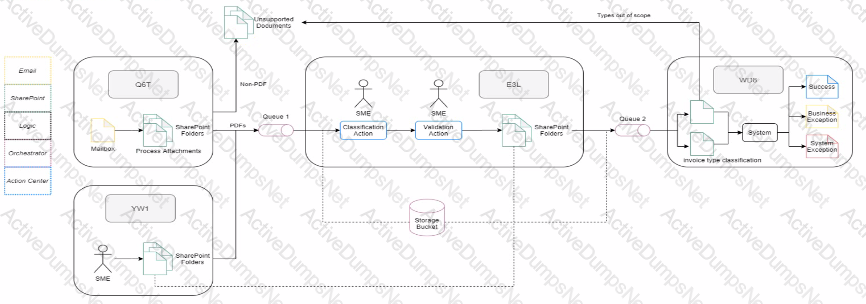
A)
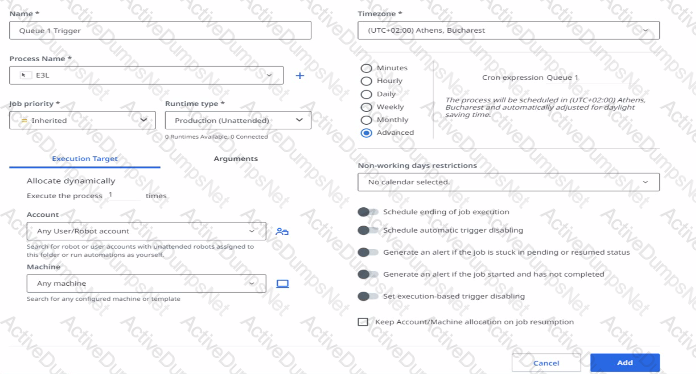
B)
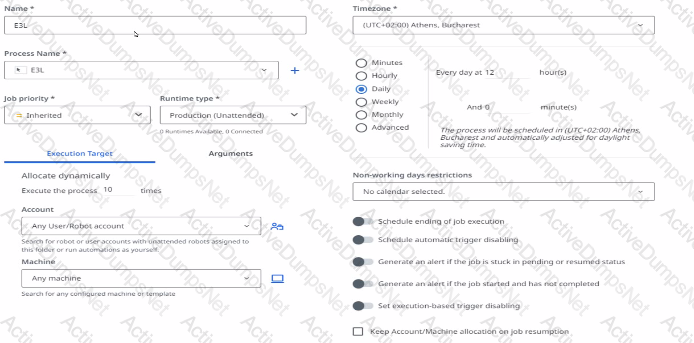
C)
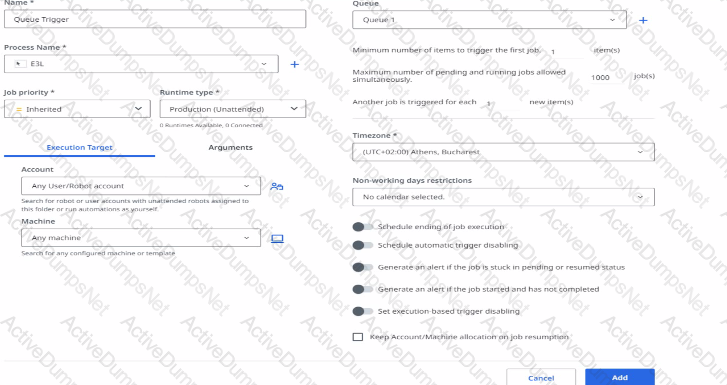
D)
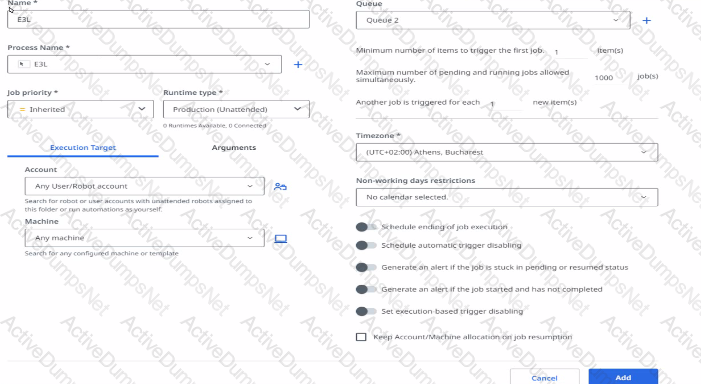
Options:
Option A
Option B
Option C
Option D
Answer:
AExplanation:
References:
- Orchestrator - Queue Triggers
- Orchestrator - UI Automation Triggers
- Orchestrator - Form Triggers
- Orchestrator - Event Triggers
What are long-running workflows?
Options:
Processes are designed to run continuously for an extended period of time.
Workflow intended to be used only by attended robots.
Master projects that supports orchestration and human intervention.
Workflow for which one can set a Stop Time
Answer:
CExplanation:
This answer is correct because long-running workflows are processes that require logical fragmentation or human intervention (validations, approvals, exception handling) such as invoice processing and performance reviews. They are handled with a set of instruments in the UiPath suite: a dedicated project template in Studio called Orchestration Process, actions and resource allocation capabilities in Orchestrator. Long-running workflows use a pair of activities to introduce a condition that suspends the main job until the condition is met, and then resumes the job with the obtained data. The condition can be a job, a queue item, a form action, or an external action12
References:
- Orchestrator - Working With Long-running Workflows
- Designing long-running workflows - UiPath Documentation Portal
How can automated Test Sets be executed?
Options:
From both Orchestrator and Test Manager
Only from Orchestrator
From boll Studio and Test Manager
Only from Test Manager
Answer:
AExplanation:
Automated Test Sets can be executed from both Orchestrator and Test Manager, depending on the source and type of the test cases. Test Sets that have been linked from Orchestrator can be executed automatically or manually, if they have manual steps defined. Test Sets that have been created in Test Manager can also be executed automatically or manually, if they have test cases linked from Studio or manual steps12.
References:
- Test Suite - Test Sets
- Test Suite - Executing Tests
What are the main functionalities inside a UiPath Test Manager project?
Options:
Requirements, Test Cases, Test Sets, Test Results, Integrations, Project Settings.
Dashboard, Test Cases, Test Sets, Test Results.
Dashboard, Requirements, Test Cases, Test Sets, Test Results, Project Settings.
Requirements, Test Cases, Test Sets, Test Results.
Answer:
AExplanation:
UiPath Test Manager is designed to facilitate comprehensive testing of automation projects, including managing requirements, creating and executing test cases, organizing tests into sets, reviewing test results, integrating with other tools, and configuring project settings to tailor the testing environment to specific needs.
What is a critical security and compliance check performed by the Solution Architect during code reviews?
Options:
Check client geographic datastore requirements.
Check for Personally Identifiable Information written as clear text in logs.
Check for workflows invoked with Isolated option.
Check the applications used by the automation.
Answer:
BExplanation:
Ensuring the security and compliance of automation solutions is paramount, especially when dealing with sensitive data. A critical security and compliance check performed by Solution Architects during code reviews is verifying that Personally Identifiable Information (PII) is not written as clear text in logs. Writing PII to logs can lead to security breaches and non-compliance with data protection regulations such as GDPR. Solution Architects must ensure that the code is designed to either mask or exclude PII from logs, thereby protecting sensitive information and adhering to compliance standards.
References:
- UiPath Security Guide: Logging Best Practices
- UiPath Security and Compliance: Data Protection and Privacy
What is a primary purpose of Uipath Data Service in Robotic Process Automation (RPA)?
Options:
Data modeling and storage.
Streaming robot-human collaboration management.
Centralizing Ui component libraries
Implementing process monitoring and analytics
Answer:
AExplanation:
The primary purpose of UiPath Data Service is to provide a persistent data storage service that brings powerful no-code data modeling and storage capabilities to your Robotic Process Automation (RPA) projects. UiPath Data Service allows you to securely store and manage your business data within UiPath, and use it for various automation scenarios, such as aggregating data from multiple systems, supporting long-running business processes, and passing data across attended and unattended workflows. UiPath Data Service is integrated with Studio and Robot, and offers rich relational data types, integrated security, and instantaneous and adjustable provisioning and deployments. (https://docs.uipath.com/data-service/automation-cloud/latest/user-guide/introduction)
References:
- Data Service - Introduction - UiPath Documentation Portal
- Data Service - UiPath Documentation Portal
- Data Visualization in UiPath Data Service | Community Blog
- UiPath Data Service: Data management and storage simplified for your automation
What are the two main categories that a development Specification Document (DSD) should focus on?
Options:
Input types and output files.
Runtime guide and development details
Process description and project timeline
Infrastructure settings and error handling
Answer:
BExplanation:
A development Specification Document (DSD) is a critical document for a smooth implementation of an RPA project. It should contain the automated process details and focus on two main categories: runtime guide and development details1. The runtime guide should provide information about how the robot will run, such as the input and output files, the configuration settings, the error handling, the logging and reporting, the credential management, and the Orchestrator usage. The development details should provide information about how the robot was built, such as the packages, the environment, the source code repository, the workflow components, the reusable components, the invoke tree, the custom logs, and the background versus foreground automation.
References: 1: Studio - Automation Lifecycle - UiPath Documentation Portal
What is a requirement to access Automation Cloud?
Options:
Need a dedicated infrastructure
Need a compatible browser
Need to install on-premises
Need an offline access
Answer:
BExplanation:
To access Automation Cloud, you do not need a dedicated infrastructure, an on-premises installation, or an offline access. You only need an internet connection with TLS and a compatible web browser. Automation Cloud is a cloud-based platform that delivers the full UiPath Platform, including SaaS robots and self-hosted robots, in under a minute, from any of six regions around the world. You can access it from any supported browser, such as Google Chrome, Microsoft Edge Chromium, Mozilla Firefox, or Apple Safari. Other browsers that are not listed, older versions of the listed ones, or mobile browsers are not supported and may cause errors or malfunctions. References: Automation Cloud - Software requirements - UiPath Documentation Portal, Complete cloud-based enterprise automation solution | UiPath
What is the main purpose of Workflow Analyzer in UiPath Studio?
Options:
Downloading external packages and resolving dependencies for a project.
Creating a visual flowchart that represents the logic of the workflow for easy understanding.
Evaluating best-practices usage in the process, identifying design errors and areas for improvement.
Debugging and executing the workflow step-by-step to track any errors.
Answer:
CExplanation:
The main purpose of Workflow Analyzer in UiPath Studio is to evaluate the usage of best practices within the development process, identify design errors, and pinpoint areas for improvement. Workflow Analyzer is a static code analysis tool that scans automation projects for potential issues, inefficiencies, and deviations from best practices. It provides developers with actionable feedback and recommendations, helping to improve the quality, maintainability, and performance of the workflows. This tool is instrumental in ensuring that automations are built to the highest standards, aligning with organizational guidelines and industry best practices.
References:
- UiPath Studio Guide: Workflow Analyzer
- UiPath Best Practices: Workflow Design
What are two key best practices for UiPath license estimation?
Options:
Assess the number and complexity of processes and identify required robot types (such as Attended or Unattended).
Calculate the ROI of automating a certain process and assess the volume of emails processed by the automations.
Analyze business metrics and identify the number of applications automated by the processes.
Assess concurrent robot usage during peak workload and optimize the chain of approvals in the decision-making.
Answer:
A, DExplanation:
For UiPath license estimation, two key best practices include assessing the number and complexity of processes to determine the required types of robots (e.g., Attended, Unattended, Studio, StudioX) and evaluating concurrent robot usage during peak workloads. Understanding the complexity of the processes helps in choosing the right type of robots that align with the tasks' needs, ensuring efficient automation. Concurrent usage assessment is crucial for optimizing resource allocation, especially during peak periods, to maintain high efficiency and productivity without overprovisioning resources. This strategic approach to licensing can significantly enhance the scalability and cost-effectiveness of RPA initiatives.
References:
- UiPath Licensing Guide: Robot Types and Licensing
- UiPath Best Practices: License Management
What is the involvement of an RPA Solution Architect throughout the stages of an RPA project?
Options:
Acting as technical lead during the lull RPA project Lifecycle from planning through implementation and hypercare
Offering consultations during the initial planning stage then withdrawing from the project before development begins
Performing post-deployment code reviews and inspecting the final RPA solution without engaging in earlier stages
Response for giving presentations and training sessions on RPA products without involvement in protect planning
Answer:
AExplanation:
According to the UiPath Automation Solution Architect course1, the role of an RPA Solution Architect is to design, develop, and deliver end-to-end automation solutions for various business processes. The RPA Solution Architect is involved in all the stages of an RPA project, from the initial analysis and planning, to the development and testing, to the deployment and maintenance. The RPA Solution Architect also acts as a technical lead and mentor for the RPA developers, ensuring that the best practices and standards are followed. The RPA Solution Architect also collaborates with the business analysts, process owners, and other stakeholders to ensure that the automation solutions meet the business requirements and expectations.
References: 1: UiPath Automation Solution Architect Course
According to the ‘’ process automation visibility criteria’’, which tasks are most suitable for automation?
Options:
Rule-based and repetitive tasks.
Tasks involving creative problem-solving.
Tasks relying on manual user input.
Tasks requiring consultant human intervention
Answer:
AExplanation:
According to the process automation visibility criteria, the tasks that are most suitable for automation are those that are rule-based and repetitive. Rule-based tasks are those that follow a clear and consistent logic that can be programmed without human judgment. Repetitive tasks are those that are performed frequently and in large volumes, and do not vary much in their execution. These tasks are ideal for automation because they can be easily standardized, optimized, and scaled by software robots, while reducing human errors, costs, and efforts.
References:
- Are all processes are suitable for RPA, so how to identify the right processes for Robotic Process Automation
- Determining What Business Processes To Automate
- How To Choose Which Processes To Automate With RPA
Unlock UiPath-ASAPv1 Features
- UiPath-ASAPv1 All Real Exam Questions
- UiPath-ASAPv1 Exam easy to use and print PDF format
- Download Free UiPath-ASAPv1 Demo (Try before Buy)
- Free Frequent Updates
- 100% Passing Guarantee by Activedumpsnet
Questions & Answers PDF Demo
- UiPath-ASAPv1 All Real Exam Questions
- UiPath-ASAPv1 Exam easy to use and print PDF format
- Download Free UiPath-ASAPv1 Demo (Try before Buy)
- Free Frequent Updates
- 100% Passing Guarantee by Activedumpsnet