- Home
- Snowflake
- SnowPro Advanced: Architect
- ARA-R01
- ARA-R01 - SnowPro Advanced: Architect Recertification Exam
Snowflake ARA-R01 SnowPro Advanced: Architect Recertification Exam Exam Practice Test
SnowPro Advanced: Architect Recertification Exam Questions and Answers
Which system functions does Snowflake provide to monitor clustering information within a table (Choose two.)
Options:
SYSTEM$CLUSTERING_INFORMATION
SYSTEM$CLUSTERING_USAGE
SYSTEM$CLUSTERING_DEPTH
SYSTEM$CLUSTERING_KEYS
SYSTEM$CLUSTERING_PERCENT
Answer:
A, CExplanation:
According to the Snowflake documentation, these two system functions are provided by Snowflake to monitor clustering information within a table. A system function is a type of function that allows executing actions or returning information about the system. A clustering key is a feature that allows organizing data across micro-partitions based on one or more columns in the table. Clustering can improve query performance by reducing the number of files to scan.
- SYSTEM$CLUSTERING_INFORMATION is a system function that returns clustering information, including average clustering depth, for a table based on one or more columns in the table. The function takes a table name and an optional column name or expression as arguments, and returns a JSON string with the clustering information. The clustering information includes the cluster by keys, the total partition count, the total constant partition count, the average overlaps, and the average depth1.
- SYSTEM$CLUSTERING_DEPTH is a system function that returns the clustering depth for a table based on one or more columns in the table. The function takes a table name and an optional column name or expression as arguments, and returns an integer value with the clustering depth. The clustering depth is the maximum number of overlapping micro-partitions for any micro-partition in the table. A lower clustering depth indicates a better clustering2.
References:
- SYSTEM$CLUSTERING_INFORMATION | Snowflake Documentation
- SYSTEM$CLUSTERING_DEPTH | Snowflake Documentation
Which SQL alter command will MAXIMIZE memory and compute resources for a Snowpark stored procedure when executed on the snowpark_opt_wh warehouse?
A)
B) 
C) 
D) 
Options:
Option A
Option B
Option C
Option D
Answer:
AExplanation:
To maximize memory and compute resources for a Snowpark stored procedure, you need to set the MAX_CONCURRENCY_LEVEL parameter for the warehouse that executes the stored procedure. This parameter determines the maximum number of concurrent queries that can run on a single warehouse. By setting it to 16, you ensure that the warehouse can use all the available CPU cores and memory on a single node, which is the optimal configuration for Snowpark-optimized warehouses. This will improve the performance and efficiency of the stored procedure, as it will not have to share resources with other queries or nodes. The other options are incorrect because they either do not change the MAX_CONCURRENCY_LEVEL parameter, or they set it to a lower value than 16, which will reduce the memory and compute resources for the stored procedure. References:
- [Snowpark-optimized Warehouses] 1
- [Training Machine Learning Models with Snowpark Python] 2
- [Snowflake Shorts: Snowpark Optimized Warehouses] 3
Consider the following scenario where a masking policy is applied on the CREDICARDND column of the CREDITCARDINFO table. The masking policy definition Is as follows:

Sample data for the CREDITCARDINFO table is as follows:
NAME EXPIRYDATE CREDITCARDNO
JOHN DOE 2022-07-23 4321 5678 9012 1234
if the Snowflake system rotes have not been granted any additional roles, what will be the result?
Options:
The sysadmin can see the CREDICARDND column data in clear text.
The owner of the table will see the CREDICARDND column data in clear text.
Anyone with the Pl_ANALYTICS role will see the last 4 characters of the CREDICARDND column data in dear text.
Anyone with the Pl_ANALYTICS role will see the CREDICARDND column as*** 'MASKED* **'.
Answer:
DExplanation:
- The masking policy defined in the image indicates that if a user has the PI_ANALYTICS role, they will be able to see the last 4 characters of the CREDITCARDNO column data in clear text. Otherwise, they will see ‘MASKED’. Since Snowflake system roles have not been granted any additional roles, they won’t have the PI_ANALYTICS role and therefore cannot view the last 4 characters of credit card numbers.
- To apply a masking policy on a column in Snowflake, you need to use the ALTER TABLE … ALTER COLUMN command or the ALTER VIEW command and specify the policy name. For example, to apply the creditcardno_mask policy on the CREDITCARDNO column of the CREDITCARDINFO table, you can use the following command:
ALTER TABLE CREDITCARDINFO ALTER COLUMN CREDITCARDNO SET MASKING POLICY creditcardno_mask;
- For more information on how to create and use masking policies in Snowflake, you can refer to the following resources:
CREATE MASKING POLICY: This document explains the syntax and usage of the CREATE MASKING POLICY command, which allows you to create a new masking policy or replace an existing one.
Using Dynamic Data Masking: This guide provides instructions on how to configure and use dynamic data masking in Snowflake, which is a feature that allows you to mask sensitive data based on the execution context of the user.
ALTER MASKING POLICY: This document explains the syntax and usage of the ALTER MASKING POLICY command, which allows you to modify the properties of an existing masking policy.
References: 1: https://docs.snowflake.com/en/sql-reference/sql/create-masking-policy 2: https://docs.snowflake.com/en/user-guide/security-column-ddm-use 3: https://docs.snowflake.com/en/sql-reference/sql/alter-masking-policy
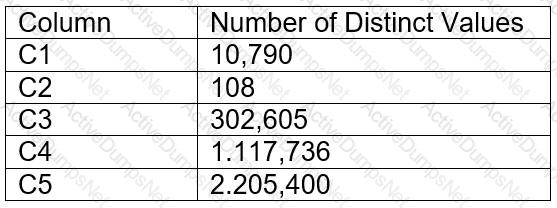
A table for IOT devices that measures water usage is created. The table quickly becomes large and contains more than 2 billion rows.
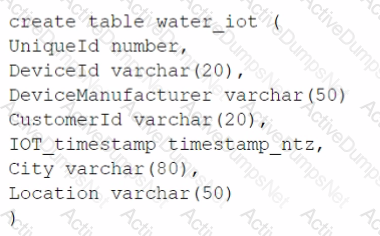
The general query patterns for the table are:
1. DeviceId, lOT_timestamp and Customerld are frequently used in the filter predicate for the select statement
2. The columns City and DeviceManuf acturer are often retrieved
3. There is often a count on Uniqueld
Which field(s) should be used for the clustering key?
Options:
lOT_timestamp
City and DeviceManuf acturer
Deviceld and Customerld
Uniqueld
Answer:
CExplanation:
A clustering key is a subset of columns or expressions that are used to co-locate the data in the same micro-partitions, which are the units of storage in Snowflake. Clustering can improve the performance of queries that filter on the clustering key columns, as it reduces the amount of data that needs to be scanned. The best choice for a clustering key depends on the query patterns and the data distribution in the table. In this case, the columns DeviceId, IOT_timestamp, and CustomerId are frequently used in the filter predicate for the select statement, which means they are good candidates for the clustering key. The columns City and DeviceManufacturer are often retrieved, but not filtered on, so they are not as important for the clustering key. The column UniqueId is used for counting, but it is not a good choice for the clustering key, as it is likely to have a high cardinality and a uniform distribution, which means it will not help to co-locate the data. Therefore, the best option is to use DeviceId and CustomerId as the clustering key, as they can help to prune the micro-partitions and speed up the queries. References: Clustering Keys & Clustered Tables, Micro-partitions & Data Clustering, A Complete Guide to Snowflake Clustering
A company is designing its serving layer for data that is in cloud storage. Multiple terabytes of the data will be used for reporting. Some data does not have a clear use case but could be useful for experimental analysis. This experimentation data changes frequently and is sometimes wiped out and replaced completely in a few days.
The company wants to centralize access control, provide a single point of connection for the end-users, and maintain data governance.
What solution meets these requirements while MINIMIZING costs, administrative effort, and development overhead?
Options:
Import the data used for reporting into a Snowflake schema with native tables. Then create external tables pointing to the cloud storage folders used for the experimentation data. Then create two different roles with grants to the different datasets to match the different user personas, and grant these roles to the corresponding users.
Import all the data in cloud storage to be used for reporting into a Snowflake schema with native tables. Then create a role that has access to this schema and manage access to the data through that role.
Import all the data in cloud storage to be used for reporting into a Snowflake schema with native tables. Then create two different roles with grants to the different datasets to match the different user personas, and grant these roles to the corresponding users.
Import the data used for reporting into a Snowflake schema with native tables. Then create views that have SELECT commands pointing to the cloud storage files for the experimentation data. Then create two different roles to match the different user personas, and grant these roles to the corresponding users.
Answer:
AExplanation:
The most cost-effective and administratively efficient solution is to use a combination of native and external tables. Native tables for reporting data ensure performance and governance, while external tables allow for flexibility with frequently changing experimental data. Creating roles with specific grants to datasets aligns with the principle of least privilege, centralizing access control and simplifying user management12.
References
•Snowflake Documentation on Optimizing Cost1.
•Snowflake Documentation on Controlling Cost2.
Data is being imported and stored as JSON in a VARIANT column. Query performance was fine, but most recently, poor query performance has been reported.
What could be causing this?
Options:
There were JSON nulls in the recent data imports.
The order of the keys in the JSON was changed.
The recent data imports contained fewer fields than usual.
There were variations in string lengths for the JSON values in the recent data imports.
Answer:
BExplanation:
Data is being imported and stored as JSON in a VARIANT column. Query performance was fine, but most recently, poor query performance has been reported. This could be caused by the following factors:
- The order of the keys in the JSON was changed. Snowflake stores semi-structured data internally in a column-like structure for the most common elements, and the remainder in a leftovers-like column. The order of the keys in the JSON affects how Snowflake determines the common elements and how it optimizes the query performance. If the order of the keys in the JSON was changed, Snowflake might have to re-parse the data and re-organize the internal storage, which could result in slower query performance.
- There were variations in string lengths for the JSON values in the recent data imports. Non-native values, such as dates and timestamps, are stored as strings when loaded into a VARIANT column. Operations on these values could be slower and also consume more space than when stored in a relational column with the corresponding data type. If there were variations in string lengths for the JSON values in the recent data imports, Snowflake might have to allocate more space and perform more conversions, which could also result in slower query performance.
The other options are not valid causes for poor query performance:
- There were JSON nulls in the recent data imports. Snowflake supports two types of null values in semi-structured data: SQL NULL and JSON null. SQL NULL means the value is missing or unknown, while JSON null means the value is explicitly set to null. Snowflake can distinguish between these two types of null values and handle them accordingly. Having JSON nulls in the recent data imports should not affect the query performance significantly.
- The recent data imports contained fewer fields than usual. Snowflake can handle semi-structured data with varying schemas and fields. Having fewer fields than usual in the recent data imports should not affect the query performance significantly, as Snowflake can still optimize the data ingestion and query execution based on the existing fields.
References:
- Considerations for Semi-structured Data Stored in VARIANT
- Snowflake Architect Training
- Snowflake query performance on unique element in variant column
- Snowflake variant performance
A group of Data Analysts have been granted the role analyst role. They need a Snowflake database where they can create and modify tables, views, and other objects to load with their own data. The Analysts should not have the ability to give other Snowflake users outside of their role access to this data.
How should these requirements be met?
Options:
Grant ANALYST_R0LE OWNERSHIP on the database, but make sure that ANALYST_ROLE does not have the MANAGE GRANTS privilege on the account.
Grant SYSADMIN ownership of the database, but grant the create schema privilege on the database to the ANALYST_ROLE.
Make every schema in the database a managed access schema, owned by SYSADMIN, and grant create privileges on each schema to the ANALYST_ROLE for each type of object that needs to be created.
Grant ANALYST_ROLE ownership on the database, but grant the ownership on future [object type] s in database privilege to SYSADMIN.
Answer:
CExplanation:
The requirements state that the data analysts need to be able to create and modify database objects and load data, but should not be able to manage access for users outside of their role.
Option C: By making each schema within the database a managed access schema and having them owned by SYSADMIN, the ability to grant privileges on the schema's objects is strictly controlled. Managed access schemas limit the granting of privileges to the role specified as the owner of the schema, in this case, SYSADMIN. The ANALYST_ROLE can be granted the privileges necessary to create and modify objects within these schemas, satisfying the requirement for the analysts to perform their tasks without being able to extend access beyond their role.
Assuming all Snowflake accounts are using an Enterprise edition or higher, in which development and testing scenarios would be copying of data be required, and zero-copy cloning not be suitable? (Select TWO).
Options:
Developers create their own datasets to work against transformed versions of the live data.
Production and development run in different databases in the same account, and Developers need to see production-like data but with specific columns masked.
Data is in a production Snowflake account that needs to be provided to Developers in a separate development/testing Snowflake account in the same cloud region.
Developers create their own copies of a standard test database previously created for them in the development account, for their initial development and unit testing.
The release process requires pre-production testing of changes with data of production scale and complexity. For security reasons, pre-production also runs in the production account.
Answer:
A, CExplanation:
Zero-copy cloning is a feature that allows creating a clone of a table, schema, or database without physically copying the data. Zero-copy cloning is suitable for scenarios where the cloned object needs to have the same data and metadata as the original object, and where the cloned object does not need to be modified or updated frequently. Zero-copy cloning is also suitable for scenarios where the cloned object needs to be shared within the same Snowflake account or across different accounts in the same cloud region2
However, zero-copy cloning is not suitable for scenarios where the cloned object needs to have different data or metadata than the original object, or where the cloned object needs to be modified or updated frequently. Zero-copy cloning is also not suitable for scenarios where the cloned object needs to be shared across different accounts in different cloud regions. In these scenarios, copying of data would be required, either by using the COPY INTO command or by using data sharing with secure views3
The following are examples of development and testing scenarios where copying of data would be required, and zero-copy cloning would not be suitable:
- Developers create their own datasets to work against transformed versions of the live data. This scenario requires copying of data because the developers need to modify the data or metadata of the cloned object to perform transformations, such as adding, deleting, or updating columns, rows, or values. Zero-copy cloning would not be suitable because it would create a read-only clone that shares the same data and metadata as the original object, and any changes made to the clone would affect the original object as well4
- Data is in a production Snowflake account that needs to be provided to Developers in a separate development/testing Snowflake account in the same cloud region. This scenario requires copying of data because the data needs to be shared across different accounts in the same cloud region. Zero-copy cloning would not be suitable because it would create a clone within the same account as the original object, and it would not allow sharing the clone with another account. To share data across different accounts in the same cloud region, data sharing with secure views or COPY INTO command can be used5
The following are examples of development and testing scenarios where zero-copy cloning would be suitable, and copying of data would not be required:
- Production and development run in different databases in the same account, and Developers need to see production-like data but with specific columns masked. This scenario can use zero-copy cloning because the data needs to be shared within the same account, and the cloned object does not need to have different data or metadata than the original object. Zero-copy cloning can create a clone of the production database in the development database, and the clone can have the same data and metadata as the original database. To mask specific columns, secure views can be created on top of the clone, and the developers can access the secure views instead of the clone directly6
- Developers create their own copies of a standard test database previously created for them in the development account, for their initial development and unit testing. This scenario can use zero-copy cloning because the data needs to be shared within the same account, and the cloned object does not need to have different data or metadata than the original object. Zero-copy cloning can create a clone of the standard test database for each developer, and the clone can have the same data and metadata as the original database. The developers can use the clone for their initial development and unit testing, and any changes made to the clone would not affect the original database or other clones7
- The release process requires pre-production testing of changes with data of production scale and complexity. For security reasons, pre-production also runs in the production account. This scenario can use zero-copy cloning because the data needs to be shared within the same account, and the cloned object does not need to have different data or metadata than the original object. Zero-copy cloning can create a clone of the production database in the pre-production database, and the clone can have the same data and metadata as the original database. The pre-production testing can use the clone to test the changes with data of production scale and complexity, and any changes made to the clone would not affect the original database or the production environment8 References:
- 1: SnowPro Advanced: Architect | Study Guide 9
- 2: Snowflake Documentation | Cloning Overview
- 3: Snowflake Documentation | Loading Data Using COPY into a Table
- 4: Snowflake Documentation | Transforming Data During a Load
- 5: Snowflake Documentation | Data Sharing Overview
- 6: Snowflake Documentation | Secure Views
- 7: Snowflake Documentation | Cloning Databases, Schemas, and Tables
- 8: Snowflake Documentation | Cloning for Testing and Development
- : SnowPro Advanced: Architect | Study Guide
- : Cloning Overview
- : Loading Data Using COPY into a Table
- : Transforming Data During a Load
- : Data Sharing Overview
- : Secure Views
- : Cloning Databases, Schemas, and Tables
- : Cloning for Testing and Development
An Architect needs to grant a group of ORDER_ADMIN users the ability to clean old data in an ORDERS table (deleting all records older than 5 years), without granting any privileges on the table. The group’s manager (ORDER_MANAGER) has full DELETE privileges on the table.
How can the ORDER_ADMIN role be enabled to perform this data cleanup, without needing the DELETE privilege held by the ORDER_MANAGER role?
Options:
Create a stored procedure that runs with caller’s rights, including the appropriate "> 5 years" business logic, and grant USAGE on this procedure to ORDER_ADMIN. The ORDER_MANAGER role owns the procedure.
Create a stored procedure that can be run using both caller’s and owner’s rights (allowing the user to specify which rights are used during execution), and grant USAGE on this procedure to ORDER_ADMIN. The ORDER_MANAGER role owns the procedure.
Create a stored procedure that runs with owner’s rights, including the appropriate "> 5 years" business logic, and grant USAGE on this procedure to ORDER_ADMIN. The ORDER_MANAGER role owns the procedure.
This scenario would actually not be possible in Snowflake – any user performing a DELETE on a table requires the DELETE privilege to be granted to the role they are using.
Answer:
CExplanation:
This is the correct answer because it allows the ORDER_ADMIN role to perform the data cleanup without needing the DELETE privilege on the ORDERS table. A stored procedure is a feature that allows scheduling and executing SQL statements or stored procedures in Snowflake. A stored procedure can run with either the caller’s rights or the owner’s rights. A caller’s rights stored procedure runs with the privileges of the role that called the stored procedure, while an owner’s rights stored procedure runs with the privileges of the role that created the stored procedure. By creating a stored procedure that runs with owner’s rights, the ORDER_MANAGER role can delegate the specific task of deleting old data to the ORDER_ADMIN role, without granting the ORDER_ADMIN role more general privileges on the ORDERS table. The stored procedure must include the appropriate business logic to delete only the records older than 5 years, and the ORDER_MANAGER role must grant the USAGE privilege on the stored procedure to the ORDER_ADMIN role. The ORDER_ADMIN role can then execute the stored procedure to perform the data cleanup12.
References:
- Snowflake Documentation: Stored Procedures
- Snowflake Documentation: Understanding Caller’s Rights and Owner’s Rights Stored Procedures
A Snowflake Architect is designing an application and tenancy strategy for an organization where strong legal isolation rules as well as multi-tenancy are requirements.
Which approach will meet these requirements if Role-Based Access Policies (RBAC) is a viable option for isolating tenants?
Options:
Create accounts for each tenant in the Snowflake organization.
Create an object for each tenant strategy if row level security is viable for isolating tenants.
Create an object for each tenant strategy if row level security is not viable for isolating tenants.
Create a multi-tenant table strategy if row level security is not viable for isolating tenants.
Answer:
AExplanation:
In a scenario where strong legal isolation is required alongside the need for multi-tenancy, the most effective approach is to create separate accounts for each tenant within the Snowflake organization. This approach ensures complete isolation of data, resources, and management, adhering to strict legal and compliance requirements. Role-Based Access Control (RBAC) further enhances security by allowing granular control over who can access what resources within each account. This solution leverages Snowflake’s capabilities for managing multiple accounts under a single organization umbrella, ensuring that each tenant's data and operations are isolated from others.References: Snowflake documentation on multi-tenancy and account management, part of the SnowPro Advanced: Architect learning path.
The IT Security team has identified that there is an ongoing credential stuffing attack on many of their organization’s system.
What is the BEST way to find recent and ongoing login attempts to Snowflake?
Options:
Call the LOGIN_HISTORY Information Schema table function.
Query the LOGIN_HISTORY view in the ACCOUNT_USAGE schema in the SNOWFLAKE database.
View the History tab in the Snowflake UI and set up a filter for SQL text that contains the text "LOGIN".
View the Users section in the Account tab in the Snowflake UI and review the last login column.
Answer:
BExplanation:
This view can be used to query login attempts by Snowflake users within the last 365 days (1 year). It provides information such as the event timestamp, the user name, the client IP, the authentication method, the success or failure status, and the error code or message if the login attempt was unsuccessful. By querying this view, the IT Security team can identify any suspicious or malicious login attempts to Snowflake and take appropriate actions to prevent credential stuffing attacks1. The other options are not the best ways to find recent and ongoing login attempts to Snowflake. Option A is incorrect because the LOGIN_HISTORY Information Schema table function only returns login events within the last 7 days, which may not be sufficient to detect credential stuffing attacks that span a longer period of time2. Option C is incorrect because the History tab in the Snowflake UI only shows the queries executed by the current user or role, not the login events of other users or roles3. Option D is incorrect because the Users section in the Account tab in the Snowflake UI only shows the last login time for each user, not the details of the login attempts or the failures.
An Architect needs to meet a company requirement to ingest files from the company's AWS storage accounts into the company's Snowflake Google Cloud Platform (GCP) account. How can the ingestion of these files into the company's Snowflake account be initiated? (Select TWO).
Options:
Configure the client application to call the Snowpipe REST endpoint when new files have arrived in Amazon S3 storage.
Configure the client application to call the Snowpipe REST endpoint when new files have arrived in Amazon S3 Glacier storage.
Create an AWS Lambda function to call the Snowpipe REST endpoint when new files have arrived in Amazon S3 storage.
Configure AWS Simple Notification Service (SNS) to notify Snowpipe when new files have arrived in Amazon S3 storage.
Configure the client application to issue a COPY INTO