
- Home
- SAP
- SAP Certified Application Associate
- C_THR84_2311
- C_THR84_2311 - SAP Certified Application Associate - SAP SuccessFactors Recruiting: Candidate Experience 2H/2023
SAP C_THR84_2311 SAP Certified Application Associate - SAP SuccessFactors Recruiting: Candidate Experience 2H/2023 Exam Practice Test
SAP Certified Application Associate - SAP SuccessFactors Recruiting: Candidate Experience 2H/2023 Questions and Answers
What are some of the ways that candidates can be added to a talent pool?Note: There are 3 correct answers to this question.
Options:
Add from the Candidate Workbench (Talent Pipeline page).
Add from an email campaign.
Auto-populate from a saved search.
Add from a Candidate Search.
Candidates can add themselves.
Answer:
A, C, DExplanation:
Candidates can be added to a talent pool from the following sources:
- Candidate Workbench (Talent Pipeline page): You can manually add candidates to a talent pool from the Talent Pipeline page, which shows all the candidates who have applied to your jobs or have been sourced by you or your team12.
- Auto-populate from a saved search: You can create a saved search based on certain criteria and assign it to a talent pool. This will automatically add any candidates who match the criteria to the talent pool13.
- Add from a Candidate Search: You can perform a candidate search using keywords, filters, or Boolean operators and add the search results to a talent pool14.
You cannot add candidates to a talent pool from an email campaign or allow candidates to add themselves. Email campaigns are used to communicate with candidates who are already in a talent pool1 . Candidates can only join a talent community, which is a broader group of candidates who have expressed interest in your company, but not a specific job or talent pool1 . References: SAP SuccessFactors Recruiting: Candidate Experience Administration, Unit 5: Candidate Relationship Management, Lesson: Talent Pools, pages 5-3 to 5-9.
What are the recommended actions to be completed before the Career Site Builder (CSB) kickoff call?Note: There are 2 correct answers to this question.
Options:
Assist the customer to complete the Readiness Checklist.
Review the statement of work (SOW).
Develop the CSB project plan.
Finish the CSB Configuration Workbook.
Answer:
A, BExplanation:
According to the SAP SuccessFactors Recruiting: Candidate Experience Administration course1, before the CSB kickoff call, the following actions are recommended:
- Assist the customer to complete the Readiness Checklist. This checklist helps the customer to prepare for the CSB implementation by gathering the necessary information and assets, such as logos, images, videos, etc.
- Review the statement of work (SOW). This document defines the scope, deliverables, timeline, and responsibilities of the CSB project. It is important to review the SOW to ensure that the customer’s expectations and requirements are aligned with the project plan and budget.
- Developing the CSB project plan and finishing the CSB Configuration Workbook are not recommended actions before the CSB kickoff call. These tasks are usually done after the kickoff call, as part of the CSB implementation process. References: SAP Certified Application Associate - SAP SuccessFactors Recruiting: Candidate Experience 2H/2023, SAP SuccessFactors Recruiting: Candidate Experience Administration
Other Career Site Setup
Where is the Job Alerts Email Template configured?
Options:
E-Mail Notification Templates Settings
Command Center
Recruiting Email Triggers
Career Site Builder
Answer:
AExplanation:
The Job Alerts Email Template is configured in the E-Mail Notification Templates Settings.This is where you can customize the content and appearance of the email that candidates receive when they subscribe to job alerts on the career site1.You can also specify the sender name, sender email address, subject line, and footer for the job alerts email2.
The other options are not correct places to configure the Job Alerts Email Template:
- Command Center: This is where you can manage the career site builder projects, sites, and settings, but not the email templates3.
- Recruiting Email Triggers: This is where you can configure the email notifications that are sent to candidates, recruiters, and hiring managers based on certain events or actions in the recruiting process, but not the job alerts email4.
- Career Site Builder: This is where you can design and build the career site pages, components, and styles, but not the email templates5.
References:1:SAP Help Portal - Job Alerts Email Template2:SAP Help Portal - E-Mail Notification Templates Settings3:SAP Help Portal - Command Center4:SAP Help Portal - Recruiting Email Triggers5:SAP Help Portal - Career Site Builder
What are some leading practices regarding text on websites?Note: There are 3 correct answers to this question.
Options:
Use high contrast text, for example, black text on a white background.
Use half the word count or less than conventional writing.
Avoid using bulleted or numbered lists.
Break up lengthy content and separate with headings.
Use a serif font (such as Times New Roman), rather than a sans-serif font (such as Arial).
Answer:
A, B, DExplanation:
Text on websites is an important element of the candidate experience, as it conveys information, instructions, and messages to the visitors. Some leading practices regarding text on websites are:
- Use high contrast text, for example, black text on a white background: High contrast text improves readability and accessibility, as it makes the text stand out from the background and reduces eye strain. High contrast text also helps people with visual impairments or color blindness to perceive the text better. You can use the Color Contrast Analyzer tool1 to check the contrast ratio of your text and background colors.
- Use half the word count or less than conventional writing: Web users tend to scan rather than read text, so it is important to use concise and clear language that conveys the main points quickly and effectively. You can use the Hemingway Editor tool2 to check the readability and simplicity of your text and eliminate unnecessary words, passive voice, or complex sentences.
- Break up lengthy content and separate with headings: Long blocks of text can be overwhelming and boring for web users, so it is advisable to break up the content into smaller chunks and use headings to organize and label them. Headings help web users to navigate and find the information they need, and also improve the SEO (search engine optimization) of your site. You can use the HTML Heading Structure tool3 to check the hierarchy and consistency of your headings.
- Avoid using bulleted or numbered lists: This is not a correct answer, because bulleted or numbered lists are useful for presenting multiple items or steps in a concise and structured way. Lists help web users to scan and comprehend the information easily, and also add visual variety to the text. However, you should avoid using too many or too long lists, as they can lose their impact and clarity. You can use the List-o-matic tool4 to generate HTML code for your lists.
- Use a serif font (such as Times New Roman), rather than a sans-serif font (such as Arial): This is not a correct answer, because the choice of font depends on the purpose, audience, and style of your site. Serif fonts have small strokes or lines at the end of the letters, while sans-serif fonts do not. Serif fonts are usually considered more traditional, formal, and elegant, while sans-serif fonts are more modern, casual, and simple. However, there is no definitive rule on which font is better for web text, as both have their advantages and disadvantages. You can use the Font Squirrel tool to find and download free web fonts for your site. References:
Move to Production
What are some conditions that will prevent you from moving the Career Site Builder (CSB) site from stage to production?
Note: There are 3 correct answers to this question.
Options:
The site setup steps, such as configuring Real Time Job Sync, have NOT yet been done in production.
Email layouts have NOT been configured in the CSB stage environment.
The SSL certificate has NOT yet been created.
You exported Site Settings from stage but did NOT update values in the XML file.
SAP SuccessFactors has released code to preview, but NOT yet to production.
Answer:
A, C, EExplanation:
Moving the Career Site Builder (CSB) site from stage to production is the final step of the implementation process. It allows you to publish your site to the live environment andmake it accessible to the candidates. However, there are some conditions that will prevent you from moving the CSB site from stage to production. Some of these conditions are:
- The site setup steps, such as configuring Real Time Job Sync, have NOT yet been done in production. Real Time Job Sync is a feature that synchronizes the job data between the Recruiting Management and the CSB modules. You need to configure it in both the stage and the production environments to ensure that the job data is consistent and up-to-date on your site1.
- The SSL certificate has NOT yet been created. SSL is a protocol that encrypts the personal data used in the recruiting process. You need to create and install an SSL certificate for your site to ensure that the data transmission between the candidate’s browser and the site is secure and protected2.
- SAP SuccessFactors has released code to preview, but NOT yet to production. SAP SuccessFactors releases code updates to the preview and the production environments at different times. You need to wait until the code is released to the production environment before you can move the CSB site from stage to production. This ensures that the site functionality and performance are not affected by the code changes3.
References:
- SAP SuccessFactors Recruiting: Candidate Experience Administration, Unit 6: Move to Production, Lesson: Moving to Production, Slide 7
- SAP SuccessFactors Recruiting: Candidate Experience Academy, Unit 6: Move to Production, Lesson: Moving to Production, Slide 8
- SAP SuccessFactors Recruiting: Candidate Experience 2H/2023, Topic Areas: Move to Production <= 10%
Move to Production
When moving a Career Site Builder site to production, which four XML files must you export for the move to production?
Options:
Content pages, Category pages, Job Layouts, Career Site Builder Settings
Site Settings, Career Site Builder Settings, Category pages, Translations
Candidate Profile, Site Settings, Translations, Category pages
Site Settings, Career Site Builder Settings, Content pages, Translations
Answer:
BExplanation:
- Option B is correct because when moving a Career Site Builder site to production, you need to export four XML files: Site Settings, Career Site Builder Settings, Category pages, and Translations1. These files contain the configuration and content of your site, such as the site name, URL, logo, theme, layout, language, categories, and pages1.
- Option A is incorrect because Content pages and Job Layouts are not required to export for the move to production. Content pages are automatically generated from the Category pages, and Job Layouts are part of the Career Site Builder Settings1.
- Option C is incorrect because Candidate Profile is not an XML file that can be exported from Career Site Builder. Candidate Profile is a feature that allows candidates to create and manage their profiles on the career site.
- Option D is incorrect because Content pages are not required to export for the move to production, as explained above.
References:
- 1: 1H 2023 Release Highlights: Talent Acquisition Innovations and Enhancements | SAP Blogs
- 2: SAP Certified Application Associate - SAP SuccessFactors Recruiting: Candidate Experience 1H/2023 | SAP Training Certification
- 3: HR832 - SAP SuccessFactors Recruiting: Candidate Experience Administration | SAP Training
- [4]: SAP SuccessFactors Recruiting | SAP Help Portal
Implement Advanced Analytics
What are some considerations when defining user permissions for Advanced Analytics? Note: There are 2 correct answers to this question.
Options:
Advanced Analytics user permissions CANNOT be configured until after the Career SiteBuilder site is live.
Advanced Analytics user permissions are configured in Command Center.
Users can be given permissions to view only the high-level report, or can also be provided with the ability to drill to details.
Users must be set up for Recruiter SSO.
Answer:
B, CExplanation:
- Option B is correct because Advanced Analytics user permissions are configured in Command Center, which is the administration tool for SAP SuccessFactors Recruiting Marketing. In Command Center, you can assign users to different roles and grant them access to view and use the Advanced Analytics reports1.
- Option C is correct because users can be given permissions to view only the high-level report, or can also be provided with the ability to drill to details. The high-level report shows the overall performance of the career site and the sources, while the drill to details feature allows users to see the individual candidate records and actions1.
- Option A is incorrect because Advanced Analytics user permissions can be configured before or after the Career Site Builder site is live. However, it is recommended to configure the user permissions before the site is live, so that the users can access the reports as soon as the data is available1.
- Option D is incorrect because users do not need to be set up for Recruiter SSO to access Advanced Analytics. Recruiter SSO is a feature that allows recruiters to log in to the Recruiting Management system using their Recruiting Marketing credentials. This feature is optional and does not affect the user permissions for Advanced Analytics2.
References:
- 1: SAP Certified Application Associate - SAP SuccessFactors Recruiting: Candidate Experience 1H/2023 | SAP Training Certification
- 2: Get certified in SAP SuccessFactors Recruiting: Candidate Experience 1H/2023 | SAP Learning
- 3: Setting Admin User Permissions | SAP Help Portal
- 4: Recruiter SSO | SAP Help Portal
Which of these Recruiting features use generic objects?Note: There are 2 correct answers to this question.
Options:
Marketing brands
Talent pool status sets
Recruiting teams
Activity tracking
Answer:
A, BExplanation:
Marketing brands and talent pool status sets are two of the Recruiting features that use generic objects. Generic objects are custom objects that can be created and configured in the Metadata Framework (MDF) to extend the functionality and the flexibility of the SAP SuccessFactors solutions. Generic objects can have their own fields, associations, rules, validations, and UI configurations. Some of the benefits of using generic objects are:
- They can be easily created and maintained by the administrators without coding or provisioning.
- They can be integrated with other SAP SuccessFactors modules and features, such as Role-Based Permissions, Reporting, and Intelligent Services.
- They can be updated and deployed without affecting the system performance or availability.
Marketing brands and talent pool status sets are examples of generic objects that are used in the Recruiting module to enhance the candidate experience and the recruiter efficiency. Marketing brands are generic objects that define the branding and the messaging of the customer’s organization to attract and engage the candidates. Marketing brandscan have different attributes, such as the brand name, the brand logo, the brand description, the brand color, the brand font, and the brand email signature. Marketing brands can be associated with other generic objects, such as job requisitions, email campaigns, and landing pages, to create a consistent and personalized candidate experience. Talent pool status sets are generic objects that define the stages and the actions of the candidate relationship management (CRM) process. Talent pool status sets can have different attributes, such as the status set name, the status set description, the status set type, and the status set values. Talent pool status sets can be associated with other generic objects, such as talent pools, talent pool candidates, and email templates, to manage and track the candidate pipeline and the communication.
The other two options are incorrect because:
- Recruiting teams are not generic objects, but rather standard objects that are predefined and configured in the Recruiting Management system. Recruiting teams are objects that define the roles and the responsibilities of the users who are involved in the recruiting process, such as the hiring manager, the recruiter, the interviewer, and the coordinator. Recruiting teams can be associated with other standard objects, such as job requisitions, job applications, and offer approvals, to assign and control the access and the actions of the users.
- Activity tracking is not a generic object, but rather a standard feature that is enabled and configured in the Provisioning system. Activity tracking is a feature that records and displays the activities and the interactions of the candidates and the recruiters throughout the recruiting process, such as the candidate views, the candidate applies, the recruiter emails, and the recruiter notes. Activity tracking can be integrated with other standard features, such as Reporting, Intelligent Services, and Email Notifications, to analyze and improve the candidate experience and the recruiter efficiency.
References:
- SAP SuccessFactors Recruiting: Candidate Experience 2H/2023
- SAP Certified Application Associate - SAP SuccessFactors Recruiting: Candidate Experience 2H/2023
- [THR84 - SAP SuccessFactors Recruiting: Candidate Experience Academy]
- [THR84 - Unit 3: Candidate Relationship Management]
- [THR84 - Unit 4: Career Site Builder Global Settings and Global Styles]
Site Setup
Which of the following quick links are available in Command Center? Note: There are 3 correct answers to this question.
Options:
Recruiting Advanced Analytics
Career Site
Delete Jobs
API Credentials
Career Site Builder
Answer:
B, D, EExplanation:
The Command Center is a central location where you can access various features and settings related to your Career Site Builder site. The quick links are shortcuts to the most commonly used functions, such as editing your site, managing your API credentials, or viewing your career site. The quick links available in Command Center are:
- Career Site: This link opens your career site in a new tab, where you can see how it looks to candidates and test its functionality.
- API Credentials: This link takes you to the API Credentials page, where you can generate, view, and revoke your API keys for integrating with external systems or services, such as job boards, CRM platforms, or analytics tools.
- Career Site Builder: This link takes you to the Career Site Builder page, where you can edit your site settings, pages, components, styles, and content. You can also preview, publish, or revert your changes from here.
- Recruiting Advanced Analytics and Delete Jobs are not quick links in Command Center, but they are available in other sections of the Admin Center. Recruiting Advanced Analytics is a reporting tool that allows you to measure and optimize your recruiting performance and candidate experience. Delete Jobs is a function that allows you to permanently remove jobs from your system, either individually or in bulk. References: 1, 2, 3
Which of the following encrypts personal data used in the recruiting process?
Options:
Identity Authentication Service (IAS)
Data Retention Time Management (DRTM)
Secure Socket Layer (SSL)
Data Privacy Consent Statement (DPCS)
Answer:
CExplanation:
Secure Socket Layer (SSL) is a protocol that encrypts personal data used in the recruiting process. SSL ensures that the data transmitted between the candidate’s browser and the career site is secure and protected from unauthorized access or tampering1. SSL also helps to improve the candidate’s trust and confidence in the career site and the recruiting process2.
References:
- SAP SuccessFactors Recruiting: Candidate Experience Administration, Unit 2: Site Setup, Lesson: Configuring SSL, Slide 4
- SAP SuccessFactors Recruiting: Candidate Experience Academy, Unit 2: Site Setup, Lesson: Configuring SSL, Slide 5
- SAP SuccessFactors Recruiting: Candidate Experience 2H/2023, Topic Areas: Site Setup <= 10%
Which of the following statements describe recruitment marketing?Note: There are 2 correct answers to this question.
Options:
The practice of promoting the value of an employer's brand in order to recruit talent
The strategies an organization uses to find, attract, engage, and nurture talent before they apply for a job
The collection of candidate information and organization of prospects based on experience and skills
The focus is on the immediate need to fill a specific job opening
Answer:
A, BExplanation:
Recruitment marketing is a term that refers to the process of attracting and engaging potential candidates for an organization, using various marketing techniques and channels. Recruitment marketing has two main aspects:
- The practice of promoting the value of an employer’s brand in order to recruit talent: This involves creating and communicating a compelling and consistent message about the organization’s culture, vision, values, and benefits, and showcasing it to the target talent pool. The goal is to build awareness, trust, and loyalty among the candidates, and to differentiate the organization from its competitors. Employer branding can be done through various media, such as websites, social media, blogs, videos, podcasts, events, or referrals.
- The strategies an organization uses to find, attract, engage, and nurture talent before they apply for a job: This involves identifying and reaching out to the right candidates, using data-driven insights and personalized content. The goal is to generate interest, curiosity, and excitement among the candidates, and to guide them through the candidate journey, from awareness to consideration to application. Recruitment marketing strategies can include search engine optimization (SEO), pay-per-click (PPC) advertising, email marketing, social media marketing, content marketing, or talent networks.
- The collection of candidate information and organization of prospects based on experience and skills: This is not a correct answer, because this is more related to candidate relationship management (CRM) than recruitment marketing. CRM is a tool or system that helps recruiters to manage and track their interactions with candidates, and to build and maintain long-term relationships with them. CRM can help recruiters to collect and store candidate information, such as resumes, profiles, preferences, or feedback, and to segment and organize prospects based on various criteria, such as experience, skills, location, or source. CRM can also help recruiters to communicate and engage with candidates, such as sending automated messages, reminders, or newsletters, or inviting them to events or webinars.
- The focus is on the immediate need to fill a specific job opening: This is not a correct answer, because this is more related to recruitment than recruitment marketing. Recruitment is the process of finding, screening, interviewing, and hiring candidates for a specific job opening, using various methods and tools. Recruitment focuses on the short-term need to fill a vacancy, and evaluates candidates based on their qualifications, competencies, and fit for the role. Recruitment can be done through various channels, such as job boards, career sites, referrals, or agencies. References:
What are some leading practices when creating a color palette for the Career Site Builder site?Note: There are 3 correct answers to this question.
Options:
Add colors for all brands that will be needed for a multi-branded site.
Create colors using the color picker grid or by typing in the RGB or hex code.
Use the opacity slide to lighten a color in your palette instead of creating a new color.
Archive colors that are only used in the header and footer.
Enter a label for each color in your customer's color palette.
Answer:
B, C, EExplanation:
- Option B is correct because you can create colors for your Career Site Builder site using the color picker grid or by typing in the RGB or hex code. This gives you moreflexibility and precision in choosing the colors that match your customer’s branding and design1.
- Option C is correct because you can use the opacity slide to lighten a color in your palette instead of creating a new color. This helps you save space in your palette and avoid having too many similar colors1.
- Option D is incorrect because you should not archive colors that are only used in the header and footer. Archiving a color will remove it from your palette and from any components that use it. This can cause errors and inconsistencies in your site design1.
- Option E is correct because you should enter a label for each color in your customer’s color palette. This helps you identify and organize the colors in your palette and makes it easier to apply them to the components in your site1.
- Option A is incorrect because you should not add colors for all brands that will be needed for a multi-branded site. You should create separate color palettes for each brand and assign them to the corresponding site settings. This allows you to manage the colors for each brand independently and avoid confusion and duplication1.
References:
- 1: SAP Certified Application Associate - SAP SuccessFactors Recruiting: Candidate Experience 1H/2023 | SAP Training Certification
- 2: 1H 2023 Release Highlights: Talent Acquisition Innovations and Enhancements | SAP Blogs
- 3: Career Site Builder Global Settings and Global Styles | SAP Help Portal
When you test the customer's Career Site Builder (CSB) site with an accessibility checker, two of the footer links display Redundant Title Text alerts.How can you correct this?
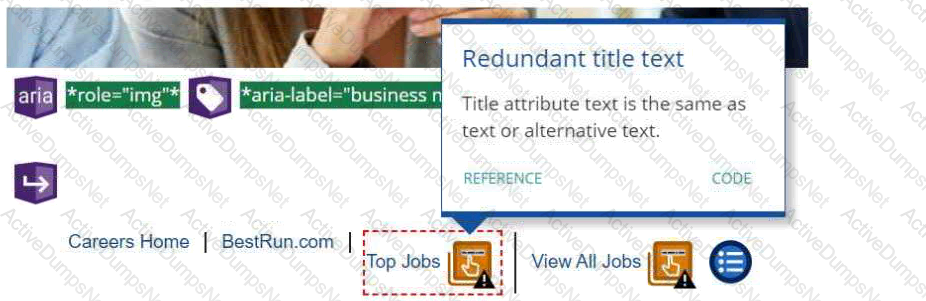
Options:
Replace the footer link with one that does NOT require a title tag.
Click the CODE link for suggestions to correct the issue.
Rename the link using different text for the Title and Text.
The Redundant Title Text issue CANNOT be corrected in the footer of CSB sites.
Answer:
CExplanation:
In SAP SuccessFactors Recruiting: Candidate Experience, when an accessibility checker identifies Redundant Title Text alerts, it indicates that the title attribute text is identical to the link or alternative text. This redundancy can be corrected by renaming the link using different texts for the Title and Text fields to ensure that they are not identical, enhancing website accessibility. References: SAP SuccessFactors Recruiting: Candidate Experience documents available at SAP Training)
Your customer wants to build three About Us pages on their Career Site Builder (CSB) site, in addition to a link that opens a page on their corporate site.What are the steps to configure the About Us links in the header?Note: There are 3 correct answers to this question.
Options:
Create an external type link in the header under About Us that opens a new session and links to the page hosted on the customer’s corporate site.
Enable the About Us link in the header that is provided with all CSB sites.
Create category type links in the header under About Us that link to the three internal pages.
Create content type links in the header under About Us that link to the three internal pages.
Create a list type link in the header named About Us.
Answer:
A, C, EExplanation:
To configure the About Us links in the header, you need to do the following:
- Create a list type link in the header named About Us. This will create a drop-down menu that can contain multiple links under the About Us label.
- Create category type links in the header under About Us that link to the three internal pages. These pages are created using the Page Builder tool in CSB, and they can contain various components and content related to the customer’s organization, such as mission, vision, values, culture, etc.
- Create an external type link in the header under About Us that opens a new session and links to the page hosted on the customer’s corporate site. This will allow the candidates to access more information about the customer’s company from their main website.
References:
- SAP SuccessFactors Recruiting: Candidate Experience Administration, Unit 2: Career Site Builder Pages and Components, Lesson: Header and Footer
- SAP Certified Application Associate - SAP SuccessFactors Recruiting: Candidate Experience 2H/2023, Topic Area: Career Site Builder Pages and Components <= 10%
It is important for customers to be able to report on which candidates arrived at their Career Site Builder (CSB) site from their corporate site.What are the actions you need to take to facilitate this reporting?Note: There are 2 correct answers to this question.
Options:
Add a campaign code to all XML job feeds that you create for your customer.
Recommend that your customer opt-in for the Organic Network.
Deliver source-coded backlinks so that your customer can replace all links from their externally- hosted sites to their CSB site.
Submit the Referral Engine Task support ticket after moving your customer's CSB site to production.
Answer:
C, DExplanation:
According to the SAP SuccessFactors Recruiting: Candidate Experience Administration course1, the actions you need to take to facilitate reporting on which candidates arrived at the CSB site from the corporate site are:
- Deliver source-coded backlinks so that your customer can replace all links from their externally-hosted sites to their CSB site. This means that you need to add a source parameter to the URL of each link that points to the CSB site, such as ?source=corporate. This will allow the CSB site to track the source of the traffic and report it in the Advanced Analytics dashboard1.
- Submit the Referral Engine Task support ticket after moving your customer’s CSB site to production. This is a mandatory step that enables the Referral Engine feature, which is a tool that allows you to create and manage referral campaigns for your CSB site. The Referral Engine also provides reporting on the referral sources and conversions of the candidates who applied through the CSB site1.
- Adding a campaign code to all XML job feeds that you create for your customer is not an action you need to take to facilitate reporting on which candidates arrived at the CSB site from the corporate site. This is because the campaign code is used to track the performance of the job postings on external platforms, such as job boards or social media, and not on the corporate site. The campaign code is also optional and not required for the XML job feeds to work23.
- Recommending that your customer opt-in for the Organic Network is not an action you need to take to facilitate reporting on which candidates arrived at the CSB site from the corporate site. This is because the Organic Network is a feature that allows your customer to leverage the existing traffic on their CSB site to promote their jobs to other relevant candidates, and not to track the traffic from their corporate site. The Organic Network is also optional and not required for the CSB site to function4.
References: XML Job Feeds, Campaign Codes, SAP SuccessFactors Recruiting: Candidate Experience Administration, Organic Network
Which of the following are leading practices for using images on a Career Site Builder site?Note: There are 3 correct answers to this question.
Options:
Select images that have a strong focal point.
Do NOT use embedded text on images.
Unique alt text should be populated for all images in all languages.
Alt Text is NOT required for logos on the site.
All images on a Career Site Builder site should be oriented as portrait, NOT landscape.
Answer:
A, B, CExplanation:
- Select images that have a strong focal point. This helps to capture the attention of the visitors and convey the message of the site. Images with a strong focal point also look better on different devices and screen sizes1.
- Do NOT use embedded text on images. Embedded text is the text that is part of the image file, not the HTML code. Embedded text is not accessible to screen readers, search engines, or translation tools. It also reduces the quality and clarity of the image, especially on high-resolution screens2.
- Unique alt text should be populated for all images in all languages. Alt text is the text that describes the content and function of an image, and it is displayed when the image cannot be loaded or is accessed by screen readers. Alt text helps to improve the accessibility, SEO, and user experience of the site. It should be unique for each image and language, and it should be concise and relevant3.
References:
- 1: SAP SuccessFactors Recruiting: Candidate Experience Administration, Unit 4: Career Site Design and Accessibility, Lesson: Image Best Practices
- 2: SAP SuccessFactors Recruiting: Candidate Experience Administration, Unit 4: Career Site Design and Accessibility, Lesson: Image Best Practices
- 3: SAP SuccessFactors Recruiting: Candidate Experience Administration, Unit 4: Career Site Design and Accessibility, Lesson: Image Best Practices
Career Site Builder Pages and Components
What are some leading practices when creating Category pages?Note: There are 3 correct answers to this question.
Options:
Page titles should end with the word Jobs or Careers for better search engine optimization (SEO).
Category pages use the same design layout to provide a consistent user experience.
Category pages contain different headers and footers than the Home page.
Category pages do NOT contain jobs that appear on other Category pages.
Category pages host minimal content to allow candidates to find jobs quickly and easily.
Answer:
A, B, EExplanation:
Some leading practices when creating Category pages are:
- Page titles should end with the word Jobs or Careers for better search engine optimization (SEO).This will help the career site rank higher in search engines and attract more candidates1.
- Category pages use the same design layout to provide a consistent user experience.This will make the career site look professional and easy to navigate2.
- Category pages host minimal content to allow candidates to find jobs quickly and easily.This will reduce the cognitive load and increase the conversion rate of the candidates3.
The other options are not leading practices when creating Category pages:
- Category pages contain different headers and footers than the Home page. This will create confusion and inconsistency for the candidates and may affect the branding of the career site.
- Category pages do NOT contain jobs that appear on other Category pages. This will limit the exposure and visibility of the jobs and may prevent candidates from finding the best fit for their skills and interests.
References:1:SAP Help Portal - SEO Best Practices2:SAP Help Portal - Guidelines3:SAP Learning Journey - Reviewing the Candidate Experience in SAP SuccessFactors Recruiting: [SAP Training - HR832 - SAP SuccessFactors Recruiting: Candidate Experience Administration] : [SAP Certification - C_THR84_2305 - SAP Certified Application Associate - SAP SuccessFactors Recruiting: Candidate Experience 1H/2023]
Replacing the search grid in Career Site Builder with tiles achieves which of the following? Note: There are 2 correct answers to this question.
Options:
It allows any of the mapped fields to be displayed on the tiles.
It allows users to tab through the search results.
It allows users to share jobs on social media more easily.
It allows any of the fields on the job requisition to be displayed on the tiles.
Answer:
A, DExplanation:
According to the SAP Help Portal1, replacing the search grid in Career Site Builder with tiles achieves the following benefits:
- It allows any of the mapped fields to be displayed on the tiles. You can customize the tile layout and content by selecting the fields you want to show from the list of available fields in the Search Tiles tab in Appearance Styles Global Styles (Brand)1.
- It allows any of the fields on the job requisition to be displayed on the tiles. You can also use the custom fields that you have created in the job requisition template as part of the tile content1.
- It does not allow users to tab through the search results. This is a feature of the grid layout, which enables keyboard navigation through the search results2. For that reason, the tile layout is not recommended for accessibility purposes3.
- It does not allow users to share jobs on social media more easily. This is a feature of the Job Details component, which enables users to share the job posting on various social media platforms. This component can be used in both grid and tile layouts. References: Search Tiles Settings in Career Site Builder Global Styles, Search-Related Settings in Career Site Builder, Configuring Search Grid Settings, [Job Details Component]
Career Site Builder Pages and Components
In addition to their Career Site Builder (CSB) site, some customers also maintain career information on a site they host externally.
The content of what type of page is most often hosted by a customer externally and linked with their CSB site?
Options:
Content page
Map page
Category page
Landing page
Answer:
AExplanation:
A content page is a type of page that can be created and edited in Career Site Builder, and it is used to display static or dynamic content, such as text, images, videos, or forms. A content page can be linked to other pages or external sites, and it can be customized withdifferent styles, components, and layouts. Some customers may choose to host some of their content pages externally, and link them with their CSB site, for various reasons, such as:
- They have existing content pages on their corporate website or intranet that they want to reuse or integrate with their CSB site, without duplicating or migrating them.
- They have complex or interactive content pages that require advanced coding or functionality that is not supported by CSB, such as animations, games, quizzes, or surveys.
- They have content pages that need to comply with specific legal or security requirements that are not met by CSB, such as data privacy, encryption, or authentication.
Some examples of content pages that are often hosted externally and linked with CSB sites are:
- About Us: This page provides information about the company’s history, vision, mission, values, and culture. It may also include testimonials, awards, or achievements of the company or its employees.
- Diversity and Inclusion: This page showcases the company’s commitment and efforts to foster a diverse and inclusive workplace, and to support various groups and initiatives, such as women, veterans, LGBTQ+, or sustainability.
- Benefits: This page details the benefits and perks that the company offers to its employees, such as health insurance, retirement plan, wellness program, or employee discounts.
- Learning and Development: This page highlights the learning and development opportunities and resources that the company provides to its employees, such as training courses, certifications, mentoring, or career coaching.
- Events: This page lists the upcoming events that the company is hosting or participating in, such as webinars, career fairs, or networking sessions. It may also allow candidates to register or RSVP for the events. References
https://training.sap.com/course/hr832-sap-successfactors-recruiting-candidate-experience-administration-classroom-094-g-en/
https://learning.sap.com/learning-journeys/configure-sap-successfactors-recruiting-recruiter-experience
When configuring Advanced Analytics, which applicant statuses do NOT need to be mapped?Note: There are 2 correct answers to this question.
Options:
Invited to Apply
Auto Disqualified
Forwarded
Withdrawn by Candidate
Answer:
B, DExplanation:
When configuring Advanced Analytics, you need to map the applicant statuses from the Recruiting Management module to the corresponding statuses in the Advanced Analytics module. This allows you to track and report on the candidate journey and the effectiveness of your sourcing channels and campaigns. However, some applicant statuses do not need to be mapped, as they are either not relevant or automatically mapped by the system. These statuses are:
- Auto Disqualified: This status is assigned to candidates who fail to meet the minimum qualifications or pass the pre-screening questions. This status is automatically mapped to the Disqualified status in Advanced Analytics, and does not need to be manually mapped.
- Withdrawn by Candidate: This status is assigned to candidates who withdraw their application voluntarily. This status is not relevant for Advanced Analytics, as it does not reflect the recruiter’s actions or decisions.Therefore, it does not need to be mapped.
The other statuses, Invited to Apply and Forwarded, do need to be mapped, as they are important for measuring the candidate experience and the recruiter performance. The Invited to Apply status is assigned to candidates who are invited to apply for a job requisition by the recruiter. This status should be mapped to the Sourced status in Advanced Analytics, to indicate that the candidate was sourced by the recruiter.The Forwarded status is assigned to candidates who are forwarded to another job requisition by the recruiter. This status should be mapped to the Forwarded status in Advanced Analytics, to indicate that the candidate was moved to another opportunity. References:
- SAP SuccessFactors Recruiting: Candidate Experience 2H/2023
- SAP SuccessFactors Recruiting: Candidate Experience Academy
- HR832 - SAP SuccessFactors Recruiting: Candidate Experience Administration
You have created a data capture form for your customer and now are configuring the RecruitingEmail Notification template and Recruiting email trigger for candidates who complete the form.Which trigger will you enable for this purpose?
Options:
Welcome/Thanks for Creating Account
Career Site E-Mail Notification
Recruiting Manual Candidate Creation Notification
Data Capture Form Submitted - Welcome and Set Password Email
Answer:
DExplanation:
The trigger that you will enable for this purpose is Data Capture Form Submitted - Welcome and Set Password Email. This trigger is used to send an email to candidates who complete a data capture form on the career site, inviting them to create a password and access their candidate profile. This email can be customized using the Recruiting Email Notification template and the Recruiting email trigger settings. This email helps to engage candidates and encourage them to apply for jobs or join talent pools. References: Candidate Relationship Management, Other Career Site Setup, HR832 - SAP SuccessFactors Recruiting: Candidate Experience Administration
Your customer has defined 10 categories. They require 2 languages and 2 brands on their career site, and want the same Category pages represented for all brands and languages.How many Category pages should be created?
Options:
10
20
30
40
Answer:
DExplanation:
The number of Category pages that should be created for a career site with 10 categories, 2 languages, and 2 brands is 40. This is because each Category page needs to be created for each combination of language and brand, to ensure that the content and layout are consistent and appropriate for each audience. For example, if the categories are Accounting, Engineering, Marketing, Sales, IT, HR, Finance, Operations, Customer Service, and Legal, and the languages are English and French, and the brands are Brand A and Brand B, then the following Category pages need to be created:
- Accounting - English - Brand A
- Accounting - English - Brand B
- Accounting - French - Brand A
- Accounting - French - Brand B
- Engineering - English - Brand A
- Engineering - English - Brand B
- Engineering - French - Brand A
- Engineering - French - Brand B
- Marketing - English - Brand A
- Marketing - English - Brand B
- Marketing - French - Brand A
- Marketing - French - Brand B
- Sales - English - Brand A
- Sales - English - Brand B
- Sales - French - Brand A
- Sales - French - Brand B
- IT - English - Brand A
- IT - English - Brand B
- IT - French - Brand A
- IT - French - Brand B
- HR - English - Brand A
- HR - English - Brand B
- HR - French - Brand A
- HR - French - Brand B
- Finance - English - Brand A
- Finance - English - Brand B
- Finance - French - Brand A
- Finance - French - Brand B
- Operations - English - Brand A
- Operations - English - Brand B
- Operations - French - Brand A
- Operations - French - Brand B
- Customer Service - English - Brand A
- Customer Service - English - Brand B
- Customer Service - French - Brand A
- Customer Service - French - Brand B
- Legal - English - Brand A
- Legal - English - Brand B
- Legal - French - Brand A
- Legal - French - Brand B
Therefore, the total number of Category pages is 10 x 2 x 2 = 40. References:
- SAP SuccessFactors Recruiting: Candidate Experience 2H/2023
- SAP SuccessFactors Recruiting: Candidate Experience Academy
- HR832 - SAP SuccessFactors Recruiting: Candidate Experience Administration
Based on leading practices, which of the following page types can contain job listings?
Options:
Category page
Landing page
Home page
Content page
Answer:
AExplanation:
Category pages are designed to display job listings based on predefined criteria, such as location, function, or industry. They allow candidates to browse and filter jobs that match their interests and qualifications. Category pages can also include components such as banners, videos, or testimonials to showcase the employer brand and culture.
Which of the following are leading practices regarding the Source Tracker functionality?Note: There are 3 correct answers to this question.
Options:
Before a recruiter manually posts a job online, they should generate a tracking link from Recruiting > Source Tracker > Campaign URL Builder.
Enable your customer's Source Tracker options from Command Center.
When setting up the Source Tracker for your customer, always enable all possible sources.
Adding a tracking link enables reporting in Advanced Analytics for manually posted jobs.
If a source that the customer requests is NOT available to enable in the Site Source Editor, submit a support ticket to request that the source be created.
Answer:
A, B, DExplanation:
The Source Tracker functionality allows you to track the effectiveness of your sourcing channels and campaigns by generating unique tracking links for each job posting. These links can be used to manually post jobs on external sites, such as social media, job boards, or email campaigns. The tracking links capture the source of the candidates who apply through them, and enable reporting in Advanced Analytics for manually posted jobs. You can generate tracking links from Recruiting > Source Tracker > Campaign URL Builder, where you can select the job requisition, the source, and the campaign name. You can also enable your customer’s Source Tracker options from Command Center, where you can configure the default source, the source expiration, and the source attribution. You can also edit the sources that are available to select from the Site Source Editor. You should not enable all possible sources, as this may cause confusion and inaccurate data. You should only enable the sources that are relevant and useful for your customer. If a source that the customer requests is not available to enable in the Site Source Editor, you can submit a support ticket to request that the source be created. References:
- SAP SuccessFactors Recruiting: Candidate Experience 2H/2023
- SAP SuccessFactors Recruiting: Candidate Experience Academy
- [Reviewing the Candidate Experience in SAP SuccessFactors Recruiting]
You have created a data capture form. What are some options when adding the form to a Landing page?Note: There are 3 correct answers to this question.
Options:
You can configure a specific job alert associated with candidates who submit the form.
You can customize the instructions to complete the form.
You can configure the options when a candidate already has a candidate profile.
You can modify the messages displayed after the candidate submits the form.
You can add or remove fields on the data capture form.
Answer:
A, B, DExplanation:
You can create a data capture form to collect information from candidates who visit your career site. You can use the form to build your talent pool, segment your candidates, and send them personalized communications. When you add the form to a Landing page, you have some options to customize the form and its behavior. Some of these options are:
- You can configure a specific job alert associated with candidates who submit the form. This allows you to send relevant job notifications to the candidates based on their preferences and qualifications1.
- You can customize the instructions to complete the form. This allows you to provide clear and concise guidance to the candidates on how to fill out the form and what information is required2.
- You can modify the messages displayed after the candidate submits the form. This allows you to thank the candidates for their interest, confirm their submission, and provide any additional information or next steps3.
References:
- SAP SuccessFactors Recruiting: Candidate Experience Administration, Unit 5: Candidate Relationship Management, Lesson: Creating Data Capture Forms, Slide 11
- SAP SuccessFactors Recruiting: Candidate Experience Academy, Unit 5: Candidate Relationship Management, Lesson: Creating Data Capture Forms, Slide 12
- SAP SuccessFactors Recruiting: Candidate Experience 2H/2023, Topic Areas: Candidate Relationship Management 11% - 20%
Unlock C_THR84_2311 Features
- C_THR84_2311 All Real Exam Questions
- C_THR84_2311 Exam easy to use and print PDF format
- Download Free C_THR84_2311 Demo (Try before Buy)
- Free Frequent Updates
- 100% Passing Guarantee by Activedumpsnet
Questions & Answers PDF Demo
- C_THR84_2311 All Real Exam Questions
- C_THR84_2311 Exam easy to use and print PDF format
- Download Free C_THR84_2311 Demo (Try before Buy)
- Free Frequent Updates
- 100% Passing Guarantee by Activedumpsnet