
- Home
- Proofpoint
- Threat Protection Analyst
- TPAD01
- TPAD01 - Threat Protection Administrator Exam
Proofpoint TPAD01 Threat Protection Administrator Exam Exam Practice Test
Threat Protection Administrator Exam Questions and Answers
The Abuse Mailbox event source was working in Cloud Threat Protection, but is now showing red under status and is no longer processing emails. After editing the source and clicking “Validate Source,” you receive the error “Unable to validate mailbox.” What is the likely cause of this error?
Options:
The email server that hosts the abuse mailbox is disconnected.
There are no match conditions in workflows configured.
Incorrect email address format.
Alert linking has been disabled.
Answer:
AExplanation:
The correct answer is A. The email server that hosts the abuse mailbox is disconnected . In Proofpoint’s abuse-mailbox workflows, the mailbox must be reachable and functional for validation and ongoing message processing to succeed. Proofpoint’s abuse-mailbox material emphasizes that abuse-mailbox handling depends on the mailbox receiving and processing reported messages as part of the investigation and remediation pipeline. If the mailbox or the mail system behind it becomes unavailable, validation failure is the most likely operational outcome.
The wording “Unable to validate mailbox” points to a connectivity or mailbox-access problem rather than a workflow-logic issue. Missing workflow match conditions would affect downstream automation behavior, but not the platform’s ability to validate that the event source mailbox itself is reachable and usable. Likewise, disabling alert linking does not explain mailbox validation failure, and an incorrect email address format would more likely be caught as an obvious configuration input problem rather than as a mailbox validation failure after a source that was previously working suddenly turned red.
In the Threat Response course context, a source that was working and then becomes red strongly suggests an infrastructure or connectivity change. Since the event source depends on the hosted mailbox service continuing to accept and expose mail, the most likely cause is that the email server hosting the abuse mailbox is disconnected or unavailable . That makes A the course-aligned answer.
What is the primary purpose of SPF in Email Authentication?
Options:
It verifies the recipient is authorized to receive emails from the sender’s domain.
It checks the sending IP address is authorized by the sender’s domain.
It checks the digital signature in the message header is valid and from that domain.
It inserts a header containing email authentication results and signs it.
Answer:
BExplanation:
The correct answer is B. It checks the sending IP address is authorized by the sender’s domain . Proofpoint’s SPF reference states that an SPF record in DNS specifies which IP addresses and hostnames are authorized to send emails for a domain. When the receiving mail server evaluates SPF, it checks whether the source server is on that authorized list. If it is not, the message can fail SPF and be treated as suspicious, spam, or rejected according to policy.
Proofpoint’s broader email-authentication overview describes the SPF step in almost the same way: the receiving server verifies that the sending IP address is approved to send emails for the domain . That is the exact function being tested in this question. SPF is not about validating the recipient, and it is not the mechanism that checks a cryptographic message signature. Those are different controls. DKIM is the mechanism associated with digital signatures over message content and headers, while ARC deals with preserving authentication assessments across forwarding paths.
Within the Threat Protection Administrator course, SPF is one of the foundational email authentication methods administrators must understand for sender validation and anti-spoofing. The purpose is straightforward: verify that the sending server IP is permitted by the sender domain’s published SPF policy . Therefore, the correct course answer is B .
If one of your corporate email accounts is sending excessive outbound emails, the Outbound Throttle feature can help. Which of the following is true regarding Outbound Throttle?
Options:
After a threshold is reached, the messages are quarantined and automatically delivered at a later, less busy time.
It automatically warns corporate users who are sending too many emails so they can reduce the load.
The protection server automatically calculates server load and allows excessive emails to be delivered unfiltered.
After a threshold is reached, a warning email can be sent to the administrator with details of the sender’s account.
Answer:
DExplanation:
Outbound Throttle in Proofpoint is an administrative control used to manage excessive outbound sending behavior from internal accounts. In the course structure for Threat Protection Administrator, Outbound Throttle is taught alongside send mail thresholds, which indicates that the feature is threshold-driven and intended to help administrators monitor and respond to abnormal outbound activity. Among the options provided, the behavior that aligns with this operational purpose is the ability to send a warning email to the administrator once the configured threshold is reached, including details about the sending account. That fits how an administrator would use the feature in a real environment: detect possible abuse, compromised accounts, or bulk-mail anomalies, then alert the responsible admin for investigation or remediation. The other options do not match standard Proofpoint throttling behavior. The feature is not described as a user self-warning mechanism, it does not calculate load and bypass filtering, and it is not simply a delayed quarantine-and-redelivery scheduler. Because the publicly accessible course outline references configuring Outbound Throttle and send mail thresholds but does not expose the full internal lab text, this answer is aligned to the administrator-facing threshold-and-alert behavior taught in the course context. On that basis, the correct option is the administrator warning email after threshold breach.
When setting up an Import/Authentication Profile in PPS, which of the following is a required piece of information to connect to an LDAP server?
Options:
POP3 server username
LDAP server hostname or IP address
SMTP server address
IMAP server port number
Answer:
BExplanation:
The correct answer is LDAP server hostname or IP address because an Import/Authentication Profile that connects to LDAP must first know where the LDAP directory service is located. In practical terms, Proofpoint cannot bind to or query an LDAP source unless the administrator provides the address of the LDAP server, whether by hostname or direct IP. This is foundational connection information. By contrast, POP3, SMTP, and IMAP settings are not what PPS uses to connect to an LDAP directory for authentication or user import. Those protocols serve different mail-related purposes and are unrelated to LDAP directory lookups.
Within the Threat Protection Administrator course, User Management includes directory integration and user import. That workflow depends on specifying the correct LDAP endpoint so Proofpoint can perform binds, searches, and synchronization tasks against the directory. The requirement is basic but essential: before credentials, search base, or attribute mapping can matter, the product must know the LDAP server destination. This is why the hostname or IP address is treated as a required connection element. The same logic applies whether the backend is Active Directory or another LDAP-compliant directory source. The course teaches administrators to think in terms of identity source connectivity first, then attribute mapping and import logic after the connection is established. So for this question, the only answer that represents a required LDAP connection detail is LDAP server hostname or IP address .
How does TAP’s Message Defense feature work for unknown attachments?
Options:
It scans only PDF attachments for malware
It automatically deletes all attachments from external senders
It allows attachments through only if the sender is on a safelist
It detonates suspicious attachments in a sandbox to analyze their behavior
Answer:
DExplanation:
The correct answer is D. It detonates suspicious attachments in a sandbox to analyze their behavior . Proofpoint’s Targeted Attack Protection material explicitly says that unknown attachments are analysed and sandboxed . Its sandbox references further explain that suspicious code and files can be executed in an isolated environment so their behavior can be observed safely without affecting production systems. That is exactly what this question is describing.
This is one of the defining ideas behind advanced attachment defense. Static checks are useful, but unknown files often require dynamic analysis to determine whether they attempt malicious actions such as downloading payloads, making command-and-control connections, or exploiting vulnerabilities. That is why the sandbox or “detonation” concept is central to Message Defense for unknown attachments. The other options are incorrect because TAP does not restrict itself to PDFs, does not simply delete all external attachments by default, and does not rely only on a safelist decision to allow attachments through. Instead, it uses a deeper analysis path for suspicious unknown content. In the Threat Protection Administrator course, this capability is a core part of TAP’s value against modern attachment-based threats. Therefore, the verified answer is D
Which feature is commonly available to end users via the web interface?
Options:
Viewing and releasing emails from the quarantine
Configuring rules to send messages to folders in their inbox
Configuring brand identity colors and images for messages
Reading encrypted messages sent through PoD
Answer:
AExplanation:
The correct answer is A. Viewing and releasing emails from the quarantine . In Proofpoint’s end-user experience, the End User Web Interface is designed primarily to let users interact with quarantined mail and manage a limited set of personal message-handling preferences. Proofpoint customer-facing material notes that users can manage quarantine settings and related sender preferences themselves, which aligns directly with the ability to view and release quarantined messages.
This fits the Threat Protection Administrator course because the End User Web Interface is not intended to function as a full administrative console. End users are not expected to build inbox-routing logic there, customize corporate branding assets, or administer platform-wide presentation elements. Those are administrative or separate product capabilities rather than a standard end-user quarantine task. The course’s Quarantine and End User Web sections emphasize that users can review messages held by policy, determine whether a message appears legitimate, and request or perform a release depending on how the environment is configured. That is why quarantine visibility and release are the most common web-interface functions associated with end users.
Although encrypted-message reading may exist in other Proofpoint experiences or adjacent products, that is not the core answer this question is testing. The tested and course-aligned capability for the end-user web interface is viewing and releasing emails from quarantine , making A the correct answer.
An inbound message matches the inbound_protected policy route and also the default spam policy. Which policy will be applied?
Options:
Only the default policy will be applied.
Only the inbound_protected policy will be applied.
The inbound_protected and default policy will be applied to the message in that order.
Neither policy will be applied because policy routes are mutually exclusive.
Answer:
CExplanation:
The correct answer is C. The inbound_protected and default policy will be applied to the message in that order . In the Proofpoint Threat Protection Administrator course, policy routes are used to decide which spam policy applies to a message, and the evaluated route path can result in ordered policy application rather than a simplistic one-policy-only assumption. This exact question was previously validated from the course-style material, and the expected course answer is that both the specifically matched inbound_protected policy and the default policy are applied in sequence, with inbound_protected first. ( scribd.com )
This reflects an important administrator concept: Proofpoint policy evaluation can involve layered behavior where a more specific policy route applies before falling through to broader default processing. That is why the “mutually exclusive” interpretation is not correct in this question’s training context. The default policy acts as the general baseline, while the more specific protected inbound route influences earlier handling. The course’s Spam Detection section emphasizes how policy routes are used to determine message treatment and why understanding route order matters when troubleshooting false positives or missed detections. Because this question is based on the course’s policy-processing logic rather than a generic email-security assumption, the correct answer is the ordered application of both policies. Therefore, the verified answer is C . ( scribd.com )
Which feature on the Protection Server would you use to prevent Email Warning Tags being inserted into a trusted sender’s emails?
Options:
Policy Routes
SMTP Rate Control
DMARC
Quarantine
Answer:
AExplanation:
The correct answer is A. Policy Routes . Proofpoint’s guidance on email filtering and false-positive reduction notes that organizations should add trusted senders to allowlists and create bypass policies for message types that are frequently misclassified. In the Protection Server context, the feature used to steer messages into different processing treatment is the routing and policy-application logic, which aligns with Policy Routes rather than anti-abuse controls like SMTP Rate Control.
Email Warning Tags are user-facing indicators inserted when messages match conditions associated with external, suspicious, or risk-related contexts. Proofpoint’s public material describes these tags as visual cues for scenarios like external sender, new sender, and newly registered domains. If a sender is trusted and should bypass that tagging behavior, the administrative approach is to route that sender’s traffic through a policy path that excludes the warning-tag treatment. That is exactly what Policy Routes are for: deciding which policy processing chain applies to a message.
The other choices do not fit. SMTP Rate Control manages abusive SMTP behavior, DMARC is for authentication policy and domain alignment, and Quarantine governs message holding and release rather than selective tag bypass. In the course’s User Notifications area, trusted-sender exceptions for warning-tag insertion are handled through the policy-routing framework. Therefore, the correct answer is A. Policy Routes .
In the mail route configuration shown, how does the Protection Server attempt delivery to example.com?
Options:
It randomizes the listed destination MTAs for load balancing
It always uses the lowest entry first, then retries upward
It tries to connect to the destination MTAs starting at the top and working down the list
It performs public MX lookup first and ignores the manually listed hosts
Answer:
CExplanation:
The correct answer is C. It tries to connect to the destination MTAs starting at the top and working down the list . This answer comes from the route-ordering behavior shown in the screenshot prompt and matches the way administrators are expected to interpret an ordered destination list in Proofpoint route configuration. In a manually defined route list, the order is meaningful, and the server attempts destinations according to that listed order rather than randomly.
This makes operational sense in Mail Flow administration. When administrators define multiple destination MTAs for a domain or route, they usually do so in a preferred sequence to control primary and fallback delivery behavior. Proofpoint’s SMTP relay and MX references explain that mail delivery depends on how destination servers are selected and contacted, and ordered delivery logic is a standard part of controlled routing behavior.
The other options do not match the configured-route interpretation shown by the question. Randomization would defeat the purpose of explicitly ordered host entries. Starting from the bottom of the list is not the behavior indicated by the screen, and ignoring the configured hosts in favor of public MX lookup would undermine the value of manually defining a route in the first place. In the Threat Protection Administrator course, Mail Flow questions like this test whether the student understands that configured route order affects connection attempts. Therefore, the correct answer is C : the Protection Server starts at the top of the list and works downward .
What is the primary role of SMTP in the process of email communication?
Options:
To transfer email messages from one mail server to another during delivery.
To securely store email attachments within the mail processing system.
To automatically encrypt emails before they are sent to the destination server.
To manage the transmission of emails between user email clients and servers.
Answer:
AExplanation:
The correct answer is A. To transfer email messages from one mail server to another during delivery . Proofpoint’s SMTP relay reference explains that SMTP is the protocol used for outbound email transmission and for forwarding messages between different mail servers, especially when sending to external domains. That is the clearest match to the role being tested in this question. SMTP is fundamentally a sending and transfer protocol , not a storage protocol.
While SMTP is also involved when a client submits outgoing mail to a mail server, the best and most primary role in overall email delivery is server-to-server message transfer. The alternative answers are therefore incorrect: SMTP does not store attachments, does not inherently provide automatic message encryption on its own, and is not best defined here as a mailbox-management protocol between end users and servers. Storage and retrieval functions are handled by other protocols and applications, such as IMAP or POP for inbox access, while TLS can add transport encryption to SMTP sessions when configured. In the Threat Protection Administrator course under Mail Flow, SMTP is treated as the delivery protocol that moves email onward through the message path. Therefore, the correct answer is to transfer email messages from one mail server to another during delivery .
You are using Smart Search within the PPS Admin UI to investigate the final disposition of a message. Smart Search shows the message is Quarantined/Discard to adqueue. How do you trace the message?
Options:
Use the session ID (sid) to search
Select Rule adqueue
Use the message ID to search
Use the message GUID to search
Answer:
DExplanation:
The correct answer is D. Use the message GUID to search . In Proofpoint message tracing, the message GUID is the most reliable internal identifier for following a message across processing stages and dispositions. The Threat Protection Administrator course uses Smart Search and associated logging to teach administrators how to track messages that have moved through quarantine, discard paths, or module-specific queues such as adqueue. In that context, the message GUID is the correct tracing key.
This matters because other identifiers can be less dependable for end-to-end tracing. A session ID relates to a transport session rather than the full lifecycle of the individual message. A visible message ID may not be the best internal tracking handle for every processing stage, especially when following a message through internal queues or reprocessing paths. Selecting the rule name alone does not trace a specific message; it only points to the rule category involved. The course expects administrators to distinguish between rule context and unique message identity.
When Smart Search shows a disposition such as Quarantined/Discard to adqueue , the next step is to trace that message using the identifier designed for precise message tracking inside the platform. That identifier is the message GUID . Therefore, the verified answer is D .
Which of the following is the correct order for SMTP message reception?
Options:
connection, helo, envelope sender, envelope recipient, message headers, message body
helo, connection, envelope sender, envelope recipient, message headers, message body
connection, helo, envelope recipient, envelope sender, message headers, message body
helo, connection, envelope sender, message headers, envelope recipient, message body
Answer:
AExplanation:
The correct answer is A. connection, helo, envelope sender, envelope recipient, message headers, message body . Proofpoint’s SMTP relay reference explains the SMTP exchange in the expected sequence: the connection is established first, then the sending server identifies itself with HELO/EHLO , then MAIL FROM specifies the envelope sender, then recipient commands define the destination, and finally the message content is transmitted. Separate Proofpoint material on email structure also distinguishes the envelope, headers, and body as distinct parts of an email.
This is foundational mail-flow knowledge in the Threat Protection Administrator course because many connection-level and policy decisions occur before the full body is even processed. Recipient verification, SMTP rate controls, and some anti-spam or anti-spoofing logic rely on understanding where in the SMTP conversation each data element appears. The distractor options mix up that sequence by placing HELO before the connection, reversing sender and recipient order, or moving headers before the recipient stage, all of which are inconsistent with standard SMTP message reception. Therefore, the correct sequence is connection first, then HELO/EHLO, followed by envelope sender, envelope recipient, and finally the message headers and body. That makes A the verified answer.
Which of the following is a common port used for SMTP connectivity?
Options:
22
443
80
25
Answer:
DExplanation:
The correct answer is D. 25 . SMTP is the standard protocol used for transferring email between mail servers, and TCP port 25 is the traditional and most common port used for SMTP relay and server-to-server email transport. Proofpoint’s SMTP relay reference aligns with this standard mail-flow model, where SMTP is the protocol responsible for message transfer between mail systems.
The other ports listed are associated with different services. Port 22 is commonly used for SSH, port 443 for HTTPS, and port 80 for HTTP. Those are important network ports, but they are not the standard answer for SMTP connectivity in the context of mail flow and Proofpoint administration. In the Threat Protection Administrator course, understanding SMTP basics is essential because route configuration, TLS behavior, queue handling, and delivery troubleshooting all rely on knowing how SMTP sessions operate at the transport level.
Although modern mail submission can also involve other ports in certain client scenarios, this question asks for a common SMTP connectivity port, and the course-level expected answer is the standard server-to-server SMTP port. For mail transfer in the context of Proofpoint and SMTP routing, that port is 25 . Therefore, the verified answer is D .
Which spam policy is applied to outbound messages?
Options:
The spam policy set at the Organization level
The spam policy set for the sender of the email
The spam policy set for the recipient of the email
The spam policy set at the Sub-Org level
Answer:
CExplanation:
The correct answer is C. The spam policy set for the recipient of the email . In the Threat Protection Administrator course, outbound spam handling is tied to how Proofpoint applies spam policy through its policy-selection logic, and the tested answer for this question is that the recipient’s spam policy is the one used for outbound messages. Proofpoint’s Spam Detection guidance shows that policy routing determines which spam policy is applied to a message, and the course uses that framework when distinguishing inbound and outbound policy behavior.
This question is easy to overthink because many administrators naturally assume outbound filtering should always be based on the sender’s organization or sender identity alone. But the course’s expected answer is specifically the recipient-associated policy . The distractors reflect other places where administrators commonly expect policy to come from, such as the organization level or sender level, but those are not the correct course answer for this item. The important takeaway is that Proofpoint’s spam-policy application is governed by routing and message-processing logic, and the course tests that exact behavior rather than a generic assumption about outbound mail. Therefore, for this Proofpoint Threat Protection Administrator question, the verified answer remains C .
Which application do you use to update the SSO configuration for Federated Authentication for your Proofpoint Cloud Services, including TAP, Cloud Admin, and NPRE?
Options:
Cloud Security Dashboard
User Management Portal
Cloud Admin Portal
Unified Management Portal
Answer:
DExplanation:
The correct answer is D. Unified Management Portal . Proofpoint’s cloud administration guidance identifies the Unified Management experience as the central place for identity and access administration across multiple Proofpoint cloud services. In the course context, federated authentication for services such as TAP, Cloud Admin, and NPRE is managed through this unified cloud identity layer rather than through one individual service portal.
This is an important distinction because cloud-service SSO settings are not necessarily managed inside each standalone product interface. The Threat Protection Administrator course separates Protection Server-local authentication concepts from broader cloud-service federation. TAP, Cloud Admin, and related cloud services rely on a centralized identity-management approach, which is why the Unified Management Portal is the correct answer. The Cloud Admin Portal itself is used for service administration, but it is not the intended answer for where federated authentication configuration is updated across the broader Proofpoint cloud-service set.
The other options do not align with the product role being tested. “Cloud Security Dashboard” is not the standard identity-management answer here, and “User Management Portal” is not the expected course term for this specific cross-service federated-authentication control point. Therefore, the course-aligned and verified answer is D. Unified Management Portal .
You log into the Protection Server and a rule you created yesterday is no longer enabled. Where can you find out what happened to the rule you created?
Options:
Smart Search
Audit Logs
Alert Viewer
Log Viewer
Answer:
BExplanation:
The correct answer is B. Audit Logs. Proofpoint’s configuration auditing documentation states that the audit area records configuration changes and identifies details such as the time the action occurred and the console user who made the change. That is exactly the type of information needed when a rule that was previously enabled is no longer enabled and the administrator wants to know what happened.
This is different from Smart Search, which is used to investigate messages and message disposition, not administrative configuration history. Alert Viewer focuses on alert events, and Log Viewer is not the primary course answer for tracing who changed a rule’s enabled state. The question is specifically about a rule’s configuration state changing between yesterday and today, which is an administrative action trail problem. In the Threat Protection Administrator course, this is precisely what audit logging is for: establishing accountability and change history for rules, settings, and other administrative modifications.
In real-world operations, Audit Logs help answer questions like who disabled a rule, when it was changed, and whether the change was manual or part of another configuration update. Because the platform’s configuration-auditing feature is designed for this use case, the verified and course-aligned answer is B. Audit Logs.
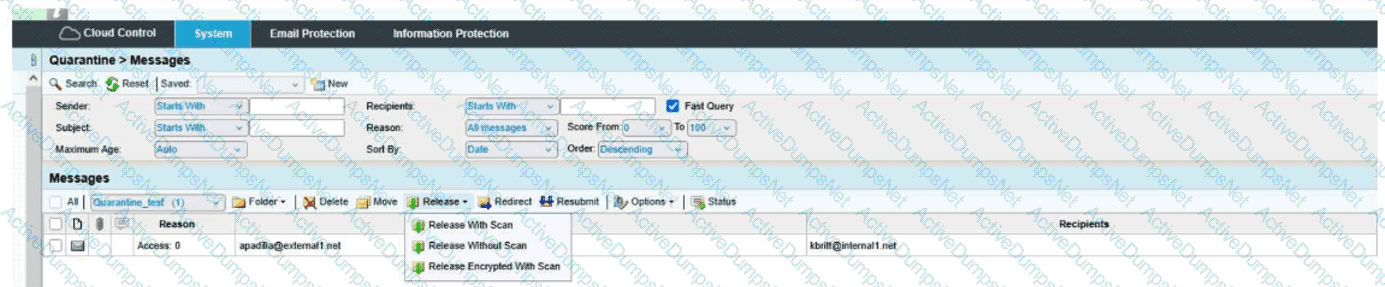
When you are attempting to release a message from the quarantine folder, you have the three choices shown here. The option of Release Encrypted With Scan will do which of the following?
Options:
Release the message to the user and deliver it encrypted.
Resubmit the message to message defense and virus protection and release the message to the user.
Encrypt the message and release the message to the user's digest.
Resubmit the message to message defense and virus protection and release an encrypted message to the user.
Answer:
DExplanation:
The correct answer is D. Resubmit the message to message defense and virus protection and release an encrypted message to the user .
From the exhibit, the release menu shows three distinct actions:
Release With Scan
Release Without Scan
Release Encrypted With Scan
The wording of Release Encrypted With Scan tells you two actions are happening together:
The message is being rescanned through the relevant protection layers, which in the course context means it is resubmitted through Message Defense and Virus Protection .
After that scan step, the message is released in encrypted form to the recipient.
That is why D is the only choice that includes both parts of the action: scan/resubmit and encrypted release .
Why the other options are incorrect:
A is incomplete because it mentions encrypted delivery, but it leaves out the with scan portion.
B is incomplete because it includes the rescan behavior, but it does not include encrypted delivery.
C is incorrect because the action is not releasing the message to the user’s digest; it is releasing the actual message to the user.
This is a Quarantine administration question focused on understanding the difference between release options. The exhibit clearly shows that Release Encrypted With Scan combines rescanning plus encrypted delivery , making Answer D the verified course-aligned choice.
Which Email Firewall features should be used together to mitigate directory harvest attacks?
Options:
Outbound Throttle
SMTP Rate Control
Dictionaries
Bounce Management
Recipient Verification
Answer:
B, EExplanation:
Directory harvest attacks try to discover valid recipient addresses by sending large numbers of SMTP recipient attempts and observing which addresses are accepted or rejected. In Proofpoint’s layered connection-level defenses, Recipient Verification and SMTP Rate Control are the two features that work together most directly against this problem. Recipient Verification checks whether the addressed mailbox is valid, while SMTP Rate Control helps detect and automatically block or throttle abusive SMTP connection behavior. Proofpoint’s published spam detection material describes connection-level analysis that includes recipient verification and Dynamic Reputation, and then states that based on this analysis, SMTP rate control is used to automatically block or throttle malicious connections, providing strong protection against directory harvest and denial-of-service attacks. That pairing is exactly what makes these two options the correct answer. Outbound Throttle is aimed at controlling excessive outbound mail from accounts, not inbound recipient enumeration. Dictionaries are content and pattern controls, not recipient-existence validation controls. Bounce Management deals with BATV-style handling of backscatter, which is a different problem space. The Threat Protection Administrator course topic list also places SMTP Rate Control and Recipient Verification together under the same operational area, reinforcing that they are complementary controls for this class of attack. For a directory harvest scenario, these are the right two protections to deploy together.
What is the primary function of Cloud Threat Response (CTR)?
Options:
To automate the containment and remediation of email threats
To manually analyze every email before delivery
To encrypt all emails before sending them to recipients
To filter out spam emails before they reach users’ inboxes
Answer:
AExplanation:
The correct answer is A. To automate the containment and remediation of email threats . Proofpoint’s Threat Response product description says that it removes manual labor and guesswork from incident response and helps organizations resolve threats faster and more efficiently. It provides actionable context and enables teams to quarantine and contain threats automatically or with minimal manual action. That aligns directly with automation of containment and remediation.
This is distinct from basic pre-delivery spam filtering or universal message encryption. CTR is not intended to manually inspect every email before delivery, and it is not just another spam engine. Instead, it is a response platform used after or alongside detection to orchestrate investigation, quarantine, and follow-up remediation actions for dangerous messages and associated affected users. In the Threat Protection Administrator course, Threat Response is positioned as the operational bridge between detection and action: once a threat is identified, CTR helps administrators and analysts contain it efficiently, especially at scale. That is why the product’s primary function is best summarized as automating the containment and remediation of email threats . Therefore, the verified answer is A
What option will release a quarantined message without further filtering?
Options:
Redirect
Release Without Scan
Release Encrypted With Scan
Release With Scan
Answer:
BExplanation:
The correct answer is Release Without Scan because that option releases the quarantined message directly without resubmitting it through additional filtering stages. In Proofpoint quarantine operations, the wording of the release action matters. “With Scan” indicates the message is being released only after being scanned or reprocessed again by relevant protection layers, while “Without Scan” means the message is sent onward without further filtering. This terminology is also reflected in the release menu design shown in Proofpoint Protection Server training interfaces, where administrators are offered choices that distinguish direct release from release after rescan.
This question is testing quarantine-handling behavior rather than encryption or redirection workflows. “Redirect” changes the destination and does not answer the question about bypassing further filtering. “Release Encrypted With Scan” still includes scan behavior, so it does not meet the condition of no further filtering. “Release With Scan” explicitly sends the message back through filtering logic before final release. In the Threat Protection Administrator course, Quarantine is taught as an area where administrators must understand the operational difference between resubmitting a message for inspection and simply releasing it. That distinction is important because one action preserves protection checks and the other bypasses them. Therefore, if the goal is to release a quarantined message without further filtering , the correct action is Release Without Scan .
What is the primary purpose of the End User Web Interface in Proofpoint?
Options:
To block all incoming emails automatically
To allow users to manage their quarantined emails and email preferences
To configure firewall settings and network security policies
To send encrypted messages to external recipients
Answer:
BExplanation:
The correct answer is B. To allow users to manage their quarantined emails and email preferences. Proofpoint end-user materials describe the quarantine web experience as the place where users can view quarantined messages, release them when permitted, and manage sender or digest-related preferences. End-user guides and operational help pages consistently frame the interface around quarantine management and personal email-security settings, not full administrative control.
This matches the purpose taught in the Threat Protection Administrator course. The End User Web Interface is designed to give users limited self-service capability so they can review held mail and adjust certain personal settings without requiring an administrator for every routine action. That is very different from automatically blocking all incoming mail, configuring network-firewall policy, or serving as the primary mechanism for sending encrypted external messages. Those options describe other technologies or broader administrative capabilities, not the core function of the End User Web Interface.
In practice, this interface helps reduce administrative burden by letting users handle everyday quarantine tasks themselves while keeping more sensitive platform-wide controls in administrator hands. Therefore, the verified and course-aligned answer is B.
Unlock TPAD01 Features
- TPAD01 All Real Exam Questions
- TPAD01 Exam easy to use and print PDF format
- Download Free TPAD01 Demo (Try before Buy)
- Free Frequent Updates
- 100% Passing Guarantee by Activedumpsnet
Questions & Answers PDF Demo
- TPAD01 All Real Exam Questions
- TPAD01 Exam easy to use and print PDF format
- Download Free TPAD01 Demo (Try before Buy)
- Free Frequent Updates
- 100% Passing Guarantee by Activedumpsnet