
- Home
- Nutanix
- Nutanix Certified Professional (NCP)
- NCP-DB
- NCP-DB - Nutanix Certified Professional - Database Automation (NCP-DB v7.5)
Nutanix NCP-DB Nutanix Certified Professional - Database Automation (NCP-DB v7.5) Exam Practice Test
Nutanix Certified Professional - Database Automation (NCP-DB v7.5) Questions and Answers
An administrator needs to replace the default Nutanix self-signed certificates in Era.
Which SSL Certificate file format is supported?
Options:
PKCS#7
DER encoded binary X.509
Base-64 encoded X 509
PKCS#12
Answer:
CExplanation:
According to the Nutanix Database Automation (NCP-DB) learning documents, Nutanix Era supports x509 certificates in Base-64 encoded PEM format1. This format is used when an administrator needs to replace the default Nutanix self-signed certificates in Era1.
What are two status values that can be set within the Alerts Dashboard? (Choose two.)
Options:
Auto
Resolved
Data Resiliency
Acknowledged
Answer:
B, DExplanation:
The correct answer is B and D because these are the two status values that can be set within the Alerts Dashboard in NDB. Resolved means that the alert has been fixed and no longer requires attention. Acknowledged means that the alert has been seen and is being worked on. Option A is incorrect because Auto is not a status value, but a mode that automatically resolves alerts based on predefined rules. Option C is incorrect because Data Resiliency is not a status value, but a feature that ensures the availability and integrity of the data in NDB.
The following sources provide more information about the Alerts Dashboard and its status values in NDB:
Nutanix Database Management & Automation (NDMA) course, Module 3: Monitoring Alerts and Storage Usage Within an NDB Implementation, Lesson 3.1: Monitoring Alerts
Nutanix Certified Professional - Database Automation (NCP-DB) v6.5, Knowledge Objectives, Section 3 - Monitor Alerts and Storage Usage Within an NDB Implementation
Nutanix Database Service (NDB) User Guide, Chapter 3: Monitoring Alerts and Storage Usage Within an NDB Implementation, Section 3.1: Monitoring Alerts
[Nutanix Support & Insights], Resolving All Alerts Related to a Database or Database Server VM in NDB
An administrator is adding a stretched VLAN in NDB.
Which VLAN type(s) will satisfy this task?
Options:
Only VLANs that are not managed in NDB
Only static VLANs that are managed in NDB
Only dynamic VLANs
Both static and dynamic VLANs
Answer:
DExplanation:
The administrator can add a stretched VLAN in NDB using either static or dynamic VLANs. A stretched VLAN is a VLAN that spans across multiple Nutanix clusters, and allows the NDB-managed databases to communicate and migrate between different clusters. A static VLAN is a VLAN that is manually configured and assigned to the database server VMs and the databases by the administrator. A dynamic VLAN is a VLAN that is automatically configured and assigned to the database server VMs and the databases by the NDB instance, using the Nutanix Calm orchestration service. Both static and dynamic VLANs can be used to create a stretched VLAN in NDB, as long as they have the same VLAN ID and network configuration across the clusters.
The administrator cannot add a stretched VLAN in NDB using only VLANs that are not managed in NDB. A VLAN that is not managed in NDB is a VLAN that is configured and assigned to the database server VMs and the databases outside of the NDB instance, using the Nutanix Prism web console or other tools. A VLAN that is not managed in NDB cannot be used to create a stretched VLAN in NDB, as it is not recognized or controlled by the NDB instance.
Nutanix Database Management & Automation Training Course, Module 4: Nutanix Era Configuration, Lesson 4.1: Nutanix Era Configuration, slide 8.
Nutanix Database Management & Automation Training Course, Module 6: Nutanix Era Disaster Recovery, Lesson 6.1: Nutanix Era Disaster Recovery, slides 6-7.
An administrator is experiencing issues with NDB and some of its operations. A case has been logged with Nutanix Support and a request has been made to gather a diagnostics bundle.
Where are two valid places to generate and download a diagnostics bundle? (Choose two.)
Options:
Prism Central GUI
Prism Element GUI
NDB GUI
NDB CLI
Answer:
C, DExplanation:
When an administrator experiences issues with NDB and Nutanix Support requests a diagnostics bundle, it can be generated from two valid locations. The NDB GUI provides an option under the administration or support section to create and download the bundle, offering a user-friendly interface. Alternatively, the NDB CLI allows generation via specific commands (e.g., era diagnostics collect), providing a scriptable approach. Both methods are supported for troubleshooting and support purposes.
Option A (Prism Central GUI) is incorrect because diagnostics for NDB are managed within NDB interfaces, not Prism Central.
Option B (Prism Element GUI) is incorrect as Prism Element focuses on cluster management, not NDB-specific diagnostics.
Option C (NDB GUI) is correct as it supports bundle generation via the UI.
Option D (NDB CLI) is correct as it supports bundle generation via command-line tools.
References
Nutanix Database Service (NDB) User Guide, Chapter 6: Administering an NDB Environment, Section: Generating Diagnostics Bundle
Nutanix Support & Insights, Knowledge Base Article: "Collecting NDB Diagnostics for Support"
Nutanix Certified Professional - Database Automation (NCP-DB) v7.5Blueprint, Section 6: Administer an NDB Environment
Which action can be performed on Alert Policies?
Options:
Disable
Delete
Pause
Publish
Answer:
AExplanation:
NDB alert policies are enabled by default and may be disabled when an administrator does not want a particular policy to generate alerts. The policy can later be enabled again, allowing alert generation to resume without recreating the policy or changing the monitored resource. This preserves the policy definition while suppressing unwanted notifications and events. NDB also supports operations such as configuring retention and resolving alerts, but those are separate alert-management functions. Pause is terminology associated with other scheduled processes, not the alert-policy control. Publish applies to objects such as software profile versions, and deletion is not the standard control exposed for built-in NDB alert policies. Consequently, Disable is the valid action among the choices. The supported behavior is described in Nutanix’s Disabling or Enabling Alert Policies procedure.
An administrator needs to perform patching on a MongoDB server cluster within an NDB environment.
How should the administrator accomplish this task?
Options:
Perform a rolling upgrade, applying the patch to the primary member first, followed by the secondary members.
Apply the patch to all nodes at once.
Perform a rolling upgrade, applying the patch to the secondary members first, followed by the primary member.
Disable the replica set while patching.
Answer:
CExplanation:
The administrator should perform a rolling upgrade, applying the patch to the secondary members first, followed by the primary member, to accomplish the task of patching a MongoDB server cluster within an NDB environment. A rolling upgrade is a method of applying patches or updates to a cluster without downtime or interruption of service. The administrator can use the NDB patching feature to perform a rolling upgrade on a MongoDB server cluster, which consists of a primary member and one or more secondary members that form a replica set. The NDB patching feature allows the administrator to select the software profile version, the database parameters profile, and the network profile for the patching operation. The NDB patching feature also automates the steps of the rolling upgrade, such as:
Step 1: The administrator initiates the patching operation on the NDB instance, and selects the MongoDB server cluster to be patched.
Step 2: The NDB instance verifies the prerequisites and compatibility of the patching operation, and creates a pre-patch snapshot of the MongoDB server cluster.
Step 3: The NDB instance applies the patch to the first secondary member of the MongoDB server cluster, and waits for the patching to complete successfully.
Step 4: The NDB instance verifies the status and functionality of the patched secondary member, and repeats the patching process for the remaining secondary members of the MongoDB server cluster, one at a time.
Step 5: The NDB instance performs a failover of the primary member to one of the patched secondary members, and applies the patch to the original primary member.
Step 6: The NDB instance verifies the status and functionality of the patched primary member, and performs a failback of the primary member to the original primary member, if desired.
Step 7: The NDB instance creates a post-patch snapshot of the MongoDB server cluster, and completes the patching operation.
Performing a rolling upgrade, applying the patch to the secondary members first, followed by the primary member, is the recommended and best practice method of patching a MongoDB server cluster within an NDB environment, as it ensures the high availability, consistency, and performance of the MongoDB server cluster and the databases.
Performing a rolling upgrade, applying the patch to the primary member first, followed by the secondary members, is not a valid or feasible method of patching a MongoDB server cluster within an NDB environment, as it would cause downtime, data loss, and inconsistency of the MongoDB server cluster and the databases. Applying the patch to the primary member first would disrupt the replication and synchronization of the MongoDB server cluster, and would require manual intervention and recovery steps to restore the MongoDB server cluster to a functional state.
Applying the patch to all nodes at once is not a valid or feasible method of patching a MongoDB server cluster within an NDB environment, as it would cause downtime, data loss, and inconsistency of the MongoDB server cluster and the databases. Applying the patch to all nodes at once would require shutting down the entire MongoDB server cluster, and would expose the MongoDB server cluster and the databases to potential errors, failures, and corruption during the patching process.
Disabling the replica set while patching is not a valid or feasible method of patching a MongoDB server cluster within an NDB environment, as it would cause downtime, data loss, and inconsistency of the MongoDB server cluster and the databases. Disabling the replica set while patching would break the replication and synchronization of the MongoDB server cluster, and would require manual intervention and recovery steps to re-enable the replica set and restore the MongoDB server cluster to a functional state.
Nutanix Database Management & Automation Training Course, Module 5: Nutanix Era Operations, Lesson 5.1: Nutanix Era Operations, slides 11-12, 15-16.
Nutanix Database Management & Automation Training Course, Module 5: Nutanix Era Operations, Lesson 5.3: Nutanix Era Patching, slides 5-9.
Nutanix Database Management & Automation Training Course, Module 5: Nutanix Era Operations, Lesson 5.4: Nutanix Era Patching Lab, slides 5-10.
Nutanix Database Management & Automation Training Course, Module 7: Nutanix Era Troubleshooting, Lesson 7.1: Nutanix Era Troubleshooting, slide 6.
Which action must an administrator take in Era Networks before using Era to provision a MSSQL AG cluster?
Options:
A network in each data center must be configured for Era.
A private network must be configured in Era for the heartbeat traffic.
A that has a static pool managed by Era must be configured.
A network that has a DHCP pool must be configured in Era.
Answer:
BExplanation:
According to the Nutanix Database Automation (NCP-DB) learning documents, before using Era to provision a MSSQL AG cluster, an administrator must configure a private network in Era for the heartbeat traffic1. This is because the heartbeat traffic is crucial for maintaining the health and status of the MSSQL AG cluster. The heartbeat traffic is used by the nodes in the cluster to communicate with each other and check the status of the other nodes. If a node does not receive a heartbeat from another node within a certain time frame, it assumes that the other node has failed and takes appropriate action234.
Which step 's optional when completing the NDE Wizard?
Options:
Network Segmentation
ND8 Cluster Name
Storage Container
Services
Answer:
AExplanation:
When completing the NDB (Nutanix Database Service) Wizard for initial setup or configuration, certain steps are mandatory to ensure the environment is properly configured, while others are optional based on specific needs. Network Segmentation is an optional step that allows for advanced network isolation and configuration, but it is not required for basic NDB deployment. Mandatory steps include specifying the NDB Cluster Name, selecting a Storage Container, and configuring Services (e.g., database services), as these are essential for NDB to function and manage databases.
Option A (Network Segmentation) is correct as it is an optional feature for advanced networking, not a required step in the wizard.
Option B (NDB Cluster Name) is incorrect because assigning a cluster name is a mandatory step to identify the NDB instance.
Option C (Storage Container) is incorrect because selecting a storage container is required for data storage and protection.
Option D (Services) is incorrect because configuring services (e.g., database engines) is a core requirement for NDB operation.
Note: The question mentions "NDE Wizard," which is assumed to be a typo for "NDB Wizard" based on context.
References
Nutanix Database Service (NDB) User Guide, Chapter 1: Deploying NDB, Section: Completing the NDB Wizard
Nutanix Certified Professional - Database Automation (NCP-DB) v7.5Blueprint, Section 1: Deploy NDB
An administrator has noticed that the automatic snapshot and log catch-up (automatic and manual) activities for a Time Machine are halted and manual snapshots cannot be created.
What status is this Time Machine in?
Options:
FROZEN
OFFLINE
PAUSED
READY
Answer:
CExplanation:
In NDB, a Time Machine manages snapshots and log catch-up operations for database protection and recovery. The scenario describes a Time Machine where automatic snapshot and log catch-up activities (both automatic and manual) are halted, and manual snapshots cannot be created. This indicates the Time Machine is in a PAUSED state.
In NDB, the Time Machine states are:
FROZEN: A temporary state during specific operations (e.g., cloning), but it doesn’t halt all activities permanently.
OFFLINE: Indicates the Time Machine is unavailable or not operational, often due to connectivity or configuration issues, but this typically prevents access rather than just halting operations.
PAUSED: Explicitly stops all scheduled and manual snapshot/log activities, often manually triggered by an administrator or due to an error condition (e.g., resource constraints). Operations resume when unpaused.
READY: The normal operational state where snapshots and log catch-ups occur as scheduled.
Given the inability to create manual snapshots alongside halted automatic operations, PAUSED is the most fitting status, as it reflects an intentional or enforced suspension of activities.
Official Nutanix Database Automation References
Nutanix Database Management & Automation (NDMA) course, Module 5: Data Protection and Recovery, Lesson 5.2: Managing Time Machines.
Nutanix Certified Professional - Database Automation (NCP-DB) v7.5Knowledge Objectives, Section 5: Protect Databases Using NDB, Objective 5.2: Manage Time Machine States (applicable to v7.5).
Nutanix NDB Administration Guide: "Time Machine Statuses and Operations" section.
An NDB administrator would like to configure a database with a Time Machine protection mode that includes the Log Catchup operation.
What would be the most essential component to make such a configuration possible?
Options:
At least one snapshot must be taken daily on the database.
An SLA retention schedule must be identified for daily snapshots.
A protection SLA with the Continuous Log Retention option must be selected.
The Log Catchup frequency must be selected and conform to RPO requirements.
Answer:
CExplanation:
To configure a database with a Time Machine protection mode that includes the Log Catchup operation in NDB, the most essential component is a Service Level Agreement (SLA) that supports continuous log retention. The Log Catchup operation enables point-in-time recovery (PITR) by replaying transaction logs from a specified point, ensuring minimal data loss and meeting Recovery Point Objective (RPO) requirements. This functionality depends on the Time Machine being configured with an SLA that includes the "Continuous Log Retention" option, which ensures transaction logs are captured and retained continuously alongside snapshots.
Option A is incorrect because a daily snapshot alone is insufficient without log retention to enable Log Catchup.
Option B is incorrect because an SLA retention schedule for daily snapshots does not inherently include continuous log capture, which is required for Log Catchup.
Option C is correct as it specifies the Continuous Log Retention option, the critical feature for enabling Log Catchup in a Time Machine SLA.
Option D is incorrect because while frequency settings are important, they are secondary to selecting an SLA with continuous log retention as the foundational requirement.
This configuration ensures robust data protection and recovery capabilities tailored to the database’s needs.
References
Nutanix Database Service (NDB) User Guide, Chapter 5: Configuring Time Machines, Section: Setting Up SLAs with Log Catchup
Nutanix Support & Insights, Knowledge Base Article: "Configuring Time Machine with Log Catchup in NDB"
Nutanix Certified Professional - Database Automation (NCP-DB) v7.5Blueprint, Section 5: Protect Databases Using Time Machine
Which statement best describes what happens when a 3rd-party backup tool is chosen to manage log backups for Microsoft SQL in NDB?
Options:
If exclusive log access is not granted to NDB, the Point-in-Time (PIT) recovery will not be supported, but snapshot-based recovery of the databases is supported.
Third-party backups vendors can continue to backup the archived logs from the database log destination. NDB will still be able to capture the logs, considering the log catch-up begins before the logs get backed up
If exclusive log access is not granted to NDB, the Point-in-Time (PIT) recovery will be supported, but snapshot-based recovery of the databases is not supported.
Third-party backups vendors can continue to backup the binary logs from the binary log location. NDB will still be able to capture the logs, considering the log catch-up begins before the logs get purged.
Answer:
BExplanation:
NDB supports two modes of log backup management for Microsoft SQL databases: NDB-managed and 3rd-party managed. In the NDB-managed mode, NDB takes full control of the log backups and stores them in the Cerebro log location. In the 3rd-party managed mode, NDB allows the use of external backup tools to backup the logs from the database log destination. However, NDB still needs to capture the logs for its own operations, such as point-in-time recovery, clone refresh, and log catch-up. Therefore, NDB will periodically scan the database log destination and copy the logs to the Cerebro log location. This process requires that the log catch-up begins before the logs get backed up by the 3rd-party tool, otherwise NDB will miss some logs and the operations will fail. If the 3rd-party tool grants exclusive access to the logs, then NDB will not be able to capture them at all, and the operations will not be supported. References:
Nutanix Database Management & Automation (NDMA) course, Module 5, Lesson 5.2 - Log Backup Management
Nutanix Support & Insights, Nutanix NDB User Guide v2.5, Log Backup Management
A Linux OS is running a PostgreSQL instance that is managed by NDB. This instance is not working properly after a manual OS update, so an administrator has prepared a new Linux DB server VM that is ready to host the data from the broken DB.
Which action should the administrator perform to migrate data to the new DB server VM?
Options:
Provision a new PostgreSQL instance from the Databases page.
From The Machine policy, Authorize Database Sever VMs.
Follow the Provision a PostgreSQL Instance wizard.
Register the new DB Server VM in NDB.
Answer:
DExplanation:
In this scenario, a PostgreSQL instance managed by NDB on a Linux VM is malfunctioning after a manual OS update, and a new Linux DB server VM has been prepared to host the data. To migrate the data to the new VM, the administrator must integrate the new VM into NDB’s management framework. The correct action is to register the new DB Server VM in NDB, which allows NDB to recognize and manage the VM as a database server. Once registered, the administrator can use NDB’s features (e.g., cloning, restoring, or reprovisioning) to migrate the data from the broken instance to the new VM.
Here’s why the other options are incorrect:
A. Provision a new PostgreSQL instance from the Databases page: This creates a fresh instance without migrating existing data, losing the broken instance’s data unless separately restored.
B. From The Machine policy, Authorize Database Server VMs: Machine policies in NDB define rules for VM management, but authorizing VMs is not a direct migration action and assumes prior registration.
C. Follow the Provision a PostgreSQL Instance wizard: Similar to A, this provisions a new instance rather than migrating data to an existing prepared VM.
Registering the new VM in NDB (via the "Database Server VMs" section) enables the administrator to associate it with the existing PostgreSQL instance’s configuration and perform a data migration (e.g., using a snapshot or backup). This aligns with NDB’s workflow for replacing a broken server. Thus, the verified answer is D.
Official Nutanix Database Automation References
Nutanix Database Management & Automation (NDMA) course, Module 3: Managing Database Instances, Lesson 3.3: Registering and Managing Database Server VMs.
Nutanix Certified Professional - Database Automation (NCP-DB) v7.5Knowledge Objectives, Section 3: Manage NDB Solutions, Objective 3.2: Register and Manage DB Server VMs (applicable to v7.5).
Nutanix NDB Administration Guide: "Registering a Database Server VM" section.
An administrator needs to change the maximum number of database connections during the cloning workflow.
Which Era profile should the administrator choose?
Options:
Compute
Database Parameters
Network
Answer:
BExplanation:
In Nutanix Database Automation (NCP-DB), the Database Parameters profile is used to manage database-specific settings, including the maximum number of database connections. This profile would be the appropriate choice when an administrator needs to change these settings during the cloning workflow1.
What is the purpose of Data Access Management policies in NDB Multi-Cluster?
Options:
To register multiple Nutanix clusters in NDB
To perform snapshot operations on a single Nutanix cluster
To manage time machine data availability across all registered Nutanix clusters in NDB
To remove data accessibility of a time machine across all registered Nutanix clusters in NDB
Answer:
CExplanation:
Data Access Management (DAM) policies are a feature of NDB Multi-Cluster that allows you to control the access and availability of time machine data across different Nutanix clusters. You can use DAM policies to specify which clusters can access the time machine data of a source database, and which clusters can replicate the time machine data for backup or disaster recovery purposes. DAM policies help you to optimize the storage and network resources, as well as ensure the security and compliance of your database workloads. The purpose of DAM policies is not to register multiple Nutanix clusters in NDB, as this is done by using the Add Cluster option in the NDB settings page. The purpose of DAM policies is also not to perform snapshot operations on a single Nutanix cluster, as this is done by using the Time Machine feature in the NDB dashboard. The purpose of DAM policies is also not to remove data accessibility of a time machine across all registered Nutanix clusters in NDB, as this is done by using the Delete option in the Time Machine page. References:
Nutanix Database Management & Automation Training Course, Module 6: Managing NDB Multi-Cluster, Lesson 2: Data Access Management Policies, Slide 3: Data Access Management Policies
Nutanix Certified Professional - Database Automation (NCP-DB) 5 Exam, Section 6: Administer an NDB Environment, Objective 6.5: Apply procedural concepts to create Data Access Management (DAM) policies
An administrator needs to restore a source database from a point in time at 21:50, but the restore option is not available.
What could explain the matter?
Options:
Point in time must be within the most recent range.
Selected Restore time is not available.
Change to snapshot option.
Logs to Backup must be run first.
Answer:
DExplanation:
The provided exhibit shows the NDB Time Machine restore interface for October 31, 2024, with a Point-in-Time (PIT) restore option selected at 21:50. However, the restore option is unavailable, as indicated by the question. The exhibit includes a warning: "Logs to Backup: The database may contain additional logs. Backup any remaining logs before restore or they will be lost." This suggests that PIT restore requires continuous log retention, and if logs since the last snapshot (at 01:10:00) are not backed up, the restore to 21:50 cannot proceed. Running the "Logs to Backup" operation ensures all transaction logs are captured, enabling PIT restore by allowing NDB to replay logs to the desired point.
Option A (Point in time must be within the most recent range) is incorrect because the selected 21:50 is within the log retention period shown (up to the current time), but logs need to be backed up.
Option B (Selected Restore time is not available) is incorrect because 21:50 is a valid time within the log range, but log backup is the issue.
Option C (Change to snapshot option) is incorrect because switching to a snapshot limits the restore to the snapshot time (01:10:00), not 21:50.
Option D (Logs to Backup must be run first) is correct as the warning indicates that backing up remaining logs is necessary for PIT restore.
After running the backup, the administrator can proceed with the PIT restore.
References
Nutanix Database Service (NDB) User Guide, Chapter 5: Configuring Time Machines, Section: Point-in-Time Restore Requirements
Nutanix Support & Insights, Knowledge Base Article: "Troubleshooting PIT Restore Issues in NDB"
Nutanix Certified Professional - Database Automation (NCP-DB) v7.5Blueprint, Section 5: Protect Databases Using Time Machine
An Era-managed production MSSQL database crashed during a busy holiday weekend and the administrator has to restore the database to
the most recent timestamp with an objective to reduce the restore time and minimize data loss.
What option should the administrator do to achieve this objective?
Options:
Perform Restore Source Database by selecting Restore time just before the database crash.
Perform Restore Source Database by selecting most recent and include Tail log Backup
Perform Restore Source Database by selecting the available snapshot.
Perform Restore Source Database by selecting the current time.
Answer:
BExplanation:
Nutanix Era is a database management solution that automates and simplifies database administration tasks such as provisioning, patching, cloning, and backup. In the event of a database crash, the most effective way to minimize data loss and reduce restore time is to perform a restore of the source database by selecting the most recent point in time and including the Tail log Backup12.
The Tail log Backup includes all the transactions that have occurred since the last transaction log backup, which helps to minimize data loss. By selecting the most recent point in time for the restore, the administrator ensures that the database is restored to the state it was in just before the crash, thereby reducing the amount of data that needs to be reprocessed or reentered12. This approach aligns with the Nutanix Era’s capabilities and best practices for database recovery12.
A database administrator wants to be notified in advance before any database clones are removed using a removal schedule What is the best way to configure this notification?
Options:
Create a Playbook to create an alert based on the removal event.
Select the Create an Alert Before Removal option.
Build a custom report in Prism to report on these events.
Configure SMTP alerts for all actions in NDB.
Answer:
BExplanation:
A database administrator wanting to be notified in advance before any database clones are removed using a removal schedule can configure this directly within the NDB interface. The "Update Removal Schedule" feature includes an option labeled "Create an Alert Before Removal," which is pre-selected as non-optional by default but can be customized. Selecting this option generates an alert (e.g., via email or the NDB dashboard) prior to the scheduled clone removal, allowing the administrator to take action if needed. This is the most efficient and built-in method, avoiding the complexity of custom scripts or reports.
Option A (Create a Playbook to create an alert based on the removal event) is incorrect because a Playbook is an advanced automation tool, not the simplest solution for this notification need.
Option B (Select the Create an Alert Before Removal option) is correct as it is a native NDB feature designed for this purpose.
Option C (Build a custom report in Prism to report on these events) is incorrect because Prism reports are for historical analysis, not real-time notifications.
Option D (Configure SMTP alerts for all actions in NDB) is incorrect because configuring SMTP for all actions is overly broad and less targeted than the specific alert option.
This ensures timely notifications with minimal configuration.
References
Nutanix Database Service (NDB) User Guide, Chapter 5: Configuring Time Machines, Section: Managing Clone Removal Schedules
Nutanix Certified Professional - Database Automation (NCP-DB) v7.5Blueprint, Section 5: Protect Databases Using Time Machine
While registering a database, the Group Database with One Time Machine option is selected.
What is the key architectural benefit of this option?
Options:
Optimized RPO and performance
Faster provisioning
Independent recovery for each database
Reduced storage consumption
Answer:
AExplanation:
Selecting Group Database with One Time Machine associates multiple SQL Server databases with one protection construct rather than separate Time Machines. Nutanix explicitly recommends grouping databases when they share protection requirements because the arrangement provides optimized RPO and improved performance. It also lets the group be protected, cloned, and recovered consistently under one SLA and one snapshot and log-catch-up schedule. Reduced storage consumption may occur as a secondary operational effect, but it is not the documented key architectural benefit. Faster provisioning is likewise not the principal reason for creating a database group, and independent recovery contradicts the group model because the databases share the same Time Machine. Therefore, optimized RPO and performance is the only option that matches Nutanix’s documented guidance for database groups.
An administrator enables NDB Multi-Cluster on Cluster A. Cluster B is then registered with NDB.
What are the different NDB Service VMs present in each Nutanix cluster?
Options:
Cluster A: 1 NDB ServerCluster B: 1 NDB Agent
Cluster A: 1 NDB AgentCluster B: 1 NDB Server, 1 NDB Agent
Cluster A: 1 NDB Server, 1 NDB AgentCluster B: 1 NDB Agent
Cluster A: 1 NDB AgentCluster B: 1 NDB Server
Answer:
CExplanation:
NDB Multi-Cluster is a feature that allows multiple Nutanix clusters to share a common NDB service for database management and automation. NDB service consists of two components: NDB Server and NDB Agent. NDB Server is the central component that provides the web UI, REST API, and database orchestration logic. NDB Agent is the component that runs on each Nutanix cluster and communicates with the NDB Server to perform database operations.
When NDB Multi-Cluster is enabled on Cluster A, it becomes the primary cluster that hosts the NDB Server VM. Cluster B, which is registered with NDB, becomes a secondary cluster that hosts only the NDB Agent VM. Therefore, Cluster A has both NDB Server and NDB Agent, while Cluster B has only NDB Agent. This configuration allows Cluster B to leverage the NDB service running on Cluster A for database management and automation.
Nutanix Database Automation (NCP-DB) Course Details, Section 3.1: NDB Multi-Cluster Overview
Nutanix Database Automation (NCP-DB) Certification Details, Objective 3.1: Configure NDB Multi-Cluster
Nutanix Database Automation (NCP-DB) YouTube Playlist, Video 3.1: NDB Multi-Cluster Overview
An administrator needs to restore a source database from a snapshot. The database shares the source volume with multiple other databases.
How does NDB handle this database restore operation?
Options:
Copies the specific database files to the source volume
Replaces source volume with specific db disks
Replaces the source volume with the snapshot volume
Copies all database files to the source volume
Answer:
AExplanation:
The correct answer is A because NDB handles the database restore operation by copying the specific database files from the snapshot volume to the source volume, without affecting the other databases that share the same source volume. NDB uses a copy-on-write mechanism to create snapshots and clones, which means that only the changes made to the database files are stored in the snapshot or clone volume, while the original files are kept in the source volume. Therefore, when restoring a source database from a snapshot, NDB only needs to copy the specific database files that have been modified since the snapshot was taken, and overwrite them on the source volume. The other options are not correct because they either cause data loss or unnecessary data transfer. Option B is not correct because replacing the source volume with specific db disks would erase the other databases that share the same source volume, which is not desirable. Option C is not correct because replacing the source volume with the snapshot volume would also erase the other databases that share the same source volume, as well as any changes made to the source database after the snapshot was taken, which is not desirable. Option D is not correct because copying all database files to the source volume would be inefficient and unnecessary, as only the modified files need to be copied, and the other files are already present on the source volume. References: Nutanix Database Management & Automation (NDMA) course, Nutanix Certified Professional - Database Automation (NCP-DB) certification, Nutanix NCP-DB Certification Exam Syllabus and Study Guide, [Nutanix Support & Insights]
An administrator created a database clone that is scheduled for removal on the last day of the month.
A request has been received to keep the clone for an additional 14 days.
After selecting the desired clone, how should the administrator satisfy this task?
Options:
Update the Removal schedule to the desired date.
Update the Removal schedule to the end of the month.
Remove the Removal schedule, then add the desired removal schedule.
Select Update and modify the Removal schedule.
Answer:
DExplanation:
The Removal schedule is a feature of Nutanix Era that allows you to specify when a database clone will be automatically deleted. You can modify the Removal schedule of an existing clone by selecting the clone from the Clones page, clicking on the Update button, and changing the Removal schedule option to the desired date. This way, you can extend or shorten the lifespan of a clone as per your requirements. You do not need to remove the existing Removal schedule and add a new one, as this would be an unnecessary step. You also do not need to update the Removal schedule to the end of the month, as this would not meet the request of keeping the clone for an additional 14 days. References:
Nutanix Database Management & Automation Training Course, Module 4: Protecting Databases Using Time Machine, Lesson 3: Cloning Databases, Slide 10: Clone Removal Schedule
Nutanix Certified Professional - Database Automation (NCP-DB) 5 Exam, Section 5: Protect NDB-managed Databases Using Time Machine, Objective 5.3: Given business requirements, perform a database clone
An administrator provisioned a MongoDB sharded cluster but cannot use Time Machine. NDB reports that Time Machine is unavailable.
What could be the reason?
Options:
Time Machine is supported only for MongoDB single-instance and replica-set deployments.
Nutanix Guest Tools must be installed in the MongoDB software profile before Time Machine can be used.
The database must be associated with MongoDB Ops Manager before Time Machine can be enabled.
The administrator selected the None SLA during the provisioning workflow.
Answer:
CExplanation:
Current NDB support for MongoDB sharded clusters requires MongoDB Ops Manager for Time Machine functionality. The administrator must install and configure a supported Ops Manager instance, register it with NDB, and associate it with the provisioned sharded cluster. Time Machine must then be enabled for that cluster. Without this association, NDB reports that Time Machine capabilities are unavailable because the required sharded-cluster backup and transaction-management integration has not been established. Nutanix Guest Tools are not the prerequisite that activates MongoDB Time Machine. Option A reflects an older limitation and is incorrect for the NDB release aligned with the NCP-DB 7.5 objectives, because sharded-cluster Time Machine protection is now supported. Nutanix explicitly identifies the Ops Manager requirement in its official MongoDB Ops Manager registration documentation.
What is the first step to add Time Machine (TM) data access to a Nutanix cluster?
Options:
Enable multi-cluster in NDB.
Disable multi-cluster in ND8.
Register the required Nutanix clusters in ND8.
Delete the TM data from the source database.
Answer:
CExplanation:
To add Time Machine data access to a Nutanix cluster, the first step is to register the cluster in NDB. This will allow NDB to discover and manage the databases and snapshots on the cluster. You can register multiple Nutanix clusters in NDB using the Add Cluster option in the NDB settings page. You can also specify the cluster role, such as source, target, or both, depending on the data access and replication needs. Enabling or disabling multi-cluster in NDB is not the first step, as this is a global setting that affects the entire NDB instance. Deleting the TM data from the source database is not the first step, as this will remove the data protection and availability of the database. References:
Nutanix Database Management & Automation Training Course, Module 6: Managing NDB Multi-Cluster, Lesson 1: NDB Multi-Cluster Overview, Slide 5: Registering Nutanix Clusters
Nutanix Certified Professional - Database Automation (NCP-DB) 5 Exam, Section 6: Administer an NDB Environment, Objective 6.4: Apply procedural concepts to add Nutanix clusters to NDB
When the NDB upgrade includes updates to the out-of-the-box (OOB) software profiles, what happens to older OOB software profile versions when upgrading NDB?
Options:
If the database VMs using the software profiles are using Time Machines and have had a successful snapshot in the last 24 hours before the patch.
If the software profiles are not in use, NDB deletes all versions of the profiles from the metadata and protection domains.
If the database VM using the software profiles are shutdown, NDB deletes all versions of the profiles from the metadata and protection domains.
If the database VMs are not using the base version of the software profile NDB deletes all versions of the profiles from the metadata and protection domains.
Answer:
BExplanation:
When upgrading NDB and the upgrade includes updates to out-of-the-box (OOB) software profiles (e.g., predefined profiles for database software like PostgreSQL, SQL Server, etc.), NDB manages older versions of these profiles based on their usage. If the older OOB software profiles are not actively in use by any database VMs, NDB automatically deletes all versions of those profiles from its metadata and associated protection domains during the upgrade process. This cleanup mechanism helps maintain a lean and efficient system by removing obsolete profiles that are no longer relevant or required.
Option A is incorrect because the condition about Time Machines and snapshots in the last 24 hours is not a documented criterion for profile deletion during an NDB upgrade.
Option B is correct as it reflects NDB’s behavior of removing unused OOB software profiles during upgrades to optimize resource usage and metadata.
Option C is incorrect because shutting down database VMs does not trigger automatic deletion of software profiles; the key factor is whether the profiles are in use.
Option D is incorrect because the concept of a "base version" is not relevant here; deletion depends solely on whether the profiles are unused, not on versioning specifics.
This behavior ensures that only active and necessary profiles persist post-upgrade, streamlining administration.
References
Nutanix Database Service (NDB) User Guide, Chapter 6: Upgrading NDB, Section: Handling Software Profile Updates
Nutanix Support & Insights, Technical Note: "NDB Upgrade Process and Software Profile Management"
Nutanix Certified Professional - Database Automation (NCP-DB) v7.5Blueprint, Section 6: Administer an NDB Environment
An administrator needs to provision a PostgreSQL cluster instance with an external Load Balancer. Which software can be omitted on the Reference VM while creating the Software Profile?
Options:
Patron
HAProxy
keepalived
etcd
Answer:
BExplanation:
When provisioning a PostgreSQL cluster instance with an external load balancer in NDB, the administrator creates a software profile from a reference VM. The reference VM typically includes software like Patroni (for HA management), HAProxy (for internal load balancing), keepalived (for high availability IP management), and etcd (for distributed configuration). Since an external load balancer is used, the internal HAProxy can be omitted from the reference VM. NDB will rely on the external load balancer to distribute traffic, eliminating the need for HAProxy in the software profile, while the other components remain essential for cluster management.
Option A (Patroni) is incorrect because Patroni is required for PostgreSQL HA management.
Option B (HAProxy) is correct as it can be omitted when an external load balancer is configured.
Option C (keepalived) is incorrect because keepalived is needed for HA IP failover.
Option D (etcd) is incorrect because etcd is necessary for distributed configuration in the cluster.
This adjustment streamlines the profile for external load balancer use.
References
Nutanix Database Service (NDB) User Guide, Chapter 4: Managing Software Profiles, Section: Creating Software Profiles for HA Instances
Nutanix Certified Professional - Database Automation (NCP-DB) v7.5Blueprint, Section 4: Manage Database Software Profiles
During maintenance, a team wants to power off the repository VM. The VM is not the primary or synchronized copy node. What is the expected outcome?
Options:
The HAProxy VMs will failover instead.
There will be no service interruption.
Manual interaction will be required to restore service.
NDB services will fail over immediately.
Answer:
BExplanation:
In an NDB environment, the repository VM stores metadata and configuration data but is not a critical runtime component for service availability. If the team powers off the repository VM during maintenance, and it is neither the primary nor a synchronized copy node, the NDB service will continue to operate without interruption. NDB’s high availability (HA) architecture, managed by HAProxy and other components, ensures redundancy and failover capabilities, allowing the system to rely on the primary and synchronized nodes. The repository VM’s downtime only affects metadata access, which can be restored post-maintenance without impacting ongoing database operations.
Option A (The HAProxy VMs will failover instead) is incorrect because HAProxy failover is triggered by primary service node failures, not repository VM power-off.
Option B (There will be no service interruption) is correct as the HA design tolerates a non-primary, non-synchronized repository VM being offline.
Option C (Manual interaction will be required to restore service) is incorrect because no service restoration is needed during this scenario.
Option D (NDB services will fail over immediately) is incorrect because failover is not triggered by a non-critical repository VM power-off.
This reflects NDB’s robust HA implementation.
References
Nutanix Database Service (NDB) User Guide, Chapter 3: Configuring an NDB Environment, Section: High Availability Architecture
Nutanix Support & Insights, Knowledge Base Article: "Impact of Repository VM Maintenance in NDB"
Nutanix Certified Professional - Database Automation (NCP-DB) v7.5Blueprint, Section 3: Configure an NDB Environment
A Log Catchup gap has occurred, impacting the ability to perform point-in-time restore (PITR) operations to create a clone or perform a database restore.
Which two statements below are true for the NDB Time Machine Heal Snapshot feature? (Choose two.)
Options:
By default the time machine auto-heal feature is enabled.
Manual Heal is only used when gaps in Log Catchup are detected once the operation has begun failing.
Once a Time Machine Heal process has been invoked and successful, the Log Catchup gap can be spanned for a PITR operation.
Time Machine auto-heal runs on the NDB server every 5 minutes and checks for different cases that require a heal.
Answer:
C, DExplanation:
A Log Catchup gap in Nutanix Database Service (NDB) occurs when transaction logs are missing or corrupted, disrupting point-in-time restore (PITR) operations for cloning or database restoration via Time Machine. The NDB Time Machine Heal Snapshot feature addresses this by repairing snapshots to resolve such gaps.
Option A (By default the time machine auto-heal feature is enabled) is incorrect because the auto-heal feature is not enabled by default; it requires explicit configuration or manual invocation.
Option B (Manual Heal is only used when gaps in Log Catchup are detected once the operation has begun failing) is incorrect because manual heal can be initiated proactively or reactively, not solely after failure detection.
Option C is correct because a successful Time Machine Heal process restores the snapshot integrity, allowing PITR to span the previously gapped period.
Option D is correct as the auto-heal process, when enabled, runs every 5 minutes to detect and address healable conditions, aligning with NDB’s automated maintenance schedule.
Together, C and D reflect the operational mechanics of the Heal Snapshot feature.
References
Nutanix Database Service (NDB) User Guide, Chapter 5: Configuring Time Machines, Section: Healing Snapshot Gaps
Nutanix Support & Insights, Knowledge Base Article: "Resolving Log Catchup Gaps with Time Machine Heal"
Nutanix Certified Professional - Database Automation (NCP-DB) v7.5Blueprint, Section 5: Protect Databases Using Time Machine
The container used for provisioning databases and deploying NDB is named NDB.
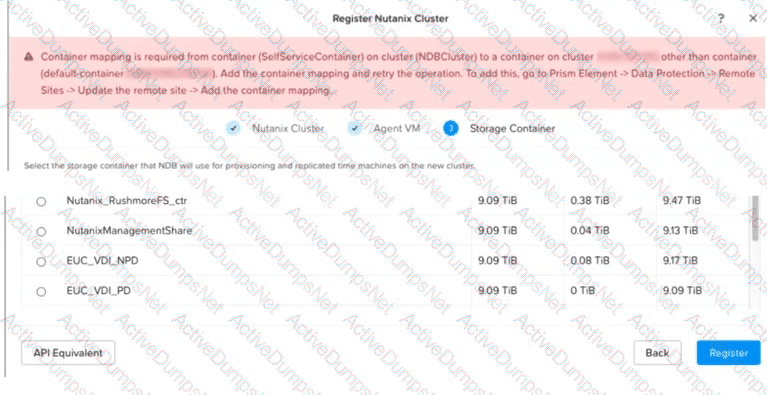
What should the administrator do before registering the cluster?
Options:
Create a mapping between NutanixManagementShare and a remote container.
Remove any CD-ROM mounted from SelfServiceContainer on the NDB VM.
Remove any SCSI disks mounted from the NDB container on the NDB VM.
Create a mapping between the NDB and default-container containers.
Answer:
AExplanation:
Comprehensive and Detailed 100 to 150 words of Explanation From Nutanix Database Management & Automation (NDMA) topics:
NDB cluster registration must account for storage containers associated with resources that need to be available during cross-cluster operations. Although the NDB control-plane VM and database provisioning operations use the same NDB container in this scenario, NutanixManagementShare is a separate Nutanix-managed service container. Its corresponding remote-container relationship must therefore be represented through storage mapping. Mapping the NDB container to default-container is unnecessary because the NDB server and provisioning storage are already consolidated. Removing SCSI disks from the NDB VM would damage the appliance configuration, while an attached CD-ROM does not justify altering the required storage mapping. This differs from the existing questions, which ask when mapping is required because the NDB server and provisioning containers are separate. Therefore, option A is correct. Nutanix cluster-registration documentation
While restoring a PostgreSQL HA instance, an administrator notices that the restore of a standby node has failed. The primary node is ready to seive application traffic.
In what state does NDB leave the database?
Options:
PAKFIAL.READY
OFFLINE
ONLINE
RECOVERY PENDING
Answer:
CExplanation:
When restoring a PostgreSQL HA instance in NDB, if the standby node fails to restore but the primary node is successfully restored and ready to serve application traffic, NDB considers the database operational from the perspective of the primary node. In this scenario, NDB leaves the database in an "ONLINE" state, reflecting that the primary node is functional and capable of handling requests, even though the HA configuration is not fully intact due to the standby failure. The administrator would need to address the standby node separately (e.g., by re-provisioning or troubleshooting), but the database’s state is determined by the primary node’s readiness.
Option A (PAKFIAL.READY) appears to be a typo and is not a valid NDB state.
Option B (OFFLINE) is incorrect because the primary node is operational, so the database is not offline.
Option C (ONLINE) is correct as it reflects the primary node’s ability to serve traffic.
Option D (RECOVERY PENDING) is incorrect because the primary node has completed recovery and is active, not pending.
This behavior aligns with NDB’s focus on maintaining service availability where possible.
References
Nutanix Database Service (NDB) User Guide, Chapter 5: Configuring Time Machines, Section: Restoring HA Instances
Nutanix Support & Insights, Knowledge Base Article: "Handling Partial Restore Failures in PostgreSQL HA"
Nutanix Certified Professional - Database Automation (NCP-DB) v7.5Blueprint, Section 5: Protect Databases Using Time Machine
How long is the default continuous recovery for the Gold SLA in Era Time Machine?
Options:
30 days
15 days
60 days
90 days
Answer:
AExplanation:
The default continuous recovery for the Gold SLA in Era Time Machine is 30 days1. This means that the system keeps a continuous recovery point for the last 30 days, allowing you to restore your database to any point within this period1.
Which two MongoDB-specific prerequisites must be satisfied before database registration? (Choose two.)
Options:
Ensure that MongoDB is installed using YUM or DNF.
MongoDB tools must be downloaded separately.
Ensure that the requiretty setting on the source database is enabled.
MongoDB tools and binaries must be present in the bin directory under the software home.
Answer:
B, DExplanation:
MongoDB registration requires the database tools to be available to NDB and placed in the expected MongoDB software-home layout. Nutanix instructs administrators to download and extract the MongoDB tools, then copy or extract them into the bin directory under the software home specified during registration. Accordingly, both B and D describe required preparation. Installing MongoDB through YUM or DNF is not the required approach; Nutanix states that package-manager installation is not recommended and prevents NDB-managed patching in relevant workflows. The requiretty setting must be disabled or absent for NDB sudo automation, so an option stating that it must be enabled reverses the requirement. With the tools and binaries in the software-home bin path, NDB can discover and execute the utilities needed to manage the registered server. These requirements are documented under MongoDB Prerequisites.
An administrator needs to work with databases and time machines, but not database parameter profiles. Which role satisfies this requirement?
Options:
Database Administrator (DBA)
super Administrator
Database Infrastructure Administrator
Infrastructure Administrator
Answer:
AExplanation:
In the Nutanix Database Automation (NCP-DB) framework, the role that allows an administrator to work with databases and time machines, but not database parameter profiles, is the Database Administrator (DBA)123. This role provides the necessary permissions to manage databases and time machines, which are essential components of the Nutanix Era solution. However, it does not grant access to database parameter profiles, which are typically managed by other roles45.
An administrator wants to deploy NDB on Nutanix Cloud Clusters (NC2) on AWS. Which two steps are required? (Choose two.)
Options:
Create a native AWS VPC.
Create a Flow overlay subnet.
Create or assign a floating IP address to NDB.
Create a Flow underlay subnet.
Answer:
B, CExplanation:
NDB deployments on NC2 use overlay networking created with Nutanix Flow Virtual Networking. Consequently, an appropriate Flow overlay subnet must be created for NDB and the database server VMs that it will manage. A floating IP address must also be created or assigned to the NDB VM so that the NDB interface and services are reachable through the cloud networking environment. A Flow underlay subnet is not the supported network type for this deployment. Although an NC2 environment ultimately operates within AWS networking infrastructure, creating a native AWS VPC is not the NDB-specific deployment step requested by the question. Nutanix’s NC2 networking documentation identifies Flow-created overlay networks, while the Flow integration guidance describes assigning a floating IP address to the NDB VM.
Which statement is true regarding the NDB alert retention feature?
Options:
NDB supports alert retention globally.
NDB supports retention at the individual policy.
NDB supports retention at the grouped policy.
NDB supports retention at the registered cluster.
Answer:
AExplanation:
The NDB alert retention feature allows the database administrator to configure the duration for which the NDB alerts are stored and displayed in the NDB instance. The NDB alert retention feature supports alert retention globally, meaning that the same retention period applies to all the alerts generated by the NDB instance, regardless of the source cluster, policy, or operation. The database administrator can set the alert retention period from 1 day to 365 days, or choose to retain the alerts indefinitely. The NDB alert retention feature helps to manage the storage space and the visibility of the NDB alerts.
The NDB alert retention feature does not support retention at the individual policy, grouped policy, or registered cluster level. The NDB alert retention feature applies to all the alerts uniformly, and does not allow the database administrator to specify different retention periods for different policies or clusters.
Nutanix Database Management & Automation Training Course, Module 3: Nutanix Era Deployment, Lesson 3.2: Nutanix Era Deployment, slide 11.
Nutanix Database Management & Automation Training Course, Module 5: Nutanix Era Operations, Lesson 5.1: Nutanix Era Operations, slide 6.
Which two processes should an administrator take to create a software profile version for a newly-released Oracle ISc patch? (Choose
two.)
Options:
1. Download the required patch from Microsoft Support.2. Apply the patch to the Oracle Home/Grid Home on e cloned VM of the gold image usingOPatchAuto utiliv.3. Ensure success of patch application.
1. Create new software profile version from the original software profile using the clonedVM where OPatchAuto was run successfully using Era Gul.2. Mark the original patch profile as deprecated.
1. Download the required patch from MyOracle Support2. Apply the patch to the Oracle Hom€Grid Home on a cloned VM of the gold image usingO PatchAuto3. Ensure success of patch application
1. Create new software profile version from the original software profile using the clonedVM where OPatchAuto was run successfully using Era Gul.2. Mark the original patch profile as hidden.
Answer:
C, DExplanation:
To create a software profile version for a newly-released Oracle ISc patch, an administrator should follow these steps:
Download the required patch from MyOracle Support1. This is because Oracle patches are typically available from MyOracle Support, not Microsoft Support.
Apply the patch to the Oracle Home/Grid Home on a cloned VM of the gold image using OPatchAuto1. OPatchAuto is a utility provided by Oracle that automates the process of applying patches to a database.
Ensure success of patch application1. It’s important to verify that the patch has been applied successfully to avoid any issues down the line.
Create a new software profile version from the original software profile using the cloned VM where OPatchAuto was run successfully using Era GUI1. This step is necessary to ensure that the new patch is included in the software profile.
Mark the original patch profile as hidden1. This step is optional but can be useful for keeping the software profile clean and organized.
Please note that these answers are based on the information available as of my last update in 2021 and may need to be verified with the most recent Nutanix Database Automation (NCP-DB) documentation or resources.
Where would an administrator find the total space being used by all Era clones for a specific database?
Options:
Under the Cloning widget on the Databases > Clones database summary page.
Under the Capacity widget on the Database Server VMS > List database summary page.
On the Era Dashboard Database Summary Table under Clones.
On the Database > Overview dashboard.
Answer:
AExplanation:
Nutanix Era leverages the Nutanix time-efficient snapshots to create the clones1. These database clones are highly space-efficient, consuming near-zero bytes by having only the further writes constituting to its size1. Therefore, an administrator would find the total space being used by all Era clones for a specific database under the Cloning widget on the Databases > Clones database summary page. The other options do not specifically provide information about the total space used by all Era clones for a specific database. Therefore, the correct answer is A. Under the Cloning widget on the Databases > Clones database summary page.
An administrator wants to migrate an existing MSSQL Server database to NDB.
How should the administrator complete this migration?
Options:
Use Nutanix Move to migrate the database server VM.
Provision a new database server VM and database then migrate the data.
Create a new database server VM and database then register it with NDB.
Backup your database VM and import it into Nutanix.
Answer:
BExplanation:
To migrate an existing Microsoft SQL Server (MSSQL) database to NDB, the recommended approach is to:
Provision a new database server VM and database: Use the NDB interface to provision a new VM and configure an MSSQL database instance on the Nutanix platform. This leverages NDB’s automated provisioning capabilities to ensure compatibility with Nutanix infrastructure.
Migrate the data: Transfer the data from the existing MSSQL database to the newly provisioned database. This can be achieved using native MSSQL tools (e.g., backup/restore, log shipping, or replication) or NDB’s data migration features, such as cloning or restoring from a backup, depending on the source environment.
Other options are incorrect or incomplete:
A. Use Nutanix Move to migrate the database server VM: Nutanix Move is designed for VM migration between platforms, not for database-specific migrations within NDB, which requires data migration to a new instance.
C. Create a new database server VM and database then register it with NDB: Registering an existing VM with NDB does not handle data migration from the source MSSQL database.
D. Backup your database VM and import it into Nutanix: Backing up the entire VM and importing it does not integrate the database with NDB’s management framework, and data migration would still be required separately.
Thus, the verified answer is B, providing a structured migration process tailored to NDB’s capabilities.
Official Nutanix Database Automation References
Nutanix Database Management & Automation (NDMA) course, Module 3: Managing Database Instances, Lesson 3.5: Migrating Databases to NDB.
Nutanix Certified Professional - Database Automation (NCP-DB) v7.5Knowledge Objectives, Section 3: Manage NDB Solutions, Objective 3.4: Migrate Databases (applicable to v7.5).
Nutanix NDB Administration Guide: "Migrating MSSQL Databases to NDB" section, outlining provisioning and data migration steps.
When configuring Disaster Recovery (DR) for an Oracle database using Nutanix Database Service (NDB), how does NDB natively automate and orchestrate high-availability data replication between a primary data center and a remote DR site?
Options:
NDB forces the primary instance to write transactions to local and remote storage arrays concurrently using cross-site synchronous iSCSI multipath links.
NDB uses external replication agents inside the guest operating system to capture and replicate block changes continuously between the data centers.
NDB creates scheduled storage snapshots at the primary site and uses Nutanix replication to copy them to the DR site.
NDB deploys an Oracle instance on the remote cluster and configures native Oracle Data Guard to automate redo log transport.
Answer:
DExplanation:
NDB implements Oracle database disaster recovery by orchestrating Oracle Data Guard, not by duplicating every write through cross-site iSCSI or relying on a generic guest replication agent. The NDB Oracle workflow provisions or manages a standby database on the remote cluster and configures the native Data Guard relationship, including redo transport and the supported protection mode. This lets administrators manage DR through the NDB console and APIs and perform planned or unplanned role transitions within the supported workflow. Nutanix storage snapshots and Time Machine replication remain important for backup, clone, and restore operations, but scheduled snapshot replication is not the mechanism used to continuously maintain an Oracle DR standby. Therefore, deploying the remote Oracle instance and configuring native Oracle Data Guard log transport is the correct architecture. Nutanix documents this capability under Oracle Database Disaster Recovery.
What severity level are alert policies set to for ND8?
Options:
Error
Info
Critical
Warning
Answer:
AExplanation:
In Nutanix Database Service (NDB), alert policies are configured to notify administrators of significant events affecting database operations. The default severity level for NDB alert policies is set to Error. This level indicates issues that require attention, such as failed operations (e.g., provisioning failures, as shown in the exhibit), connectivity issues, or other critical operational problems. Other severity levels like Info, Critical, and Warning may be used for different scenarios, but the base configuration for NDB alert policies starts at Error to ensure administrators are alerted to actionable issues without being overwhelmed by less severe notifications.
Official Nutanix Database Automation References
Nutanix Database Management & Automation (NDMA) course, Module 6: Monitoring and Alerts, Lesson 6.1: Configuring Alert Policies.
Nutanix Certified Professional - Database Automation (NCP-DB) v7.5Knowledge Objectives, Section 6: Optimize NDB Solutions, Objective 6.2: Manage Alerts (applicable to v7.5).
Nutanix NDB Administration Guide: "Alert Policies and Severity Levels" section.
Which two profiles are required to provision a new Oracle database through Era? (Choose two.)
Options:
Memory
Compute
Network
Storage
Answer:
B, DExplanation:
In the Nutanix Database Automation (NCP-DB) framework, provisioning a new Oracle database through Era requires the configuration of both a Compute and a Storage profile1. The Compute profile is used to define the resources allocated to the database, such as CPU and memory, while the Storage profile is used to specify the storage configuration for the database. These profiles are essential in ensuring that the database is provisioned with the necessary resources and storage configurations for optimal performance23.
When registering a new Nutanix Cluster with Era, what component is installed on the target Nutanix cluster via the Register Nutanix Cluster workflow?
Options:
Era Sewer
Era Agent
API Server
Repository Server
Answer:
BExplanation:
When registering a new Nutanix Cluster with Era, the Era Agent is installed on the target Nutanix cluster via the Register Nutanix Cluster workflow1. This agent is crucial for the functioning of the Nutanix Database Service (NDB) as it helps in managing and optimizing database workloads2. It also enables the application of procedural concepts to add Nutanix clusters to NDB2.
An administrator is managing a high availability (HA) NDB environment and has been tasked to configure custom SSL certificates. Which server instances must be updated?
Options:
All API server VMs
All HA Proxy VMs
The API and Repository VMs running on the primary cluster
The primary API, Repository and HA Proxy servers
Answer:
BExplanation:
In a high availability (HA) Nutanix Database Service (NDB) environment, custom SSL certificates are used to secure communication between clients (e.g., NDB GUI, API calls) and the NDB control plane. The HA Proxy VMs serve as the entry point for all external traffic, load balancing requests across the NDB API server VMs and providing secure SSL termination. When configuring custom SSL certificates, they must be updated on all HA Proxy VMs to ensure consistent and secure communication across the HA environment. Updating only a subset of servers or other components (like API or Repository VMs) would lead to inconsistencies or SSL handshake failures.
Option A (All API server VMs) is incorrect because the API servers do not directly handle external SSL termination; this is managed by the HA Proxy layer.
Option B (All HA Proxy VMs) is correct as these VMs are responsible for SSL termination and load balancing in an HA setup, requiring the custom certificates to be applied uniformly.
Option C (The API and Repository VMs running on the primary cluster) is incorrect because Repository VMs do not handle client-facing traffic, and the API servers rely on HA Proxy for SSL handling.
Option D (The primary API, Repository, and HA Proxy servers) is incorrect because it implies a single "primary" server focus, whereas in an HA setup, all HA Proxy VMs (not just a primary one) must be updated.
This aligns with NDB’s HA architecture, where HA Proxy VMs are the critical components for SSL certificate management.
References
Nutanix Database Service (NDB) User Guide, Chapter 3: Configuring an NDB Environment, Section: Configuring High Availability and SSL Certificates
Nutanix Support & Insights, Knowledge Base Article: "Configuring Custom SSL Certificates in NDB HA Environments"
Nutanix Certified Professional - Database Automation (NCP-DB) v7.5Blueprint, Section 3: Configure an NDB Environment
What is causing this issue?
Options:
The VLAN is DHCP
The VLAN is static
The VLAN is stretched
The VLAN is IPAM
Answer:
CExplanation:
The correct answer is C because a stretched VLAN is a VLAN that spans across multiple Nutanix clusters, which may cause network conflicts or latency issues when starting the database server. Option A is incorrect because a DHCP VLAN is a VLAN that uses dynamic IP address allocation, which does not affect the database server startup. Option B is incorrect because a static VLAN is a VLAN that uses fixed IP address allocation, which also does not affect the database server startup. Option D is incorrect because IPAM is not a type of VLAN, but a feature of NDB that allows managing IP addresses for database servers and databases.
The following sources provide more information about the VLAN and IPAM concepts and configuration in NDB:
Nutanix Database Management & Automation (NDMA) course, Module 2: Deploying and Configuring an NDB Solution, Lesson 2.4: Configuring NDB High Availability
Nutanix Certified Professional - Database Automation (NCP-DB) v6.5, Knowledge Objectives, Section 2 - Deploy and Configure an NDB Solution
Nutanix Database Service (NDB) User Guide, Chapter 2: Deploying and Configuring an NDB Solution, Section 2.4: Configuring NDB High Availability
Nutanix Database Service (NDB) User Guide, Chapter 8: Administering an NDB Environment, Section 8.5: Managing Networks in NDB
Nutanix Database Service (NDB) User Guide, Chapter 8: Administering an NDB Environment, Section 8.6: Managing IP Addresses in NDB
A DBA team needs to release PostgreSQL HA instances using a dedicated subnet.
Which action is mandatory before creating the network profile?
Options:
The subnet in Prism Element must be iPAM configured.
The DB VMs must be registered first.
A VLAN must be added to NDB networks.
Configure Network Segmentation.
Answer:
CExplanation:
To release PostgreSQL HA instances using a dedicated subnet in Nutanix Database Service (NDB), the administrator must create a network profile that defines the subnet and its associated VLAN. Before creating this network profile, it is mandatory to add a VLAN to the NDB Networks configuration. This VLAN ensures that the dedicated subnet is recognized and manageable within NDB, allowing the HA instances to be provisioned with isolated network connectivity. The VLAN must be configured in the NDB Networks page to be available for selection during network profile creation.
Option A (The subnet in Prism Element must be IPAM configured) is incorrect because IP Address Management (IPAM) configuration in Prism Element is optional and not a mandatory prerequisite for creating a network profile in NDB.
Option B (The DB VMs must be registered first) is incorrect because VM registration is a subsequent step, not a prerequisite for network profile creation.
Option C (A VLAN must be added to NDB networks) is correct as it is a required step to define the network infrastructure before creating the profile.
Option D (Configure Network Segmentation) is incorrect because network segmentation is an advanced feature and not mandatory for basic network profile setup.
This ensures the dedicated subnet is properly integrated into NDB for HA provisioning.
References
Nutanix Database Service (NDB) User Guide, Chapter 3: Configuring an NDB Environment, Section: Configuring Network Profiles
Nutanix Certified Professional - Database Automation (NCP-DB) v7.5Blueprint, Section 3: Configure an NDB Environment
An administrator needs to distribute NDB management plane components.
Which NDB HA VM needs to be deployed on the same L2 network?
Options:
NDB Agent
API Server
Repository VMs
HA Proxy VMs
Answer:
DExplanation:
NDB High Availability (HA) is a feature that ensures the availability and reliability of the NDB management plane components, such as the API Server, the Repository VMs, and the NDB Agents. To enable NDB HA, you need to deploy at least three HA Proxy VMs on the same L2 network as the NDB Server VM. The HA Proxy VMs act as load balancers and health monitors for the NDB management plane components, and they also provide a single endpoint for accessing the NDB APIs and UI. References:
Nutanix Certified Professional - Database Automation (NCP-DB), Section 2 - Deploy and Configure an NDB Solution
Database (NCP-DB) Exam Blueprint Guide - Nutanix, Page 7, Objective 2.3
Nutanix Database Management & Automation (NDMA) course, Module 2, Lesson 2.3 - NDB High Availability
What is the terminology used for registering an existing database with Era?
Options:
Greenfield Database
Brownfield Database
Cloned Database
Source Database
Answer:
BExplanation:
In the context of Nutanix Era, the term “Brownfield Database” is used to refer to an existing database that is registered with Era1. This process allows Era to bring Database as a Service (DBaaS) capabilities to your existing database2. It’s important to note that before you register a database with Era, certain prerequisites must be met3.
An administrator needs to add multiple databases to an existing PostgreSQL instance.
How should the administrator satisfy this requirement?
Options:
Modify parameter profile using ncli.
Modify parameter profile using the GUI.
Modify parameter profile using post script.
Modify parameter profile using NDB CLI.
Answer:
BExplanation:
To add multiple databases to an existing PostgreSQL instance managed by NDB, the administrator should use the NDB graphical user interface (GUI). The GUI provides a user-friendly way to modify the parameter profile associated with the PostgreSQL instance, allowing the addition of new databases by adjusting settings such as database names, sizes, or configurations. This process typically involves navigating to the "Databases" or "Instances" section, selecting the PostgreSQL instance, and editing the parameter profile to include additional databases.
Other options are less appropriate:
A. Modify parameter profile using ncli: The ncli (Nutanix Command Line Interface) is used for cluster-level management in Prism, not for NDB database configuration.
C. Modify parameter profile using post script: Post-scripts are used for custom actions post-provisioning, not for modifying parameter profiles to add databases.
D. Modify parameter profile using NDB CLI: While NDB has a CLI, the GUI is the recommended and supported method for such configuration changes, offering a guided workflow and validation.
Thus, the verified answer is B, leveraging the NDB GUI for ease and compliance with best practices.
Official Nutanix Database Automation References
Nutanix Database Management & Automation (NDMA) course, Module 3: Managing Database Instances, Lesson 3.4: Modifying Database Configurations.
Nutanix Certified Professional - Database Automation (NCP-DB) v7.5Knowledge Objectives, Section 3: Manage NDB Solutions, Objective 3.3: Modify Parameter Profiles (applicable to v7.5).
Nutanix NDB Administration Guide: "Managing PostgreSQL Instances" section, detailing GUI-based modifications.
For an NDB offline upgrade, which NDB CLI command should be used to upload the upgrade bundle?
Options:
upgrade upload_bundle path=path_to_upgrade_bundle upload bundle
path=path_to_upgrade_bundle upgrade bundle
path=path_to_upgrade_bundle
upload upgrade_bundle path=path_to_upgrade_bundle
Answer:
DExplanation:
For an NDB offline upgrade, you need to download the upgrade bundle from the Nutanix Support Portal and copy it to the NDB server. Then, you need to use the NDB CLI command upload upgrade_bundle with the path parameter to specify the location of the upgrade bundle file. This command will upload the upgrade bundle to the NDB server and verify its integrity. After uploading the upgrade bundle, you can use the upgrade command to perform the upgrade. References: Nutanix Support & Insights, Cisco Nexus Data Broker Deployment Guide, Release 3.10.x
An administrator needs to create multiple databases within an existing PostgreSQL database server managed by NDB.
How should the administrator satisfy this requirement?
Options:
Create additional Time Machines.
Modify the database server’s Database Parameters Profile.
Create a new Software Profile.
Execute a post-provisioning script.
Answer:
BExplanation:
For an existing PostgreSQL database server managed by NDB, additional databases are added by updating the applicable database server parameters through the NDB graphical interface. The Database Parameters Profile represents PostgreSQL instance-level configuration and allows NDB to apply the supported database definition and configuration consistently. Creating additional Time Machines would protect separate database entities but would not create the databases themselves. A Software Profile contains the operating-system and PostgreSQL binaries used for provisioning database server VMs; replacing it is unnecessary for adding databases to an existing instance. A post-provisioning script is also not the standard managed workflow because it would bypass the profile-based configuration maintained by NDB. Therefore, option B is correct: the administrator should modify the Database Parameters Profile for the existing PostgreSQL server. Nutanix PostgreSQL Database Parameters Profile documentation
An administrator wants to provision a MySQL high-availability instance.
Which option must be enabled in NDB to allow automated routing and failover of application traffic to the database replicas?
Options:
Configure External Load Balancer
HAProxy
Create MySQL Router
Enable Multi-Host Connection String
Answer:
CExplanation:
MySQL HA uses MySQL Router as the application-facing routing layer. When NDB provisions an HA instance, the Create MySQL Router option can be enabled so clients connect through router VMs instead of targeting individual database nodes. The router uses cluster topology information to direct traffic to the appropriate active member and maintain connectivity when failover changes the primary. HAProxy is the component NDB commonly uses for PostgreSQL HA and for the NDB control plane; it is not the native routing choice for a MySQL InnoDB HA deployment. An external load balancer can be used in a custom design, but it is not the requested NDB-managed option. A multi-host connection string shifts failover handling to the application rather than enabling automated routing in NDB. Nutanix exposes this setting in the MySQL HA provisioning workflow.
An administrator is preparing to deploy a new Nutanix Database Service (NDB) appliance.
Which infrastructure component must be available before deploying the NDB VM?
Options:
A Nutanix Objects bucket
A Nutanix cluster managed by Prism Element
A Prism Central instance
Flow Virtual Networking managed by Prism Central
Answer:
BExplanation:
The NDB control-plane appliance is deployed as a VM on a Nutanix AHV cluster, so an operational Nutanix cluster managed through Prism Element must exist first. The deployment workflow connects to Prism Element, selects the required cluster networking and storage resources, and creates the NDB VM. Nutanix’s installation prerequisites also require suitable Prism Element credentials, such as an account with the documented cluster-level administrative access. Prism Central can support additional services and integrations, but it is not a universal prerequisite for the initial NDB appliance deployment. Nutanix Objects is optional and is used for capabilities such as database log-backup storage. Flow Virtual Networking is likewise not required for the base installation. Therefore, option B identifies the component that must be available before deployment. Nutanix NDB installation documentation
How would an administrator enter the NDB command line to change the static IP address on the NDB VM?
Options:
era-server
era
cerebro_cli
arithmos cli
Answer:
CExplanation:
To change the static IP address on the NDB VM, an administrator would need to enter the NDB command line using the cerebro_cli command. The cerebro_cli command is used to access the Cerebro service, which is responsible for managing the NDB instance and its components. The cerebro_cli command can be run from the NDB VM or from any other VM that has network connectivity to the NDB VM. The cerebro_cli command has various subcommands and options to perform different tasks, such as changing the IP address, hostname, password, or certificate of the NDB VM. To change the static IP address, the administrator would need to use the cerebro_cli network update subcommand with the appropriate parameters, such as the new IP address, netmask, gateway, and DNS servers. The cerebro_cli network update subcommand also requires the administrator to provide the current password of the NDB VM for authentication. After changing the IP address, the administrator would need to restart the NDB VM for the changes to take effect. References:
Nutanix Certified Professional - Database Automation (NCP-DB) v6.5, Section 2 - Deploy and Configure an NDB Solution, Objective 2.2: Configure an NDB Instance
Nutanix Database Management & Automation (NDMA) Course, Module 3: Nutanix Database Service (NDB) Installation and Configuration, Lesson 3.2: Configuring NDB, Topic: Changing the IP Address of the NDB VM
Nutanix Database Service (NDB) Command Line Interface Guide, Chapter 2: Cerebro CLI, Section: cerebro_cli network update
An administrator needs to restore databases provisioned with a shared disk configuration on Windows Storage Spaces What happens when NDB runs the restore operation?
Options:
NDB restores the disk that are associated with the database.
NDB copies the DB files to be restored to the source volume.
NDB replaces the source volume with the snapshot volume.
NDB performs Tail Log backup to backup any remaining logs.
Answer:
AExplanation:
When an administrator needs to restore databases provisioned with a shared disk configuration on Windows Storage Spaces in Nutanix Database Service (NDB), the restore operation focuses on the disks associated with the database. Windows Storage Spaces provides a virtualized storage layer, and NDB manages the restoration by reverting or recovering the specific disks that host the database files and logs. This ensures that the database is restored to its previous state using the snapshot or backup data, while preserving the shared disk configuration integrity. NDB does not replace the source volume or perform additional operations like tail log backups unless explicitly configured.
Option A (NDB restores the disk that are associated with the database) is correct as it accurately describes NDB’s restore behavior for shared disk setups.
Option B (NDB copies the DB files to be restored to the source volume) is incorrect because NDB restores the entire disk state, not just copying files to the source.
Option C (NDB replaces the source volume with the snapshot volume) is incorrect because NDB restores data to the existing volume, not replacing it entirely.
Option D (NDB performs Tail Log backup to backup any remaining logs) is incorrect because tail log backups are not automatically part of the restore process unless specified for point-in-time recovery.
This approach ensures compatibility with Windows Storage Spaces configurations.
References
Nutanix Database Service (NDB) User Guide, Chapter 5: Configuring Time Machines, Section: Restoring Databases with Shared Disks
Nutanix Support & Insights, Knowledge Base Article: "Restoring Windows Storage Spaces in NDB"
Nutanix Certified Professional - Database Automation (NCP-DB) v7.5Blueprint, Section 5: Protect Databases Using Time Machine
An administrator created an NDB managed VLAN called PGSQLVLAN40 After deploying PostgreSQL HA, it was noticed that the databases were able to communicate with everything on VLAN 40 only.
What can the administrator do to fix the current issue and going forward?
Options:
Use VLAN 1 for the PostgreSQL deployment.
Change the Default Gateway on the PostgreSQL servers and update NDB for VLAN PGSQLVLAN40.
Engage the networking team as this is a network related issue.
Delete the data base servers, VLAN name PGSQLVLAN40 and redeploy the same information under a different VLAN name.
Answer:
CExplanation:
The scenario describes a PostgreSQL HA deployment managed by NDB, where an NDB-managed VLAN (PGSQLVLAN40) restricts database communication to only within VLAN 40. This indicates a network isolation issue, likely due to VLAN segmentation or routing misconfiguration, preventing communication with external networks or other VLANs. Since NDB manages the VLAN and assigns it to the database VMs, the issue lies beyond NDB’s direct control and involves the underlying network infrastructure (e.g., switches, routers, or Prism Element network settings).
Here’s why the other options are insufficient:
A. Use VLAN 1: VLAN 1 is typically a default VLAN and not recommended for production use due to security and isolation concerns. Changing to VLAN 1 does not address the root cause and could introduce further issues.
B. Change the Default Gateway on the PostgreSQL servers and update NDB: While adjusting the default gateway might enable external communication, this is a workaround rather than a fix. NDB manages the network configuration, and manual changes could be overwritten or cause inconsistency. The root issue (VLAN routing) remains unaddressed.
D. Delete the database servers, VLAN name PGSQLVLAN40, and redeploy: This is overly disruptive and unnecessary, as recreating everything under a new VLAN name does not guarantee resolution unless the network configuration is corrected.
The best approach is to engage the networking team to investigate and resolve the issue, such as configuring inter-VLAN routing, updating firewall rules, or adjusting the default gateway at the network level. Going forward, the administrator should collaborate with the networking team during VLAN planning to ensure proper connectivity. Thus, the verified answer is C.
Official Nutanix Database Automation References
Nutanix Database Management & Automation (NDMA) course, Module 4: Troubleshooting NDB, Lesson 4.1: Identifying and Resolving Network Issues.
Nutanix Certified Professional - Database Automation (NCP-DB) v7.5Knowledge Objectives, Section 4: Troubleshoot NDB Solutions, Objective 4.2: Resolve Network-Related Issues (applicable to v7.5).
Nutanix NDB Administration Guide: "Networking Considerations for HA Deployments" section.
What behavior is observed when applying patch profiles as a Super Admin?
Options:
Unpublished patches can be applied.
Published patches cannot be applied if currently deprecated.
Hidden patches can be applied.
Deprecated patches can be applied.
Answer:
BExplanation:
In the context of Nutanix Database Automation (NCP-DB), a Super Admin has the authority to apply patch profiles. However, if a patch is marked as deprecated, even if it’s published, it cannot be applied. This is because deprecation is a status that indicates the patch is outdated or has been superseded by a newer version, and thus should not be used1. This behavior ensures that only the most up-to-date and secure patches are applied to the system, maintaining the integrity and security of the database environment1.
Which two network prerequisites are required to deploy an Era instance in production? (Choose two.)
Options:
NTP, DNS servers, gateway, and subnet mask must be available and visible to Ere,
One static IP address must be available and changed using CLI after VM deployment.
A storage container must be available es a prerequisite.
An SMTP server and details must be provided for notifications.
Answer:
A, BExplanation:
Option A: Nutanix Era requires network prerequisites like NTP, DNS servers, gateway, and subnet mask to be available and visible. These are essential for the proper functioning of the Era instance1.
Option B: One static IP address must be available and can be changed using CLI after VM deployment. This is necessary for the Era VM to communicate with other components in the network1.
Option C: While a storage container is necessary for Nutanix infrastructure, it is not a network prerequisite specifically for deploying an Era instance.
Option D: An SMTP server and details are typically used for sending notifications, but they are not a network prerequisite for deploying an Era instance. They are more related to the operational aspect post-deployment.
An administrator needs to migrate a large 1/0-intensive database that doesn't support multi-disk layout.
How should the storage be provisioned with Era to support the database while optimizing performance?
Options:
Volume Group
Volume Group with Load Balancing
Storage Spaces
vDisk based provisioning
Answer:
AExplanation:
In Nutanix Era, a Volume Group is the recommended storage provisioning method for a large I/O-intensive database that doesn’t support a multi-disk layout1. A Volume Group in Nutanix Era is a collection of disks that can be managed as a single entity, providing a way to aggregate the storage capacity of multiple disks into a larger storage unit1. This allows for better performance optimization as it enables the database to leverage the combined I/O capabilities of all the disks in the group1. It’s important to note that while other options like Load Balancing, Storage Spaces, and vDisk based provisioning can also be used in certain scenarios, a Volume Group is specifically designed for situations where a single, high-performance storage unit is required1.
An administrator needs to create a custom PostgreSQL HA software profile.
Which software component manages the state of the cluster and handles failover?
Options:
etcd
keepa lived
HAProxy
Patroni
Answer:
DExplanation:
NDB supports PostgreSQL HA software profiles for provisioning PostgreSQL databases with high availability. PostgreSQL HA software profiles consist of three components: etcd, HAProxy, and Patroni.
etcd is a distributed key-value store that provides a reliable way to store configuration data across a cluster of machines. etcd is used by Patroni to store and synchronize the cluster state and configuration.
HAProxy is a load balancer that distributes incoming requests to the PostgreSQL nodes. HAProxy is used to expose a single endpoint for database connections even as the roles of the individual nodes change.
Patroni is a template for PostgreSQL high availability. Patroni is responsible for managing the state of the cluster and handling failover. Patroni uses etcd as the distributed configuration store and relies on HAProxy for load balancing.
Therefore, the software component that manages the state of the cluster and handles failover is Patroni.
Nutanix Database Automation (NCP-DB) Course Details, Section 2.4: Provisioning PostgreSQL Databases
Nutanix Database Automation (NCP-DB) Certification Details, Objective 2.4: Provision PostgreSQL Databases
Nutanix Database Automation (NCP-DB) YouTube Playlist, Video 2.4: Provisioning PostgreSQL Databases
[Nutanix Database Automation (NCP-DB) User Guide], Section 2.4: Provision PostgreSQL Databases
[PostgreSQL High Availability: Under the Hood – Nutanix.dev]
An administrator needs to provision PostgreSQL instance from a software profile. The software profile was created from a VM with services such as etcd, HAProxy, Patroni and keepalived installed.
What should the administrator perform to successfully provision an HA instance?
Options:
Provision an HA instance with the services enabled.
Disable the services, create a software profile version, and provision an HA instance.
Provision an HA instance with the services disabled.
Enable the services, create a software profile version, and provision an HA instance.
Answer:
CExplanation:
To provision a PostgreSQL HA instance from a software profile created from a VM with services like etcd, HAProxy, Patroni, and keepalived installed, the administrator must ensure the instance aligns with NDB’s HA framework. These services (e.g., Patroni for PostgreSQL HA management, HAProxy for load balancing) may conflict with NDB’s built-in HA mechanisms. Provisioning an HA instance with these services disabled allows NDB to manage HA using its native replication and failover capabilities (e.g., streaming replication), avoiding duplication or interference from the VM’s pre-installed services.
Option A (Provision an HA instance with the services enabled) is incorrect because enabling these services may cause conflicts with NDB’s HA management.
Option B (Disable the services, create a software profile version, and provision an HA instance) is incorrect because disabling services and recreating a profile is unnecessary; the provisioning step can handle service configuration.
Option C (Provision an HA instance with the services disabled) is correct as it ensures NDB’s HA features take precedence without interference.
Option D (Enable the services, create a software profile version, and provision an HA instance) is incorrect due to potential conflicts with NDB’s HA implementation.
Note: The typo "PostqreSQL" is assumed to mean "PostgreSQL."
References
Nutanix Database Service (NDB) User Guide, Chapter 4: Managing Database Engines, Section: Provisioning HA Instances
Nutanix Certified Professional - Database Automation (NCP-DB) v7.5Blueprint, Section 4: Manage Database Engines
Where are two locations an administrator would find the size of a Source Database? (Choose two.)
Options:
On the Era Dashboard Database Summary Table under Source Database.
Under the Capacity widget on the Database Server VMS > List database summary page.
On the Databases > Sources table.
On the Profiles > Database Parameters list for the assigned DB Parameter Profile.
Answer:
A, CExplanation:
Option A: On the Era Dashboard Database Summary Table under Source Database. The dashboard provides a summary of the databases, including their sizes1.
Option B: Under the Capacity widget on the Database Server VMS > List database summary page. While this might provide information about the capacity, it does not specifically provide the size of a Source Database.
Option C: On the Databases > Sources table. This table provides detailed information about the databases, including their sizes1.
Option D: On the Profiles > Database Parameters list for the assigned DB Parameter Profile. This list provides parameters for the database but does not provide the size of a Source Database.
If an administrator clones a Microsoft SQL Server database by using the “Latest Time” option in NDB Time Machine, how does NDB maintain transactional consistency through the latest protected point?
Options:
It temporarily changes the database to read-only mode and clones its disks.
It initiates a crash-consistent VM snapshot to capture the database’s memory state.
It relies exclusively on Windows Volume Shadow Copy Service without applying database transaction-log backups.
It captures the final required transaction-log records and applies them when creating the clone.
Answer:
DExplanation:
NDB Time Machine protects Microsoft SQL Server databases through application-consistent snapshots and a continuous sequence of transaction-log backups captured by Log Catch-up operations. When the latest protected time is selected, NDB uses the appropriate snapshot as the baseline and applies the required transaction logs through the most recent available recovery point. This produces a transactionally consistent clone rather than a crash-consistent VM copy. NDB does not need to leave the source database in read-only mode, and Volume Shadow Copy Service alone cannot provide the transaction-log replay required for granular point-in-time cloning. “Latest Time” means the latest point covered by the valid Time Machine snapshot and log chain, not an unprotected wall-clock instant after the last log capture. Nutanix’s Database Log Backup Management documentation explains that Log Catch-up captures database transaction logs for point-in-time cloning.
An administrator begins an SQL database clone deletion, but notices it fails almost immediately.
What could be the cause of this failure?
Options:
A refresh operation is in progress.
The clone has been marked as Immutable.
The database was not marked as Offline before the operation.
The database data drives are shared with other applications.
Answer:
BExplanation:
If an SQL database clone deletion fails immediately in NDB, the most likely cause is that the clone has been marked as Immutable. An immutable clone is protected from deletion to prevent accidental data loss, often set for critical development or testing environments. This protection must be explicitly removed by the administrator (e.g., via the NDB GUI or CLI) before the deletion can proceed.
Option A (A refresh operation is in progress) is incorrect because a refresh operation would delay but not immediately fail the deletion.
Option B (The clone has been marked as Immutable) is correct as immutability blocks deletion until changed.
Option C (The database was not marked as Offline before the operation) is incorrect because the offline state is not a prerequisite for clone deletion.
Option D (The database data drives are shared with other applications) is incorrect because shared drives might cause issues, but immutability is a more direct cause of immediate failure.
References
Nutanix Database Service (NDB) User Guide, Chapter 5: Configuring Time Machines, Section: Managing Clones and Deletion
Nutanix Support & Insights, Knowledge Base Article: "Troubleshooting Clone Deletion Failures in NDB"
Nutanix Certified Professional - Database Automation (NCP-DB) v7.5Blueprint, Section 5: Protect Databases Using Time Machine
Which NDB feature collects logs and snapshots from databases?
Options:
Database Restore
Time Machine
SLA
One-click Patching
Answer:
BExplanation:
The correct answer is B because the Time Machine feature of NDB collects logs and snapshots from databases and stores them in a distributed file system. The Time Machine enables the administrator to protect, clone, and restore databases using the SLA policies and the NDB UI or API. The Time Machine also manages the replication of database snapshots in an NDB multicluster environment. The other options are not correct because they describe different features or functions of NDB. Option A is not correct because Database Restore is an operation that uses the Time Machine to restore a source database or a clone to a previous point in time. Option C is not correct because SLA is a policy that defines the frequency and retention of database snapshots and logs. Option D is not correct because One-click Patching is a feature that allows the administrator to test, publish, and apply database patches using the NDB UI or API. References: Nutanix Database Management & Automation (NDMA) course, Nutanix Certified Professional - Database Automation (NCP-DB) certification, Nutanix NCP-DB Certification Exam Syllabus and Study Guide, Nutanix Support & Insights
An administrator needs to create a Network Profile for NDB HA VMs spread across three Nutanix clusters.
What type of Network Profile is required for NDB API and Repository VMs?
Options:
PostgreSQL HA instance managed in NDB
PostgreSQL single instance managed in NDB
PostgreSQL HA instance managed outside NDB
PostgreSQL single instance managed outside NDB
Answer:
CExplanation:
When creating a Network Profile for NDB HA VMs (e.g., NDB API and Repository VMs) spread across three Nutanix clusters, the required type is PostgreSQL HA instance managed outside NDB. NDB HA relies on a PostgreSQL database for its control plane, and in a multi-cluster HA setup, this PostgreSQL instance must be configured for high availability (e.g., using streaming replication) outside NDB’s management. The Network Profile must support this external HA instance’s networking requirements (e.g., VLANs, IP ranges) to ensure connectivity across clusters.
Other options are incorrect:
A. PostgreSQL HA instance managed in NDB: NDB manages database instances, not its own HA control plane database.
B. PostgreSQL single instance managed in NDB: A single instance lacks HA, unsuitable for multi-cluster.
D. PostgreSQL single instance managed outside NDB: Lacks HA, insufficient for NDB HA VMs.
Thus, the verified answer is C, aligning with NDB HA architecture.
Official Nutanix Database Automation References
Nutanix Database Management & Automation (NDMA) course, Module 4: High Availability and Disaster Recovery, Lesson 4.2: Configuring Multi-Cluster HA.
Nutanix Certified Professional - Database Automation (NCP-DB) v7.5Knowledge Objectives, Section 4: Troubleshoot NDB Solutions, Objective 4.3: Configure HA Across Clusters (applicable to v7.5).
Nutanix NDB Administration Guide: "Network Profile Configuration for HA VMs" section.
What is purpose of the NDB Database Agent service?
Options:
Temporarily stores the transaction logs.
Hosts one or more source databases for the same time machine.
Schedules and monitors the NDB-related operations.
Contains an instance of the database engine software.
Answer:
CExplanation:
The correct answer is C because the NDB Database Agent service is responsible for scheduling and monitoring the NDB-related operations, such as provisioning, patching, cloning, and restoring databases. The NDB Database Agent service is deployed on the NDB server and on each of the database server VMs provisioned by NDB. It contains the tools required to perform each task and communicates with the NDB server through the NDB API. The other options are not correct because they describe different components or functions of the NDB solution. Option A is not correct because the transaction logs are not stored by the NDB Database Agent service, but by the NDB Time Machine service, which is a distributed file system that stores the database snapshots and logs. Option B is not correct because the source databases are not hosted by the NDB Database Agent service, but by the database server VMs, which are virtual machines that contain an instance of the database engine software and the database files. Option D is not correct because the NDB Database Agent service does not contain an instance of the database engine software, but only the tools required to perform the NDB-related operations. The database engine software is installed on the database server VMs, which are provisioned by NDB using the profiles defined by the administrator. References: Nutanix Database Management & Automation (NDMA) course, Nutanix Certified Professional - Database Automation (NCP-DB) certification, Nutanix NCP-DB Certification Exam Syllabus and Study Guide, Nutanix Support & Insights
Which ports must be open between the NDB server and Controller VMs to facilitate iSCSI connections?
Options:
22 and 9440
80 and 443
3205 and 3260
5985 and 5986
Answer:
CExplanation:
According to the Nutanix Database Automation (NCP-DB) course, the ports 3205 and 3260 are required for iSCSI connections between the NDB server and the Controller VMs1. Port 3205 is used for the NDB iSCSI initiator service, which initiates the iSCSI sessions and sends SCSI commands to the Controller VMs1. Port 3260 is used for the iSCSI target service, which listens for incoming iSCSI requests and provides access to the storage devices on the Controller VMs1. The other options are not related to iSCSI connections. Port 22 is used for SSH, port 9440 is used for Prism Central, port 80 is used for HTTP, port 443 is used for HTTPS, port 5985 is used for WinRM HTTP, and port 5986 is used for WinRM HTTPS2. References:
1: Nutanix Database Automation (NCP-DB) course, Module 2: Database Provisioning, Lesson 2.2: Database Engine Installation, slide 13
2: Nutanix NCP-DB Certification Exam Sample Questions, Question 18, Answer
An administrator needs to register a Nutanix cluster with NDB.
Which condition requires the administrator to create a manual storage mapping between the remote container and NDB provisioning container?
Options:
NDB Server container and NDB Provisioning container are separate.
Disaster Recovery Network Segmentation is enabled on the cluster.
Nutanix Database Service High Availability is enabled on the cluster.
DB VMs are stored in the NDB Server or NDB Provisioning container.
Answer:
AExplanation:
When registering a Nutanix cluster with NDB, a manual storage mapping between the remote container and the NDB provisioning container is required if the NDB Server container and NDB Provisioning container are separate. This separation occurs when the storage containers used by the NDB server (for its own operations) and the provisioning container (for database VMs) are distinct, either due to multi-cluster setups or custom configurations. Manual mapping ensures NDB can correctly allocate storage resources and manage database provisioning across these containers.
Other conditions do not necessitate manual mapping:
B. Disaster Recovery Network Segmentation is enabled on the cluster: This affects networking, not storage mapping.
C. Nutanix Database Service High Availability is enabled on the cluster: HA configurations handle replication, not container mapping.
D. DB VMs are stored in the NDB Server or NDB Provisioning container: This is a typical setup and does not require manual mapping unless containers differ.
Thus, the verified answer is A, addressing storage container separation.
Official Nutanix Database Automation References
Nutanix Database Management & Automation (NDMA) course, Module 2: Deploying and Configuring an NDB Solution, Lesson 2.3: Registering a Nutanix Cluster.
Nutanix Certified Professional - Database Automation (NCP-DB) v7.5Knowledge Objectives, Section 2: Deploy and Configure an NDB Solution, Objective 2.2: Register a Nutanix Cluster (applicable to v7.5).
Nutanix NDB Administration Guide: "Storage Container Mapping" section.
Which two Oracle software components does Era patch? (Choose two.)
Options:
Grid home
Oracle home
Application home
user home
Answer:
A, BExplanation:
According to the Nutanix Database Automation (NCP-DB) learning documents, Era provides out-of-band patching of databases to eliminate database configuration sprawl1. The two Oracle software components that Era patches are:
A. Grid home2 B. Oracle home2
These components are crucial for the operation of Oracle databases and keeping them updated ensures data security and efficient validation of critical database updates1. Please refer to the official Nutanix documentation and training materials for more detailed information2.
An administrator needs to patch Oracle DB engines, but the Update button is not present in the database server VMs. What could explain the current situation?
Options:
OS credentials are not set.
Database parameters are missing.
Oracle DB engines cannot be patched.
Software profile is not published.
Answer:
AExplanation:
In Nutanix Database Service (NDB), patching Oracle database engines requires the "Update" button to be available on the database server VM’s management interface. If this button is missing, it typically indicates a configuration issue preventing NDB from performing the patching operation. The most common and critical reason is that the operating system (OS) credentials for the database server VM have not been set or registered with NDB. These credentials are necessary for NDB to authenticate and execute patching tasks on the VM, such as accessing the Oracle software and applying updates via a software profile.
Option A is correct because missing OS credentials prevent NDB from establishing the required connection to the VM, disabling the Update button.
Option B (Database parameters are missing) is incorrect because while database parameters are important for configuration, they do not directly control the visibility of the Update button for patching.
Option C (Oracle DB engines cannot be patched) is incorrect as NDB explicitly supports patching Oracle databases when properly configured.
Option D (Software profile is not published) is incorrect because an unpublished software profile might limit availability to users, but the Update button’s presence relies on VM connectivity, not profile publication status.
To resolve this, the administrator must register valid OS credentials for the VM in NDB, enabling the patching functionality.
References
Nutanix Database Service (NDB) User Guide, Chapter 4: Managing Software Profiles, Section: Patching Database Engines
Nutanix Support & Insights, Knowledge Base Article: "Troubleshooting Missing Update Button in NDB"
Nutanix Certified Professional - Database Automation (NCP-DB) v7.5Blueprint, Section 4: Manage Database Software Profiles
An administrator is trying to register a database server VM with NDB.
Which file types will prevent the registration from being successful if located in the C:\ drive?
Options:
Page
System
Database
Backup
Answer:
AExplanation:
Page files are temporary files that Windows uses to store data that does not fit in the physical memory. Page files can interfere with the registration of a database server VM with NDB, as they can cause errors or performance issues. Therefore, page files should be located in a separate drive or partition from the C:\ drive, where the NDB agent and other files are installed. System, database, and backup files do not prevent the registration of a database server VM with NDB, as long as they are not corrupted or incompatible with the NDB requirements. References:
Nutanix Database Management & Automation Training Course, Module 2: Deploying and Configuring an NDB Solution, Lesson 2: Configuring an NDB Instance, Slide 13: Registering Database Server VMs
Nutanix Certified Professional - Database Automation (NCP-DB) 5 Exam, Section 4: Operate and Maintain an NDB Environment, Objective 4.1: Apply procedural concepts to register database server VMs and databases
An administrator wants to view the information for all the roles and the number of users assigned to each of them What role must a user belong to in order to view this information?
Options:
Database infrastructure administrator
Database administrator
Infrastructure administrator
Super Administrator
Answer:
DExplanation:
To view information about all roles and the number of users assigned to each in NDB, the user must belong to the Super Administrator role. This role provides full administrative privileges, including access to the "Users and Roles" section of the NDB GUI, where role assignments and user counts are visible. Lower-tier roles (e.g., Database Infrastructure Administrator, Database Administrator, Infrastructure Administrator) have limited scopes and cannot access this comprehensive role/user overview.
Other options are insufficient:
A. Database Infrastructure Administrator: Manages infrastructure but not role/user details.
B. Database Administrator: Focuses on database operations, not user management.
C. Infrastructure Administrator: Handles cluster resources, not role/user analytics.
Thus, the verified answer is D, requiring the highest privilege level.
Official Nutanix Database Automation References
Nutanix Database Management & Automation (NDMA) course, Module 1: Introduction to NDB, Lesson 1.4: Managing Users and Roles.
Nutanix Certified Professional - Database Automation (NCP-DB) v7.5Knowledge Objectives, Section 1: Understand NDB Basics, Objective 1.3: Manage User Permissions (applicable to v7.5).
Nutanix NDB Administration Guide: "Role-Based Access Control (RBAC)" section, detailing Super Administrator privileges.
What step should be taken to make the profile available to all users:
Options:
Create an Access Control role with the Create Profile right and assign to all users.
Create an Access Control group with the desired users and grant it the Database Admin role.
Update the profile and set the status to Published.
Update the profile and set available state to All.
Answer:
DExplanation:
The correct answer is D because it allows the administrator to make the profile available to all users without requiring any additional permissions or roles. A profile is a collection of settings that define how NDB manages a database server or a database. By default, a profile is only available to the user who created it and the Database Admin role. To make a profile available to all users, the administrator can update the profile and set the available state to All. This will enable all users to view and use the profile for their database operations. The other options are not correct because they either require additional steps or do not achieve the desired outcome. Option A is not correct because creating an Access Control role with the Create Profile right and assigning it to all users will only allow them to create their own profiles, not use the existing one. Option B is not correct because creating an Access Control group with the desired users and granting it the Database Admin role will only make the profile available to those users, not all users. Option C is not correct because updating the profile and setting the status to Published will not change the availability of the profile, only the state of the profile. A published profile is a profile that has been tested and verified by the administrator and is ready for use. A draft profile is a profile that is still under development or testing and is not ready for use. References: Nutanix Database Management & Automation (NDMA) course, Nutanix Certified Professional - Database Automation (NCP-DB) certification, Nutanix NCP-DB Certification Exam Syllabus and Study Guide, Nutanix Certified Professional - Database Automation (NCP-DB) datasheet
A new web application performs up to 200 concurrent connections to a PostgreSQL database. An administrator needs to configure the system to provision those DB servers.
Which action would easily help the administrator achieving this goal?
Options:
Use Post Create Command when provisioning the DB.
Create a new Database Parameters profile.
Edit the API equivalent shell script to apply the setting.
Provision a PostqreSQL HA Instance.
Answer:
DExplanation:
A new web application with up to 200 concurrent connections to a PostgreSQL database requires a robust and scalable configuration. Provisioning a PostgreSQL HA (High Availability) instance in NDB is the most effective action to achieve this goal. An HA instance leverages replication (e.g., streaming replication) to distribute load and ensure availability, accommodating high concurrency by allowing multiple nodes to handle traffic. This approach simplifies configuration compared to manual scripting or parameter adjustments.
Option A (Use Post Create Command when provisioning the DB) is incorrect because post-create commands are for custom scripts, not optimal for handling concurrent connections.
Option B (Create a new Database Parameters profile) is incorrect because while it can tune settings, it’s less efficient than HA for scaling concurrency.
Option C (Edit the API equivalent shell script) is incorrect as it’s a manual and error-prone method compared to HA provisioning.
Option D is correct because a PostgreSQL HA instance natively supports high concurrency and availability.
Note: The typo "PostqreSQL" is assumed to mean "PostgreSQL."
References
Nutanix Database Service (NDB) User Guide, Chapter 4: Managing Database Engines, Section: Provisioning HA Instances
Nutanix Certified Professional - Database Automation (NCP-DB) v7.5Blueprint, Section 4: Manage Database Engines
How does NDB send notifications when alerts are generated?
Options:
SNMP
APIs
Pulse
Answer:
DExplanation:
NDB sends notifications when alerts are generated via email. The email notifications can be configured to send to one or more recipients, and can be customized to include the alert severity, category, description, and resolution steps. The email notifications help to inform the database administrator and other stakeholders about the status and issues of the NDB-managed databases and operations.
NDB does not send notifications via SNMP, APIs, or Pulse. SNMP is a protocol for collecting and organizing information about managed devices on a network. APIs are interfaces for communicating and exchanging data between different applications or systems. Pulse is a feature of the Nutanix cluster that collects and sends diagnostic and usage data to Nutanix for analysis and support.
Nutanix Database Management & Automation Training Course, Module 3: Nutanix Era Deployment, Lesson 3.2: Nutanix Era Deployment, slide 11.
Nutanix Database Management & Automation Training Course, Module 5: Nutanix Era Operations, Lesson 5.1: Nutanix Era Operations, slide 6.
Nutanix Database Management & Automation Training Course, Module 5: Nutanix Era Operations, Lesson 5.2: Nutanix Era Alerts and Notifications, slides 5-7.
A customer has NDB configured to create snapshots of their production databases every 4 hours.
A developer requires a copy of the current production data at 7:00am of each day.
What is the most efficient way to meet this requirement?
Options:
Authorize the developer in RBAC to create clones as required.
Run a script which creates a clone from the latest snapshot at 7:00am.
Configure Time Machine to create a clone from a daily snapshot at 7:00am.
Configure a done with a daily Data Refresh Schedule at 7:00am.
Answer:
CExplanation:
Time Machine is a feature of Nutanix Era that allows you to create and manage snapshots of your databases. You can use Time Machine to create clones from any snapshot, either manually or automatically. You can also configure Time Machine to create clones from snapshots based on a schedule, such as daily, weekly, or monthly. This way, you can ensure that your clones are always up to date with the latest data from your production databases. In this scenario, the most efficient way to meet the developer’s requirement is to configure Time Machine to create a clone from a daily snapshot at 7:00am. This will save the developer’s time and effort, as well as reduce the storage consumption by using the existing snapshots. References:
Nutanix Database Management & Automation Training Course
Nutanix Certified Professional - Database Automation datasheet
Nutanix Certified Professional - Database Automation (NCP-DB) 5 Exam
A developer with RBAC privileges in Era needs to refresh an existing DB Clone.
What steps must the developer take to perform the refresh?
Options:
Navigate to Databases > Sources, Select the appropriate Database from the table andRefresh Clone from the Database Actions menu.
Navigate to Databases > Clones, Select the appropriate clone from the table, clickRefresh, select the desired Point In Time or Snapshot and click Refresh
Navigate to Time Machines Select the appropriate Database Time Machine from thetable end Refresh Clone from the Actions menu.
Navigate to Databases > Clones, Select the appropriate clone from the table, choose
Answer:
BExplanation:
According to the Nutanix Database Automation (NCP-DB) learning documents, to refresh an existing DB Clone, a developer with RBAC privileges in Era needs to navigate to Databases > Clones. From there, they select the appropriate clone from the table, click Refresh, select the desired Point In Time or Snapshot, and then click Refresh12. This process allows the developer to update the cloned database3.
When preparing to provision multiple database server VMs, an administrator is tasked with configuring this set of VMs with the same number of cores per vCPU.
What is the easiest way for the administrator to accomplish this task?
Options:
Create a Compute Profile and apply it to the VMs during provisioning.
Update the VMs after provisioning and enter the changes to the vCPU cores.
After provisioning the VMs. update the DEFAULT_OOB_COMPUTE Profile.
Create a Windows Domain Profile that will synchronize the configurations.
Answer:
AExplanation:
A Compute Profile is a template that defines the CPU, memory, and disk resources for a database server VM. By creating a Compute Profile with the desired number of cores per vCPU, the administrator can easily apply it to multiple VMs during provisioning, ensuring consistent and optimal performance. This also saves time and effort compared to updating the VMs individually or modifying the default profile after provisioning. References: Nutanix Database Automation (NCP-DB) Course Details, Nutanix Database Automation (NCP-DB) Certification Details, Nutanix Database Automation (NCP-DB) YouTube Playlist, How-to setup number of cores per CPU in a virtual machine.
A database administrator wants to define initialization variables for different types of database engines and workloads, like OLTP and DW.
What type of profile would be used?
Options:
Software Profile Version
Network
Compute
Database Parameters
Answer:
DExplanation:
The database parameters profile is used to define the initialization variables for different types of database engines and workloads, such as OLTP and DW. The database parameters profile allows the database administrator to customize the configuration settings for each database engine, such as Oracle, SQL Server, PostgreSQL, and MySQL. The database parameters profile can also be applied to different database operations, such as provisioning, cloning, and patching. The database parameters profile helps to optimize the performance and functionality of the databases according to the specific requirements and best practices of each database engine and workload.
The software profile version is used to define the software version and edition for each database engine, such as Oracle 19c Enterprise Edition or SQL Server 2019 Standard Edition. The software profile version is required for provisioning new databases and patching existing databases. The software profile version helps to ensure the compatibility and compliance of the databases with the supported software versions and editions.
The network profile is used to define the network configuration and security settings for the database server VMs and the databases, such as the IP address, subnet mask, gateway, DNS, firewall rules, and SSL certificates. The network profile is required for registering new database server VMs and provisioning new databases. The network profile helps to ensure the connectivity and protection of the database server VMs and the databases within the network environment.
The compute profile is used to define the compute resources and storage policies for the database server VMs and the databases, such as the CPU, memory, disk size, disk type, compression, deduplication, and replication factor. The compute profile is required for provisioning new databases and cloning existing databases. The compute profile helps to ensure the availability and efficiency of the database server VMs and the databases within the Nutanix cluster.
Nutanix Database Management & Automation Training Course, Module 4: Nutanix Era Configuration, Lesson 4.1: Nutanix Era Configuration, slides 6-9.
Nutanix Database Management & Automation Training Course, Module 5: Nutanix Era Operations, Lesson 5.1: Nutanix Era Operations, slides 5-8, 11-12, 15-16.
An administrator wants to use Time Machine to protect a SQL Server instance containing 90 databases.
What is the most efficient supported configuration?
Options:
Add all 90 databases to one database group with the same snapshot schedule.
Create three database groups containing no more than 35 databases per group.
Distribute the databases across multiple SQL Server instances so that each instance contains no more than 35 databases.
Create a separate Time Machine for every database.
Answer:
BExplanation:
NDB supports SQL Server database groups so multiple databases can share one Time Machine and a coordinated protection schedule. Nutanix documents a maximum selection of 35 databases for group-registration workflows and states that Microsoft recommends no more than 35 databases in one database group. A SQL Server database server VM or cluster can contain as many as five NDB database groups. The efficient design for 90 databases is therefore three groups—for example, 35, 35, and 20 databases—with one Time Machine for each group. A single 90-database group exceeds the supported or recommended size, while creating 90 individual Time Machines or relocating databases to other servers introduces unnecessary operational overhead. Therefore, option B is correct. Nutanix SQL Server database-group documentation
When a database-group clone operation is executed for a collection of SQL Server databases, how does NDB ensure point-in-time consistency across the entire group?
Options:
It merges all databases in the group into a single monolithic MDF file.
It quiesces all databases in the group and takes a snapshot.
It synchronizes the transaction logs across all databases in the group to the same recovery timestamp.
It clones each database sequentially with a mandatory delay between instances to prevent performance degradation.
Answer:
CExplanation:
For a point-in-time SQL Server database-group clone, NDB treats the selected databases as one coordinated recovery set. It uses the group’s Time Machine and transaction-log backups to recover every member to the same requested timestamp. Applying a common recovery boundary preserves cross-database point-in-time consistency; each database represents the group at that moment rather than at a separately selected time. Nutanix documents that full or partial SQL Server database-group clones can be created to a point in time by using transaction logs. NDB does not merge databases into one MDF file, require a deliberate delay between clones, or rely solely on quiescing all members for this point-in-time workflow. Therefore, option C is correct. Nutanix SQL Server database-group clone documentation
An administrator tried to provision Nutanix Database Service (NDB) from Prism Central Marketplace and is getting the error shown in the exhibit.
Which action would have prevented this issue?
Options:
Configure an IP address when deploying the application.
Import the proper image in the Prism Central.
Provide a subnet with IP Address Management
Register NDB using the correct IP address.
Answer:
AExplanation:
The exhibit shows an error during the provisioning of NDB from the Prism Central Marketplace, with a failure reason stating "IP not found" in the "EraService - Substrate Create" step. This indicates that the provisioning process could not assign or detect an IP address for the NDB instance, likely due to an unconfigured or missing IP address during deployment. To prevent this issue, the administrator should configure an IP address when deploying the application. This involves specifying a static IP or ensuring IP Address Management (IPAM) is properly set up to allocate an IP during the Prism Central Marketplace deployment wizard.
Other options are less directly relevant:
B. Import the proper image in the Prism Central: This ensures the correct NDB image is available but does not address the IP assignment issue.
C. Provide a subnet with IP Address Management: While useful, this is a broader configuration step and not the specific action needed during deployment.
D. Register NDB using the correct IP address: Registration occurs after deployment and does not prevent the initial IP assignment failure.
Thus, the verified answer is A, as configuring the IP address during deployment directly addresses the "IP not found" error.
Official Nutanix Database Automation References
Nutanix Database Management & Automation (NDMA) course, Module 2: Deploying and Configuring an NDB Solution, Lesson 2.2: Deploying NDB from Prism Central.
Nutanix Certified Professional - Database Automation (NCP-DB) v7.5Knowledge Objectives, Section 2: Deploy and Configure an NDB Solution, Objective 2.2: Deploy NDB (applicable to v7.5).
Nutanix NDB Installation Guide: "Deploying NDB via Prism Central Marketplace" section, emphasizing IP configuration.
An organization wants to integrate NDB provisioning into a CI/CD pipeline. Which NDB capability should be used?
Options:
Maintenance Window
REST API
Time Machine
Network Profile
Answer:
BExplanation:
Nutanix Database Service provides REST APIs for automating database lifecycle operations, including provisioning, cloning, registration, patching, refreshing, and deprovisioning. A CI/CD pipeline can call these APIs programmatically to request a database, monitor the resulting operation, and retrieve its status without requiring an administrator to use the NDB console. Maintenance Windows schedule maintenance activities, while Time Machine provides snapshot and transaction-log-based data protection. A Network Profile supplies networking configuration but does not provide an automation interface. Therefore, the REST API is the appropriate capability for integrating database provisioning with tools such as Jenkins, GitHub Actions, GitLab CI, or other orchestration platforms. The official NDB API reference documents the endpoints and request structures available for this programmatic integration.
When doing an Era software upgrade for a Multi-Cluster enabled installation, which component is upgraded first?
Options:
Era Cluster Agent
Database Server Agent
Era Date Warehouse
Era Sewer
Answer:
AExplanation:
According to the Nutanix Database Automation (NCP-DB) learning documents, when doing an Era software upgrade for a Multi-Cluster enabled installation, the Era Cluster Agent is upgraded first1. This is the first component in a Nutanix Environment Upgrade cycle2. The Era Cluster Agent is crucial for managing and monitoring the health of the Nutanix clusters1. Please refer to the official Nutanix documentation and training materials for more detailed information1.
An NDB administrator wants to configure object storage for database log backups.
What step must be completed first to enable Nutanix Objects for use in NDB?
Options:
Register an S3-compatible Object Store.
Register the NC2 cluster in the desired cloud.
Register a Prism Central instance in NDB.
Register the Prism Element instance hosting Nutanix Objects.
Answer:
CExplanation:
Prism Central registration is the prerequisite that makes Nutanix Objects discoverable and manageable by NDB. Nutanix states that one or more Prism Central domains must be registered with NDB before an Object Store can be provisioned or registered. Once that relationship exists, the administrator can select the appropriate Prism Central and Object Store from the NDB workflow and then configure the store for database log backups. Registering an S3-compatible store is a later object-store onboarding step, not the initial prerequisite. An NC2 deployment is optional, and directly registering only the Prism Element instance hosting Objects does not satisfy the documented integration sequence. Therefore, option C is correct. The candidate file’s supplied answer D conflicts with the official prerequisite and has been corrected. Nutanix Prism Central registration documentation
An administrator has been asked to clone a 2 TB Microsoft SQL Server database within the same Nutanix cluster as the source database and leave the clone in a read-only state.
After the operation completes, how much storage would the Microsoft SQL Server database clone consume without any new writes?
Options:
The same amount of storage as the source database
Fifty percent of the source database size because of inline compression
Twenty percent of the source database size because of post-process compression
Near-zero additional bytes, with only subsequent writes contributing to its storage consumption
Answer:
DExplanation:
NDB creates database clones by using Nutanix space-efficient snapshots instead of copying every source database block into a new 2 TB allocation. The initial clone primarily consists of metadata and references to the source snapshot’s existing blocks. Consequently, it consumes near-zero additional storage when it is first created. The clone becomes an independent database environment, and new physical capacity is consumed only when blocks are changed or newly written. Because the question specifies that the clone remains read-only, there should be no meaningful database write growth after creation. Its storage consumption is therefore not equal to the source size and is not determined by fixed compression ratios such as 50 or 20 percent. Nutanix’s official Clone Management documentation states that NDB clones are highly space-efficient and initially consume near-zero additional bytes.
An administrator is attempting to enable high availability (HA) for NDB across three Nutanix clusters located in separate data centers. If the network latency between two clusters exceeds 25ms RTT, what impact might this have on the NDB HA setup?
Options:
HA will operate with increased delay.
HA cannot be enabled due to the latency.
The clusters will not synchronize.
There will be no impact on HA functionality.
Answer:
BExplanation:
NDB supports high availability (HA) across multiple Nutanix clusters, including those in separate data centers, by replicating data and ensuring failover capabilities. However, NDB imposes strict network latency requirements for HA. The official documentation specifies that the round-trip time (RTT) latency between clusters should not exceed 25ms for HA to function effectively. If the latency between two clusters exceeds this threshold (e.g., due to geographic distance or network issues), HA cannot be enabled, as the synchronization and failover mechanisms rely on low-latency communication to maintain consistency and performance.
Impact of other options:
A. HA will operate with increased delay: While latency might cause delays, exceeding 25ms RTT prevents HA setup entirely, not just delays its operation.
C. The clusters will not synchronize: Synchronization issues may occur as a symptom, but the primary impact is HA enablement failure.
D. There will be no impact on HA functionality: This is incorrect, as latency beyond 25ms RTT violates HA prerequisites.
Thus, the verified answer is B, reflecting NDB’s latency constraints for HA across clusters.
Official Nutanix Database Automation References
Nutanix Database Management & Automation (NDMA) course, Module 4: High Availability and Disaster Recovery, Lesson 4.2: Configuring Multi-Cluster HA.
Nutanix Certified Professional - Database Automation (NCP-DB) v7.5Knowledge Objectives, Section 4: Troubleshoot NDB Solutions, Objective 4.3: Configure HA Across Clusters (applicable to v7.5).
Nutanix NDB Administration Guide: "High Availability Configuration Requirements" section, specifying latency limits.
Because of a cost reduction program, many Microsoft SQL server instances will be consolidated on DB server VMs managed by NDB using a medium compute profile. Database administrators are concerned about DB storage capacity and are looking to expand it.
Which NDB task should be performed?
Options:
Update the Database server VMs.
Expand vDisk in Prism Element.
Update the compute profile.
Scale the source database.
Answer:
AExplanation:
When consolidating Microsoft SQL Server instances on database server VMs managed by NDB using a medium compute profile, concerns about DB storage capacity can arise due to increased demand. In NDB, the appropriate task to address this is to "Update the Database Server VMs," which allows the administrator to adjust resource allocations, including storage capacity, for the VMs hosting the databases. This task can be performed within the NDB interface to expand disk space or reconfigure storage settings without altering the compute profile or requiring external tools.
Option A (Update the Database server VMs) is correct as it provides a direct method in NDB to modify VM resources, including storage.
Option B (Expand vDisk in Prism Element) is incorrect because NDB manages database VMs holistically, and storage expansion should be handled through NDB’s Update task rather than Prism Element directly.
Option C (Update the compute profile) is incorrect because compute profiles define CPU and memory, not storage capacity.
Option D (Scale the source database) is incorrect as scaling typically refers to database-level adjustments (e.g., adding nodes), not VM storage expansion.
This approach ensures seamless integration with NDB’s management framework.
References
Nutanix Database Service (NDB) User Guide, Chapter 4: Managing Database Servers, Section: Updating Database Server VMs
Nutanix Certified Professional - Database Automation (NCP-DB) v7.5Blueprint, Section 4: Manage Database Servers
An administrator has been tasked with cloning a production HR database but needs to anonymize the database during the cloning process.
Which command should the administrator execute using the NDB CLI to anonymize the database?
Options:
clone snapshot id= < clone_id > snapshot_name= < snapshot_name > sanitised=true delete_sanitised_snapshot_in_days= < no_of_days >
clone snapshot id= < clone_id > snapshot_name= < snapshot_name > sanitised=no delete_sanitised_snapshot_in_days= < no_of_days >
clone snapshot id= < clone_id > snapshot_name= < snapshot_name > sanitised=yes delete_sanitised_snapshot_in_days= < no_of_days >
clone snapshot id= < clone_id > snapshot_name= < snapshot_name > sanitised=false delete_sanitised_snapshot_in_days= < no_of_days >
Answer:
AExplanation:
NDB performs anonymization through a sanitized snapshot workflow. In the CLI syntax, sanitised is a Boolean flag; it must be set to true to request the creation of a sanitized snapshot. The delete_sanitised_snapshot_in_days parameter defines how long NDB retains that sanitized artifact before deleting it, while id identifies the clone and snapshot_name supplies the sanitized snapshot name. Values such as yes and no are not the documented Boolean forms for this parameter, and setting the flag to false would disable the sanitation request. Option A is therefore the valid command form. This method keeps the masking or anonymization operation inside the managed NDB lifecycle and allows retention to be controlled explicitly. Nutanix documents these parameters in its sanitized snapshot creation procedure.
Before registering a SQL Server VM with NDB, an administrator must first verify what is enabled?
Options:
Secure Shell (SSH)
Remote Management (WinRM)
Remote Desktop (RDP)
Windows PowerShell
Answer:
BExplanation:
Before registering a SQL Server VM with Nutanix Database Service (NDB), the administrator must ensure that the VM is configured to allow NDB to communicate with and manage it. For SQL Server VMs running on Windows, NDB relies on Windows Remote Management (WinRM) to facilitate remote administration, discovery, and management tasks. WinRM is a Microsoft protocol that enables secure communication between the NDB control plane and the Windows-based database server VM. It must be enabled and properly configured (e.g., with HTTP or HTTPS listeners and appropriate firewall rules) to allow NDB to register the VM and perform operations like provisioning, patching, or cloning.
Option A (Secure Shell - SSH) is incorrect because SSH is a protocol primarily used for Linux-based systems, not Windows-based SQL Server VMs. NDB uses WinRM for Windows environments.
Option B (Remote Management - WinRM) is correct as it aligns with NDB’s requirements for managing Windows VMs hosting SQL Server instances.
Option C (Remote Desktop - RDP) is incorrect because RDP is a protocol for interactive desktop access, not for the automated management and communication required by NDB.
Option D (Windows PowerShell) is incorrect as a standalone answer. While PowerShell can leverage WinRM for remote execution, NDB specifically requires WinRM to be enabled as the underlying service, not just PowerShell itself.
To verify WinRM is enabled, the administrator can run winrm quickconfig on the SQL Server VM or check the service status and firewall settings. NDB documentation emphasizes this prerequisite to ensure successful registration and management of SQL Server VMs.
References
Nutanix Database Service (NDB) User Guide, Chapter 2: Deploying and Configuring an NDB Solution, Section: Registering Database Server VMs
Nutanix Certified Professional - Database Automation (NCP-DB) v7.5Blueprint, Section 2: Deploy and Configure an NDB Solution, Objective 2.2: Configure an NDB Instance
Nutanix Support & Insights, Technical Note: "Preparing Windows VMs for NDB Registration"
When an administrator initiates a complex database lifecycle task, such as database provisioning or a multi-node database engine patch upgrade, how does the Operations dashboard assist with live troubleshooting if the overall macro-operation encounters a terminal error?
Options:
The dashboard executes an automatic database rollback script and sends the location of the log files.
The dashboard displays a single immutable timeout code and instructs the user to log in to Prism Central to review the logs.
The dashboard continuously records network packet captures and automatically opens an outbound support ticket through the public internet.
The dashboard breaks the macro-operation into explicit subtasks and highlights the exact step at which the process failed.
Answer:
DExplanation:
NDB executes complex lifecycle operations as workflows containing multiple subtasks. In the Operations dashboard, an administrator can open an operation and review each subtask’s name, status, start time, end time, and duration. If the overall operation fails, this task-level view identifies the precise workflow step that failed, allowing the administrator to investigate the relevant error instead of relying on one generic timeout code. The dashboard does not automatically capture all network traffic, create an external support case, or guarantee an automatic database rollback. Depending on the failed operation, remediation or rollback may require a separate supported procedure. Nutanix’s official instructions for viewing operation logs confirm that detailed subtask information is available for monitoring and troubleshooting operations.
An administrator needs to add a stretched VLAN across two clusters in NDB
Which two prerequisites should be met prior to completing this action? (Choose two.)
Options:
VLAN must be IPAM.
VLAN must be static.
Both clusters must be registered in NDB.
Nutanix Cluster Management must be enabled.
Answer:
B, CExplanation:
A stretched VLAN is a virtual network that spans across multiple Nutanix clusters and allows the communication between VMs on different clusters using the same subnet. A stretched VLAN can be used to provide high availability and load balancing for NDB components, such as HAProxy VMs, that require a virtual IP address (VIP) to be accessible from any cluster. To add a stretched VLAN across two clusters in NDB, the administrator needs to meet two prerequisites: the VLAN must be static and both clusters must be registered in NDB. A static VLAN is a VLAN that is manually created and configured by the administrator, as opposed to an IPAM VLAN that is automatically created and managed by NDB. A static VLAN can be added to a stretched VLAN in NDB, while an IPAM VLAN cannot. Both clusters must be registered in NDB before adding a stretched VLAN, as NDB needs to have the information and access to the clusters and their networks. The administrator can register the clusters in NDB using the Prism Element details, agent network configuration, and storage container information. The other option, Nutanix Cluster Management, is not a prerequisite for adding a stretched VLAN in NDB. Nutanix Cluster Management is a feature that allows the administrator to manage multiple Nutanix clusters from a single NDB UI, such as creating or deleting clusters, adding or removing nodes, or performing cluster operations. Nutanix Cluster Management is not required for adding a stretched VLAN, as the VLANs are created and configured in Prism Element, not in NDB. References:
Nutanix Certified Professional - Database Automation (NCP-DB) v6.5, Section 2 - Deploy and Configure an NDB Solution, Objective 2.3: Configure NDB High Availability
Nutanix Database Management & Automation (NDMA) Course, Module 3: Nutanix Database Service (NDB) Installation and Configuration, Lesson 3.3: Configuring NDB High Availability, Topic: NDB HA Architecture and Components
Nutanix Database Service High Availability Deployment Overview, Section: HAProxy VMs and Stretched VLANs
[Configuring a Virtual NIC to Operate in Access or Trunk Mode - Nutanix], Section: Creating a vNIC in Access or Trunk Mode
An administrator needs to maintain five days of time-travel capability to any second, plus an additional seven days of discrete recovery at a daily interval.
How should the administrator define the Frequency and retention on the SLA?
Options:
• Continuous log retention (days): 7• Daily snapshot retention (days): 5
• Continuous log retention (days): 5• Weekly snapshot retention (weeks): 1
• Weekly snapshot retention (weeks): 1• Continuous log retention (days): 7
• Daily snapshot retention (days): 7• Continuous log retention (days): 5
Answer:
DExplanation:
The correct answer is D because it meets the requirements of maintaining five days of time-travel capability to any second and an additional seven days of discrete recovery at a daily interval. Continuous log retention allows the administrator to restore the database to any point in time within the specified number of days, while snapshot retention allows the administrator to restore the database to a specific point in time at a fixed interval. Therefore, by setting the daily snapshot retention to 7 days, the administrator can ensure that there is a discrete recovery point for each day of the week. By setting the continuous log retention to 5 days, the administrator can ensure that there is a time-travel capability to any second within the last five days. The other options do not meet the requirements because they either have less than five days of continuous log retention or less than seven days of snapshot retention. References: Nutanix Database Management & Automation (NDMA) course, Nutanix Certified Professional - Database Automation (NCP-DB) certification, Nutanix NCP-DB Certification Exam Syllabus and Study Guide, Nutanix Certified Professional - Database Automation (NCP-DB) datasheet
Unlock NCP-DB Features
- NCP-DB All Real Exam Questions
- NCP-DB Exam easy to use and print PDF format
- Download Free NCP-DB Demo (Try before Buy)
- Free Frequent Updates
- 100% Passing Guarantee by Activedumpsnet
Questions & Answers PDF Demo
- NCP-DB All Real Exam Questions
- NCP-DB Exam easy to use and print PDF format
- Download Free NCP-DB Demo (Try before Buy)
- Free Frequent Updates
- 100% Passing Guarantee by Activedumpsnet