
- Home
- HP
- ACA Campus Access Associate
- HPE6-A85
- HPE6-A85 - Aruba Certified Campus Access Associate Exam
HP HPE6-A85 Aruba Certified Campus Access Associate Exam Exam Practice Test
Aruba Certified Campus Access Associate Exam Questions and Answers
How does a UXI sensor establish connectivity while being onboarded?
Options:
Through Ethernet or Wi-Fi
Through Bluetooth Low Energy
By using LAN over Powerline
By using direct cloud connection
Answer:
AExplanation:
Comprehensive and Detailed Explanation
HPE Press guide context | PDF page 1035 | HPE Press, Aruba Certified Associate – Campus Access Official Certification Study Guide
Technical Deep Dive — Original Chat Wording
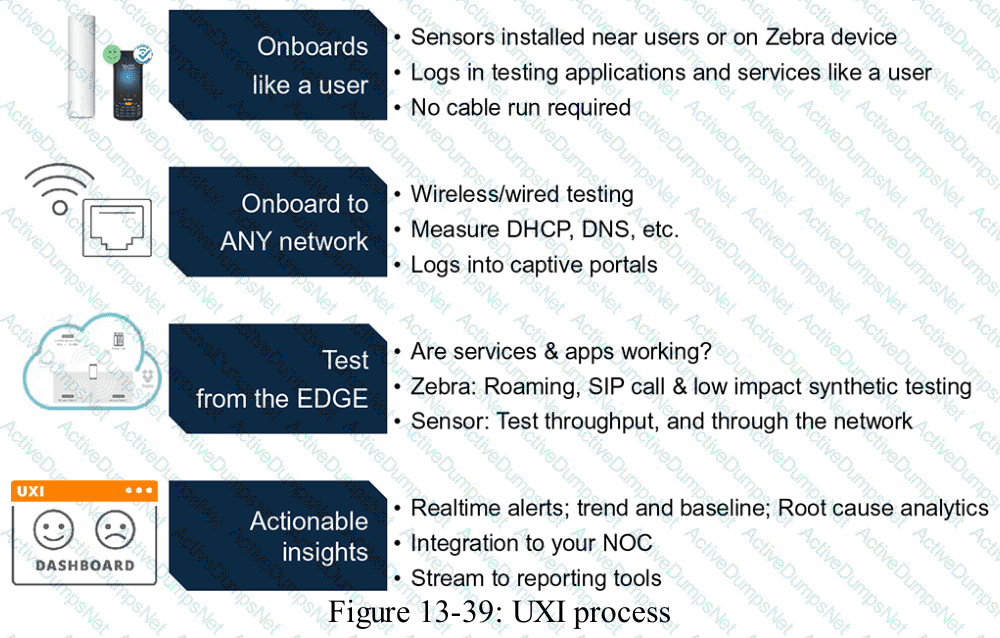
HPE Aruba Networking User Experience Insight (UXI) uses dedicated sensors and supported software agents to evaluate network connectivity from an endpoint's perspective.
A physical UXI sensor can test wired Ethernet connections and wireless networks.
When monitoring a wired network, the sensor communicates through its Ethernet interface.
When monitoring a wireless network, it associates with the configured WLAN and performs supported authentication procedures.
The sensor then measures the steps required to obtain functional network connectivity.
These can include DHCP address assignment, DNS resolution, gateway reachability, and application access.
For example, a sensor monitoring an employee WLAN can attempt to associate with the SSID, complete authentication, acquire an IP address, and access a specified application.
If one stage fails, UXI records diagnostic information that helps the administrator identify the likely point of failure.
This provides more useful visibility into user experience than infrastructure availability checks alone.
Bluetooth Low Energy and powerline networking are not the ordinary wired or wireless testing methods described in the question.
Technical distinction: The HPE Press guide also explains that physical UXI sensors may initially use cellular connectivity or standard PoE during provisioning. Cellular connectivity can provide a management bootstrap path, but the monitored network experience is tested through wired Ethernet or Wi-Fi.
Therefore, Option A (Through Ethernet or Wi-Fi) is correct.
HPE Press study-guide figure / related learning illustration · Q195 Fig 13-39 UXI
Which statement concerning ZTP switch provisioning with HPE Aruba Networking Central is accurate?
Options:
ZTP requires DHCP but does not require DNS.
ZTP does not require DHCP but does require DNS.
ZTP does not require DHCP and DNS.
ZTP requires DHCP and DNS.
Answer:
DExplanation:
Comprehensive and Detailed Explanation
HPE Press guide context | PDF page 575 | HPE Press, Aruba Certified Associate – Campus Access Official Certification Study Guide
Technical Deep Dive — Reconstructed (Original Chat Text Not Recoverable)
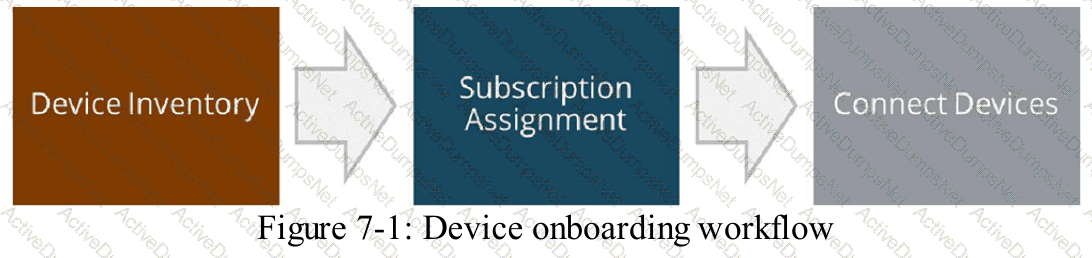
AOS-CX zero-touch provisioning normally needs DHCP for addressing and discovery options and DNS to resolve cloud-service hostnames. The switch must reach required management endpoints through a permitted network path. Manual provisioning may avoid DHCP by using static addressing, but fully automatic deployment depends on both services in the expected workflow.
The selected answer corresponds to D: ZTP requires DHCP and DNS.. This matches the mechanism or management behavior described in the scenario rather than merely a related network feature.
In an AOS-CX or Aruba Central deployment, the relevant settings must be applied in the correct interface, profile, policy, or management scope and then validated operationally.
Useful validation normally includes examining the effective running configuration, the relevant show-command output, and the actual client or infrastructure behavior.
The answer should be validated against both the control-plane state and the forwarding or management outcome. A successful individual command alone is not proof that the end-to-end requirement is satisfied.
When troubleshooting or designing a change, verify compatibility between all participating devices, the management scope, and the applicable software release. The most useful evidence is the state observed on both sides of the affected connection.
HPE Press study-guide figure / related learning illustration · Q199 Fig 7 1 Device Onboarding
When viewing the Device Inventory and Subscriptions card in HPE Aruba Networking Central, what information is available?
Options:
The device firmware versions currently running in the network.
The current subscription tier assigned to each device.
The number of devices requiring site assignment.
The uptime status for each device as a colored bar.
Answer:
CExplanation:
Comprehensive and Detailed Explanation
HPE Press guide context | PDF page 579 | HPE Press, Aruba Certified Associate – Campus Access Official Certification Study Guide
Technical Deep Dive — Original Chat Wording
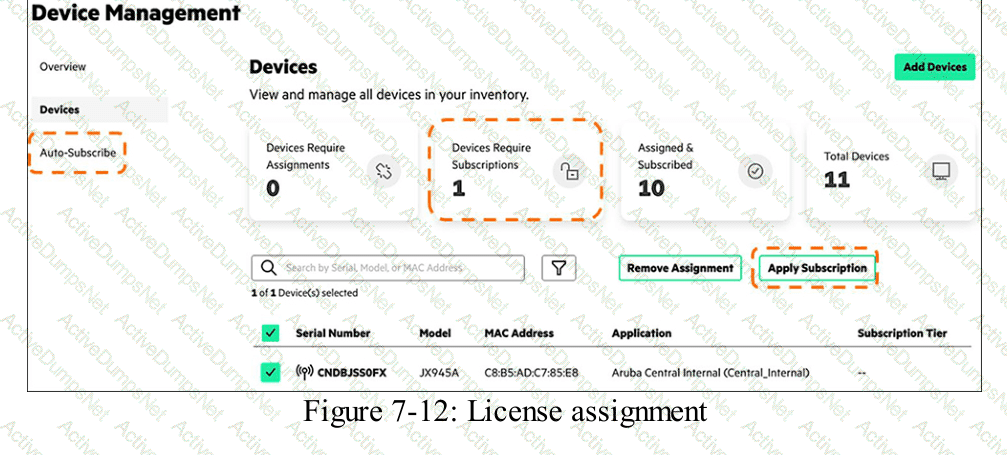
The Inventory and Subscriptions card provides a consolidated overview of infrastructure devices and their management-subscription status.
It helps administrators identify devices that have not completed important onboarding and organizational steps.
A key metric is the number of devices without an assigned site.
Site assignment organizes infrastructure according to physical locations such as offices, campuses, and branches.
This organization is important because Central uses sites for location-based visibility, operational monitoring, and supported management workflows.
The card also summarizes device totals, available subscriptions, and devices without subscriptions.
Administrators can select relevant counts to investigate the affected device inventory.
For example, when ten newly purchased switches have been registered but not assigned to a branch site, the Without Site metric helps identify that outstanding task.
The current subscription tier for an individual device may be available in the detailed Device Inventory table, but the question specifically asks about information shown on the overview card.
Firmware versions and uptime are also available through other device-management views.
Therefore, Option C (The number of devices requiring site assignment) is correct.
HPE Press study-guide figure / related learning illustration · Q116 Fig 7-12 License
When assigning functions through the Device Inventory page, what can you do to simplify the task?
Options:
Filter by subscription key
Sort by device name
Use a check box to select multiple devices
Apply site configuration
Answer:
CExplanation:
Comprehensive and Detailed Explanation
HPE Press guide context | PDF page 568 | HPE Press, Aruba Certified Associate – Campus Access Official Certification Study Guide
Technical Deep Dive — Original Chat Wording
HPE Aruba Networking Central uses device functions to classify supported infrastructure according to its intended role.
Examples of switch device functions include Access Switch, Aggregation Switch, and Core Switch.
These classifications determine which configuration capabilities and profiles are applicable.
When onboarding many devices, assigning each function individually can create unnecessary administrative work.
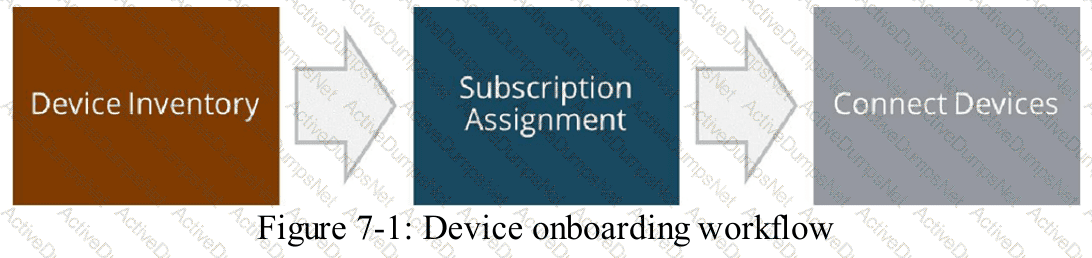
The Device Inventory page supports bulk selection to simplify this process.
Administrators can select multiple compatible devices using the checkboxes beside their inventory records.
After selecting the required devices, they can use the available assignment action to apply the appropriate device function.
For example, an organization deploying 25 access switches can select the relevant switch records and assign their access-switch function through a common workflow.
This reduces repetitive operations and helps maintain configuration consistency.
Administrators should ensure that the selected devices actually perform the same intended network function before making a bulk assignment.
A switch serving as a core device should not be assigned an access-switch function merely because it appears in the same inventory list.
Sorting by device name can make records easier to locate but does not provide the same bulk-assignment capability.
Subscription filtering and site configuration are separate management activities.
Therefore, Option C (Use a check box to select multiple devices) is correct.
HPE Press study-guide figure / related learning illustration · Q199 Fig 7 1 Device Onboarding
What results from establishing goals at the beginning of a network design project?
Options:
It helps define the scope of work for the project.
It sets the technical specifications for all network components.
It identifies which vendor partners will be involved in deployment.
It helps determine the hardware requirements for the network project.
Answer:
AExplanation:
Comprehensive and Detailed Explanation
HPE Press guide context | PDF page 567 | HPE Press, Aruba Certified Associate – Campus Access Official Certification Study Guide
Technical Deep Dive — Original Chat Wording
Establishing project goals is one of the first activities in designing a campus network.
Project goals describe the outcomes that the organization expects from the proposed solution.
Examples include improving wireless coverage, increasing network availability, providing secure guest access, or expanding capacity for future devices.
These objectives determine the boundaries of the project and help establish what must be delivered.
For example, an organization may define a goal of providing reliable wireless connectivity across three office buildings.
This objective helps the project team determine whether the work includes wireless surveys, access-point installation, switch upgrades, authentication integration, and ongoing management configuration.
The resulting scope of work defines the activities and deliverables required to satisfy the agreed objectives.
Technical specifications are developed later after requirements have been analyzed.
Hardware selection depends on factors such as port density, PoE demand, bandwidth, availability, and expected growth.
Vendor selection is also a subsequent decision that may depend on procurement and technical requirements.
Defining goals does not independently determine every switch model or interface specification.
It provides the basis for making those decisions consistently.
Therefore, Option A (It helps define the scope of work for the project) is correct.
Which network-infrastructure test directly assists with troubleshooting DNS-related issues?
Options:
Viewing interface statistics to support errors.
Use of Ping to test network infrastructure reachability.
Use of Traceroute to map network infrastructure hops.
Use of NSLookup to resolve domain names.
Answer:
DExplanation:
Comprehensive and Detailed Explanation
HPE Press guide context | PDF page 1070 | HPE Press, Aruba Certified Associate – Campus Access Official Certification Study Guide
Technical Deep Dive — Original Chat Wording
Domain Name System (DNS) translates hostnames into IP addresses and provides other information required by network applications.
A DNS problem can prevent users from accessing services even when their network interfaces, IP addresses, and default gateways are functioning correctly.
NSLookup is a diagnostic utility specifically designed to query DNS servers.
It allows administrators to determine whether a DNS server can resolve a requested hostname and return the expected records.
For example:
nslookup example.com
The result can identify the DNS server being queried and the addresses returned for the domain.
Administrators can also query a specific DNS server:
nslookup example.com 10.1.1.53
Comparing results from different DNS servers helps isolate problems involving incorrect records, unavailable resolvers, or inconsistent DNS configurations.
HPE Aruba Networking Central provides an NSLookup diagnostic for supported managed devices and software versions.
A ping test primarily checks IP reachability, although pinging a hostname may indirectly involve DNS resolution.
Traceroute identifies Layer 3 forwarding paths, while interface statistics reveal packet and physical-interface conditions.
Neither provides the same direct DNS query capability.
Therefore, Option D (Use of NSLookup to resolve domain names) is correct.
Which statement concerning Dynamic Frequency Selection (DFS) Wi-Fi channels is accurate?
Options:
DFS channels are only present on the 5GHz spectrum.
DFS channels should be included in all wireless designs.
DFS channels are required to use channel bonding.
DFS channels should not be used in very-high-density (VHD) systems.
Answer:
AExplanation:
Comprehensive and Detailed Explanation
HPE Press guide context | PDF page 709 | HPE Press, Aruba Certified Associate – Campus Access Official Certification Study Guide
Technical Deep Dive — Original Chat Wording
Dynamic Frequency Selection (DFS) is a regulatory spectrum-sharing mechanism used with designated Wi-Fi channels in the 5 GHz band.
Its purpose is to protect radar systems operating in portions of the same radio spectrum.
When an AP uses a DFS channel, it must satisfy applicable radar-detection requirements.
Before transmitting on certain DFS channels, the AP may need to perform a Channel Availability Check (CAC).
If radar activity is detected, the AP must vacate the affected channel according to the applicable regulatory rules.
This can result in channel changes and temporary connectivity disruption.
However, DFS channels also provide additional spectrum that may reduce co-channel interference in crowded WLAN environments.
Consequently, DFS should not be universally enabled or universally excluded without considering the deployment's regulatory region, radar exposure, client support, and availability requirements.
DFS is not required merely to configure 40 MHz or 80 MHz channel bonding.
Channel bonding can use appropriate non-DFS channels where permitted.
The 2.4 GHz band does not use the 5 GHz Wi-Fi DFS mechanism, and 6 GHz Wi-Fi operation has different spectrum-sharing requirements, including Automatic Frequency Coordination for certain operating classes.
Therefore, among the listed choices, Option A is correct.
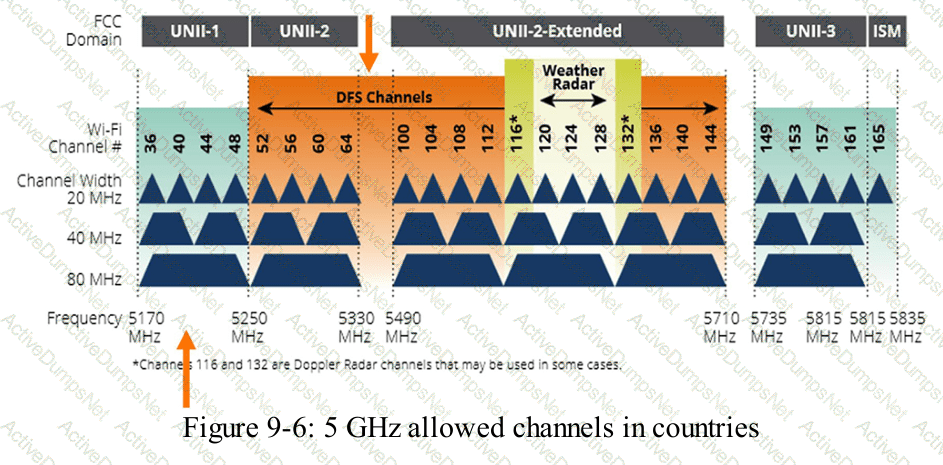
HPE Press study-guide figure / related learning illustration · Q125 Fig 9-6 DFS
Which two statements accurately distinguish multimode fiber links from single-mode fiber links?
Choose two
Options:
Multimode fiber costs more and serves longer distances.
Single-mode fiber costs more and reaches longer distances.
Multi-mode fiber costs less and is used over shorter distances.
Single-mode fiber costs less but supports shorter distances.
Multi-mode fiber has a thicker core and is used for outdoor installations.
Answer:
B, CExplanation:
Comprehensive and Detailed Explanation
HPE Press guide context | PDF page 43 | HPE Press, Aruba Certified Associate – Campus Access Official Certification Study Guide
Technical Deep Dive — Original Chat Wording
Fiber-optic networking transmits information as optical signals through glass or plastic fiber.
Two widely used fiber types are multimode fiber (MMF) and single-mode fiber (SMF).
Multimode fiber has a relatively large core, commonly 50 or 62.5 micrometers. This permits multiple propagation modes within the fiber.
Different optical paths can introduce modal dispersion, limiting achievable transmission distances at particular data rates.
Multimode fiber is commonly used for shorter building and data-center connections.
Single-mode fiber has a much smaller core, typically around 9 micrometers, and supports a single principal propagation mode.
This significantly reduces modal dispersion and enables long-distance transmission using suitable optical transceivers.
Single-mode connections are common between buildings, across campuses, and in metropolitan or carrier networks.
The study guide describes multimode as less expensive and single-mode as more expensive. In practice, total link cost depends on both cabling and transceiver selection; single-mode optics can carry a price premium even when single-mode cable itself is competitively priced.
Option E is incorrect because a thicker core does not determine whether fiber is suitable for outdoor installation. Environmental suitability depends on cable construction and installation requirements.
Therefore, Options B and C accurately reflect the study-guide comparison.
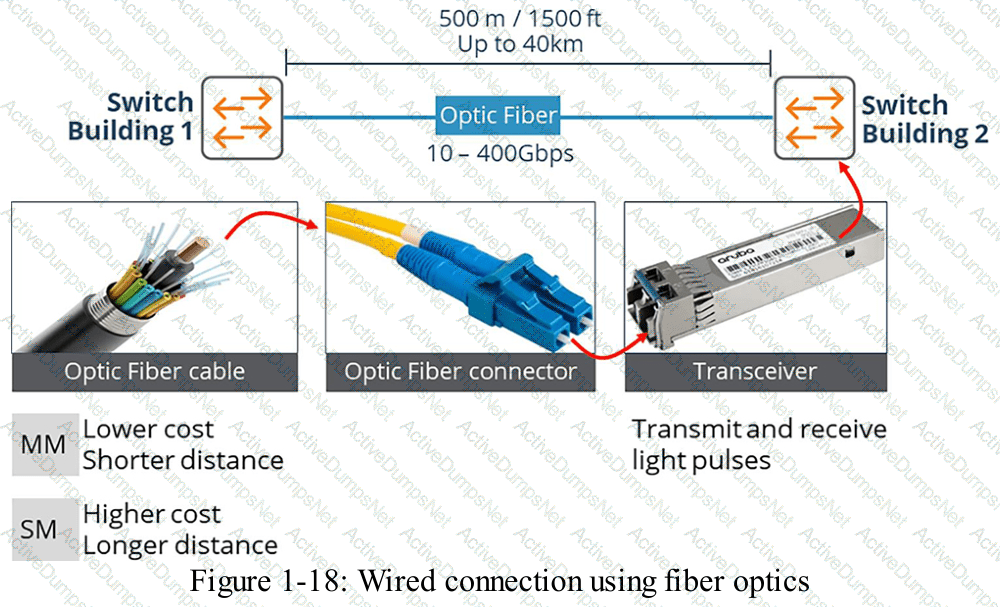
HPE Press study-guide figure / related learning illustration · Q182 Fig 1-18 fiber
How do real-time alerts in HPE Aruba Networking Central assist you in troubleshooting critical network events?
Options:
They monitor general network health metrics for long-term performance optimization
They send notifications about important issues so you can quickly respond
They show summarized reports after network problems have already been resolved
They collect and archive logs for future audit and regulatory compliance review
Answer:
BExplanation:
Comprehensive and Detailed Explanation
HPE Press guide context | PDF page 1028 | HPE Press, Aruba Certified Associate – Campus Access Official Certification Study Guide
Technical Deep Dive — Original Chat Wording
Real-time alerting enables network administrators to identify and respond to operational problems before they cause prolonged service disruption.
HPE Aruba Networking Central continuously monitors supported network infrastructure and can generate alerts when significant conditions occur.
Examples include access point disconnections, switch availability problems, authentication failures, connectivity degradation, and other network events.
When an alert condition is detected, Central records the corresponding event and can notify administrators through configured notification mechanisms.
The administrator can then examine relevant information, including affected devices, severity, event time, and associated operational details.
This provides an efficient starting point for troubleshooting.
For example, if several APs unexpectedly disconnect, Central can generate device-disconnection alerts.
A network technician can use these alerts to identify affected devices and investigate common infrastructure dependencies, such as PoE switches, uplinks, or management connectivity.
The alert acknowledgment feature allows administrators to record that an issue has been reviewed.
However, acknowledgment does not automatically resolve the underlying technical problem.
Long-term monitoring, historical reporting, and audit logging serve related but different purposes.
Real-time alerting is specifically intended to provide timely awareness of significant network conditions requiring attention.
Therefore, Option B is correct.
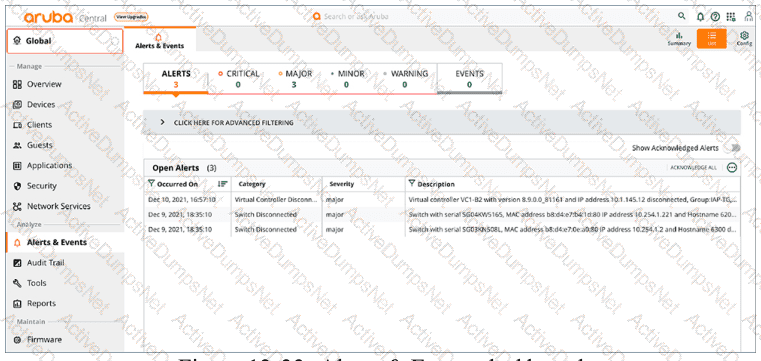
HPE Press study-guide figure / related learning illustration · Fig 13-33 Alerts
Which action helps clarify expectations when defining a network project's scope?
Options:
Document the network layout.
List the required resources.
Interview the organization's stakeholders.
Assess the existing equipment.
Answer:
CExplanation:
Comprehensive and Detailed Explanation
HPE Press guide context | PDF page 567 | HPE Press, Aruba Certified Associate – Campus Access Official Certification Study Guide
Technical Deep Dive — Original Chat Wording
Defining project scope requires a clear understanding of the organization's expectations.
Stakeholder interviews provide a structured way to gather those expectations before technical design decisions are finalized.
Relevant stakeholders may include business owners, IT managers, network operations personnel, security administrators, and facilities teams.
Each group may have different priorities and constraints.
For example, a security team may require certificate-based authentication and network segmentation.
The network operations team may prioritize simplified monitoring, configuration consistency, and high availability.
Business leaders may be concerned with deployment deadlines, cost, user experience, and future expansion.
Interviewing these stakeholders allows the design team to identify conflicting requirements and establish measurable project objectives.
It also helps clarify what the project includes and excludes.
For example, an office WLAN upgrade might include access-point replacement and switch PoE upgrades but exclude replacement of the existing WAN infrastructure.
Network diagrams, resource lists, and equipment assessments are useful inputs to the technical design.
However, they do not independently establish what the organization expects the project to accomplish.
Stakeholder interviews should therefore precede detailed technical specifications and final scope approval.
Therefore, Option C (Interview the organization's stakeholders) is correct.
Which component of the WPA Key Hierarchy is used to encrypt and/or decrypt data?
Options:
Key Confirmation Key (KCK)
Pairwise Temporal Key (PTK)
number used once (nonce)
Pairwise Master Key (PMK)
Answer:
BExplanation:
Comprehensive and Detailed Explanation
HPE Press guide context | PDF page 948 | HPE Press, Aruba Certified Associate – Campus Access Official Certification Study Guide
Technical Deep Dive — Reconstructed (Original Chat Text Not Recoverable)
In WPA2's key hierarchy, the pairwise temporal key is derived from the PMK and nonces during the four-way handshake and supplies traffic encryption/decryption material. The key-confirmation key provides handshake integrity and proof of key possession. The PMK is a parent key and nonces are freshness inputs rather than data encryption keys.
The selected answer corresponds to B: Pairwise Temporal Key (PTK). This matches the mechanism or management behavior described in the scenario rather than merely a related network feature.
Operational workflows should preserve consistent inventory, authorization, configuration history, and monitoring so that administrators can locate and manage devices predictably.
For example, a cloud-managed infrastructure device may be registered successfully but still require the correct subscription, site, group, and configuration scope.
In production, the decision should be documented and checked against the supported software release and platform model, because interface names, licensing tiers, and management workflows can change across Central and AOS-CX generations.
For practical use, confirm the prerequisite conditions first, then verify the resulting operational state. This separates an intended configuration from a working network service and avoids accepting a misleading result.
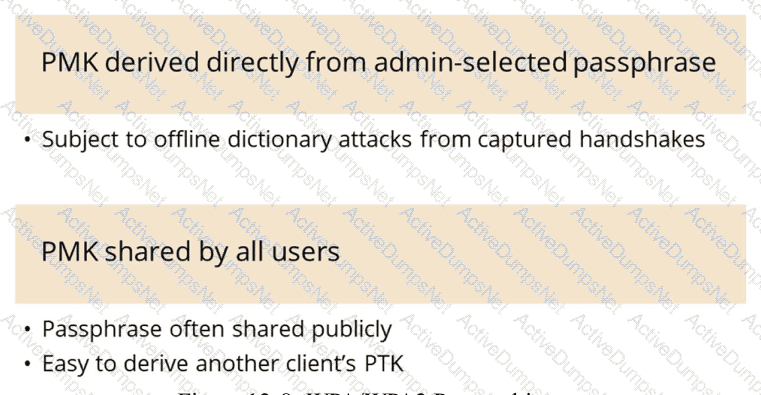
HPE Press study-guide figure / related learning illustration · Fig 12-8 WPA2 issues
What are two benefits of a UXI?
Choose two
Options:
A UXI can check different applications, such as HTTP, VOIP, or Office 365.
A UXI helps to calculate the best WiFi channels in a remote location.
A UXI behaves like a client/user.
A UXI measures the Wi-Fi coverage of all APs in the given location.
A UXI can be used without any internet connection.
Answer:
A, CExplanation:
Comprehensive and Detailed Explanation
HPE Press guide context | PDF page 1033 | HPE Press, Aruba Certified Associate – Campus Access Official Certification Study Guide
Technical Deep Dive — Reconstructed (Original Chat Text Not Recoverable)
UXI acts like a real end-user endpoint and runs synthetic connectivity/application tests, including HTTP and supported service transactions. It can monitor application reachability and user-experience symptoms. It is not a replacement for RF planning, complete AP coverage surveys, or internet-independent cloud dashboards.
The selected answer corresponds to A: A UXI can check different applications, such as HTTP, VOIP, or Office 365.; C: A UXI behaves like a client/user.. This matches the mechanism or management behavior described in the scenario rather than merely a related network feature.
Operational workflows should preserve consistent inventory, authorization, configuration history, and monitoring so that administrators can locate and manage devices predictably.
For example, a cloud-managed infrastructure device may be registered successfully but still require the correct subscription, site, group, and configuration scope.
A strong verification step is to compare the expected outcome with operational status before and after the change. This confirms not only that a configuration was accepted, but also that the required service actually functions.
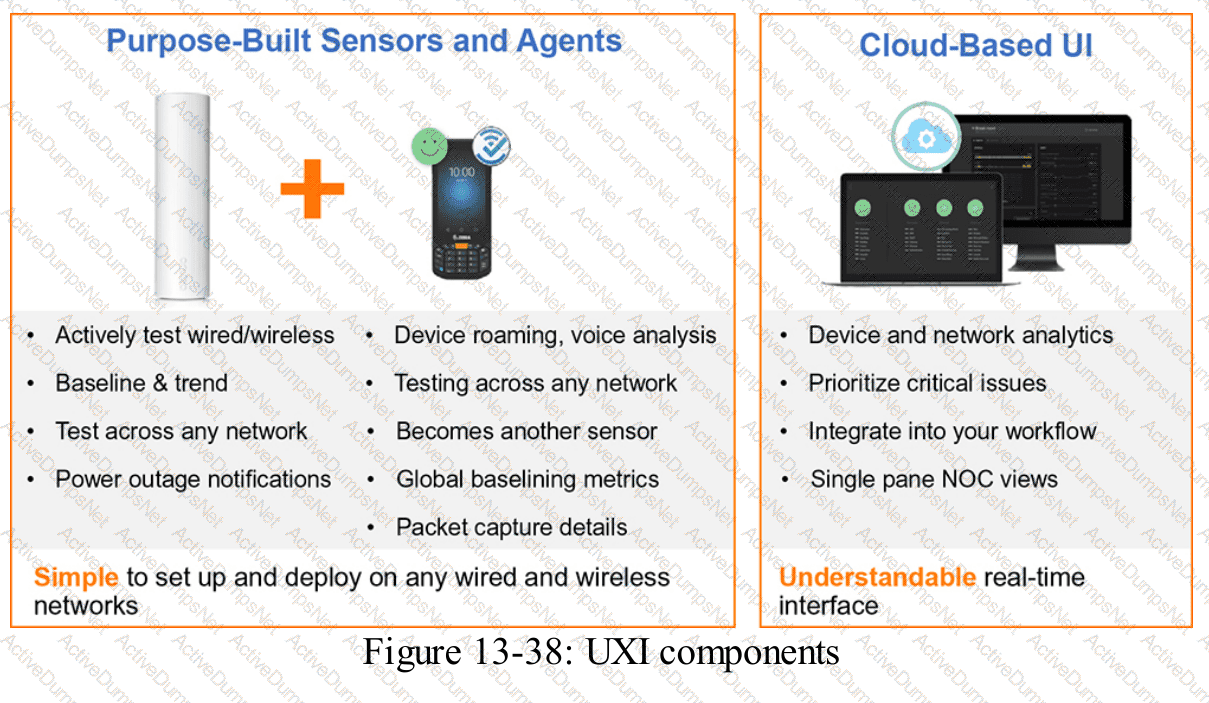
HPE Press study-guide figure / related learning illustration · Fig 13-38 UXI
What is one reason to arrange devices into device groups in HPE Aruba Networking Central?
Options:
Reduce costs
Simplify management
Decrease security
Enhance performance
Answer:
BExplanation:
Comprehensive and Detailed Explanation
HPE Press guide context | PDF page 589 | HPE Press, Aruba Certified Associate – Campus Access Official Certification Study Guide
Technical Deep Dive — Original Chat Wording
HPE Aruba Networking Central uses device groups to organize infrastructure and simplify centralized configuration management.
A group allows administrators to apply common configuration settings to multiple supported devices rather than configuring each device independently.
For example, an organization may operate 50 branch offices with similar access-switch configurations.
By assigning compatible switches to a common management group, administrators can maintain standardized VLANs, interface policies, and other supported network settings.
Group-based management reduces repetitive work and helps prevent configuration inconsistencies.
The HPE Press guide describes UI-based and template-based configuration methods.
UI-based configuration uses graphical management workflows, while template-based configuration allows reusable CLI configuration templates and device-specific variables.
A group can also support different configuration methods for different device types, depending on the management architecture.
Device groups help administrators organize infrastructure according to functional or operational requirements.
They also provide useful management scopes for configuration, monitoring, reporting, and related workflows.
Grouping devices does not inherently improve network throughput or reduce hardware costs.
However, it can reduce administrative effort and improve configuration consistency.
Similarly, device grouping does not weaken security by design. Appropriate group-level security policies can improve the consistency of security controls.
Therefore, Option B (Simplify management) is correct.
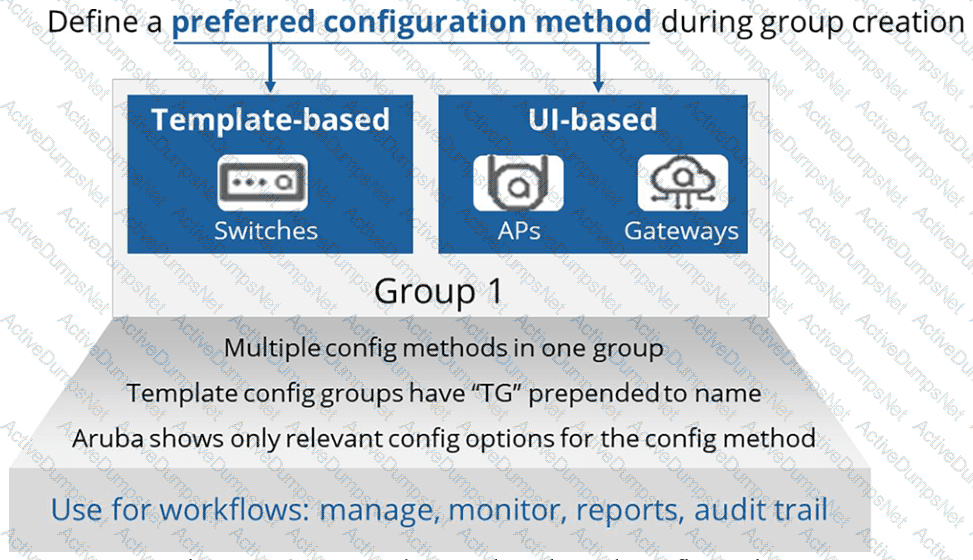
HPE Press study-guide figure / related learning illustration · Q146 Fig 7-21 Groups
Which device type and group persona are needed to manage a Microbranch environment?
Options:
AOS-8 Branch Gateway Group Persona
AOS-10 AP Group Persona
AOS-10 Branch Gateway Group Persona
AOS-8 AP Group Persona
Answer:
BExplanation:
Comprehensive and Detailed Explanation
HPE Press guide context | PDF page 654 | HPE Press, Aruba Certified Associate – Campus Access Official Certification Study Guide
Technical Deep Dive — Reconstructed (Original Chat Text Not Recoverable)
Microbranch operation in AOS 10 uses APs assigned to an AOS 10 AP group/persona for distributed branch connectivity. It does not require treating the microbranch as an AOS 8 controller-based branch gateway group. Group architecture and software generation determine the supported configuration workflow.
The selected answer corresponds to B: AOS-10 AP Group Persona. This matches the mechanism or management behavior described in the scenario rather than merely a related network feature.
Operational workflows should preserve consistent inventory, authorization, configuration history, and monitoring so that administrators can locate and manage devices predictably.
Consistent RBAC, accurate inventories, and retained audit records simplify support handovers and reduce uncertainty during incident investigations.
When reviewing alternatives, identify which one directly addresses the stated requirement, rather than selecting a related capability that is useful elsewhere but does not fulfill the requested task.
The wrong choices may describe real technologies, but they perform different functions, apply to another layer, or omit a required prerequisite. Select the answer that resolves the exact scenario, not a nearby administrative task.
Match each Open Systems Interconnection (OSI) layer to its function.
Drag & Drop
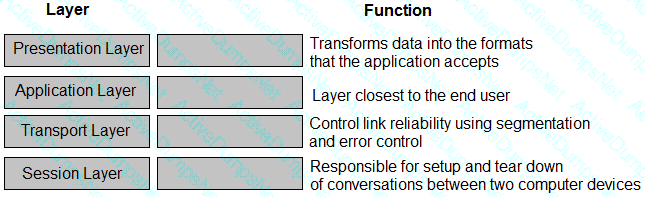
Options:
Answer:
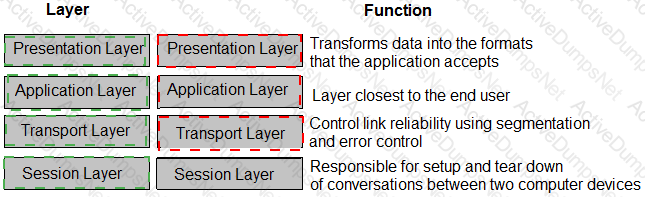
Explanation:
See mapping
Exhibit item
Correct match
Presentation layer
Transforms data into formats applications understand
Application layer
Layer closest to the end user
Transport layer
Controls reliability using segmentation and error control
Session layer
Responsible for setting up and tearing down conversations
Comprehensive and Detailed Explanation
HPE Press guide context | PDF page 29 | HPE Press, Aruba Certified Associate – Campus Access Official Certification Study Guide
Technical Deep Dive — Reconstructed (Original Chat Text Not Recoverable)
The application layer supplies network services close to the user; presentation handles representation and encoding; session handles conversation setup and teardown; and transport performs segmentation, end-to-end reliability, and port multiplexing. The exhibit maps each OSI layer to the matching function. Layer 3 routes packets and Layer 2 frames local-hop traffic.
The exhibit is a matching question: each original item must be paired with the applicable protocol, medium, security function, or address classification. The answer table below records the intended correspondence without changing the source exhibit.
Operational workflows should preserve consistent inventory, authorization, configuration history, and monitoring so that administrators can locate and manage devices predictably.
For example, a cloud-managed infrastructure device may be registered successfully but still require the correct subscription, site, group, and configuration scope.
In production, the decision should be documented and checked against the supported software release and platform model, because interface names, licensing tiers, and management workflows can change across Central and AOS-CX generations.
You are configuring a network device’s system settings. Which foundational network service should be included to ensure connectivity to HPE Aruba Networking Central?
Options:
SSH for secure access.
DNS for name resolution.
Syslog for log storage.
SNMP for device monitoring.
Answer:
BExplanation:
Comprehensive and Detailed Explanation
HPE Press guide context | PDF page 609 | HPE Press, Aruba Certified Associate – Campus Access Official Certification Study Guide
Technical Deep Dive — Original Chat Wording
Domain Name System (DNS) is a foundational network service that translates hostnames into IP addresses.
HPE Aruba Networking Central-managed devices commonly communicate with cloud services identified by fully qualified domain names.
DNS resolution enables a device to identify the IP addresses associated with those management-service endpoints.
For example, a switch may need to resolve the hostname of an Aruba Central service before establishing its management connection.
Without functioning name resolution, hostname-based service connections may fail even when ordinary IP routing is operational.
AOS-CX supports explicit DNS server configuration through commands such as:
configure terminal
ip dns server-address 10.254.1.21
Administrators should verify DNS reachability, default routing, and permitted outbound connectivity.
SSH provides secure command-line management but is not the hostname-resolution service used to locate Central endpoints.
Syslog delivers event records to logging destinations.
SNMP supports device monitoring and management information exchange.
Neither Syslog nor SNMP substitutes for DNS.
An important distinction is that the study-guide version of the AOS-CX Central client includes a default DNS resolver for its own cloud communication.
Therefore, a manually configured global DNS server is not universally required in every supported deployment.
Nevertheless, working DNS resolution remains important when Central services are identified through hostnames.
Therefore, Option B (DNS for name resolution) is correct.
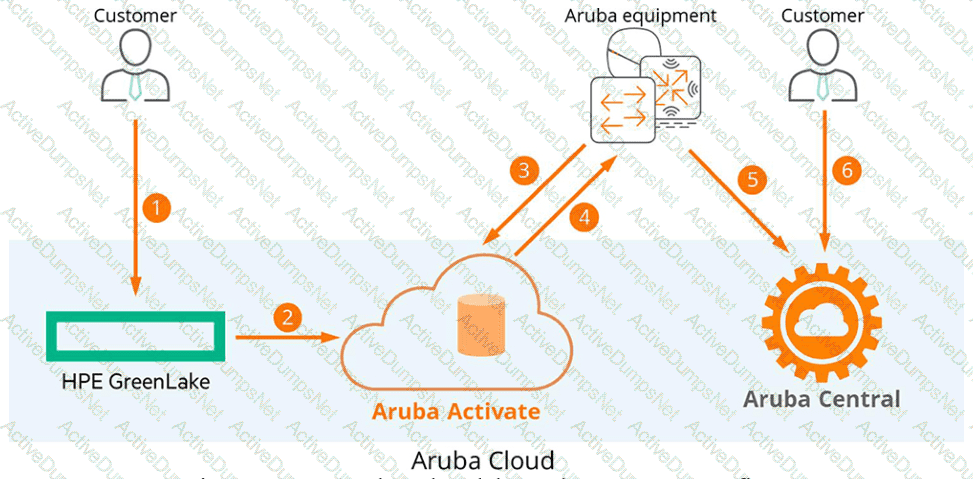
HPE Press study-guide figure / related learning illustration · Q148 Fig 7-7 Central
Which command is used to configure a default route to 10.4.5.1 on an AOS-CX switch when in-band management via an SVI is in use?
Options:
ip route 0.0.0.0/0 10.4.5.1 vrf mgmt
default-gateway 10.4.5.1
ip route 0.0.0.0/0 10.4.5.1
ip default-gateway 10.4.5.1
Answer:
CExplanation:
Comprehensive and Detailed Explanation
HPE Press guide context | PDF page 232 | HPE Press, Aruba Certified Associate – Campus Access Official Certification Study Guide
Technical Deep Dive — Reconstructed (Original Chat Text Not Recoverable)
In-band management via an SVI uses the default VRF routing table. Add the default route `ip route 0.0.0.0/0 10.4.5.1` in the normal context. A command specifying `vrf mgmt` changes the management VRF instead, and `ip default-gateway` is not the normal routed AOS-CX syntax.
The selected answer corresponds to C: ip route 0.0.0.0/0 10.4.5.1. This matches the mechanism or management behavior described in the scenario rather than merely a related network feature.
A disciplined investigation compares the observed symptom with expected behavior, tests the most likely failure stage, and verifies recovery rather than assuming that a single command has resolved the problem.
Collecting interface counters, event timestamps, configuration history, and service-test results helps determine whether a symptom originates locally or depends on another device.
The practical deployment consequence is important: a plausible configuration can still fail when the peer interface, device role, licensing scope, or physical medium is mismatched. Checking that surrounding dependency avoids a misleading diagnosis.
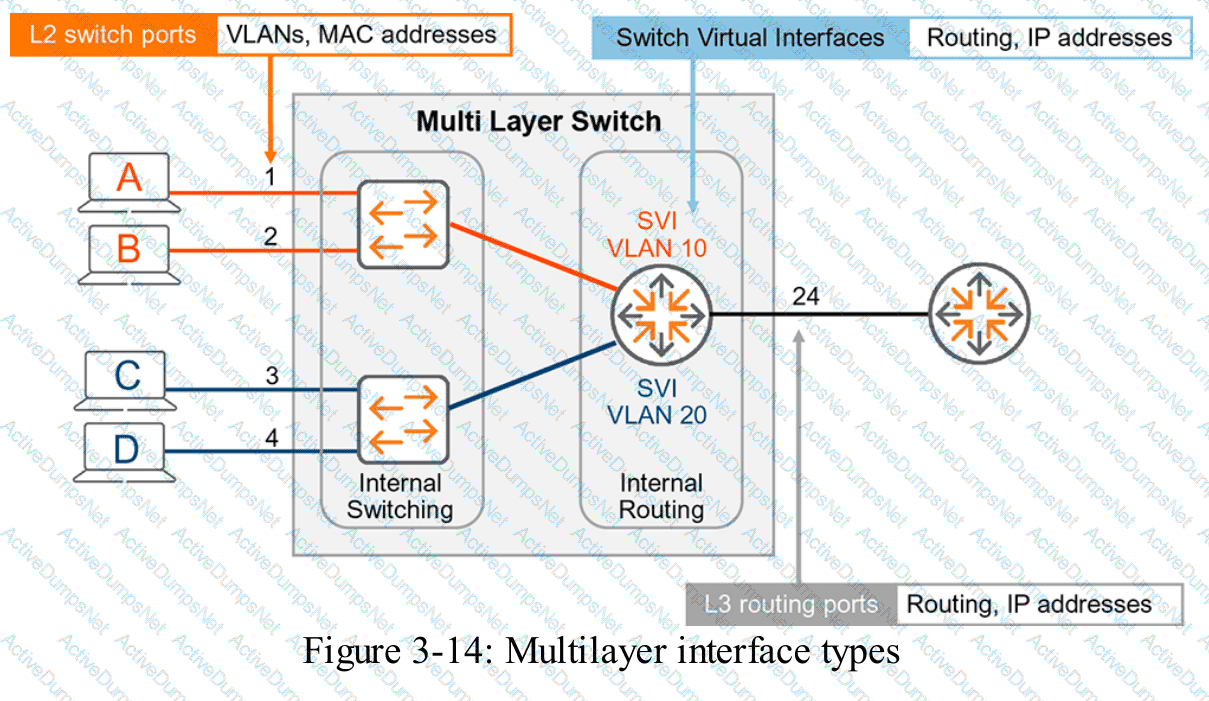
HPE Press study-guide figure / related learning illustration · Fig 3-14 SVI
A hospital relies on extensive mobile equipment to diagnose patients and document patient data. Which access switch is ideal for this large hospital, whose distribution racks have more than 400 ports in a single VSF stack?
Options:
CX 6400
CX 6100
CX 6300
CX 6200
Answer:
CExplanation:
Comprehensive and Detailed Explanation
HPE Press guide context | PDF page 535 | HPE Press, Aruba Certified Associate – Campus Access Official Certification Study Guide
Technical Deep Dive — Reconstructed (Original Chat Text Not Recoverable)
The CX 6300 family supports high-density access stacking over standard high-speed interfaces and can support more than 400 endpoint ports across a suitable VSF deployment. CX 6100/6200 have different stacking and feature constraints, while CX 6400 is modular rather than the intended VSF access stack.
The selected answer corresponds to C: CX 6300. This matches the mechanism or management behavior described in the scenario rather than merely a related network feature.
A disciplined investigation compares the observed symptom with expected behavior, tests the most likely failure stage, and verifies recovery rather than assuming that a single command has resolved the problem.
Collecting interface counters, event timestamps, configuration history, and service-test results helps determine whether a symptom originates locally or depends on another device.
The answer should be validated against both the control-plane state and the forwarding or management outcome. A successful individual command alone is not proof that the end-to-end requirement is satisfied.
When troubleshooting or designing a change, verify compatibility between all participating devices, the management scope, and the applicable software release. The most useful evidence is the state observed on both sides of the affected connection.
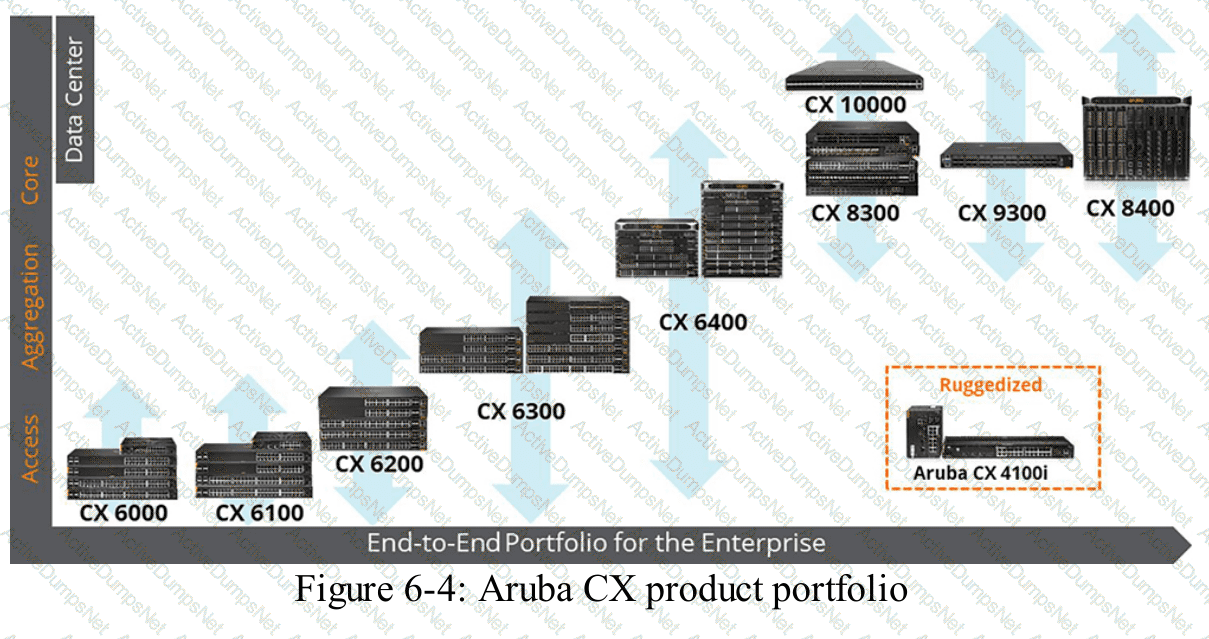
HPE Press study-guide figure / related learning illustration · Fig 6-4 CX
Which action is included in gathering information to plan a solution?
Options:
Assign roles to technical staff.
Develop test scripts for validation.
Select device models for deployment.
Collect information about site and floor plans.
Answer:
DExplanation:
Comprehensive and Detailed Explanation
HPE Press guide context | PDF page 667 | HPE Press, Aruba Certified Associate – Campus Access Official Certification Study Guide
Technical Deep Dive — Original Chat Wording
Network solution planning requires accurate information about the environment where the infrastructure will be deployed.
Site and floor plans are important inputs because they identify physical conditions that directly affect network design.
For wired networking, floor plans help engineers determine equipment-room locations, cable routes, distances between network closets, and suitable access-switch placement.
For wireless networking, they support access-point placement, predictive coverage analysis, and identification of potential RF obstructions.
For example, a campus building may contain concrete walls, elevator shafts, metal shelving, and other materials that influence wireless propagation.
Knowing these conditions before deployment helps engineers estimate the number of APs required and determine suitable installation locations.
The planning process should also gather information about building dimensions, ceiling heights, power availability, and expected endpoint density.
Accurate physical information reduces the likelihood of insufficient coverage, cabling problems, and unnecessary deployment changes.
Selecting device models normally occurs after the requirements and physical constraints are understood.
Developing validation scripts and assigning implementation responsibilities are important project activities, but they belong to later planning or execution stages.
Collecting site information is therefore a direct part of initial requirements discovery.
Option D (Collect information about site and floor plans) is correct.
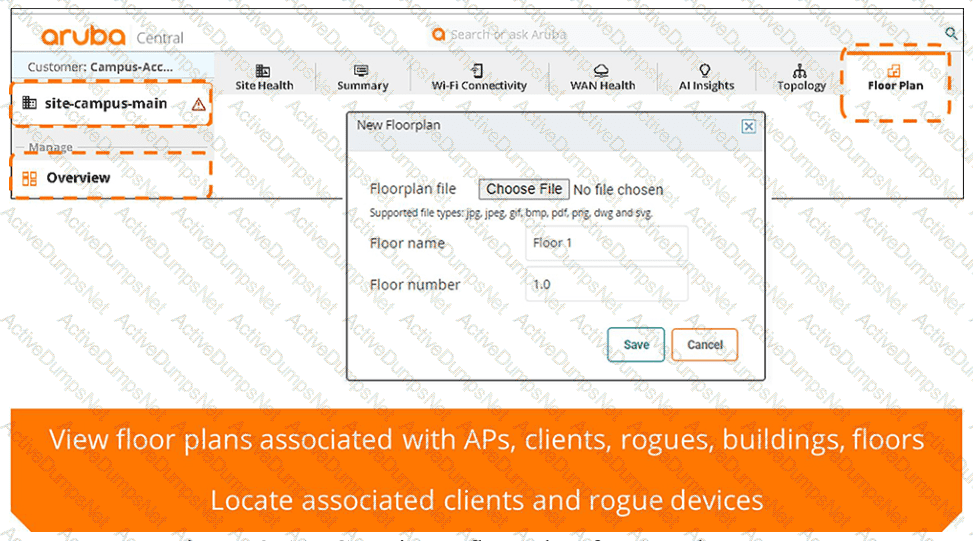
HPE Press study-guide figure / related learning illustration · Q144 Fig 8-11 Floorplan
Which address is used by Layer 2 for link-layer addressing?
Options:
IP Address
Management Address
Logical Address
MAC Address
Answer:
DExplanation:
Comprehensive and Detailed Explanation
HPE Press guide context | PDF page 48 | HPE Press, Aruba Certified Associate – Campus Access Official Certification Study Guide
Technical Deep Dive — Reconstructed (Original Chat Text Not Recoverable)
Media Access Control addresses identify network interfaces at the data-link layer and are used as source/destination addresses in Ethernet frames. IP addresses operate at Layer 3 and can persist across routed hops, whereas Ethernet source and destination MAC addresses are rewritten at each Layer 3 forwarding boundary.
The selected answer corresponds to D: MAC Address. This matches the mechanism or management behavior described in the scenario rather than merely a related network feature.
Operational workflows should preserve consistent inventory, authorization, configuration history, and monitoring so that administrators can locate and manage devices predictably.
Consistent RBAC, accurate inventories, and retained audit records simplify support handovers and reduce uncertainty during incident investigations.
For an administrator preparing for the associate certification, the key distinction is the precise protocol or Central workflow involved. Similar-sounding features often operate at different OSI layers or management stages.
The wrong choices may describe real technologies, but they perform different functions, apply to another layer, or omit a required prerequisite. Select the answer that resolves the exact scenario, not a nearby administrative task.
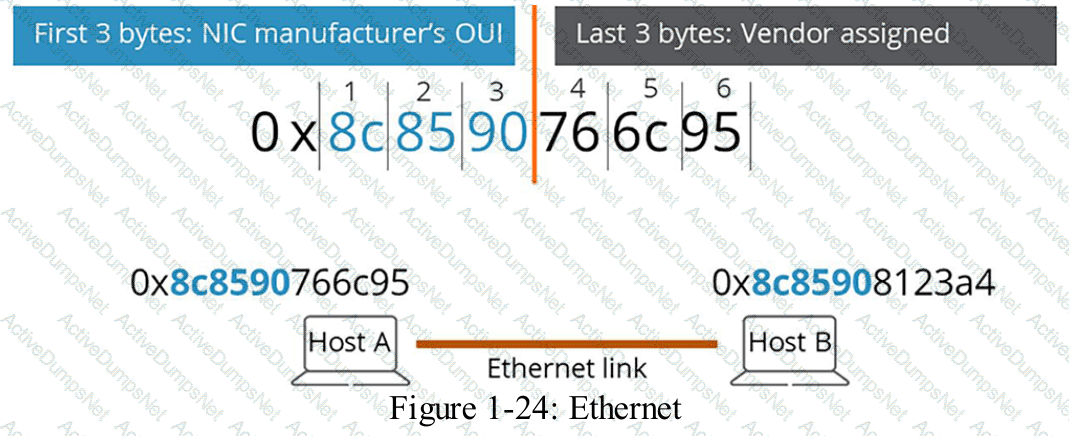
HPE Press study-guide figure / related learning illustration · Q67 Ethernet MAC
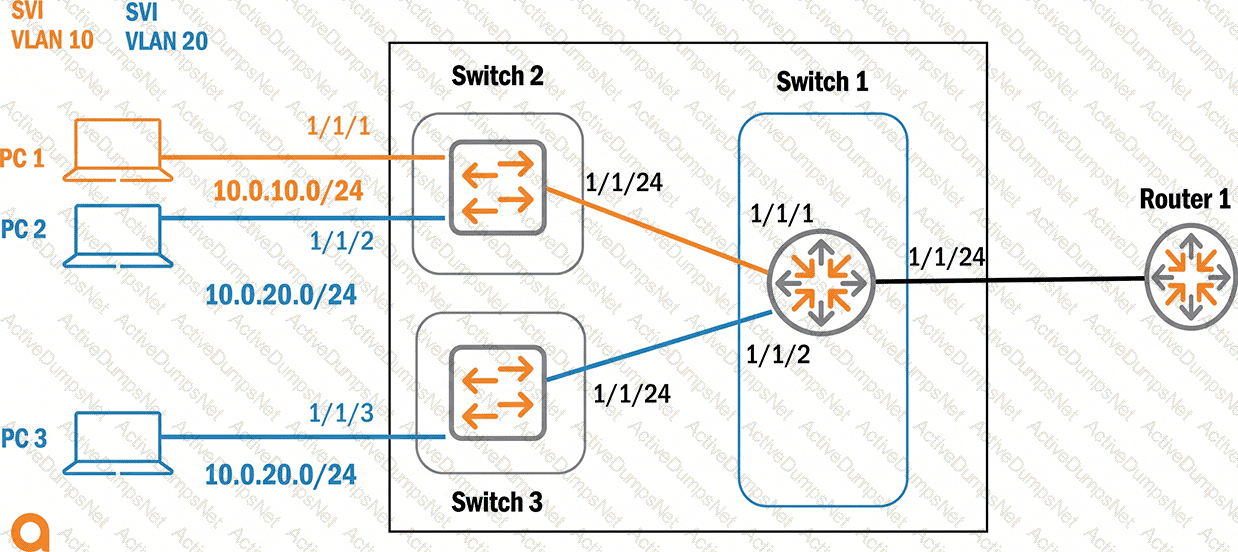
Refer to the exhibit.
Based on the given topology, how do you configure Switch 1 with IP address 10.20.0.1/24 so that PC 2 and PC 3 can use this interface as their default gateway?
Options:
vlan 20, ip default gateway 10.20.0.1
router 20, ip address 10.20.0.1/24
vlan 20, ip address 10.20.0.1/24
int vlan 20, ip address 10.20.0.1/24
Answer:
DExplanation:
Comprehensive and Detailed Explanation
HPE Press guide context | PDF page 221 | HPE Press, Aruba Certified Associate – Campus Access Official Certification Study Guide
Technical Deep Dive — Original Chat Wording
A Switched Virtual Interface (SVI) is a logical Layer 3 interface associated with a particular VLAN.
It enables a multilayer switch to provide default-gateway services for hosts within that VLAN's IP subnet.
The exhibit shows PC 2 and PC 3 connected through separate access switches but belonging to the same VLAN 20 subnet.
Both hosts should use Switch 1's VLAN 20 SVI address as their default gateway.
The appropriate AOS-CX configuration is:
configure terminal
vlan 20
interface vlan 20
ip address 10.20.0.1/24
no shutdown
The interface vlan 20 command creates or enters the SVI configuration context.
The ip address command assigns the required Layer 3 address and subnet prefix.
Switch 1 must also have operational Layer 2 connectivity to VLAN 20 through the downstream switch links.
PC 2 and PC 3 can then use 10.20.0.1 as their default gateway.
Option A confuses a switch's own default gateway with the gateway it provides to connected hosts.
Option B uses an incorrect interface context.
Option C attempts to configure an IP address directly under the Layer 2 VLAN context rather than the SVI.
Therefore, Option D is correct.
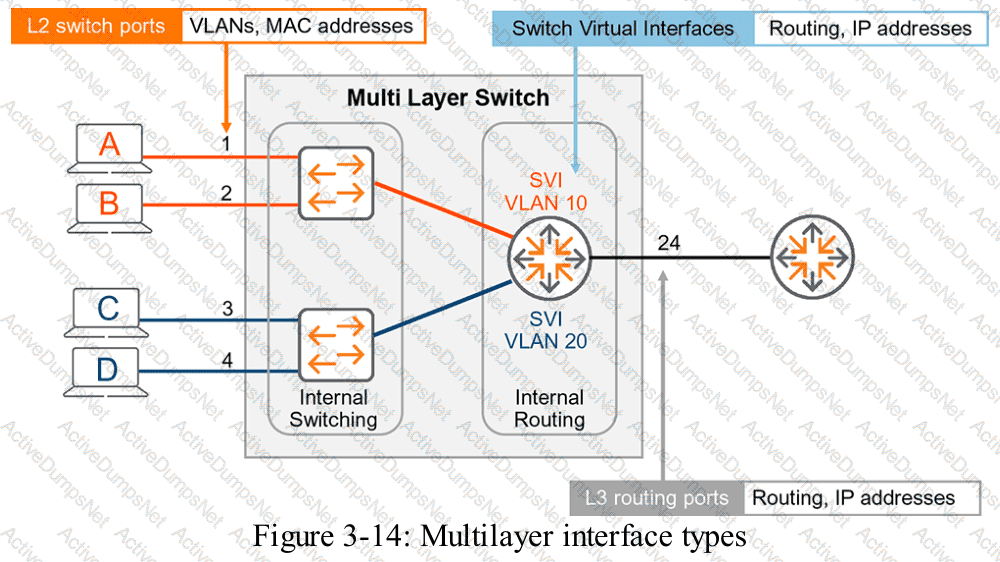
HPE Press study-guide figure / related learning illustration · Q185 Fig 3-14 SVI
You must troubleshoot a CX 6200 4-node VSF stack switch that does not boot properly. Select the option that lets you access the switch and view the boot options for OS images and ServiceOS.
Options:
Conductor mgmt port using SSH
Member 2 RJ-45 console port
Conductor USB-C console port
Member 2 switch mgmt port
Answer:
CExplanation:
Comprehensive and Detailed Explanation
HPE Press guide context | PDF page 503 | HPE Press, Aruba Certified Associate – Campus Access Official Certification Study Guide
Technical Deep Dive — Reconstructed (Original Chat Text Not Recoverable)
When a CX 6200 VSF stack cannot boot, use the conductor's supported USB-C console to access local boot and ServiceOS options. An SSH session requires an operating management plane; choosing an arbitrary member's port may not provide the required stack boot control. Confirm conductor role and hardware console availability.
The selected answer corresponds to C: Conductor USB-C console port. This matches the mechanism or management behavior described in the scenario rather than merely a related network feature.
A disciplined investigation compares the observed symptom with expected behavior, tests the most likely failure stage, and verifies recovery rather than assuming that a single command has resolved the problem.
Collecting interface counters, event timestamps, configuration history, and service-test results helps determine whether a symptom originates locally or depends on another device.
The answer should be validated against both the control-plane state and the forwarding or management outcome. A successful individual command alone is not proof that the end-to-end requirement is satisfied.
What are the primary characteristics of the 6 GHz band?
Options:
Less RF signal is absorb by objects in a 6 GHz WLAN.
In North America, the 6 GHz band offers more 80 MHz channels than there are 40 MHz channels in the 5 GHz band.
Low Power Devices are allowed for indoor and outdoor usage.
The 6 GHz band is fully backward compatible with the existing bands.
Answer:
BExplanation:
Comprehensive and Detailed Explanation
HPE Press guide context | PDF page 711 | HPE Press, Aruba Certified Associate – Campus Access Official Certification Study Guide
Technical Deep Dive — Reconstructed (Original Chat Text Not Recoverable)
The 6-GHz Wi-Fi band dramatically increases available channel capacity relative to older bands, enabling numerous 80-MHz channels where regulators authorize the spectrum. It is not backward compatible with 2.4/5-GHz-only client radios, and low-power indoor categories have location restrictions. Higher frequencies generally suffer greater material attenuation, not less.
The selected answer corresponds to B: In North America, the 6 GHz band offers more 80 MHz channels than there are 40 MHz channels in the 5 GHz band.. This matches the mechanism or management behavior described in the scenario rather than merely a related network feature.
Operational workflows should preserve consistent inventory, authorization, configuration history, and monitoring so that administrators can locate and manage devices predictably.
Consistent RBAC, accurate inventories, and retained audit records simplify support handovers and reduce uncertainty during incident investigations.
For an administrator preparing for the associate certification, the key distinction is the precise protocol or Central workflow involved. Similar-sounding features often operate at different OSI layers or management stages.
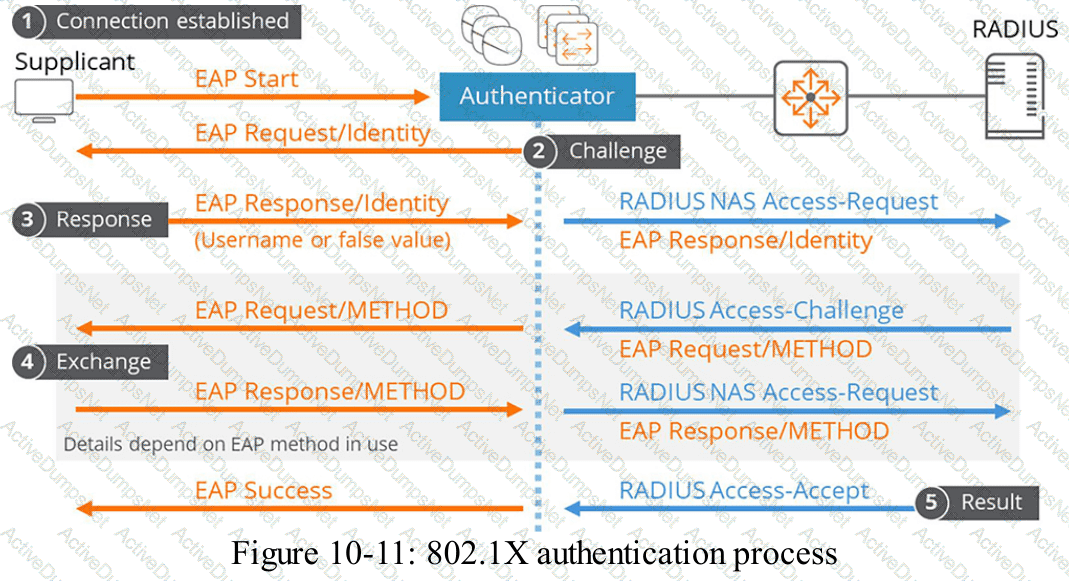
At what point does the 802.1X authentication process start when connecting to a secured wired Ethernet network?
Options:
After firewall policies are applied
When the connection is established
After captive portal authentication
When the Pairwise Master Key is received
Answer:
BExplanation:
Comprehensive and Detailed Explanation
HPE Press guide context | PDF page 818 | HPE Press, Aruba Certified Associate – Campus Access Official Certification Study Guide
Technical Deep Dive — Reconstructed (Original Chat Text Not Recoverable)
Wired 802.1X begins when a supplicant connects to an enabled switch port and initiates or responds to EAPOL exchanges. The authenticator controls admission before granting normal network access. Firewall authorization occurs after successful authentication, while captive portal and WPA keying are different processes.
The selected answer corresponds to B: When the connection is established. This matches the mechanism or management behavior described in the scenario rather than merely a related network feature.
In an AOS-CX or Aruba Central deployment, the relevant settings must be applied in the correct interface, profile, policy, or management scope and then validated operationally.
A change that is applied to the wrong VRF, VLAN, user role, or device group can be syntactically valid while leaving the original network requirement unmet.
For an administrator preparing for the associate certification, the key distinction is the precise protocol or Central workflow involved. Similar-sounding features often operate at different OSI layers or management stages.
The wrong choices may describe real technologies, but they perform different functions, apply to another layer, or omit a required prerequisite. Select the answer that resolves the exact scenario, not a nearby administrative task.
Which fiber connector is used most commonly for AOS-CX switches?
Options:
SC
LC/APC
LC
ST
Answer:
CExplanation:
Comprehensive and Detailed Explanation
HPE Press guide context | PDF page 42 | HPE Press, Aruba Certified Associate – Campus Access Official Certification Study Guide
Technical Deep Dive — Reconstructed (Original Chat Text Not Recoverable)
LC (Lucent Connector) is the compact optical connector commonly used by SFP and QSFP breakout fiber interfaces in campus switches. LC/APC has an angled polish and is not the ordinary switch transceiver connector. SC and ST exist in legacy fiber deployments, but LC is the standard connector for the optics highlighted in the HPE Press guide.
The selected answer corresponds to C: LC. This matches the mechanism or management behavior described in the scenario rather than merely a related network feature.
Operational workflows should preserve consistent inventory, authorization, configuration history, and monitoring so that administrators can locate and manage devices predictably.
The operational view should be interpreted together with its underlying records: an alert, subscription count, or device status may describe management state rather than physical availability.
The practical deployment consequence is important: a plausible configuration can still fail when the peer interface, device role, licensing scope, or physical medium is mismatched. Checking that surrounding dependency avoids a misleading diagnosis.
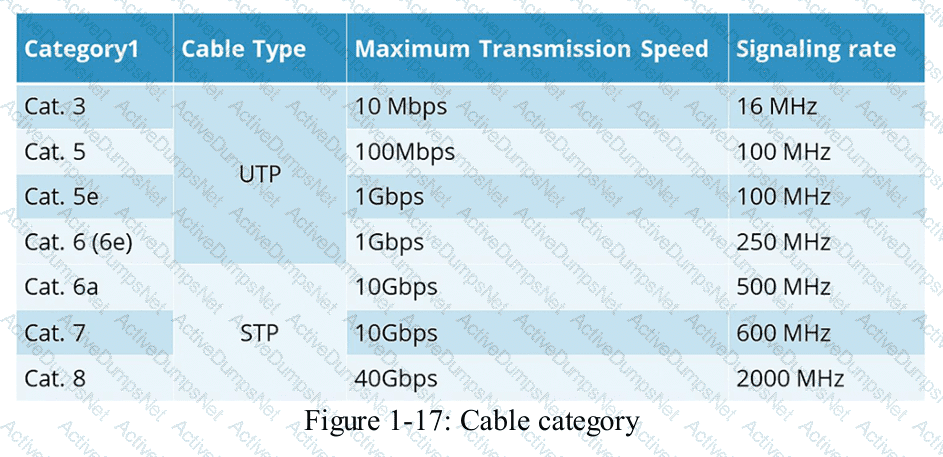
HPE Press study-guide figure / related learning illustration · Q132 Fig 1-17 Cable Cat
Which device in a WLAN is ultimately responsible for deciding to roam to a new AP?
Options:
The client device
The network gateway
The wireless controller
The access point
Answer:
AExplanation:
Comprehensive and Detailed Explanation
HPE Press guide context | PDF page 768 | HPE Press, Aruba Certified Associate – Campus Access Official Certification Study Guide
Technical Deep Dive — Reconstructed (Original Chat Text Not Recoverable)
The Wi-Fi client ultimately decides when to roam from one BSS to another. APs and WLAN management may provide 802.11k neighbor lists, 802.11v BSS transition advice, and 802.11r fast-transition support. However, the station controls the final association decision and timing.
The selected answer corresponds to A: The client device. This matches the mechanism or management behavior described in the scenario rather than merely a related network feature.
Optimization should consider both immediate performance and its tradeoffs in RF capacity, airtime, reliability, security, and operational overhead.
For example, higher PHY data rates do not guarantee higher useful throughput if airtime is lost to management traffic, contention, or retransmissions.
A strong verification step is to compare the expected outcome with operational status before and after the change. This confirms not only that a configuration was accepted, but also that the required service actually functions.
For practical use, confirm the prerequisite conditions first, then verify the resulting operational state. This separates an intended configuration from a working network service and avoids accepting a misleading result.
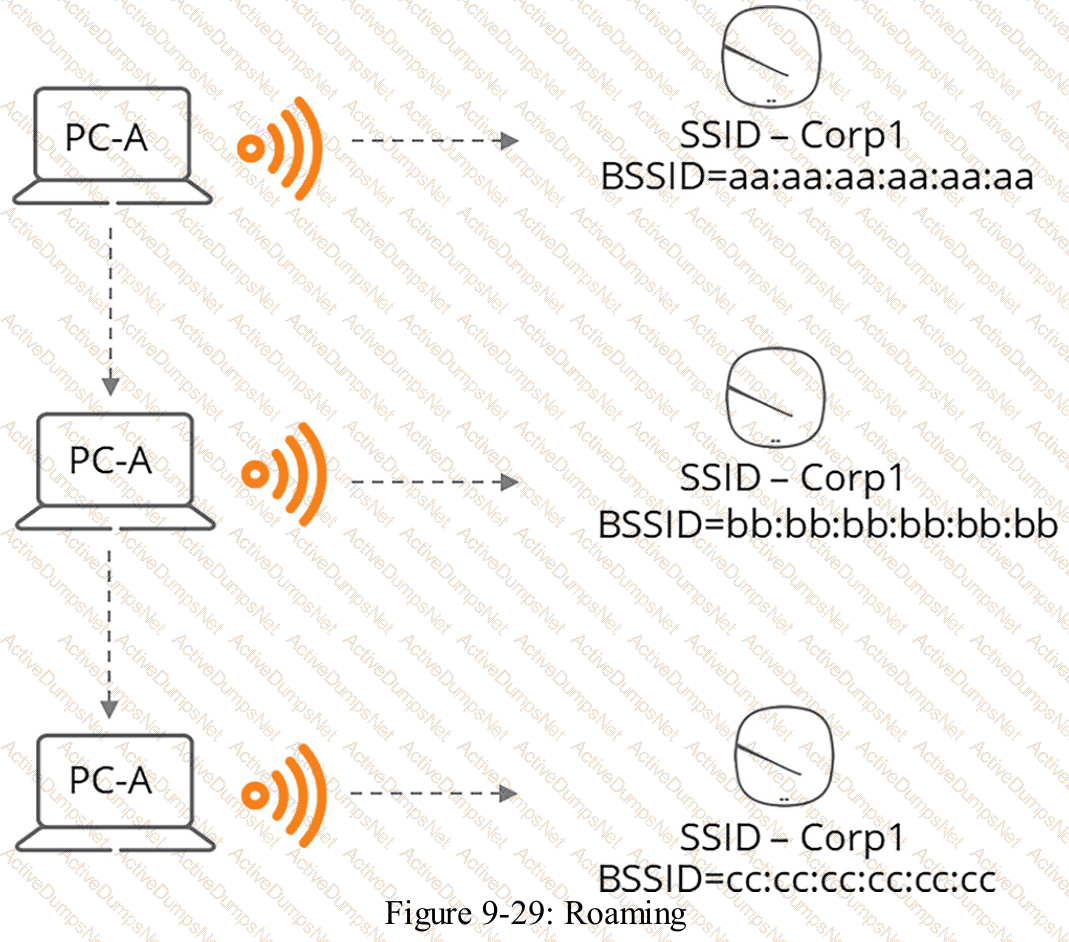
HPE Press study-guide figure / related learning illustration · Q68 Roaming
When using the geo-locate scaling method, which preparation step should be completed before implementation?
Options:
Assign devices to the floor before setting up the geo-locate method.
Upload the floor plan file after setting the target points.
Place target points at the comers of the floor plan.
Import a backup floor plan file before setting target points.
Answer:
CExplanation:
Comprehensive and Detailed Explanation
HPE Press guide context | PDF page 689 | HPE Press, Aruba Certified Associate – Campus Access Official Certification Study Guide
Technical Deep Dive — Original Chat Wording
Geo-locate scaling allows HPE Aruba Networking Central to associate a building floorplan with actual geographic coordinates.
This creates a spatial reference between locations on the uploaded drawing and their corresponding positions on a map.
A key requirement is the correct placement of reference targets.
When administrators select the geo-locate scaling method, the system provides target points that can be positioned on the floorplan.
The corresponding geographic locations are then identified on the map.
Placing targets near identifiable corners of the building provides useful reference positions and makes matching the drawing to the map easier.
The points should be accurately aligned rather than placed arbitrarily.
Using well-separated points improves the stability of the resulting scale and geographic alignment.
Inaccurate target placement can produce incorrect floorplan dimensions or positioning errors.
These inaccuracies may affect location-based network visualization and the interpretation of device placement.
The floorplan must already have been uploaded before it can be scaled.
Assigning access points to the floor can take place after the plan has been created and properly scaled.
A backup floorplan is not required merely to establish geo-location reference points.
Therefore, Option C (Place target points at the corners of the floor plan) is correct.
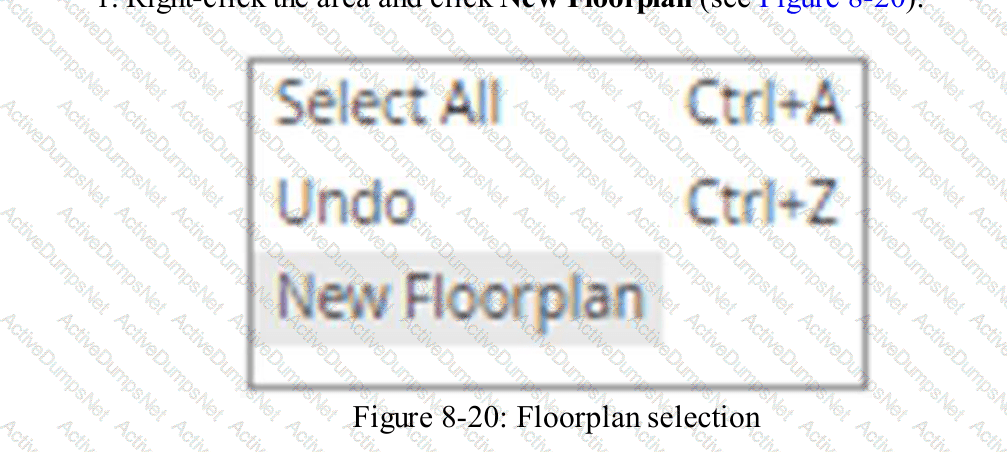
HPE Press study-guide figure / related learning illustration · Q114 Fig 8-20 Floorplan
Which metrics are available to view in the Client Connectivity Metrics card in HPE Aruba Networking Central?
Options:
Client operating systems connected during onboarding.
Signal quality levels for all connected clients.
Detailed connectivity steps such as association and authentication.
Client roles assigned during onboarding sessions.
Answer:
CExplanation:
Comprehensive and Detailed Explanation
HPE Press guide context | PDF page 1000 | HPE Press, Aruba Certified Associate – Campus Access Official Certification Study Guide
Technical Deep Dive — Original Chat Wording
The Client Connectivity Metrics card provides detailed visibility into the different stages of the network onboarding process.
Instead of showing only whether a client eventually connects, the card identifies where the connection succeeds, fails, or experiences delays.
The process is divided into four important stages:
- Association: Determines whether the wireless client successfully associates with an access point.
- Authentication: Evaluates whether the client successfully completes the applicable network authentication process.
- DHCP: Verifies that the client obtains valid IP addressing information.
- DNS: Measures successful domain-name resolution.
For example, a client may associate successfully and complete authentication but fail to receive an IP address because the DHCP server is unavailable.
The card allows administrators to distinguish this situation from an authentication failure.
It also provides connectivity success rates, failure reasons, and information about delayed connection attempts.
Administrators can analyze results by individual clients or by total connection attempts.
These measurements are particularly useful for diagnosing intermittent wireless problems and understanding their impact on users.
Client operating systems, wireless signal quality, and assigned roles are relevant to other monitoring functions but are not the primary connectivity stages displayed in this card.
Therefore, Option C (Detailed connectivity steps such as association and authentication) is correct.
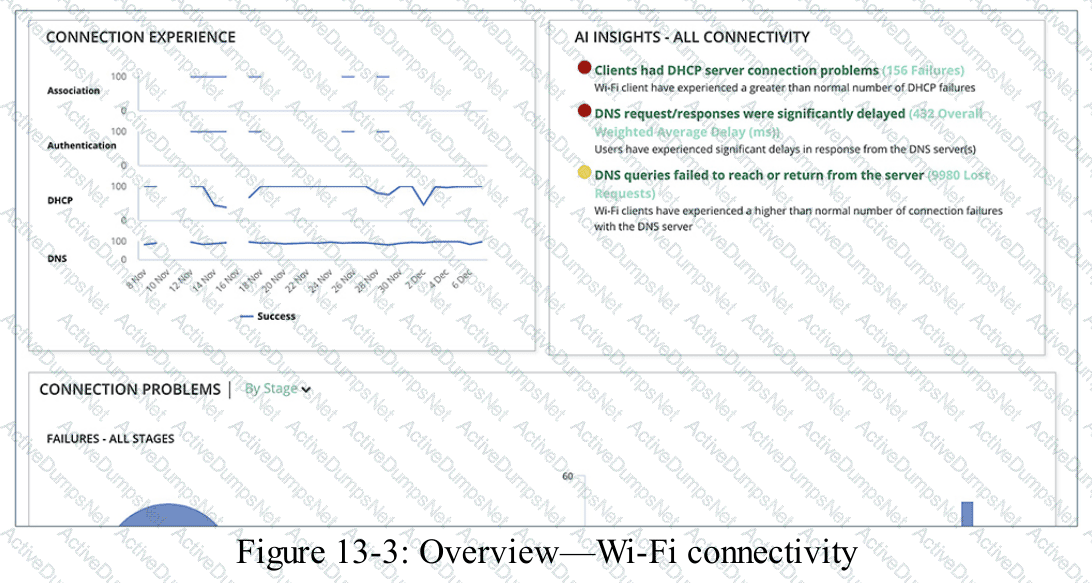
HPE Press study-guide figure / related learning illustration · Q196 Fig 13 3 Client Connectivity
Which device-status information is visible in the Inventory table in HPE Aruba Networking Central?
Options:
Whether a device is assigned to a site
Whether a device is online
Whether a device is provisioned
Whether a device is healthy
Answer:
BExplanation:
Comprehensive and Detailed Explanation
In HPE Aruba Networking Central, the Device Inventory table (found under Global > Organization > Platform Integration > Device Inventory , or the main Devices inventory view) displays hardware and administrative details such as Serial Number, MAC Address, Part Number, Device Type, Model, Assigned License, and Status (indicating whether the device is Online or Offline ).
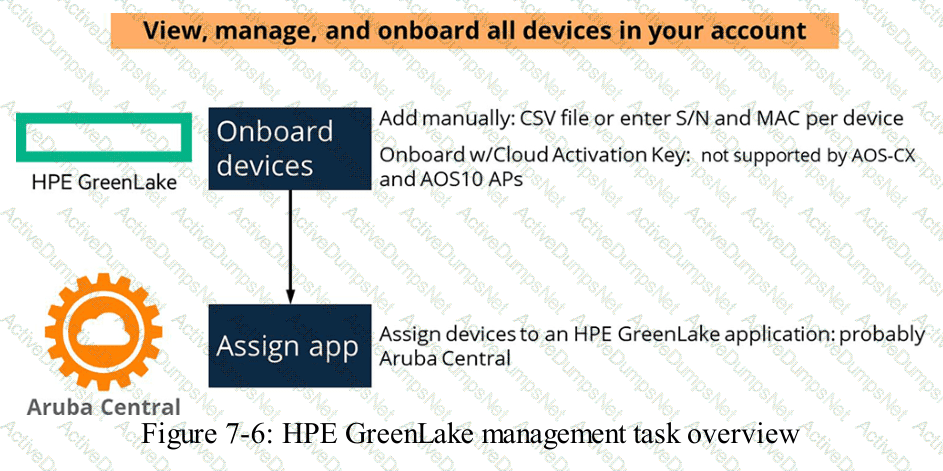
Refer to the exhibit.
In this topology, which configuration on Switch 1 port 1/1/24 enables PC 2 to reach PC 3 while retaining tagged VLAN 10 traffic from PC 1 to Router 1?
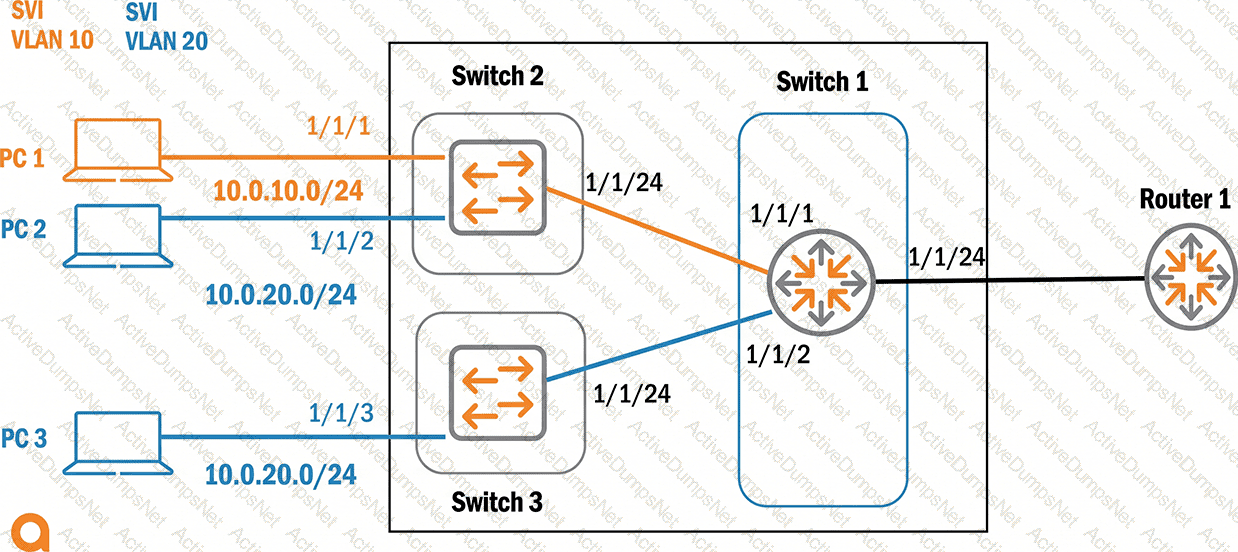
Options:
Add VLAN 20
Configure VLAN 20 as native
VLAN trunk allowed 20
VLAN trunk add 20
Answer:
BExplanation:
Comprehensive and Detailed Explanation
HPE Press guide context | PDF page 125 | HPE Press, Aruba Certified Associate – Campus Access Official Certification Study Guide
Technical Deep Dive — Original Chat Wording
IEEE 802.1Q trunks allow Ethernet switches to transport traffic belonging to multiple VLANs over a common physical connection.
In the exhibit, VLAN 10 carries traffic associated with PC 1, while VLAN 20 is associated with PC 2 and PC 3.
If the router-facing connection must carry VLAN 10 as tagged traffic and VLAN 20 as untagged traffic, VLAN 20 should be configured as the native VLAN.
An example AOS-CX configuration is:
configure terminal
interface 1/1/24
no routing
vlan trunk native 20
vlan trunk allowed 10,20
no shutdown
Under normal native-VLAN behavior, VLAN 20 traffic can be transmitted untagged while VLAN 10 retains its 802.1Q tag.
Option C is insufficient because configuring only VLAN 20 as allowed could remove VLAN 10 from the permitted VLAN list.
Option D is not the correct AOS-CX syntax for adding a permitted VLAN.
Important topology distinction: PC 2 and PC 3 are already members of VLAN 20 and the same IP subnet. Their direct communication should occur through Layer 2 switching and does not require traffic to traverse Switch 1's router-facing port.
Therefore, the question's stated requirement is technically imprecise. Option B is the intended answer for preserving tagged VLAN 10 while transmitting VLAN 20 untagged toward Router 1, but the PC 2-to-PC 3 communication requirement does not independently establish that need.
Which statements describe HPE Aruba Networking ClearPass OnGuard Software?
Choose two
Options:
OnGuard is doing posture checks on client systems.
It is used for the self-registration of guest devices.
OnGuard is an agent, running on client systems.
OnGuard assigns a unique identity to each device.D. It is an intuitive portal for users to securely configure their devices.
Answer:
A, CExplanation:
Comprehensive and Detailed Explanation
HPE Press guide context | PDF page 565 | HPE Press, Aruba Certified Associate – Campus Access Official Certification Study Guide
Technical Deep Dive — Reconstructed (Original Chat Text Not Recoverable)
ClearPass OnGuard is an endpoint posture-assessment component and is delivered as an agent that runs on supported client operating systems. It checks security posture such as antivirus, patches, and other health conditions. Guest self-registration is handled by ClearPass Guest, and unique device certificate onboarding belongs to ClearPass Onboard.
The selected answer corresponds to A: OnGuard is doing posture checks on client systems.; C: OnGuard is an agent, running on client systems.. This matches the mechanism or management behavior described in the scenario rather than merely a related network feature.
Operational workflows should preserve consistent inventory, authorization, configuration history, and monitoring so that administrators can locate and manage devices predictably.
Consistent RBAC, accurate inventories, and retained audit records simplify support handovers and reduce uncertainty during incident investigations.
For an administrator preparing for the associate certification, the key distinction is the precise protocol or Central workflow involved. Similar-sounding features often operate at different OSI layers or management stages.
HPE Press study-guide figure / related learning illustration · Q72 8021X
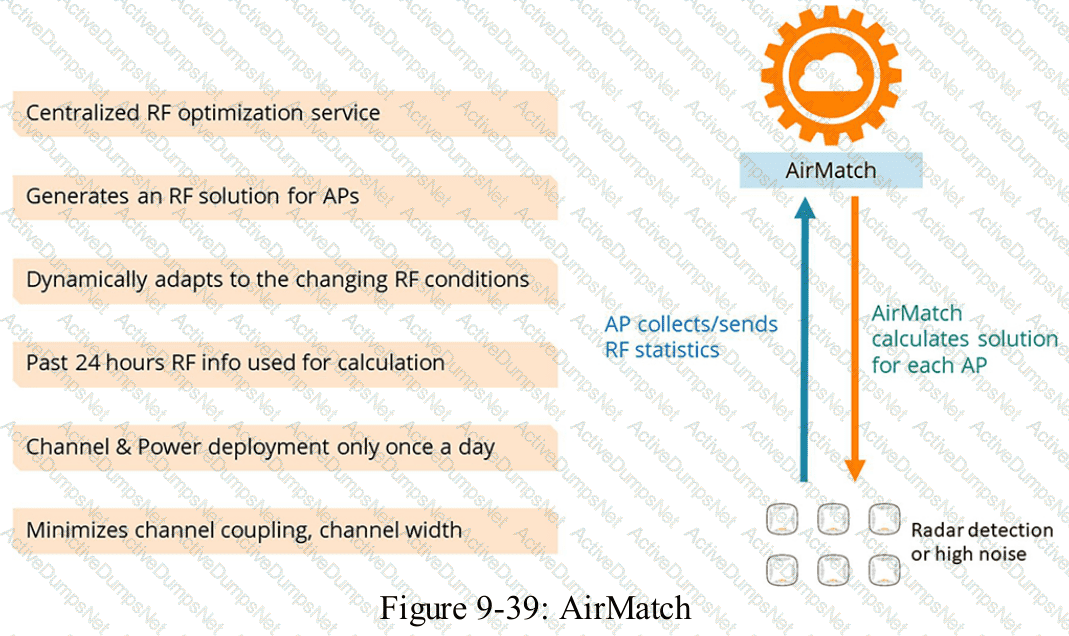
Which feature can network administrators use to centralize RF planning and optimization services when using an HPE Aruba Networking Mobility Conductor architecture?
Options:
AirWave
Client Match
Client Wave
AirMatch
Answer:
DExplanation:
Comprehensive and Detailed Explanation
HPE Press guide context | PDF page 798 | HPE Press, Aruba Certified Associate – Campus Access Official Certification Study Guide
Technical Deep Dive — Reconstructed (Original Chat Text Not Recoverable)
AirMatch uses centralized RF planning and optimization under Mobility Conductor management. It evaluates radio/channel and power conditions across the WLAN and produces RF configuration choices. ClientMatch chiefly steers client associations; AirWave focuses on monitoring rather than central RF orchestration in this architecture.
The selected answer corresponds to D: AirMatch. This matches the mechanism or management behavior described in the scenario rather than merely a related network feature.
In campus network design, a successful decision must satisfy the customer's capacity, topology, physical environment, and lifecycle constraints.
An effective plan translates the requirement into measurable acceptance criteria, such as reachability, port capacity, redundancy, or RF service quality.
The answer should be validated against both the control-plane state and the forwarding or management outcome. A successful individual command alone is not proof that the end-to-end requirement is satisfied.
When troubleshooting or designing a change, verify compatibility between all participating devices, the management scope, and the applicable software release. The most useful evidence is the state observed on both sides of the affected connection.
HPE Press study-guide figure / related learning illustration · Q64 AirMatch
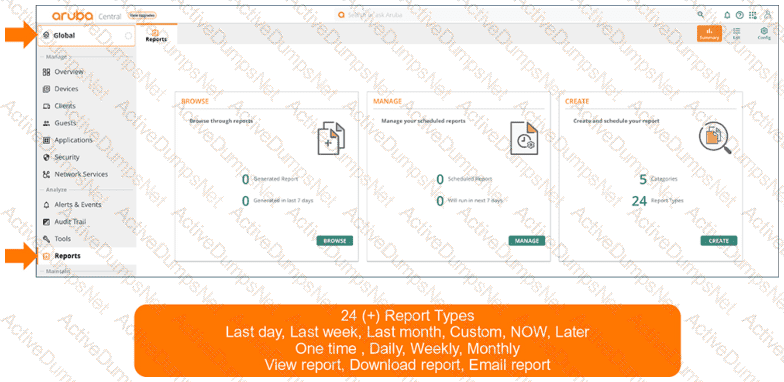
Which file format can be used to download or receive reports from HPE Aruba Networking Central?
Options:
XLSX
CSV
JSON
TXT
Answer:
BExplanation:
Comprehensive and Detailed Explanation
HPE Press guide context | PDF page 1029 | HPE Press, Aruba Certified Associate – Campus Access Official Certification Study Guide
Technical Deep Dive — Original Chat Wording
HPE Aruba Networking Central includes centralized reporting capabilities that allow administrators to analyze network activity, device health, security events, and other monitored information.
Reports can be generated on demand or according to a configured schedule.
For example, an administrator may configure recurring reports covering connected clients, network infrastructure utilization, or security-related conditions.
CSV, or Comma-Separated Values, is a text-based tabular data format commonly supported by management and analytics platforms.
A CSV file organizes information into rows and columns, with values separated by delimiters such as commas.
Its principal advantage is interoperability.
CSV reports can be imported into spreadsheet applications, database systems, data-analysis tools, and custom automation workflows.
For example, a network administrator could export client inventory information into CSV and analyze trends across multiple sites.
CSV also supports downstream processing with scripts or business intelligence applications.
PDF is another supported format and is typically more suitable for formatted presentation and distribution.
Although XLSX is widely used for spreadsheet work, it is not the correct listed format for the reporting workflow tested by this question.
JSON is commonly used for structured API responses, but it is not the specified report-download format.
TXT is a general text-file extension rather than the supported report-export selection.
Therefore, Option B (CSV) is correct.
HPE Press study-guide figure / related learning illustration · Fig 13-34 Reports
What is the correct sequence for the TCP three-way handshake?
Drag & Drop
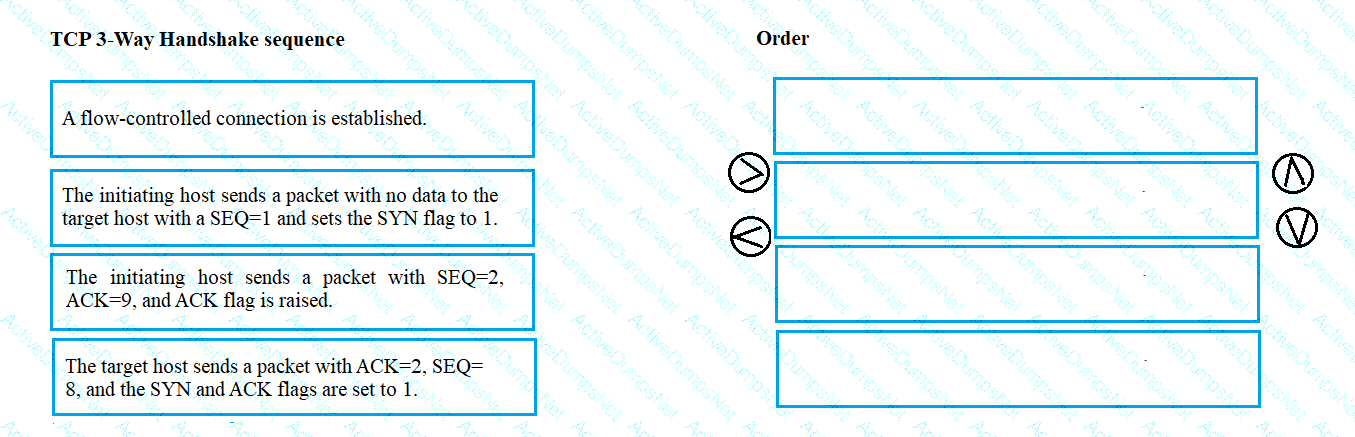
Options:
Answer:
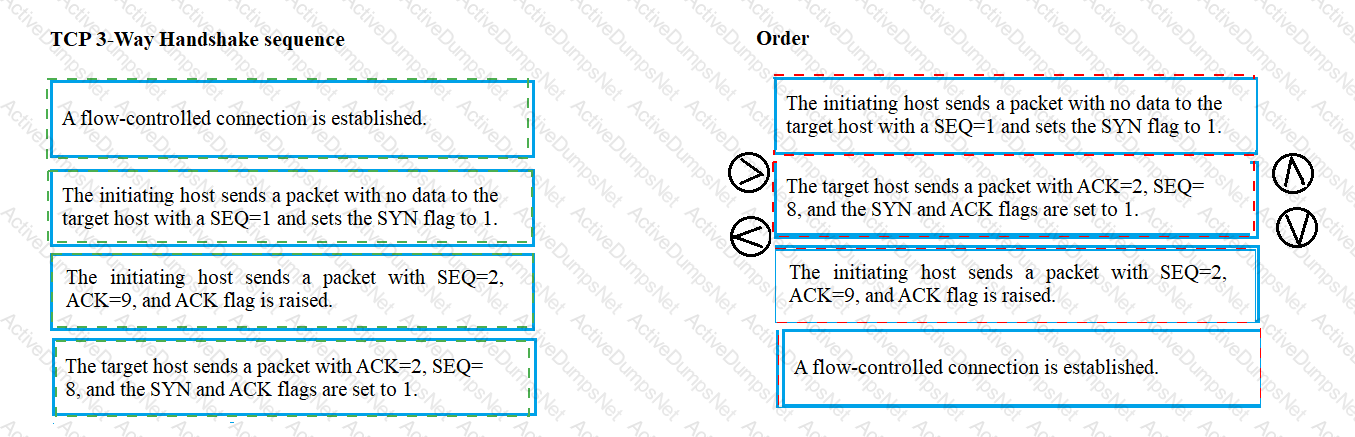
Explanation:
SYN → SYN-ACK → ACK
Exhibit item
Correct match
Step 1
Client sends SYN
Step 2
Server sends SYN-ACK
Step 3
Client sends ACK
Comprehensive and Detailed Explanation
HPE Press guide context | PDF page 62 | HPE Press, Aruba Certified Associate – Campus Access Official Certification Study Guide
Technical Deep Dive — Reconstructed (Original Chat Text Not Recoverable)
TCP establishes a normal reliable connection with SYN from the initiator, SYN-ACK from the responder, and ACK from the initiator. The exchange synchronizes initial sequence numbers and confirms bidirectional communication. Subsequent data transfer begins after the connection is established.
The exhibit is a matching question: each original item must be paired with the applicable protocol, medium, security function, or address classification. The answer table below records the intended correspondence without changing the source exhibit.
Operational workflows should preserve consistent inventory, authorization, configuration history, and monitoring so that administrators can locate and manage devices predictably.
For example, a cloud-managed infrastructure device may be registered successfully but still require the correct subscription, site, group, and configuration scope.
In production, the decision should be documented and checked against the supported software release and platform model, because interface names, licensing tiers, and management workflows can change across Central and AOS-CX generations.
For practical use, confirm the prerequisite conditions first, then verify the resulting operational state. This separates an intended configuration from a working network service and avoids accepting a misleading result.
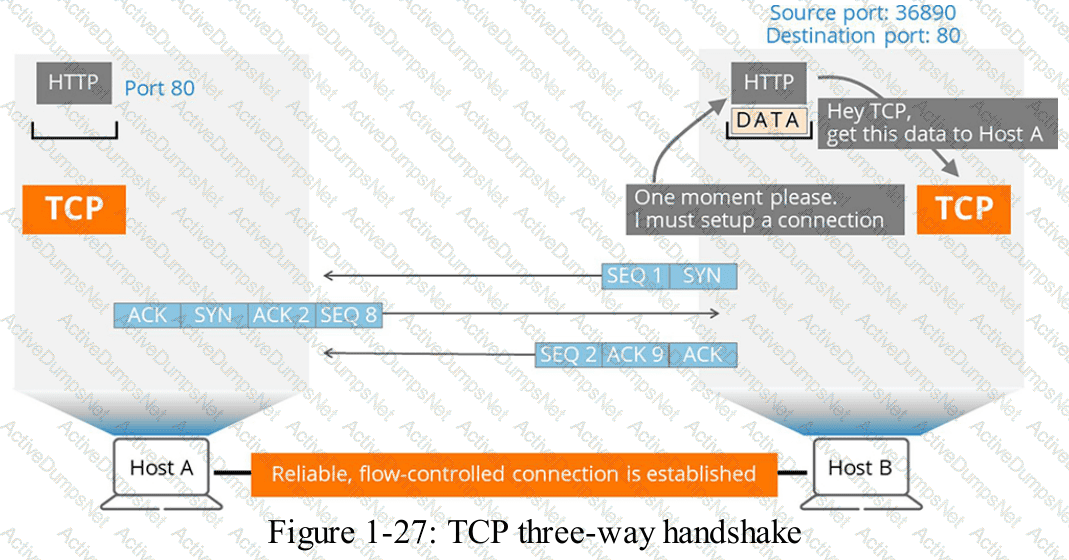
HPE Press study-guide figure / related learning illustration · Q75 TCP 3way
How is Equivalent Isotropic Radiated Power (EIRP) computed?
Options:
(power provided by PoE port) – (the cable loss) + (antenna gain)
(power provided by the radio) – (the cable loss) + (antenna gain)
(power provided by the radio) – (the cable loss) – (antenna gain)
(power provided by PoE port) – (the cable loss) – (antenna gain)
Answer:
BExplanation:
Comprehensive and Detailed Explanation
HPE Press guide context | PDF page 712 | HPE Press, Aruba Certified Associate – Campus Access Official Certification Study Guide
Technical Deep Dive — Reconstructed (Original Chat Text Not Recoverable)
Equivalent Isotropically Radiated Power is calculated using transmitter radio power, minus losses between the transmitter and antenna, plus antenna gain. Values must all be expressed consistently in dBm and dB. A PoE power budget is electrical supply capacity, not RF transmit power, so it cannot be substituted into the EIRP equation.
The selected answer corresponds to B: (power provided by the radio) – (the cable loss) + (antenna gain). This matches the mechanism or management behavior described in the scenario rather than merely a related network feature.
Optimization should consider both immediate performance and its tradeoffs in RF capacity, airtime, reliability, security, and operational overhead.
Use measurements rather than assumptions: compare the RF or switch metrics before and after making a controlled change.
For an administrator preparing for the associate certification, the key distinction is the precise protocol or Central workflow involved. Similar-sounding features often operate at different OSI layers or management stages.
The wrong choices may describe real technologies, but they perform different functions, apply to another layer, or omit a required prerequisite. Select the answer that resolves the exact scenario, not a nearby administrative task.
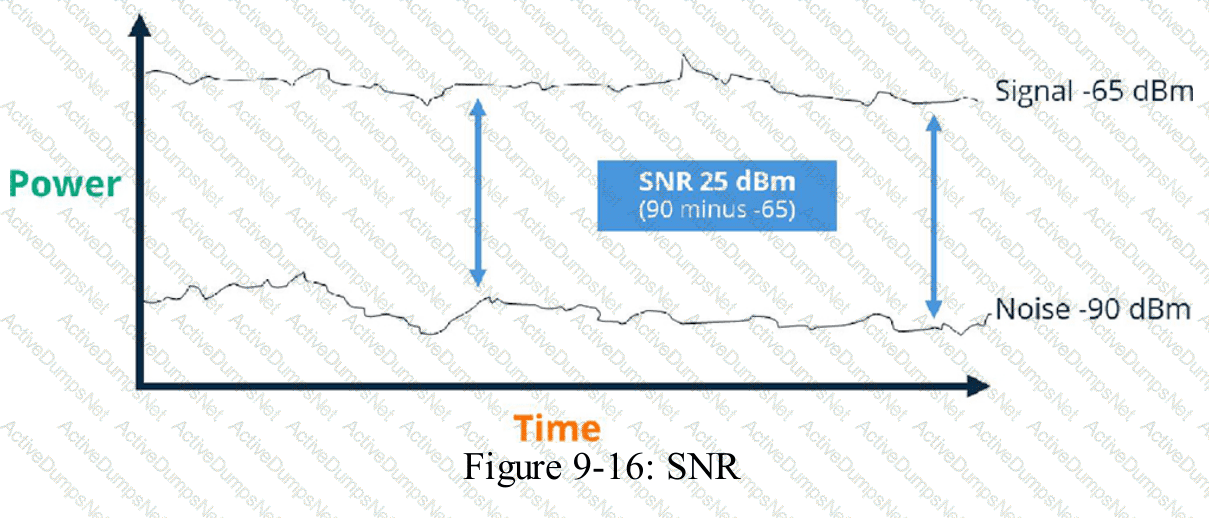
HPE Press study-guide figure / related learning illustration · Fig 9-16 SNR
What is the purpose of deferring an alert in a networked system?
Options:
To permanently remove notifications for an issue that has already been resolved
To temporarily prevent notifications for an issue that is not currently critical
To change notification settings so only urgent alerts are reported to administrators
To stop all notifications for a certain period regardless of the issue's importance
Answer:
BExplanation:
Comprehensive and Detailed Explanation
HPE Press guide context | PDF page 1028 | HPE Press, Aruba Certified Associate – Campus Access Official Certification Study Guide
Technical Deep Dive — Original Chat Wording
Alert deferral is an operational technique used to temporarily postpone or suppress notifications associated with an issue that does not require immediate attention.
It helps network administrators prioritize critical incidents while avoiding unnecessary interruption from lower-priority conditions.
For example, a technician may already be investigating a known noncritical alert during a planned maintenance period.
Repeated notifications about that same condition may provide little additional value.
Deferring the alert allows the administrator to manage the notification workload while retaining awareness of the underlying problem.
A deferred alert should remain subject to the organization's incident-management procedures and should be reviewed again when the deferral period ends.
This is different from permanently deleting an alert or declaring that the issue has been resolved.
It is also distinct from changing the global notification policy to deliver only urgent events.
Deferral should normally target specific known conditions rather than indiscriminately suppressing every alert.
Suppressing all notifications could prevent administrators from learning about unrelated critical failures.
The HPE Press guide directly documents alert acknowledgment rather than a separate deferral operation. The distinction between deferral and acknowledgment is therefore part of the operational interpretation of this question.
Therefore, Option B is correct.
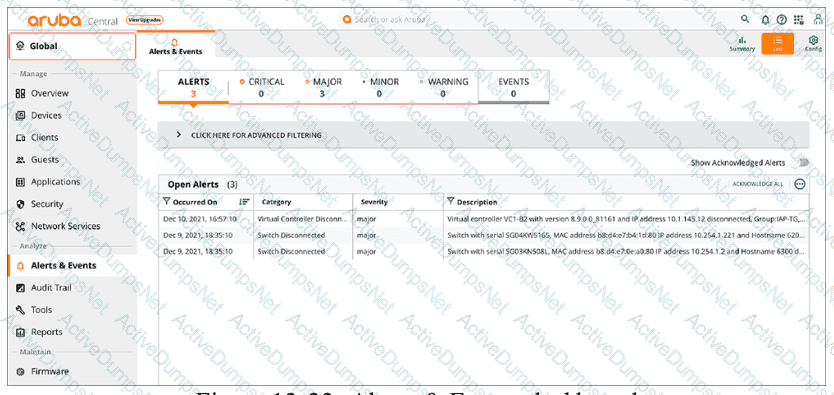
HPE Press study-guide figure / related learning illustration · Q154 Fig 13-33 Alerts
What must be done to ensure that HPE Aruba Networking Central can configure devices?
Options:
Assign devices to floor plans.
Assign device functions to devices.
Assign a name to the device.
Create a device inventory record.
Answer:
BExplanation:
Comprehensive and Detailed Explanation
HPE Press guide context | PDF page 567 | HPE Press, Aruba Certified Associate – Campus Access Official Certification Study Guide
Technical Deep Dive — Original Chat Wording
HPE Aruba Networking Central uses device functions to classify infrastructure devices according to their intended network role.
This classification determines which configuration profiles and features can be assigned to the device.
For AOS-CX switches, functions include Access Switch, Aggregation Switch, and Core Switch.
For example, an access switch may require endpoint authentication, port-access policies, and edge-device configurations.
A core switch may instead require routing protocols, high-speed interconnections, and different infrastructure policies.
Central uses the selected device function to ensure that compatible configuration profiles are offered and applied.
In the newer Central onboarding architecture, device functions must be assigned to supported switches before they can be fully configured.
Access points and gateways may receive their functions automatically through the supported onboarding workflow, while switches require explicit assignment.
Device registration remains necessary but is not sufficient by itself.
A device must also satisfy applicable site, group, subscription, and provisioning prerequisites.
Assigning a floor plan improves physical-location visibility but does not determine which configuration profiles a device can use.
Similarly, a device name identifies equipment without establishing its configuration role.
Therefore, Option B (Assign device functions to devices) is correct for the Central configuration architecture described.

HPE Press study-guide figure / related learning illustration · Q137 Fig 7-1 Onboard
Which HPE Aruba Networking technology enables device-specific passphrases to securely onboard legacy devices onto the WLAN?
Options:
Opportunistic Wireless Encryption (OWE)
Multiple Pre-Shared Key (MPSK)
Wired Equivalent Privacy (WEP)
Temporal Key Integrity Protocol (TKIP)
Answer:
BExplanation:
Comprehensive and Detailed Explanation
HPE Press guide context | PDF page 876 | HPE Press, Aruba Certified Associate – Campus Access Official Certification Study Guide
Technical Deep Dive — Reconstructed (Original Chat Text Not Recoverable)
Multiple Pre-Shared Key allows different clients or IoT device classes to use distinct passphrases on one SSID and supports differentiated role authorization. This reduces beacon overhead compared with many separate SSIDs and permits selective credential revocation. OWE encrypts open networks and WEP/TKIP are obsolete security mechanisms.
The selected answer corresponds to B: Multiple Pre-Shared Key (MPSK). This matches the mechanism or management behavior described in the scenario rather than merely a related network feature.
Operational workflows should preserve consistent inventory, authorization, configuration history, and monitoring so that administrators can locate and manage devices predictably.
For example, a cloud-managed infrastructure device may be registered successfully but still require the correct subscription, site, group, and configuration scope.
In production, the decision should be documented and checked against the supported software release and platform model, because interface names, licensing tiers, and management workflows can change across Central and AOS-CX generations.
For practical use, confirm the prerequisite conditions first, then verify the resulting operational state. This separates an intended configuration from a working network service and avoids accepting a misleading result.
Based on the show ip route output on a CX 8325, what route type is 10.20.0.0/22, vrf default via 10.1.1.1, [110/200]?
Options:
static
local
OSPF
connected
Answer:
CExplanation:
Comprehensive and Detailed Explanation
HPE Press guide context | PDF page 231 | HPE Press, Aruba Certified Associate – Campus Access Official Certification Study Guide
Technical Deep Dive — Reconstructed (Original Chat Text Not Recoverable)
In AOS-CX route output `[110/200]`, the first number indicates administrative distance and the second represents metric. Default OSPF administrative distance is 110; connected routes use 0 and static routes 1. The displayed remote next hop is therefore learned through OSPF in the default case.
The selected answer corresponds to C: OSPF. This matches the mechanism or management behavior described in the scenario rather than merely a related network feature.
A disciplined investigation compares the observed symptom with expected behavior, tests the most likely failure stage, and verifies recovery rather than assuming that a single command has resolved the problem.
Collecting interface counters, event timestamps, configuration history, and service-test results helps determine whether a symptom originates locally or depends on another device.
The answer should be validated against both the control-plane state and the forwarding or management outcome. A successful individual command alone is not proof that the end-to-end requirement is satisfied.
When troubleshooting or designing a change, verify compatibility between all participating devices, the management scope, and the applicable software release. The most useful evidence is the state observed on both sides of the affected connection.
Which design information should be reviewed before troubleshooting a wired network?
Options:
The settings for each port on the connected switches
The rack locations for all power supply equipment
The network cable colors used throughout the building
The locations of wiring closets and network rooms
Answer:
DExplanation:
Comprehensive and Detailed Explanation
HPE Press guide context | PDF page 40 | HPE Press, Aruba Certified Associate – Campus Access Official Certification Study Guide
Technical Deep Dive — Original Chat Wording
Wired-network troubleshooting begins with understanding the physical and logical architecture of the deployed network.
Physical design documentation identifies the locations of network rooms, wiring closets, patch panels, switches, and cabling routes.
This information is important because a connectivity failure may originate from a physical infrastructure problem rather than an incorrect device configuration.
For example, when several office workstations simultaneously lose connectivity, knowing their associated wiring closet helps a technician identify a possible shared access-switch or uplink failure.
The technician can then trace connectivity from affected endpoints through their patch-panel connections to the serving switch.
Accurate location information also helps technicians determine whether a cable run exceeds supported Ethernet distance limits.
In structured copper Ethernet deployments, a standard channel commonly supports a maximum length of 100 meters, subject to the applicable cabling and Ethernet standard.
Switch-port settings are important during troubleshooting, especially when investigating VLANs, interface status, or authentication failures.
However, Option A describes detailed configuration information rather than the physical network-design information targeted by the question.
Power equipment locations and cable colors can provide supporting information but do not replace a physical connectivity map.
Therefore, Option D (The locations of wiring closets and network rooms) is the best answer.
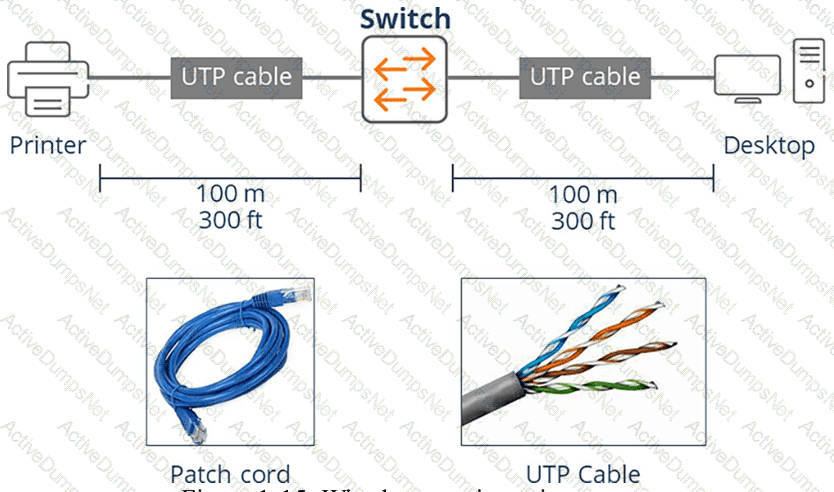
HPE Press study-guide figure / related learning illustration · Q161 Fig 1-15 Copper
What is the preferred mounting location for a typical HPE Aruba Networking indoor AP?
Options:
Horizontal, below a suspended celling
Vertical, at a wall
Horizontal, above a suspended celling
Under an office desk
Answer:
AExplanation:
Comprehensive and Detailed Explanation
HPE Press guide context | PDF page 668 | HPE Press, Aruba Certified Associate – Campus Access Official Certification Study Guide
Technical Deep Dive — Reconstructed (Original Chat Text Not Recoverable)
Typical indoor ceiling APs are designed for horizontal mounting below a suspended ceiling, where the intended antenna radiation pattern faces the occupied area. Mounting above ceiling panels can add attenuation and alter coverage; wall placement changes orientation. Follow the product's installation and antenna guidelines for the specific AP model.
The selected answer corresponds to A: Horizontal, below a suspended celling. This matches the mechanism or management behavior described in the scenario rather than merely a related network feature.
Operational workflows should preserve consistent inventory, authorization, configuration history, and monitoring so that administrators can locate and manage devices predictably.
The operational view should be interpreted together with its underlying records: an alert, subscription count, or device status may describe management state rather than physical availability.
The practical deployment consequence is important: a plausible configuration can still fail when the peer interface, device role, licensing scope, or physical medium is mismatched. Checking that surrounding dependency avoids a misleading diagnosis.
What type of knowledge is needed to establish a strong foundation for effective troubleshooting?
Options:
personal experience with similar technical problems
step-by-step instructions from product user manuals
detailed familiarity with every available troubleshooting tool
general principles about how systems should work
Answer:
DExplanation:
Comprehensive and Detailed Explanation
HPE Press guide context | PDF page 1059 | HPE Press, Aruba Certified Associate – Campus Access Official Certification Study Guide
Technical Deep Dive — Original Chat Wording
Effective network troubleshooting depends first on understanding how the system is expected to operate.
Without a sound technical model, administrators may collect large quantities of diagnostic information without recognizing which observations are relevant.
For campus networking, foundational knowledge includes Ethernet forwarding, VLANs, ARP, IP addressing, routing, wireless association, authentication, and network-management behavior.
Consider a client that cannot access the internet.
An administrator who understands the networking process can systematically investigate physical connectivity, VLAN assignment, IP addressing, default-gateway reachability, DNS resolution, and application connectivity.
This structured approach helps isolate the fault instead of making unrelated configuration changes.
For example, if a wireless client has a valid IP address and can successfully ping its gateway but cannot resolve domain names, DNS becomes a more likely investigation target than the AP's physical connection.
Experience with similar problems can improve troubleshooting speed, but experience alone may encourage incorrect assumptions.
Vendor documentation provides important commands and product-specific procedures, yet it cannot replace understanding the protocols underlying a failure.
Knowledge of troubleshooting tools is also valuable, but an administrator must understand what each test establishes and what its result does not prove.
Therefore, Option D (General principles about how systems should work) is correct.
You are meeting with a customer and are asked to explain the VRRP network-redundancy feature. Which statement about this feature is correct?
Options:
preempt feature is disabled by default on default VRF
preempt feature improves VRRP failover time for VIDs
preempt feature will resume VRRP primary role on master after a recovery
preempt feature will retain VRRP primary role on standby after a recovery
Answer:
CExplanation:
Comprehensive and Detailed Explanation
HPE Press guide context | PDF page 390 | HPE Press, Aruba Certified Associate – Campus Access Official Certification Study Guide
Technical Deep Dive — Reconstructed (Original Chat Text Not Recoverable)
VRRP preemption enables the preferred higher-priority router to regain the Master role when it recovers. Without appropriate preemption behavior, the currently active Master may retain the role. The virtual IP remains the default gateway presented to clients, and failover is based on advertisement/priority behavior.
The selected answer corresponds to C: preempt feature will resume VRRP primary role on master after a recovery. This matches the mechanism or management behavior described in the scenario rather than merely a related network feature.
Operational workflows should preserve consistent inventory, authorization, configuration history, and monitoring so that administrators can locate and manage devices predictably.
Consistent RBAC, accurate inventories, and retained audit records simplify support handovers and reduce uncertainty during incident investigations.
For an administrator preparing for the associate certification, the key distinction is the precise protocol or Central workflow involved. Similar-sounding features often operate at different OSI layers or management stages.
The wrong choices may describe real technologies, but they perform different functions, apply to another layer, or omit a required prerequisite. Select the answer that resolves the exact scenario, not a nearby administrative task.
Which indicator can signify a fault in a module on the rear of a switch chassis?
Options:
A module LED slowly flashes amber.
The front-panel reset control stays lit.
A module light flashes quickly in green color.
A module light stays on in a blue color.
Answer:
AExplanation:
Comprehensive and Detailed Explanation
HPE Press guide context | PDF page 1006 | HPE Press, Aruba Certified Associate – Campus Access Official Certification Study Guide
Technical Deep Dive — Original Chat Wording
HPE Aruba Networking AOS-CX switches provide hardware status indicators that allow technicians to identify operational faults without relying exclusively on the command-line interface.
The Back LED is associated with rear-mounted modular components on applicable switch models.
Under normal conditions, the corresponding status indication is green.
A slow flashing amber indication means the switch has detected a fault affecting a module in the rear of the chassis.
This may involve a supported power or other modular hardware component, depending on the switch platform.
The technician should identify the affected component, inspect relevant environmental information, and determine whether the problem requires reseating or replacement.
Useful AOS-CX diagnostic commands can include:
show environment
show system
show events -r
Command availability and output vary by platform and software release.
The guide distinguishes the Back LED from the PoE LED.
A slow flashing amber PoE indicator identifies a PoE-related fault under the documented LED-mode conditions.
The reset control is a physical system-control mechanism rather than a status indication for rear modules.
A green indicator ordinarily represents a healthy or selected operating state, while blue may be used for identification functions on certain platforms.
Therefore, Option A (A module LED slowly flashes amber) is correct.
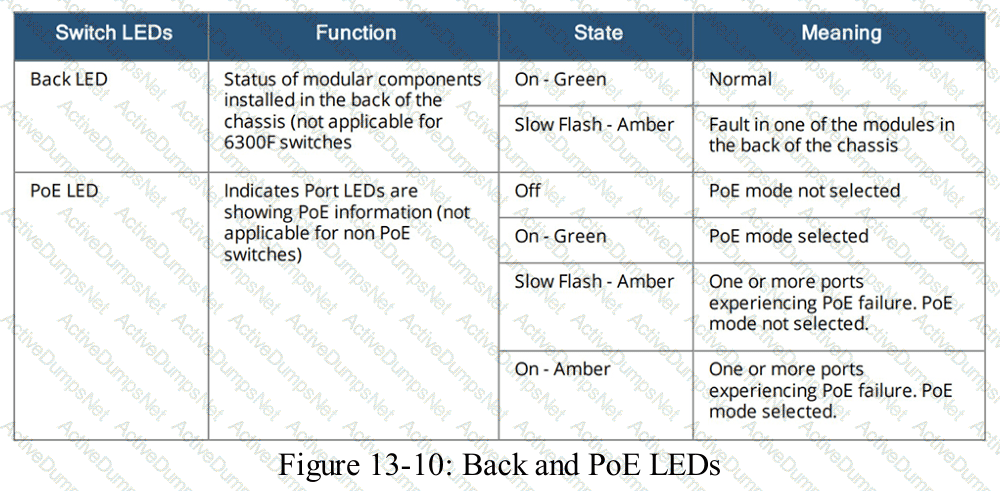
HPE Press study-guide figure / related learning illustration · Q184 Fig 13-10 LED
How do UXI probes assist when HPE Aruba Networking Central issues a high-severity alert?
Options:
They use live traffic analysis to identify and remediate potentially misconfigured devices
They correlate device logs with recent changes to identify potential misconfigurations
They run synthetic tests to quickly diagnose the scope and root cause of the problem
They provide logs for incident tracking and recommendations to prevent similar alerts
Answer:
CExplanation:
Comprehensive and Detailed Explanation
HPE Press guide context | PDF page 1035 | HPE Press, Aruba Certified Associate – Campus Access Official Certification Study Guide
Technical Deep Dive — Original Chat Wording
HPE Aruba Networking User Experience Insight (UXI) provides endpoint-perspective monitoring through physical sensors and supported software agents.
Its purpose is to reproduce user connectivity and application transactions so administrators can identify problems that conventional infrastructure monitoring may overlook.
UXI sensors perform synthetic tests that simulate ordinary user activity.
These can include wireless association, authentication, DHCP address acquisition, DNS resolution, gateway connectivity, and application access.
When HPE Aruba Networking Central identifies a high-severity network event, UXI measurements can provide additional evidence about the user-facing impact.
For example, an AP may remain operational while users experience intermittent DNS failures.
UXI can independently test DNS resolution and identify whether the failure affects a particular service or broader network connectivity.
Similarly, synthetic application tests can help determine whether an issue originates from the WLAN, local network, internet transport, or an application endpoint.
The resulting measurements support troubleshooting through time-based performance information, connectivity-stage analysis, and service availability results.
UXI does not normally modify device configurations automatically to remediate problems.
It also differs from ordinary configuration audit logging, which records changes rather than actively testing the user experience.
By measuring the same network services that users depend upon, UXI helps administrators narrow the scope of an incident and identify likely causes.
Therefore, Option C is correct.
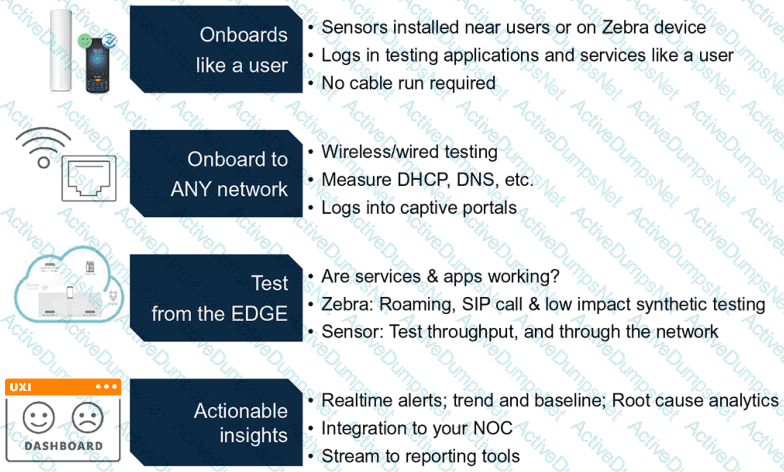
HPE Press study-guide figure / related learning illustration · Fig 13-39 UXI Process
You must ensure that voice traffic traversing an AOS-CX switch arrives with minimal latency. Which scheduling technology is best for this task?
Options:
QoS shaping
Rate limiting
Strict queuing
DWRR queuing
Answer:
CExplanation:
Comprehensive and Detailed Explanation
HPE Press guide context | PDF page 194 | HPE Press, Aruba Certified Associate – Campus Access Official Certification Study Guide
Technical Deep Dive — Reconstructed (Original Chat Text Not Recoverable)
Strict-priority queuing services a high-priority traffic queue before lower-priority queues, reducing serialization delay for latency-sensitive voice when congestion is present. DWRR distributes capacity with weights; shaping smooths rates and rate limiting drops excess packets. Strict priority must be configured carefully to avoid starving low-priority traffic.
The selected answer corresponds to C: Strict queuing. This matches the mechanism or management behavior described in the scenario rather than merely a related network feature.
Operational workflows should preserve consistent inventory, authorization, configuration history, and monitoring so that administrators can locate and manage devices predictably.
The operational view should be interpreted together with its underlying records: an alert, subscription count, or device status may describe management state rather than physical availability.
The answer should be validated against both the control-plane state and the forwarding or management outcome. A successful individual command alone is not proof that the end-to-end requirement is satisfied.
When troubleshooting or designing a change, verify compatibility between all participating devices, the management scope, and the applicable software release. The most useful evidence is the state observed on both sides of the affected connection.
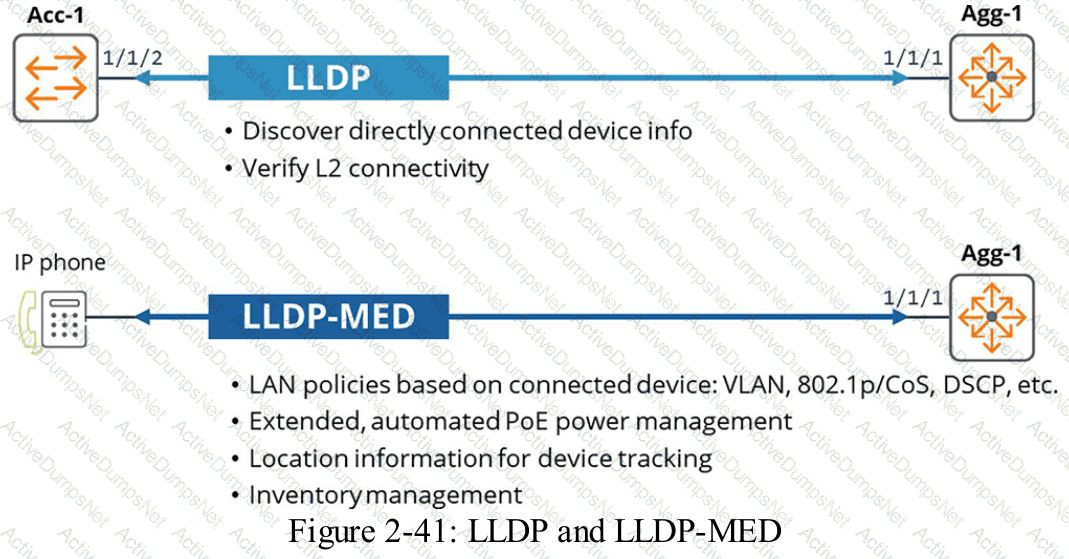
HPE Press study-guide figure / related learning illustration · Q74 LLDP MED
When measuring signal strength, dBm is commonly used, and 0 dBm represents 1 mW of power.
What does -20 dBm represent?
Options:
01 mW
1 mW
1 mV
10 mW
Answer:
AExplanation:
Comprehensive and Detailed Explanation
HPE Press guide context | PDF page 712 | HPE Press, Aruba Certified Associate – Campus Access Official Certification Study Guide
Technical Deep Dive — Reconstructed (Original Chat Text Not Recoverable)
dBm is a logarithmic power scale referenced to 1 milliwatt. The conversion is P_mW=10^(dBm/10), so -20 dBm equals 10^-2 mW or 0.01 mW. The mV choice uses a voltage unit and cannot be selected without impedance information.
The selected answer corresponds to A: 01 mW. This matches the mechanism or management behavior described in the scenario rather than merely a related network feature.
Optimization should consider both immediate performance and its tradeoffs in RF capacity, airtime, reliability, security, and operational overhead.
Use measurements rather than assumptions: compare the RF or switch metrics before and after making a controlled change.
When reviewing alternatives, identify which one directly addresses the stated requirement, rather than selecting a related capability that is useful elsewhere but does not fulfill the requested task.
The wrong choices may describe real technologies, but they perform different functions, apply to another layer, or omit a required prerequisite. Select the answer that resolves the exact scenario, not a nearby administrative task.
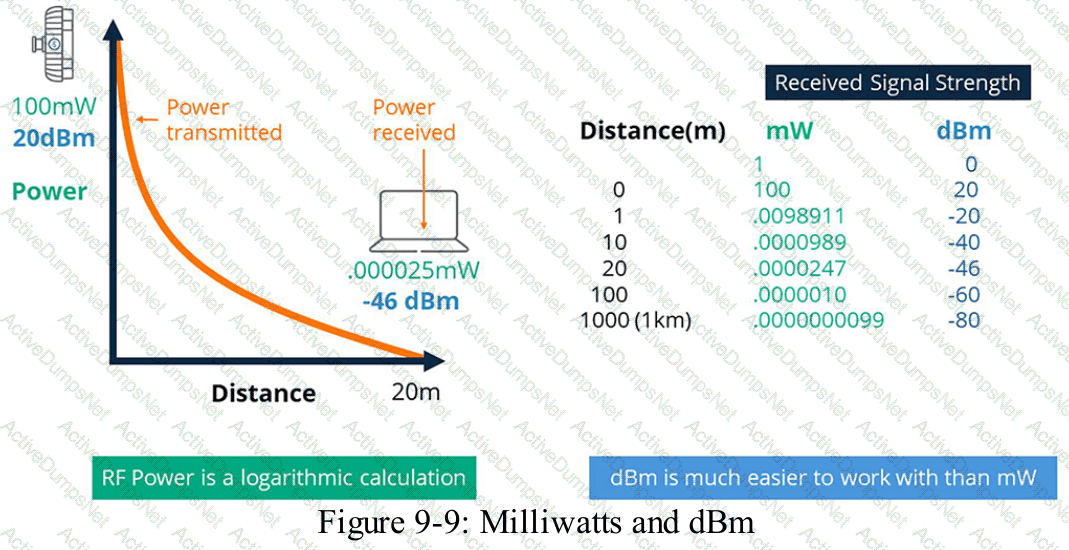
HPE Press study-guide figure / related learning illustration · Q65 dBm
Match the appropriate QoS concept to its definition.
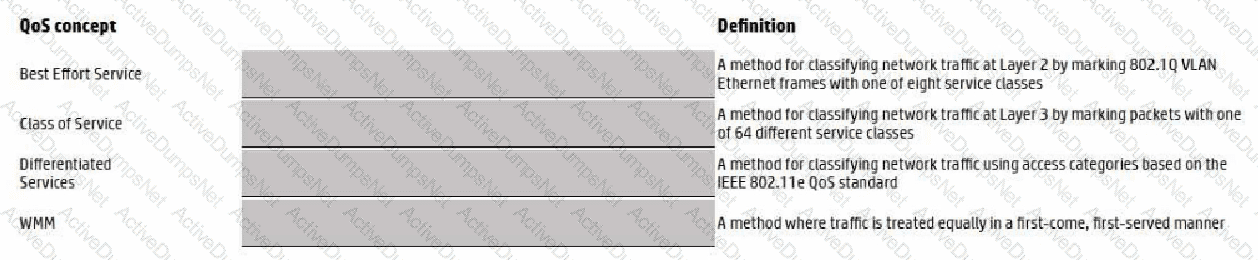
Options:
Answer:
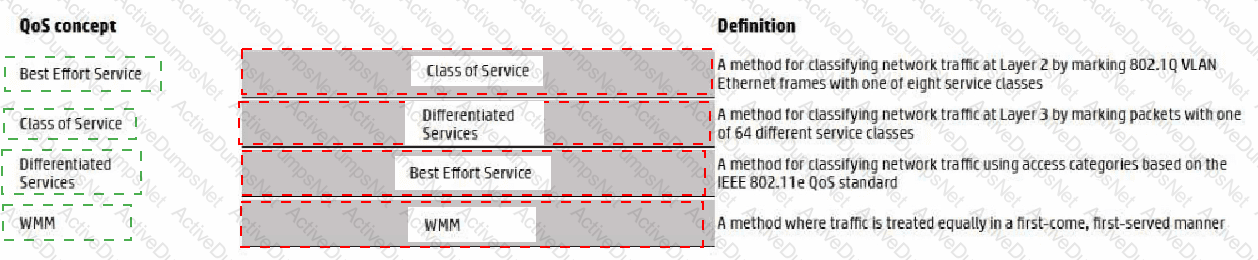
Explanation:
Exhibit item
Correct match
Class of service
Layer 2 classification marking
Differentiated Services Code Point
Layer 3 IP QoS marking
Strict Priority
Always serves selected queue before lower priorities
DWRR
Weighted scheduling distributes bandwidth among queues
Comprehensive and Detailed Explanation
HPE Press guide context | PDF page 189 | HPE Press, Aruba Certified Associate – Campus Access Official Certification Study Guide
Technical Deep Dive — Reconstructed (Original Chat Text Not Recoverable)
QoS classification and marking distinguish classes of traffic, scheduling determines queue service order, and shaping/rate limiting control offered rates. DSCP is a Layer 3 six-bit marking; CoS/802.1p is Layer 2. Strict priority favors selected queues; DWRR allocates weighted service across eligible queues.
The exhibit is a matching question: each original item must be paired with the applicable protocol, medium, security function, or address classification. The answer table below records the intended correspondence without changing the source exhibit.
Operational workflows should preserve consistent inventory, authorization, configuration history, and monitoring so that administrators can locate and manage devices predictably.
For example, a cloud-managed infrastructure device may be registered successfully but still require the correct subscription, site, group, and configuration scope.
In production, the decision should be documented and checked against the supported software release and platform model, because interface names, licensing tiers, and management workflows can change across Central and AOS-CX generations.
For practical use, confirm the prerequisite conditions first, then verify the resulting operational state. This separates an intended configuration from a working network service and avoids accepting a misleading result.
Where are wireless-client roaming decisions made?
Options:
HPE Aruba Networking Central
Joint decision made by the origination and destination APs
Client device
Virtual Controller
Answer:
CExplanation:
Comprehensive and Detailed Explanation
HPE Press guide context | PDF page 769 | HPE Press, Aruba Certified Associate – Campus Access Official Certification Study Guide
Technical Deep Dive — Reconstructed (Original Chat Text Not Recoverable)
Roaming is ultimately initiated and chosen by the wireless client, even when infrastructure supplies 802.11k neighbor reports, 802.11v transition advice, or 802.11r fast roaming. Neither Central nor an AP can guarantee a station will choose a particular neighboring BSS.
The selected answer corresponds to C: Client device. This matches the mechanism or management behavior described in the scenario rather than merely a related network feature.
Optimization should consider both immediate performance and its tradeoffs in RF capacity, airtime, reliability, security, and operational overhead.
Use measurements rather than assumptions: compare the RF or switch metrics before and after making a controlled change.
For an administrator preparing for the associate certification, the key distinction is the precise protocol or Central workflow involved. Similar-sounding features often operate at different OSI layers or management stages.
The wrong choices may describe real technologies, but they perform different functions, apply to another layer, or omit a required prerequisite. Select the answer that resolves the exact scenario, not a nearby administrative task.
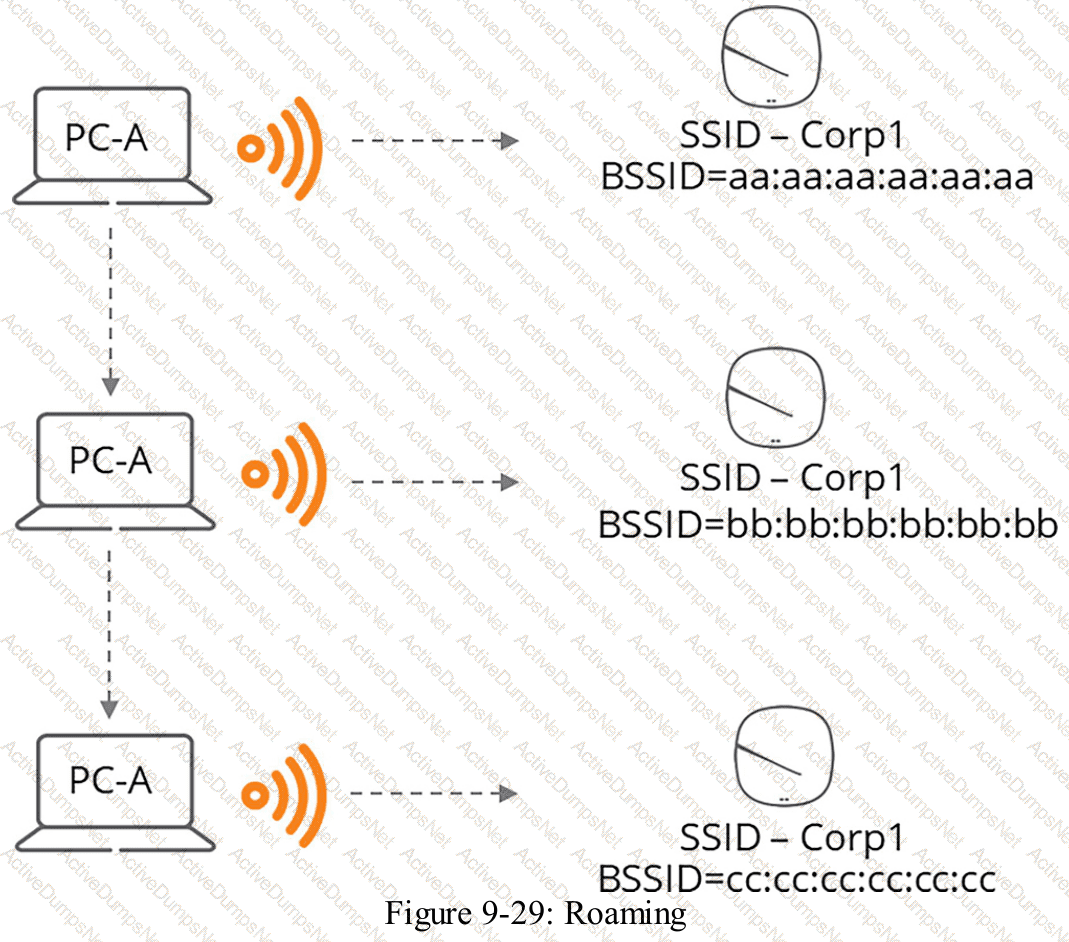
HPE Press study-guide figure / related learning illustration · Q68 Roaming
When would you bond multiple 20 MHz-wide 802.11 channels?
Options:
To decrease the Signal to Noise Ratio (SNR)
To provision highly available AP groups
To increase throughput between the client and AP
To utilize high gain omni-directional antennas
Answer:
CExplanation:
Comprehensive and Detailed Explanation
HPE Press guide context | PDF page 708 | HPE Press, Aruba Certified Associate – Campus Access Official Certification Study Guide
Technical Deep Dive — Reconstructed (Original Chat Text Not Recoverable)
Bonding adjacent 20-MHz channels creates wider 40-, 80-, or 160-MHz channels, increasing the PHY capacity available to supported clients under favorable RF conditions. Wider channels also consume more spectrum and can increase contention; they do not automatically improve coverage or SNR. Avoid wide channels in dense deployments without planning.
The selected answer corresponds to C: To increase throughput between the client and AP. This matches the mechanism or management behavior described in the scenario rather than merely a related network feature.
Optimization should consider both immediate performance and its tradeoffs in RF capacity, airtime, reliability, security, and operational overhead.
For example, higher PHY data rates do not guarantee higher useful throughput if airtime is lost to management traffic, contention, or retransmissions.
A strong verification step is to compare the expected outcome with operational status before and after the change. This confirms not only that a configuration was accepted, but also that the required service actually functions.
You have been asked to troubleshoot failed connectivity between a local subnet at the HQ Office, with 490 employees, and a remote subnet at the Branch Office. PC1 cannot ping PC2.
Use the provided topology and show command output to determine the reason for the failure.
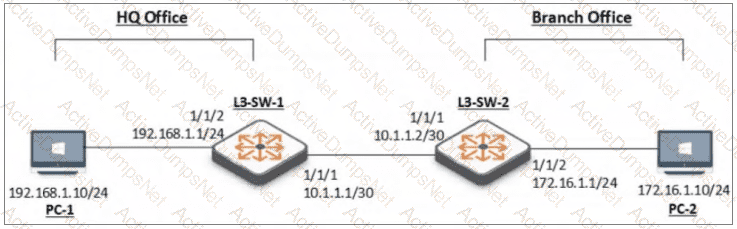
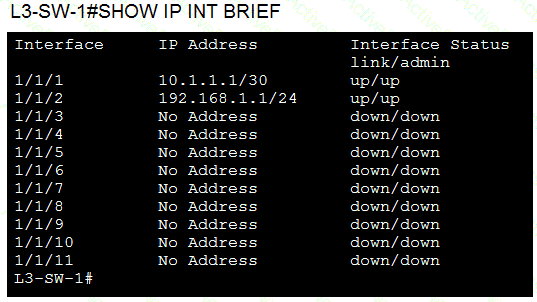
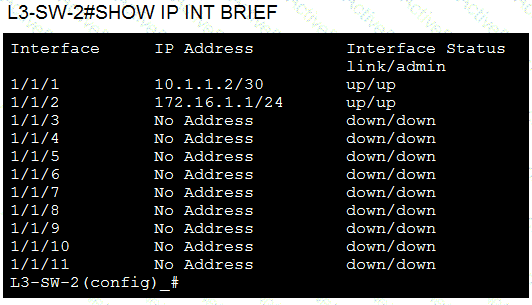
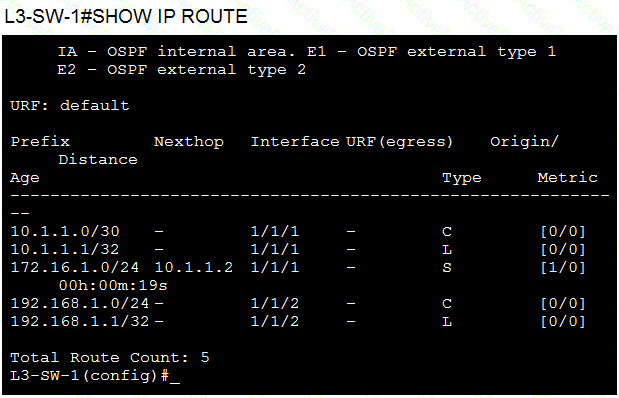
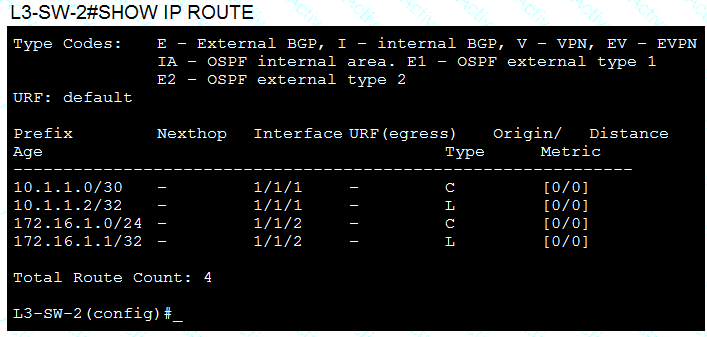
Options:
On Branch Office-L3-SW-2-There is no Layer 3 SVI configured in the correct subnet.
On Branch Office-L3-SW-2-The switch does not have a static route to the HQ Office Local Subnet.
On HQ Office L3-SW-1-The switch does not have a static default route to the internet.
On HQ OfficeL3-SW-1-There is no route to the Branch Office.
Answer:
BExplanation:
Comprehensive and Detailed Explanation
HPE Press guide context | PDF page 232 | HPE Press, Aruba Certified Associate – Campus Access Official Certification Study Guide
Technical Deep Dive — Reconstructed (Original Chat Text Not Recoverable)
The HQ switch has a static route for the branch's 172.16.1.0/24 subnet via the point-to-point next hop. However, the branch switch routing table contains only its directly connected links and the branch LAN; it lacks a route back to the HQ 192.168.1.0/24 LAN. Reply packets cannot return without a reverse route, so connectivity fails even when the forward path exists.
The selected answer corresponds to B: On Branch Office-L3-SW-2-The switch does not have a static route to the HQ Office Local Subnet.. This matches the mechanism or management behavior described in the scenario rather than merely a related network feature.
A disciplined investigation compares the observed symptom with expected behavior, tests the most likely failure stage, and verifies recovery rather than assuming that a single command has resolved the problem.
Collecting interface counters, event timestamps, configuration history, and service-test results helps determine whether a symptom originates locally or depends on another device.
Technical validation: this item contains a qualification or possible source-version ambiguity. Do not treat the choice as an unrestricted universal rule; retain the original exhibit and compare the exact deployment context with the relevant HPE documentation.
Which card lets you view your network’s health status in HPE Aruba Networking Central?
Options:
Client Health card
Device Health card
Configuration Health card
Device Inventory card
Answer:
BExplanation:
Comprehensive and Detailed Explanation
HPE Press guide context | PDF page 1002 | HPE Press, Aruba Certified Associate – Campus Access Official Certification Study Guide
Technical Deep Dive — Original Chat Wording
The Device Health card provides a consolidated view of the operational condition of managed network infrastructure.
It allows administrators to assess the health of supported device categories, including switches, access points, and gateways.
Rather than inspecting every device individually, the administrator can review a summary of the network's infrastructure-health distribution.
The card can identify devices classified into different health states and allow further investigation of affected sites or devices.
For example, if several switches show degraded health, the network operations team can open the relevant details to investigate the associated alerts or performance conditions.
This helps identify problems before they result in widespread service disruption.
The Client Health card provides a different perspective. It focuses on the experience and health of connected client devices rather than the infrastructure itself.
The Device Inventory card primarily summarizes registered devices, their types, and related inventory information.
Configuration Health is not the matching overview card specified by the documentation.
The Device Health card therefore provides the best starting point for assessing the current operational health of the managed network equipment.
Detailed troubleshooting may require examining interface status, system events, resource utilization, and other device-specific information.
Therefore, Option B (Device Health card) is correct.
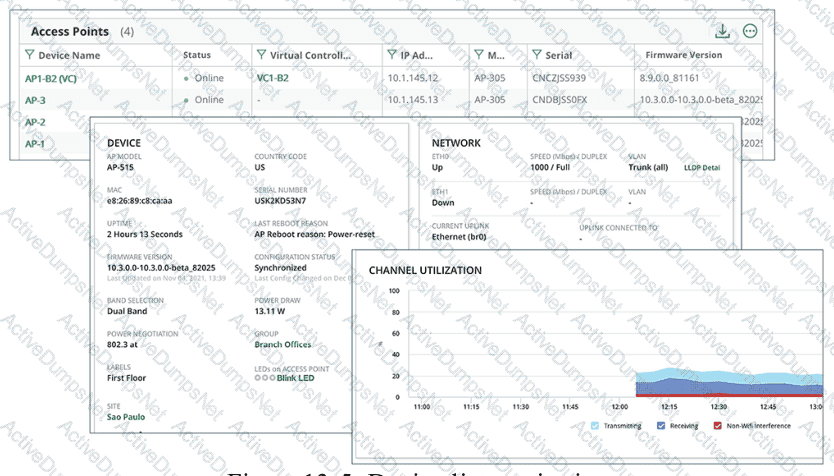
HPE Press study-guide figure / related learning illustration · Q160 Fig 13-5 Device
Which cable type is most suitable for short copper connections between network devices within the same rack?
Options:
CAT6a Ethernet patch cable.
Power cord.
Single Mode fiber optic cable.
Multimode fiber optic cable.
Answer:
AExplanation:
Comprehensive and Detailed Explanation
HPE Press guide context | PDF page 42 | HPE Press, Aruba Certified Associate – Campus Access Official Certification Study Guide
Technical Deep Dive — Original Chat Wording
Copper Ethernet cabling provides a practical method for connecting network equipment over short distances.
Category 6a (Cat 6a) is designed to support high-speed Ethernet transmission with improved performance against interference and crosstalk.
It supports 10GBASE-T connectivity over standard structured cabling distances up to 100 meters when compatible network interfaces and properly installed cabling are used.
For devices located in the same equipment rack, a short Cat 6a patch cable can provide reliable Ethernet connectivity.
Examples include connections between compatible switches, routers, firewalls, and management devices.
The chosen cable must match the physical Ethernet interfaces of the connected equipment.
For example, a Cat 6a cable is appropriate when both devices use compatible RJ-45 Ethernet ports.
A power cord carries electrical power and is not an Ethernet data cable.
Single-mode and multimode fiber are optical transmission media rather than copper cables.
Fiber connections require compatible optical interfaces and transceivers.
One additional consideration is that Direct Attach Copper (DAC) is often a cost-effective choice for very short, high-speed connections between devices with compatible SFP, SFP+, or QSFP interfaces.
However, DAC is not included among the available options.
Of the four listed choices, only Cat 6a is a suitable copper Ethernet data cable.
Therefore, Option A (CAT6a Ethernet patch cable) is correct.
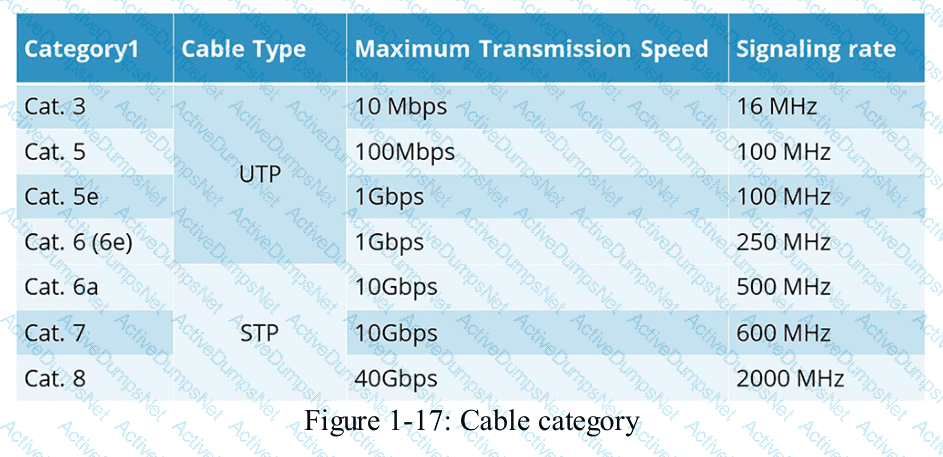
HPE Press study-guide figure / related learning illustration · Q132 Fig 1-17 Cable Cat
Which action must you perform after adding a service to HPE GreenLake?
Options:
Assign the device to an HPE Aruba Networking Central instance.
Assign the device to a device group for easier management.
Apply a digital certificate to the device for secure communication.
Assign the device to a specific site within your organization.
Answer:
AExplanation:
Comprehensive and Detailed Explanation
HPE Press guide context | PDF page 574 | HPE Press, Aruba Certified Associate – Campus Access Official Certification Study Guide
Technical Deep Dive — Original Chat Wording
HPE GreenLake provides an account-level platform for managing infrastructure resources and associated HPE services.
HPE Aruba Networking Central is a network-management service that operates within the supported GreenLake management architecture.
Adding a service or registering a device in GreenLake does not automatically complete all network-management prerequisites.
The device must be associated with the appropriate Central management environment.
The workflow generally includes registering the device, assigning it to the relevant application or service, satisfying applicable subscription requirements, and completing the necessary configuration.
For example, a company purchasing new AOS-CX switches can register their devices in the GreenLake inventory.
The administrator then associates the devices with Aruba Central so they become available for the intended management and provisioning operations.
Once the assignment is complete, the devices can be organized into appropriate management scopes, including sites and device groups, according to the supported deployment architecture.
Device-group and site assignment help organize configuration and monitoring, but those steps do not replace association with the Central management service.
Applying a digital certificate manually is not a universal prerequisite for ordinary Aruba Central onboarding.
The management system uses supported secure communication mechanisms during device registration and management.
The distinction is between registering infrastructure in GreenLake and making that infrastructure available to Aruba Central .
Therefore, Option A (Assign the device to an HPE Aruba Networking Central instance) is correct.
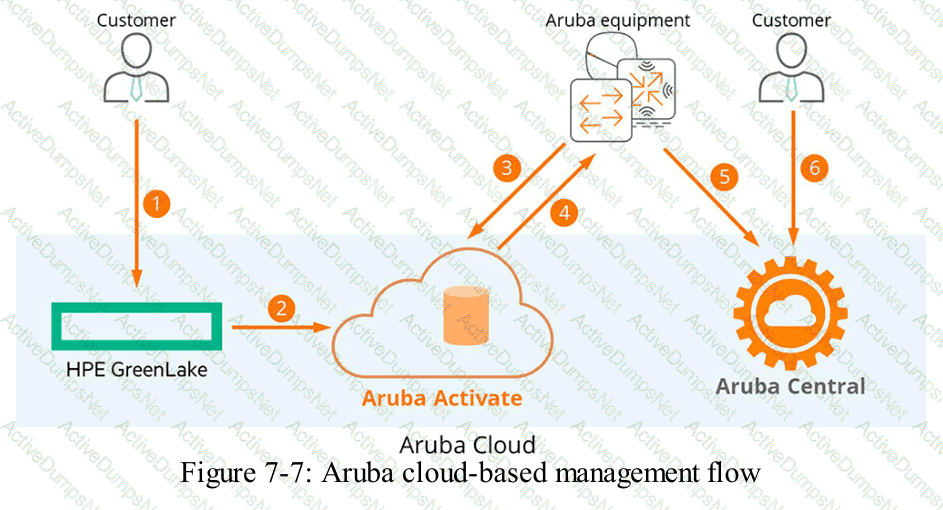
HPE Press study-guide figure / related learning illustration · Q133 Fig 7-7 Cloud Flow
You need to create a virtual stack using CX 8400. Choose the correct statement for this scenario with compatible cabling for the VSX ISL.
Options:
SFP28 7m DAC
SFP56 3m DAC
QSFP28 3m DAC
SFP 5m DAC
Answer:
CExplanation:
Comprehensive and Detailed Explanation
HPE Press guide context | PDF page 413 | HPE Press, Aruba Certified Associate – Campus Access Official Certification Study Guide
Technical Deep Dive — Reconstructed (Original Chat Text Not Recoverable)
A CX 8400 VSX inter-switch link requires supported high-speed interfaces and appropriately compatible optics or copper interconnects. A short QSFP28 100-Gb/s direct-attach cable can provide a suitable ISL. SFP-family alternatives with the stated speeds are mismatched to the expected QSFP28 VSX interconnect option.
The selected answer corresponds to C: QSFP28 3m DAC. This matches the mechanism or management behavior described in the scenario rather than merely a related network feature.
In campus network design, a successful decision must satisfy the customer's capacity, topology, physical environment, and lifecycle constraints.
For example, a campus may have sufficient equipment for today but require additional switch ports, PoE budget, or wireless capacity as its user population grows.
In production, the decision should be documented and checked against the supported software release and platform model, because interface names, licensing tiers, and management workflows can change across Central and AOS-CX generations.
For practical use, confirm the prerequisite conditions first, then verify the resulting operational state. This separates an intended configuration from a working network service and avoids accepting a misleading result.
When you export an audit log from HPE GreenLake, which detail must you provide?
Options:
File type
User role
Date range
Recipient email address
Answer:
AExplanation:
Comprehensive and Detailed Explanation
HPE Press guide context | PDF page 573 | HPE Press, Aruba Certified Associate – Campus Access Official Certification Study Guide
Technical Deep Dive — Original Chat Wording
HPE GreenLake provides audit logging to record relevant account-level and administrative activities.
Exporting these logs allows authorized personnel to examine records outside the management interface.
The export workflow begins by navigating to the Audit Log management page and selecting the export function.
Administrators must choose the required output file type.
Supported choices include CSV and PDF.
CSV is suitable for structured analysis, spreadsheet applications, and automated log processing.
PDF is generally more appropriate when records need to be presented in a fixed-layout document.
After selecting the file type, administrators can choose the records and columns to export.
Depending on the interface, they may export the entire audit log or the current search results.
A date range can be useful for filtering records before exporting, but the documented export procedure does not require a date range to be entered as its mandatory selection.
The user's role determines whether the export operation is authorized; it is not normally a parameter that the user must provide in the export dialog.
A recipient email address is also unnecessary for downloading an audit-log file.
Therefore, Option A (File type) is correct.
When deploying access points in an enterprise campus, what PoE factors should be considered to optimize the WLAN design?
Options:
Determine the PoE class and total power budget needed on switches.
Schedule PoE port shutdowns to save energy during off-peak hours.
Locate switches near access points to reduce cabling distances across floors.
Determine uplink bandwidth and select switch models that match wireless speeds.
Answer:
AExplanation:
Comprehensive and Detailed Explanation
HPE Press guide context | PDF page 671 | HPE Press, Aruba Certified Associate – Campus Access Official Certification Study Guide
Technical Deep Dive — Original Chat Wording
Power over Ethernet (PoE) enables compatible Ethernet switches to provide electrical power and data connectivity to access points through structured network cabling.
When designing an enterprise WLAN, administrators must determine the power requirements of every AP and verify that the access switches provide sufficient capacity.
IEEE PoE technologies include 802.3af, 802.3at, and 802.3bt, with different power-delivery capabilities.
The required power depends on the AP model, enabled radios, USB peripherals, Ethernet interfaces, and other supported functions.
Some APs operate in a restricted mode when the available PoE power is insufficient, potentially disabling or limiting certain capabilities.
For example, if 20 APs each require 30 watts of allocated power, the nominal requirement is:
20 × 30 = 600 W
The switch or stack must provide an appropriate usable PoE budget for these devices, allowing for platform-specific reservations and other connected endpoints.
Administrators can inspect available power through:
show power-over-ethernet
show power-over-ethernet brief
Selecting a switch solely according to Ethernet port count can result in insufficient power capacity.
Uplink bandwidth and cabling distance remain important WLAN design considerations, but they do not replace the requirement to calculate PoE power demand.
Therefore, Option A is correct.
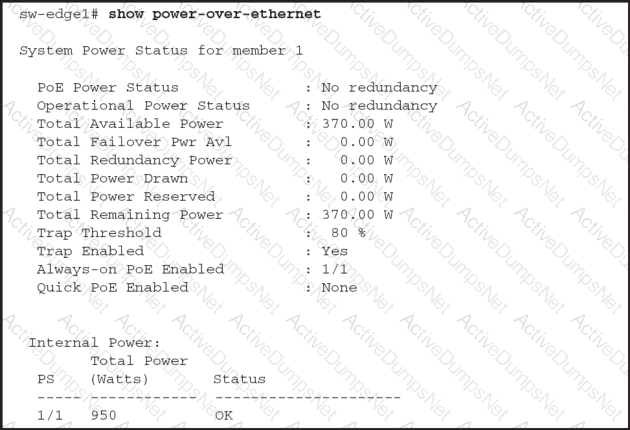
HPE Press study-guide figure / related learning illustration · Fig PoE 0
Which action ensures that audit logs are retained in accordance with compliance requirements?
Options:
Set a proper retention period for logs.
Delete audit logs after each incident review.
Decrypt audit logs for data protection.
Increase storage space for more audit logs.
Answer:
AExplanation:
Comprehensive and Detailed Explanation
HPE Press guide context | PDF page 679 | HPE Press, Aruba Certified Associate – Campus Access Official Certification Study Guide
Short exact extract: “Use the audit trail feature to track AP configuration changes in Aruba Central.”
Technical Deep Dive — Original Chat Wording
Audit logs provide a historical record of administrative activities, configuration modifications, and other security-relevant operations.
In enterprise environments, audit records are important for accountability, investigations, and demonstrating compliance with applicable requirements.
A retention policy determines how long records must be preserved before they can be archived or deleted.
The appropriate period depends on the organization's legal, contractual, regulatory, and operational obligations.
For example, a regulated organization may need to preserve security-related events for a specified period and make them available during an external audit.
The network administrator must understand those requirements and configure the logging infrastructure accordingly.
Retention controls should include appropriate storage capacity, access restrictions, integrity protection, backup arrangements, and documented deletion procedures.
Deleting logs immediately after an incident review could destroy evidence required for subsequent investigations.
Decryption is not a general data-protection method. Audit records should instead be protected using appropriate encryption, authentication, and authorization controls.
Increasing storage capacity can help support a retention policy, but additional capacity alone does not establish how long records must be retained.
The controlling requirement is a documented and correctly implemented retention period.
Therefore, Option A (Set a proper retention period for logs) is correct.
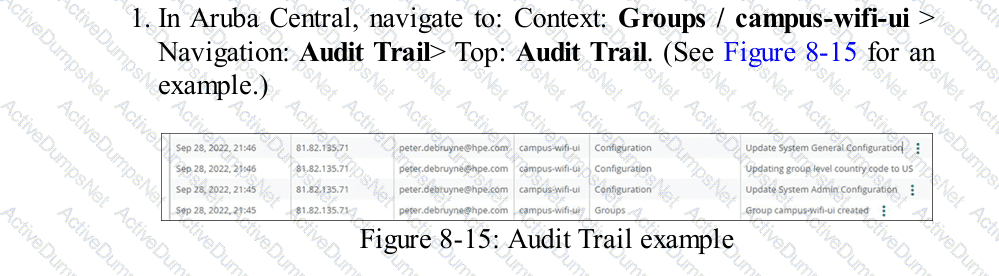
HPE Press study-guide figure / related learning illustration · Q167 Fig 8-15 Audit
A customer has recently implemented user and device certificates through a company-wide Group Policy Object (GPO).
Which EAP method requires client certificates to authenticate to the network?
Options:
EAP-TTLS
EAP-TEAP
EAP-TLS
PEAP
Answer:
CExplanation:
Comprehensive and Detailed Explanation
HPE Press guide context | PDF page 824 | HPE Press, Aruba Certified Associate – Campus Access Official Certification Study Guide
Short exact extract: “EAP-TLS is the preferred method and the one that you should implement for enterprise networks.”
Technical Deep Dive — Original Chat Wording
EAP-Transport Layer Security (EAP-TLS) is a certificate-based authentication method commonly used for secure enterprise wired and wireless networks.
It operates within the IEEE 802.1X authentication framework and provides mutual authentication between the supplicant and authentication server.
The authentication server presents its certificate so that the client can validate the server's identity.
The client also presents a valid certificate to authenticate its own identity.
This certificate-based approach avoids reliance on reusable passwords as the primary authentication secret.
In a Windows enterprise environment, Group Policy and certificate auto-enrollment can simplify certificate deployment to domain-managed computers and users.
HPE Aruba Networking ClearPass Policy Manager can validate presented certificates against trusted certificate authorities and apply authorization policies based on certificate attributes and other identity information.
EAP-TTLS and PEAP establish protected TLS tunnels, but they commonly support password-based inner authentication without requiring client certificates.
EAP-TEAP supports authentication chaining and may use certificates as part of its inner authentication methods. However, client certificates are not inherently required for every TEAP configuration.
EAP-TLS specifically requires the supplicant to possess a suitable certificate and private key for its normal certificate-based mutual authentication.
Certificate validation should also include appropriate trust-chain checks, validity periods, and identity verification.
Therefore, Option C (EAP-TLS) is correct.
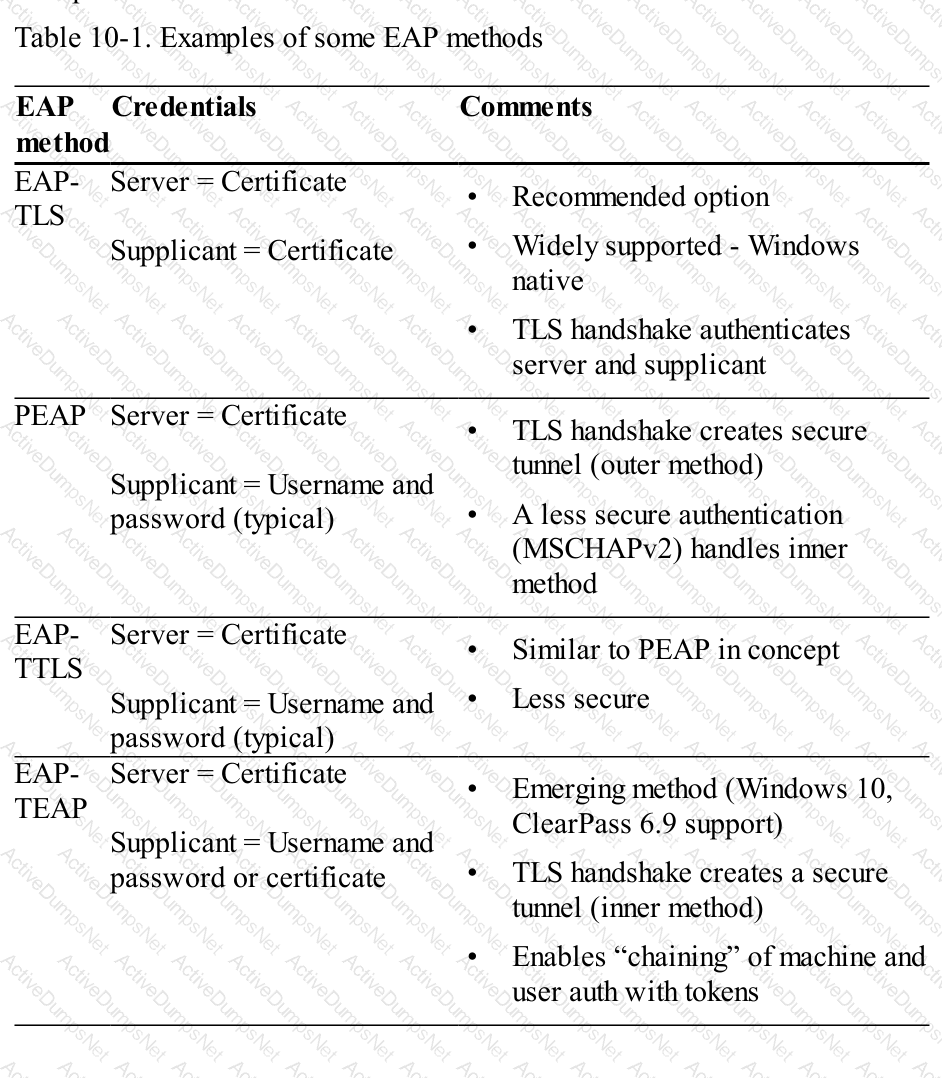
HPE Press study-guide figure / related learning illustration · Q123 Table 10-1 EAP TLS
How do Audit Trail filters improve troubleshooting efficiency in HPE Aruba Networking Central?
Options:
They emphasize severe events without regard to time or source.
They show every log record without filtering.
By narrowing down logs to relevant actions, devices, or times
By speeding up event log retrieval to support all connected devices at once
Answer:
CExplanation:
Comprehensive and Detailed Explanation
HPE Press guide context | PDF page 680 | HPE Press, Aruba Certified Associate – Campus Access Official Certification Study Guide
Technical Deep Dive — Original Chat Wording
The Audit Trail records administrative activities and supported system events generated within HPE Aruba Networking Central.
These records are valuable when a network problem appears shortly after a configuration change.
However, an enterprise environment may generate substantial numbers of audit entries across numerous sites, devices, and administrators.
Filtering enables technicians to isolate records associated with a specific investigation.
For example, if a campus switch stops forwarding traffic after a planned maintenance window, the engineer can filter the Audit Trail to examine activity affecting that switch during the relevant period.
The resulting entries may identify a VLAN change, interface modification, or unsuccessful configuration operation.
Filters can also help determine which administrator initiated an action and whether the management system successfully completed it.
This reduces the amount of irrelevant information that must be reviewed.
Time filters are particularly useful because they allow engineers to correlate configuration events with the reported onset of a problem.
A general event-severity display does not provide the same targeted administrative history.
Displaying every record without filtering makes investigation less efficient.
Therefore, Option C (By narrowing down logs to relevant actions, devices, or times) is correct.
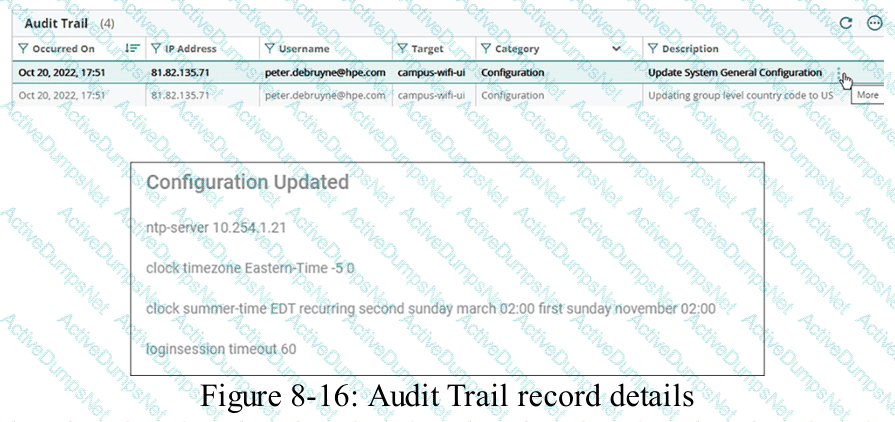
HPE Press study-guide figure / related learning illustration · Q186 Fig 8-16 Audit
Unlock HPE6-A85 Features
- HPE6-A85 All Real Exam Questions
- HPE6-A85 Exam easy to use and print PDF format
- Download Free HPE6-A85 Demo (Try before Buy)
- Free Frequent Updates
- 100% Passing Guarantee by Activedumpsnet
Questions & Answers PDF Demo
- HPE6-A85 All Real Exam Questions
- HPE6-A85 Exam easy to use and print PDF format
- Download Free HPE6-A85 Demo (Try before Buy)
- Free Frequent Updates
- 100% Passing Guarantee by Activedumpsnet