
- Home
- Fortinet
- Fortinet Network Security Expert
- NSE7_SSE_AD-25
- NSE7_SSE_AD-25 - Fortinet NSE 7 - FortiSASE 25 Enterprise Administrator
Fortinet NSE7_SSE_AD-25 Fortinet NSE 7 - FortiSASE 25 Enterprise Administrator Exam Practice Test
Fortinet NSE 7 - FortiSASE 25 Enterprise Administrator Questions and Answers
When configuring the DLP rule in FortiSASE using Regex format, what would be the correct order for the configuration steps? (Place the four correct steps in order)
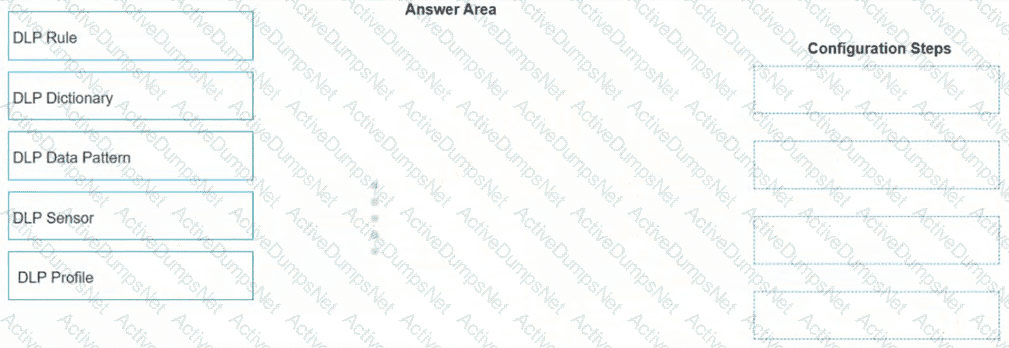
Options:
Answer:
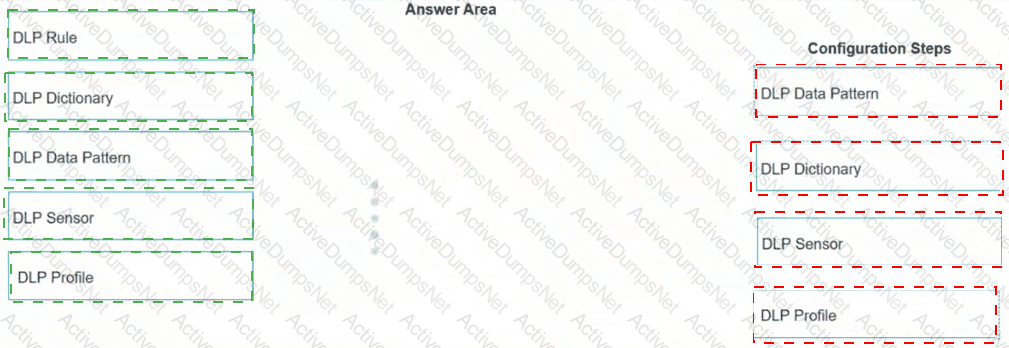
Explanation:
1. DLP Data Pattern
2. DLP Dictionary
3. DLP Sensor
4. DLP Profile
The FortiSASE Data Loss Prevention (DLP) framework follows a hierarchical object-oriented structure. When creating a custom DLP rule using Regular Expressions (Regex), the administrator must build the components from the most granular level upward to the policy level.
DLP Data Pattern: This is the first step where the actual Regex string is defined. The pattern specifies what specific data string (e.g., a specific credit card format or employee ID) the engine should look for.
DLP Dictionary: Once the pattern is created, it must be added to a Dictionary. The dictionary acts as a container that groups one or more data patterns together for easier management.
DLP Sensor: The dictionary is then linked to a DLP Sensor. Within the sensor, you define the " Rule " which specifies the dictionary to use and the action to take (such as block, log, or quarantine) when a match occurs.
DLP Profile: Finally, the sensor is applied to a DLP Profile. This profile is the high-level object that is ultimately selected within a FortiSASE Security Policy to inspect traffic for sensitive data.
Which two deployment methods are used to connect a FortiExtender as a FortiSASE LAN extension? (Choose two.)
Options:
Connect FortiExtender to FortiSASE using FortiZTP
Enable Control and Provisioning Wireless Access Points (CAPWAP) access on the FortiSASE portal.
Enter the FortiSASE domain name in the FortiExtender GUI as a static discovery server
Configure an IPsec tunnel on FortiSASE to connect to FortiExtender.
Answer:
A, CExplanation:
There are two deployment methods used to connect a FortiExtender as a FortiSASE LAN extension:
Connect FortiExtender to FortiSASE using FortiZTP:
FortiZero Touch Provisioning (FortiZTP) simplifies the deployment process by allowing FortiExtender to automatically connect and configure itself with FortiSASE.
This method requires minimal manual configuration, making it efficient for large-scale deployments.
Enter the FortiSASE domain name in the FortiExtender GUI as a static discovery server:
Manually configuring the FortiSASE domain name in the FortiExtender GUI allows the extender to discover and connect to the FortiSASE infrastructure.
This static discovery method ensures that FortiExtender can establish a connection with FortiSASE using the provided domain name.
Refer to the exhibit.
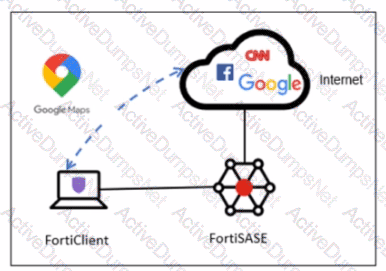
A company has a requirement to inspect all the endpoint internet traffic on FortiSASE, and exclude Google Maps traffic from the FortiSASE VPN tunnel and redirect it to the endpoint physical Interface.
Which configuration must you apply to achieve this requirement?
Options:
Exempt the Google Maps FQDN from the endpoint system proxy settings.
Configure a static route with the Google Maps FQDN on the endpoint to redirect traffic
Configure the Google Maps FQDN as a split tunneling destination on the FortiSASE endpoint profile.
Change the default DNS server configuration on FortiSASE to use the endpoint system DNS.
Answer:
CExplanation:
To meet the requirement of inspecting all endpoint internet traffic on FortiSASE while excluding Google Maps traffic from the FortiSASE VPN tunnel and redirecting it to the endpoint ' s physical interface, you should configure split tunneling. Split tunneling allows specific traffic to bypass the VPN tunnel and be routed directly through the endpoint ' s local interface.
Split Tunneling Configuration:
Split tunneling enables selective traffic to be routed outside the VPN tunnel.
By configuring the Google Maps Fully Qualified Domain Name (FQDN) as a split tunneling destination, you ensure that traffic to Google Maps bypasses the VPN tunnel and uses the endpoint ' s local interface instead.
Implementation Steps:
Access the FortiSASE endpoint profile configuration.
Add the Google Maps FQDN to the split tunneling destinations list.
This configuration directs traffic intended for Google Maps to bypass the VPN tunnel and be routed directly through the endpoint ' s physical network interface.
Which policy type is used to control traffic between the FortiClient endpoint to FortiSASE for secure internet access?
Options:
VPN policy
thin edge policy
private access policy
secure web gateway (SWG) policy
Answer:
DExplanation:
The Secure Web Gateway (SWG) policy is used to control traffic between the FortiClient endpoint and FortiSASE for secure internet access. SWG provides comprehensive web security by enforcing policies that manage and monitor user access to the internet.
Secure Web Gateway (SWG) Policy:
SWG policies are designed to protect users from web-based threats and enforce acceptable use policies.
These policies control and monitor user traffic to and from the internet, ensuring that security protocols are followed.
Traffic Control:
The SWG policy intercepts all web traffic, inspects it, and applies security rules before allowing or blocking access.
This policy type is crucial for providing secure internet access to users connecting through FortiSASE.
What is the role of ZTNA tags in the FortiSASE Secure Internet Access (SIA) and Secure Private Access (SPA) use cases? (Choose one answer)
Options:
ZTNA tags are created to isolate browser sessions in SIA and enforce data loss prevention in SPA for all devices.
ZTNA tags determine device posture for non-web traffic protocols and are applied only in agentless deployments for SIA.
ZTNA tags determine device posture for endpoints running FortiClient and are used to grant or deny access in SIA or SPA based on that posture.
ZTNA tags are applied to unmanaged endpoints without FortiClient to secure HTTP and HTTPS traffic in SIA and SPA.
Answer:
CExplanation:
In the Fortinet SASE architecture, Zero Trust Network Access (ZTNA) tags (which have been renamed to Security Posture Tags starting with FortiClient/EMS 7.4.0) play a critical role in continuous posture assessment. These tags are dynamic metadata assign 8 ed to an endpoint based on specific conditions or " tagging rules " defined in the FortiSASE Endpoint Management Service (EMS).
Posture Determination: The FortiClient agent, installed on the endpoint, monitors the device for various security attributes—such as whether an antivirus is running, the presence of specific registry keys, OS version, or the absence of critical vulnerabilities.
SIA (Secure Internet Access) Use Case: In SIA scenarios, FortiSASE uses these tags within security policies to control internet access. For example, a policy may allow full internet access only to endpoints tagged as " Compliant " while redirecting " Non-Compliant " devices to a restricted remediation portal.
SPA (Secure Private Access) Use Case: In SPA (specifically ZTNA Proxy mode), the tags are synchronized from FortiSASE to the corporate FortiGate (acting as the ZTNA Access Proxy). 12 When a user attempts to access a private application, the FortiGate checks the endpoint ' s client certificate and its synchronized ZTNA tags. 13 If the endpoint does not meet the required posture (e.g., it is missing a required " Domain-Joined " tag), access is denied at the session level.
According to the FortiSASE 25 Enterprise Administrator Study Guide , ZTNA tags are fundamental to the " Zero Trust " principle because they move beyond static identity (username/password) to verify the real-time security state of the device before granting access to either the internet or internal private resources.
What action must a FortiSASE customer take to restrict organization SaaS access to only FortiSASE-connected users? (Choose one answer)
Options:
Implement a CNAPP solution to allowlist the users under the FortiSASE egress IP
Implement ZTNA for their private apps and allow list them under SaaS portals or grant them conditional access.
Connect FortiSASE to an SPA hub for private access to an allowlisted connecting IP.
Retrieve the PoPs of the users ' public IP addresses from the FortiSASE region IP list and whitelist the IP under SaaS portals, or grant them conditional access.
Answer:
DExplanation:
To ensure that organizational SaaS applications (such as Microsoft 365, Salesforce, or AWS Console) are only accessible to users who are currently connected and protected by FortiSASE, administrators utilize Source IP Anchoring and IP-based access control .
Consistent Egress IPs: Every FortiSASE instance is assigned a set of dedicated public IP addresses (egress IPs) for each Security Point of Presence (PoP). Regardless of where a remote user is physically located, when they connect to a specific FortiSASE PoP, all their traffic destined for the internet or SaaS applications will appear to originate from that PoP ' s dedicated egress IP.
Whitelisting and Conditional Access: Administrators can retrieve the list of these dedicated egress IPs from the FortiSASE portal (typically found under the Support or Region IP list). These IPs are then configured as " Trusted Locations " or " Named Locations " within the SaaS provider ' s security settings (e.g., Microsoft Entra ID Conditional Access).
Enforcement Mechanism: Once the SaaS portal is configured to only permit logins from the FortiSASE egress IP ranges, any user attempting to access the application without being connected to the FortiSASE VPN will be denied access because their source IP will be their local ISP address rather than the trusted SASE IP. This effectively mandates the use of the SASE security stack for all corporate SaaS interactions.
Analysis of Incorrect Options:
Option A: CNAPP (Cloud-Native Application Protection Platform) is used for securing cloud-native applications and infrastructure, not for managing egress IP whitelisting for external SaaS providers.
Option B: While ZTNA is a secure access method, it is primarily used for Private Applications hosted by the organization, not for third-party public SaaS portals which rely on standard IP or identity-based conditional access.
Option C: SPA hubs are designed for Secure Private Access (connecting to a corporate data center), not for managing access to public SaaS applications.
How does FortiSASE Secure Private Access (SPA) facilitate connectivity to private resources in a hub-and-spoke network? (Choose one answer)
Options:
SPA applies source network address translation (SNAT) for remote user traffic and uses IKEv1 for IPsec tunnels to connect to standalone hubs without BGP support.
SPA connects to private resources using HTTP and HTTPS protocols and relies on FortiClient for agentless access to SD-WAN deployments.
SPA establishes direct links to spokes without IPsec or BGP and uses an easy configuration key to secure web traffic for remote users.
SPA connects a FortiSASE POP to a FortiGate hub or SD-WAN deployment using IPsec and BGP for dynamic route exchange, with an easy configuration key for simplified setup on FortiOS.
Answer:
DExplanation:
The correct answer is D . The FortiSASE study guide explains that SPA allows a FortiSASE POP to act as a spoke and connect to a FortiGate hub. It states that you can use FortiSASE SPA so that a POP connects to either a standalone hub using IPsec or to an existing Fortinet SD-WAN deployment . It also states that the BGP protocol is established through IPsec links for dynamic route exchange, which gives FortiSASE remote users access to private resources. For hub deployments running FortiOS 7.4.5 or later, the guide explains that an easy configuration key can simplify SPA setup on FortiSASE by automatically populating key fields in the FortiGate hub configuration.
The wrong options contradict the guide. Option A is false because FortiSASE does not apply SNAT for remote VPN user and edge device traffic destined for SPA hubs, and FortiSASE spokes support IKEv2, not IKEv1. Option B confuses agentless ZTNA with SD-WAN private access. Option C is wrong because SPA uses IPsec and BGP, and the easy configuration key is for SPA hub setup, not for securing general web traffic.
Which two benefits come from integrating SoCaaS with FortiSASE? (Choose two answers)
Options:
Eliminates the need of endpoint projection software
Continuous threat monitoring of all connected endpoints
Centralized visibility of all threat events
Provides bandwidth usage analytics
Answer:
B, CExplanation:
The integration of FortiGuard SOCaaS with FortiSASE significantly strengthens an organization ' s security posture by offloading complex security operations to Fortinet ' s expert analysts. 4
Continuous Threat Monitoring (B): FortiGuard SOCaaS provides 24x7x365 threat monitoring for all endpoints connected to the FortiSASE environment. This service eliminates the need for organizations to hire and maintain their own round-the-clock security operations staff while ensuring that threats are detected and verified in as little as 15 minutes.
Centralized Visibility (C): By forwarding FortiSASE logs to the SOCaaS cloud, administrators gain centralized visibility of all security events through a single, user-friendly portal. This portal allows security teams to track threats, review expert-led incident escalations, and communicate directly with Fortinet SOC analysts to streamline the incident response process.
Operational Efficiency: The integration uses AI-driven alert triage and automated correlation to distill data from the Fortinet Security Fabric, focusing on legitimate threats and reducing the alert fatigue often experienced by internal IT teams.
When you configure FortiSASE Secure Private Access (SPA) with SD-WAN integration, you must establish a routing adjacency between FortiSASE and the FortiGate SD-WAN hub. Which routing protocol must you use?
Options:
BGP
IS-IS
OSPF
EIGRP
Answer:
AExplanation:
When configuring FortiSASE Secure Private Access (SPA) with SD-WAN integration, establishing a routing adjacency between FortiSASE and the FortiGate SD-WAN hub requires the use of the Border Gateway Protocol (BGP).
BGP (Border Gateway Protocol):
BGP is widely used for establishing routing adjacencies between different networks, particularly in SD-WAN environments.
It provides scalability and flexibility in managing dynamic routing between FortiSASE and the FortiGate SD-WAN hub.
Routing Adjacency:
BGP enables the exchange of routing information between FortiSASE and the FortiGate SD-WAN hub.
This ensures optimal routing paths and efficient traffic management across the hybrid network.
Which two settings are automatically pushed from FortiSASE to FortiClient in a new FortiSASE deployment with default settings? (Choose two answers)
Options:
FortiSASE certificate authority (CA) certificate
Tunnel profile
Real-time protection
Zero trust network access (ZTNA) tags1
Answer:
A, BExplanation:
In a standard FortiSASE agent-based deployment, the FortiSASE Endpoint Management Service (EMS) acts as the central control plane for all managed FortiClient instances. When an endpoint is onboarded, the system is designed to provide " zero-touch " configuration for the core connectivity and security components.
CA Certificate (A): For SSL deep inspection to function without triggering browser certificate warnings, the endpoint must trust the FortiSASE CA. FortiSASE supports automatically installing the FortiSASE CA certificate for managed agent-based users. Once the endpoint connects to the FortiSASE EMS, the service automatically deploys the CA certificate to the trusted certificate store of the client machine.
Tunnel Profile (B): To enable Secure Internet Access (SIA), FortiClient requires a pre-configured VPN or tunnel profile that points to the FortiSASE cloud infrastructure. In a new deployment with default settings, FortiSASE automatically pushes the tunnel profile (including gateway information and auto-connect settings) to the FortiClient endpoint. This allows the user to establish a full-tunnel connection to the nearest Security PoP immediately after onboarding.
Analysis of Incorrect Options:
Real-time protection (C): While FortiSASE can manage Malware Protection and Sandbox settings, specific " Real-time protection " features often require manual activation or specific configuration within the Malware Protection profile before being pushed; they are not necessarily " automatically " active in the absolute default state without a profile assignment.
ZTNA tags (D): ZTNA tags are dynamic security posture attributes. While FortiSASE evaluates the endpoint to determine which tags apply, the tags themselves are not " pushed " to the client as a setting; rather, the ZTNA connection rules are pushed, and the tags are synchronized back to the security fabric for posture enforcement.
A FortiSASE customer has been enforcing always-on VPN for their remote users running FortiClient. What option can be enabled under the customer’s Endpoint Profile to allow them access different resources located in the same L2 network? (Choose one answer)
Options:
Allow local LAN Access in the user Endpoint Profile before they get connected to the VPN
Endpoint Sandbox protection for VPN users
Endpoint Anti-Virus protection in the Endpoint Profile for VPN
Network Lockdown for endpoints with VPN enabled
Answer:
AExplanation:
In a FortiSASE environment where always-on VPN is enforced, FortiClient typically establishes a full tunnel to a Security Point of Presence (PoP). By default, a full-tunnel configuration instructs the endpoint to send all traffic—including traffic destined for the local network—through the secure tunnel to FortiSASE for inspection.
The Local Access Challenge: When a remote user is at home or in a satellite office, they often need to access local resources such as printers, NAS devices, or other computers on the same Layer 2 (L2) broadcast domain. In a standard full-tunnel setup, these local resources become unreachable because the routing table on the endpoint prioritizes the VPN interface for all non-local-gateway traffic.
Allow Local LAN Access: To resolve this while maintaining the security of the " Always-On " requirement, FortiSASE administrators can enable the Allow Local LAN Access feature within the Endpoint Profile .
Configuration Logic: This setting modifies the FortiClient configuration (often via an XML update pushed from the FortiSASE EMS) to include an exemption for the endpoint ' s locally connected subnet. Specifically, it ensures that traffic destined for the local L2 network does not enter the IPsec or SSL-VPN tunnel, allowing the user to interact with local peripherals while all other internet and corporate-bound traffic remains secured by FortiSASE.
Incorrect Options: * Option B and C: Sandbox and Anti-Virus protections are security features for threat detection and do not influence the routing of local network traffic.
Option D: Network Lockdown actually does the opposite; it restricts network access until a VPN connection is established and typically blocks local LAN access unless specific exemptions are made, making it the incorrect choice for enabling access to local resources.
You are designing a new network, and the cybersecurity policy mandates that all remote users working from home must always be connected and protected. Which FortiSASE component facilitates this always-on security measure? (Choose one answer)
Options:
Unified FortiClient
SDWAN on-ramp2
Secure web gateway
Thin-branch SASE extension
Answer:
AExplanation:
In a FortiSASE environment, the Unified FortiClient agent is the critical component that fulfills the requirement for " always-on " connectivity and security for remote users.
Persistent Encrypted Tunnels : The Unified FortiClient maintains a persistent, always-on connection to the FortiSASE infrastructure. 4 This is typically achieved through an auto-connect VPN tunnel (SSL or IPsec) that initiates as soon as the user logs into their device and has internet access.
Continuous Security Enforcement : By staying connected to a nearby FortiSASE Point of Presence (PoP), the endpoint ensures that all traffic is inspected. This allows the organization to enforce a consistent security posture—including Web Filtering, Antivirus, and Application Control—regardless of whether the user is at home, in a coffee shop, or traveling.
Zero-Trust Integration : Beyond simple connectivity, the unified agent supports Universal ZTNA . It continuously verifies the identity of the user and the security posture of the device before granting access to specific applications, thereby satisfying modern zero-trust security mandates.
Comparison of Other Components :
SD-WAN on-ramp (B) : Used primarily to integrate existing branch office SD-WAN networks with the SASE cloud for private application access.
Secure Web Gateway (C) : While a feature of the SASE PoP, the agentless SWG deployment (using PAC files) does not provide the same level of " always-on " persistent tunnel protection as the FortiClient agent.
Thin-branch SASE extension (D) : Focused on securing small branch locations (using FortiAP or FortiExtender) where individual client agents may not be deployed on every device.
Which information does FortiSASE use to bring network lockdown into effect on an endpoint? (Choose one answer)
Options:
Zero-day malware detection on endpoint
The number of critical vulnerabilities detected on the endpoint
The connection status of the tunnel to FortiSASE
The security posture of the endpoint based on ZTNA tags
Answer:
CExplanation:
The Network Lockdown feature in FortiSASE is a specialized security control designed to ensure that managed endpoints remain protected by the SASE security stack at all times.
Mechanism of Action: Network lockdown relies specifically on the connection status of the tunnel to FortiSASE . When this feature is enabled in the Endpoint Profile, the FortiClient agent monitors whether the secure VPN tunnel (SSL or IPsec) to a FortiSASE Point of Presence (PoP) is active.
Enforcement Logic: If the agent detects that the tunnel is disconnected , it immediately places the endpoint ' s network interface into a " locked " state. In this state, all inbound and outbound network traffic is blocked, with the exception of traffic required to re-establish the connection to the FortiSASE infrastructure.
Purpose: This prevents " leakage " where an endpoint might communicate directly with the internet without inspection if the VPN tunnel drops or is manually disabled by the user. It essentially mandates that the device is either connected to FortiSASE or has no network access at all.
Analysis of Incorrect Options:
Option A and B: While malware and vulnerabilities affect the security posture, they trigger different remediation actions (like quarantine or patching) rather than the " Network Lockdown " tunnel-state feature.
Option D: ZTNA tags identify the security posture to allow or deny access to specific applications , whereas Network Lockdown is a binary state (On/Off) affecting all network traffic based purely on tunnel connectivity.
Refer to the exhibits.
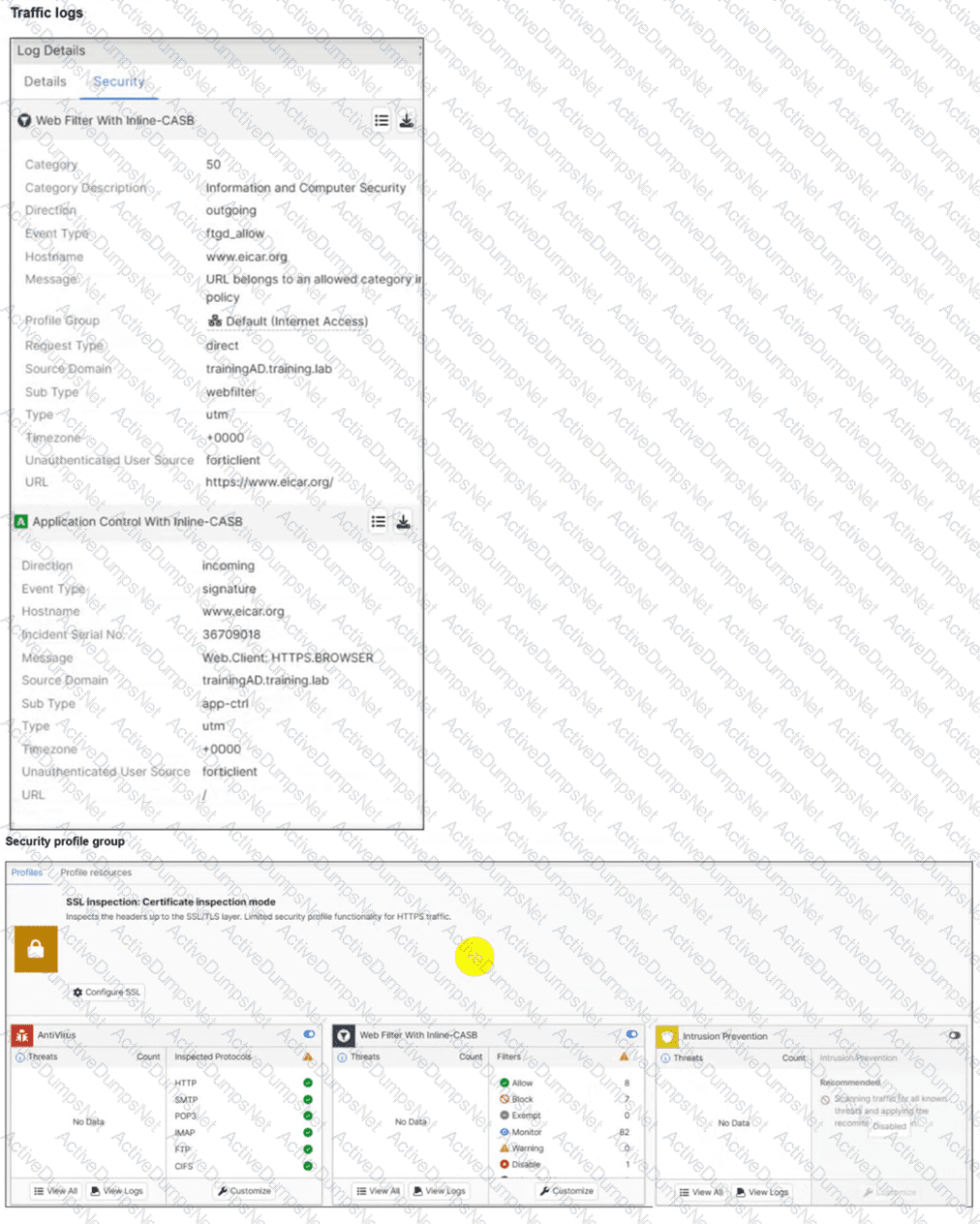
A FortiSASE administrator has configured an antivirus profile in the security profile group and applied it to the internet access policy. Remote users are still able to download the eicar.com-zip file from https://eicar.org.
Which configuration on FortiSASE is allowing users to perform the download? (Choose one answer)
Options:
Deep inspection is not enabled.
Application control is exempting all the browser traffic.
Web filter is allowing the URL.
Intrusion prevention is disabled.
Answer:
AExplanation:
The core of the issue shown in the exhibits is the lack of visibility into encrypted traffic.
HTTPS Encryption: The eicar.org website uses the HTTPS protocol for its downloads. This means the data payload, including the test malware file, is encrypted as it traverses the network.
SSL Inspection Modes: As seen in the Security profile group exhibit (image_5705fc.jpg), the SSL inspection mode is explicitly set to Certificate inspection mode .
Visibility Gap: Certificate inspection only analyzes the initial SSL handshake, such as the server certificate and SNI (Server Name Indication). It does not decrypt the traffic payload. Consequently, the antivirus engine in FortiSASE cannot " see " or scan the eicar.com-zip file hidden within the encrypted session.
Resolution Requirement: To detect and block malicious files over HTTPS, SSL Deep Inspection must be enabled. Deep inspection allows FortiSASE to act as a proxy, decrypting the traffic for full content scanning by the antivirus and IPS engines before re-encrypting it for the endpoint.
Log Analysis: While the web filtering logs (image_5704e5.jpg) show the traffic is " Allowed " because the URL is not blocked by a web filter category, this is only the first step of inspection. The antivirus engine is present but ineffective because it is blind to the encrypted content due to the lack of deep inspection.
What are the key differences between the FortiSASE BGP per overlay and BGP on loopback routing design methods? (Choose one answer)
Options:
BGP per overlay can use separate iBGP sessions for each spoke-to-hub tunnel with mode-cfg enabled for IP address assignment, while BGP on loopback uses a single iBGP session per hub terminating on a loopback interface to simplify configuration and reduce advertised routes.
BGP per overlay establishes a single iBGP session per hub on a loopback interface, while BGP on loopback requires mode-cfg for IP address assignment and uses multiple iBGP sessions per tunnel.
BGP per overlay is used for loopback interfaces to reduce routes, while BGP on loopback is the default method requiring separate iBGP sessions for each spoke.
BGP per overlay simplifies hub configuration without mode-cfg, while BGP on loopback establishes multiple iBGP sessions for each tunnel to increase advertised routes.
Answer:
AExplanation:
FortiSASE supports two main routing design methods for Secure Private Access (SPA) when connecting to a FortiGate SD-WAN hub:
BGP per Overlay (Traditional/Default Method): In this configuration, a separate iBGP session is established over every individual IPsec overlay (tunnel) between the FortiSASE PoP and the hub. These sessions terminate on the tunnel interface IP addresses . To facilitate this, the hubs typically use the IPsec VPN mode-cfg feature to dynamically assign tunnel IP addresses to the SASE PoPs. For every LAN prefix, the system generates multiple BGP routes —one for each overlay—which increases the total number of routes advertised across the network.
BGP on Loopback (Modern Alternative): This newer design establishes only a single iBGP session between the spoke and the hub, regardless of how many physical or logical overlays (tunnels) connect them. The session is terminated on a loopback interface on both sides.
Key Advantages of BGP on Loopback:
Reduced Complexity: It significantly simplifies the BGP configuration because there are fewer neighbors to manage. 2
Improved Scalability: It greatly reduces the volume of routes advertised, as only a single BGP route is generated for each LAN prefix, making it the preferred choice for large-scale deployments.
Resiliency: The BGP session remains active as long as the loopback is reachable via any of the available overlays, meaning no BGP convergence is required if a single overlay fails.
How does FortiSASE hide user information when viewing and analyzing logs? (Choose one answer)
Options:
By compressing log data
By hashing log data
By tokenization in log data
By deleting log data
Answer:
BExplanation:
The correct answer is B. By hashing log data . This question belongs to Analytics because it deals with FortiSASE log visibility, reporting, and log analysis. The FortiSASE study guide explains that FortiSASE has built-in local logging for monitoring network activity in the portal. It creates traffic logs with user sessions, destinations, protocols, and actions; security logs for detected threats; event logs for system activity; and endpoint management logs for FortiClient events. The guide also explains that FortiSASE can forward logs to FortiAnalyzer, syslog, or CEF servers for longer retention and centralized analytics.
For hiding personally identifiable user information, Fortinet’s FortiSASE documentation calls the feature log anonymization . It states that log anonymization hides user information, such as usernames, in dashboard widgets, logs, and other FortiSASE areas. When anonymization is enabled, FortiSASE uses a username anonymization hash salt ; FortiSASE then generates a hash based on the username and salt value and uses that hash to anonymize log information.
So the mechanism is hashing, not compression, deletion, or tokenization.
A company must provide access to a web server through FortiSASE secure private access for contractors. What is the recommended method to provide access? (Choose one answer)
Options:
Configure a TCP access proxy forwarding rule and push it to the contractor FortiClient endpoint.
Publish the web server URL on a bookmark portal and share it with contractors.
Update the PAC file with the web server URL and share it with contractors.
Update the DNS records on the endpoint to access private applications.
Answer:
BExplanation:
When providing Secure Private Access (SPA) to external contractors who may not be using managed corporate devices, FortiSASE offers specific methods to ensure security while maintaining ease of use.
Bookmark Portal (Clientless Access): For web-based resources like a web server, the recommended and most efficient method for contractors is to use the ZTNA portal (bookmark portal) . This allows for clientless access , meaning the contractor does not need to install the FortiClient agent or any specific software on their personal machine.
Workflow: The administrator publishes the web server URL as a bookmark within the FortiSASE portal. Contractors simply log into the secure SASE web portal via their browser, authenticate, and click the bookmark to access the internal server.
Security Benefits: This method leverages the FortiSASE ZTNA access proxy to mediate the connection. It ensures that the contractor is authenticated and that the traffic is inspected without exposing the internal network directly to the contractor ' s device.
Analysis of Incorrect Options:
Option A: TCP forwarding rules require the FortiClient agent to be installed and managed on the endpoint. Contractors often use unmanaged devices where installing agents is restricted or undesirable.
Option C: Updating a PAC (Proxy Auto-Configuration) file is part of a Secure Web Gateway (SWG) deployment for internet access, not for routing traffic to private internal web servers via an SPA hub. 1
Option D: Manually updating DNS records on a contractor ' s endpoint is an unscalable, insecure, and administratively heavy task that does not provide the session-level security required by ZTNA.
Your FortiSASE customer has a small branch office in which ten users will be using their personal laptops and mobile devices to access the internet. Which deployment should they use to secure their internet access with minimal configuration? (Choose one answer)
Options:
FortiClient endpoint agent to secure internet access
FortiAP to secure internet access
SD-WAN on-ramp to secure internet access
FortiGate as a LAN extension to secure internet access
Answer:
BExplanation:
For small branch offices (thin edges) where users utilize unmanaged personal devices (BYOD) like laptops and mobile phones, the most efficient way to provide Secure Internet Access (SIA) with minimal configuration is by deploying a FortiAP .
Thin Edge Integration: FortiSASE includes expanded integrations with the Fortinet WLAN portfolio, allowing FortiAP wireless access points to function as " thin edge " devices. These access points intelligently offload and steer traffic from the branch directly to the nearest FortiSASE Security Point of Presence (PoP).
No Endpoint Agents Required: Because the devices are personal and unmanaged, installing the FortiClient agent (Option A) is often not feasible or desirable. The FortiAP deployment secures all client devices at the location without requiring any endpoint agents .
Minimal Configuration & Zero-Touch: This solution is specifically designed for small office locations with limited budgets and no local IT staff. FortiSASE offers cloud-delivered management with zero-touch provisioning for FortiAP. Once the AP is connected, it automatically establishes a secure CAPWAP or IPsec tunnel to FortiSASE, ensuring all connected users are protected by the cloud security stack (Antivirus, Web Filtering, etc.) with almost no manual setup on the end-user side.
Why other options are less ideal:
Option C and D: SD-WAN on-ramp and FortiGate LAN extensions typically require a physical FortiGate appliance at the branch. For a small office with only ten users and personal devices, this adds unnecessary hardware costs and configuration complexity compared to a simple, cloud-managed FortiAP.
Which statement about FortiSASE and SAML is true? (Choose one answer)
Options:
FortiSASE acts as the SP, relies on an external IdP, and can use SAML group matching.
FortiSASE supports SAML login but cannot use SAML group matching.
FortiSASE acts as the IdP and can perform SAML group matching internally.
FortiSASE includes IdP functionality and uses it for SAML group matching.
Answer:
AExplanation:
FortiSASE utilizes Security Assertion Markup Language (SAML) to provide a seamless Single Sign-On (SSO) experience for remote users connecting to the cloud infrastructure.
Role Identification: In a SAML exchange, FortiSASE functions as the Service Provider (SP) . It relies on an external Identity Provider (IdP) —such as Microsoft Entra ID (formerly Azure AD), Okta, or FortiAuthenticator—to authenticate the user ' s identity and provide security assertions. 2
SAML Group Matching: One of the core features of the FortiSASE SAML implementation is the ability to perform group matching . During the authentication process, the IdP sends a SAML assertion that typically includes an " Attribute Statement " containing the user ' s group memberships. 3 FortiSASE captures this attribute and matches it against locally defined SAML user groups.
Policy Enforcement: This group matching capability is critical because it allows administrators to apply different Security Internet Access (SIA) or Secure Private Access (SPA) policies based on the user ' s role (e.g., " Marketing " vs. " Finance " ) rather than managing individual users manually.
Analysis of Incorrect Options: * Options C and D are incorrect because FortiSASE does not natively act as a SAML IdP; it is designed to consume assertions from professional identity management platforms.
Option B is incorrect because FortiSASE fully supports and relies upon group matching for enterprise-scale policy management.
What happens to the logs on FortiSASE that are older than the configured log retention period? (Choose one answer)
Options:
The logs are deleted from FortiSASE.1
The logs are compressed and archived.
The logs are backed up on FortiCloud.
The logs are indexed and can be stored in a SQL database.
Answer:
AExplanation:
In a FortiSASE environment, log management is governed by a cloud-native storage policy that prioritizes performance and resource availability.
Retention Policy Framework: All FortiSASE instances come with log retention enabled by default. The standard log retention period is 30 days , though administrators can customize this policy to any duration between 2 and 30 days . This policy applies across all log types, including traffic, security, and event logs.
Automatic Deletion (A): When logs exceed the configured retention threshold, FortiSASE automatically deletes the older logs from the platform. 2 This automatic purging is necessary to free up storage space on the cloud infrastructure and maintain compliance with the organization ' s data lifecycle settings.
Persistence and Recovery: Once logs are deleted due to the expiration of the retention period, they are generally unrecoverable from the FortiSASE platform.
Long-Term Storage Solutions: Because FortiSASE is not designed as a long-term archival solution, customers who need to store logs for months or years for regulatory compliance should configure log forwarding to an external server , such as a FortiAnalyzer or a remote Syslog server.
Analysis of Incorrect Options: * Option B and D: While traditional FortiAnalyzer deployments use SQL indexing and separate " Archive " (raw/compressed) vs. " Analytics " (SQL) tiers, FortiSASE uses a simplified cloud storage model where data is purged rather than archived or tier-shifted upon expiry.
Option C: While FortiSASE is part of the FortiCloud ecosystem, it does not automatically " back up " expired logs to another FortiCloud service; the deletion is final unless external forwarding is active.
Refer to the exhibits.
WiMO-Pro and Win7-Pro are endpoints from the same remote location. WiMO-Pro can access the internet though FortiSASE, while Wm7-Pro can no longer access the internet
Given the exhibits, which reason explains the outage on Wm7-Pro?
Options:
The Win7-Pro device posture has changed.
Win7-Pro cannot reach the FortiSASE SSL VPN gateway
The Win7-Pro FortiClient version does not match the FortiSASE endpoint requirement.
Win-7 Pro has exceeded the total vulnerability detected threshold.
Answer:
DExplanation:
Based on the provided exhibits, the reason why the Win7-Pro endpoint can no longer access the internet through FortiSASE is due to exceeding the total vulnerability detected threshold. This threshold is used to determine if a device is compliant with the security requirements to access the network.
Endpoint Compliance:
FortiSASE monitors endpoint compliance by assessing various security parameters, including the number of vulnerabilities detected on the device.
The compliance status is indicated by the ZTNA tags and the vulnerabilities detected.
Vulnerability Threshold:
The exhibit shows that Win7-Pro has 176 vulnerabilities detected, whereas Win10-Pro has 140 vulnerabilities.
If the endpoint exceeds a predefined vulnerability threshold, it may be restricted from accessing the network to ensure overall network security.
Impact on Network Access:
Since Win7-Pro has exceeded the vulnerability threshold, it is marked as non-compliant and subsequently loses internet access through FortiSASE.
The FortiSASE endpoint profile enforces this compliance check to prevent potentially vulnerable devices from accessing the internet.
How does FortiSASE Secure Private Access (SPA) facilitate connectivity to private resources in a hub-and-spoke network? (Choose one answer)
Options:
SPA establishes direct links to spokes without IPsec or BGP and uses an easy configuration key to secure web traffic for remote users.
SPA applies source network address translation (SNAT) for remote user traffic and uses IKEv1 for IPsec tunnels to connect to standalone hubs without BGP support.
SPA connects to private resources using HTTP and HTTPS protocols and relies on FortiClient for agentless access to SD-WAN deployments.
SPA connects a FortiSASE POP to a FortiGate hub or SD-WAN deployment using IPsec and BGP for dynamic route exchange with an easy configuration key for simplified setup on FortiOS.1
Answer:
DExplanation:
FortiSASE Secure Private Access (SPA) is designed to provide remote users with seamless and secure access to private applications hosted behind an organization ' s FortiGate Next-Generation Firewall (NGFW) or SD-WAN hubs. 2
Hub-and-Spoke Architecture: In this deployment model, the organization’s FortiGate (either a standalone NGFW or an SD-WAN hub) acts as the hub , while the global FortiSASE Security Points of Presence (PoPs) act as spokes . 3
IPsec and BGP Integration: The connectivity between the FortiSASE PoPs and the corporate hub is established via IPsec VPN tunnels . To manage routing and ensure that remote users can reach the correct internal subnets, Border Gateway Protocol (BGP) is used for dynamic route exchange. 4 This allows the hub to advertise internal prefixes to FortiSASE, enabling the PoPs to route user traffic effectively without requiring complex static route management.
Simplified Configuration: To reduce administrative overhead and prevent manual configuration errors on the FortiOS side, Fortinet introduced the SPA easy configuration key (also known as an invitation code or simplified SPA setup). An administrator generates this key in the FortiSASE portal and enters it on the FortiGate hub. This triggers the Fabric Overlay Orchestrator to automatically provision the necessary IPsec tunnels, BGP peerings, and firewall policies required for SPA connectivity.
According to the FortiSASE 25 Architecture Guide , this method is preferred over legacy VPNs because it supports both TCP and UDP traffic, integrates natively with existing SD-WAN deployments, and automatically finds the shortest path to applications using ADVPN (Auto-Discovery VPN) shortcuts where applicable.
An organization needs to resolve internal hostnames using its internal rather than public DNS servers for remotely connected endpoints. Which two components must be configured on FortiSASE to achieve this? (Choose two.)
Options:
SSL deep inspection
Split DNS rules
Split tunnelling destinations
DNS filter
Answer:
B, CExplanation:
To resolve internal hostnames using internal DNS servers for remotely connected endpoints, the following two components must be configured on FortiSASE:
Split DNS Rules:
Split DNS allows the configuration of specific DNS queries to be directed to internal DNS servers instead of public DNS servers.
This ensures that internal hostnames are resolved using the organization ' s internal DNS infrastructure, maintaining privacy and accuracy for internal network resources.
Split Tunneling Destinations:
Split tunneling allows specific traffic (such as DNS queries for internal domains) to be routed through the VPN tunnel while other traffic is sent directly to the internet.
By configuring split tunneling destinations, you can ensure that DNS queries for internal hostnames are directed through the VPN to the internal DNS servers.
In the Secure Private Access (SPA) use case, which two FortiSASE features facilitate access to corporate applications? (Choose two answers)
Options:
SD-WAN
zero trust network access (ZTNA)
thin edge
cloud access security broker (CASB)
Answer:
A, BExplanation:
In a FortiSASE deployment, the Secure Private Access (SPA) use case is specifically designed to provide remote users with secure, high-performance connectivity to internal corporate applications hosted in private data centers or public clouds. 5 This is achieved through two primary architectural methods:
SD-WAN Integration (A): FortiSASE integrates natively with existing Fortinet Secure SD-WAN networks. 6 In this architecture, the FortiSASE global PoPs act as spokes that establish automated IPsec tunnels to the organization’s FortiGate SD-WAN hubs. This allows the platform to use intelligent application steering and dynamic routing to find the shortest, most efficient path to private resources, ensuring a superior user experience.
Zero Trust Network Access (ZTNA) (B): FortiSASE provides Universal ZTNA to enforce granular, per-session access control. 7 Unlike traditional VPNs that grant broad network access, ZTNA verifies the user ' s identity and the endpoint ' s security posture (via ZTNA tags) before every application session. This ensures that users only have access to the specific corporate applications they are authorized to use, significantly reducing the attack surface.
Analysis of Other Options: * Thin Edge (C) is a connectivity method used to secure branch offices and micro-branches (typically using FortiExtender), rather than a specific feature for facilitating private corporate application access for individual remote users.
CASB (D) is used for Secure SaaS Access (SSA) to provide visibility and control over third-party cloud applications like Office 365, rather than private applications hosted on-premises.
What are two advantages of using zero-trust tags? (Choose two.)
Options:
Zero-trust tags can be used to allow or deny access to network resources
Zero-trust tags can determine the security posture of an endpoint.
Zero-trust tags can be used to create multiple endpoint profiles which can be applied to different endpoints
Zero-trust tags can be used to allow secure web gateway (SWG) access
Answer:
A, BExplanation:
Zero-trust tags are critical in implementing zero-trust network access (ZTNA) policies. Here are the two key advantages of using zero-trust tags:
Access Control (Allow or Deny):
Zero-trust tags can be used to define policies that either allow or deny access to specific network resources based on the tag associated with the user or device.
This granular control ensures that only authorized users or devices with the appropriate tags can access sensitive resources, thereby enhancing security.
Determining Security Posture:
Zero-trust tags can be utilized to assess and determine the security posture of an endpoint.
Based on the assigned tags, FortiSASE can evaluate the device ' s compliance with security policies, such as antivirus status, patch levels, and configuration settings.
Devices that do not meet the required security posture can be restricted from accessing the network or given limited access.
How does FortiSASE address the market trends of multicloud and Software-as-a-Service (SaaS) adoption, hybrid workforce, and zero trust? (Choose one answer)
Options:
It focuses solely on securing on-premises networks, ignoring cloud and remote work challenges.
It prioritizes legacy VPN connections for hybrid workforces, bypassing modern cloud and zero-trust security measures.
It provides visibility and control for multicloud and SaaS environments, ensures secure and seamless access for hybrid workforces, and implements zero-trust principles.1
It supports only zero-trust frameworks without addressing multicloud or hybrid workforce needs.
Answer:
CExplanation:
FortiSASE is designed as a unified, single-vendor solution that specifically targets the convergence of networking and security to address the modern challenges of a distributed enterprise. 2
Multicloud and SaaS Adoption: FortiSASE addresses the surge in cloud-first strategies by providing Next-Generation Dual-Mode CASB (Cloud Access Security Broker). 3 This feature uses both inline and API-based inspection to provide comprehensive visibility into sanctioned and unsanctioned SaaS applications (Shadow IT), ensuring that data is protected regardless of whether it resides in AWS, Azure, Google Cloud, or SaaS platforms like Microsoft 365.
Hybrid Workforce: To support a workforce that moves between the home, the office, and public spaces, FortiSASE delivers consistent security posture . 5 It replaces the inconsistent experience of legacy VPNs with a geographically dispersed network of over 150 Points of Presence (PoPs), ensuring low-latency access to applications while maintaining high-performance SSL inspection and threat detection for all remote users.
Zero Trust Integration: Central to the FortiSASE architecture is Universal ZTNA (Zero Trust Network Access). 7 Unlike traditional VPNs that grant broad network access, ZTNA applies the principle of " never trust, always verify " . It grants access on a per-session, per-application basis, continuously verifying the device posture and user identity before and during application access. 9 This shift from implicit to explicit trust significantly reduces the internal attack surface and mitigates the risk of lateral movement by attackers.
By integrating these components into a single operating system ( FortiOS ) and managed via a single console, FortiSASE simplifies IT operations while delivering the visibility and control required for today ' s multicloud and hybrid environments.
Unlock NSE7_SSE_AD-25 Features
- NSE7_SSE_AD-25 All Real Exam Questions
- NSE7_SSE_AD-25 Exam easy to use and print PDF format
- Download Free NSE7_SSE_AD-25 Demo (Try before Buy)
- Free Frequent Updates
- 100% Passing Guarantee by Activedumpsnet
Questions & Answers PDF Demo
- NSE7_SSE_AD-25 All Real Exam Questions
- NSE7_SSE_AD-25 Exam easy to use and print PDF format
- Download Free NSE7_SSE_AD-25 Demo (Try before Buy)
- Free Frequent Updates
- 100% Passing Guarantee by Activedumpsnet