
Fortinet NSE7_SOC_AR-7.6 Fortinet NSE 7 - Security Operations 7.6 Architect Exam Practice Test
Fortinet NSE 7 - Security Operations 7.6 Architect Questions and Answers
You want to use the queue and shift management feature to automatically assign newly created low-priority tasks to members of the L1 queue. However, you are unable to add the Tasks module to the Module Types list. What is the problem? Choose one answer.
Refer to the exhibit. What is the correct Jinja expression to filter the results to show only the MD5 hash values?
{{ [slot 1] | [slot 2] [slot 3].[slot 4] }}
Select the Jinja expression in the left column, hold and drag it to a blank position on the right. Place the four correct steps in order, placing the first step in the first slot.
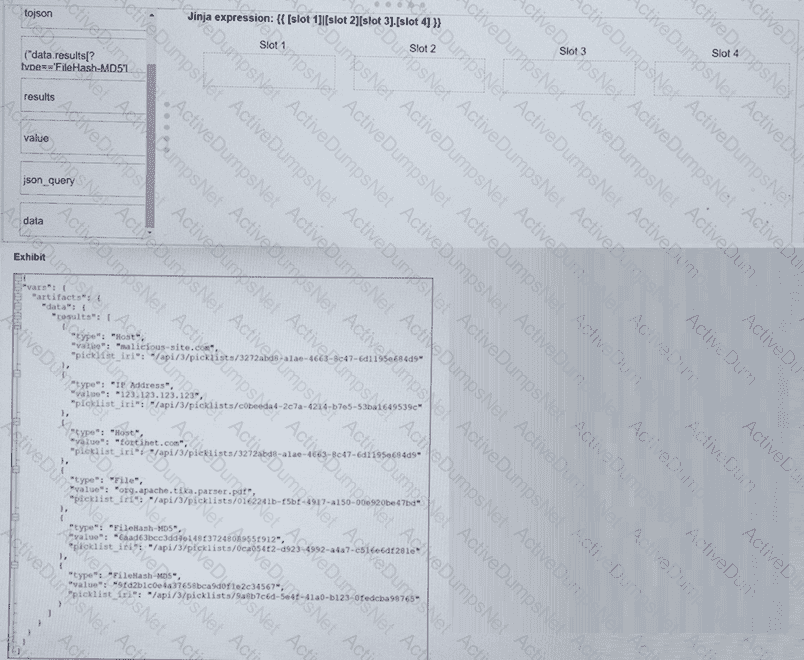
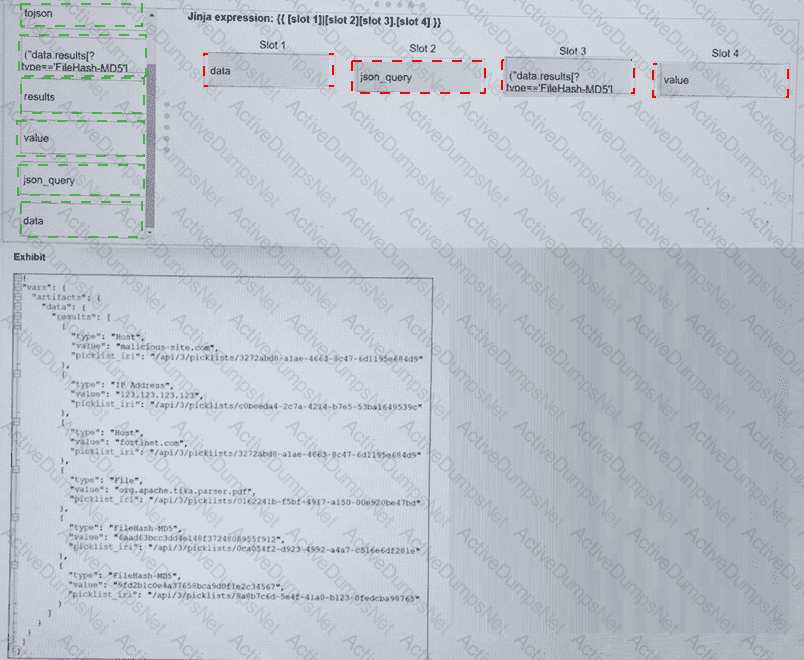
Refer to the exhibits.
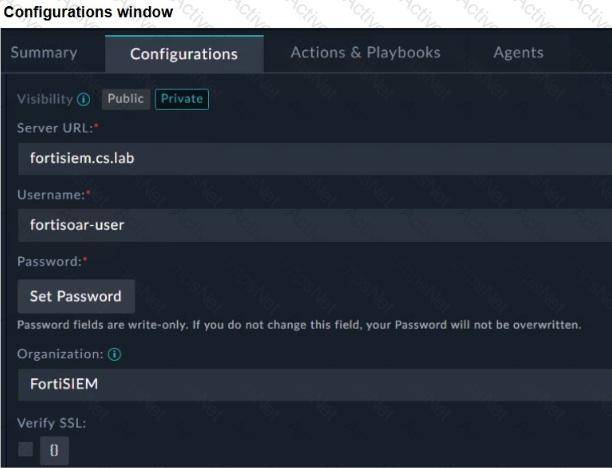
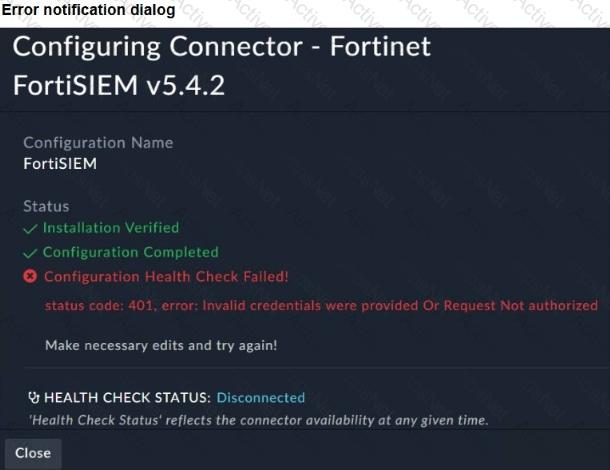
You configured the FortiSIEM connector on FortiSOAR. However, when you try to save the configuration, you see the error shown in the exhibit. What are two possible causes? Choose two answers.
A partner organization recently suffered a distributed denial-of-service (DDoS) attack, but the adversary’s identity and TTPs remain unknown. Your SOC has not received any relevant threat intelligence from the partner organization, but you are asked to determine whether similar activity could be happening in your environment. Which threat hunting action should you perform first? Choose one answer.
Which two statements about the FortiAnalyzer Fabric topology are true? (Choose two.)
Which two statements accurately describe the process to create a new rule from a search using FortiSIEM analytics? Choose two answers.
According to the National Institute of Standards and Technology (NIST) cybersecurity framework, incident handling activities can be divided into phases.
In which incident handling phase do you quarantine a compromised host in order to prevent an adversary from using it as a stepping stone to the next phase of an attack?
Which role does a threat hunter play within a SOC?
Which statement best describes the MITRE ATT & CK framework?
Refer to the exhibit.
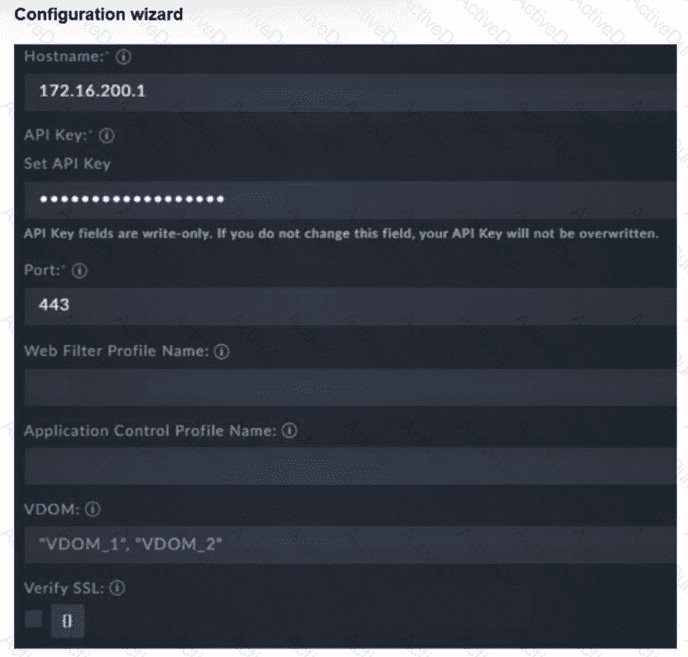
You must configure the FortiGate connector to allow FortiSOAR to perform actions on a firewall. However, the connection fails. Which two configurations are required? (Choose two answers)
Review the incident report. Shortly after being compromised, an infected host collected its own network configuration and connection details, then began sending low-volume connection attempts to multiple internal addresses to identify responding hosts. Which two MITRE ATT & CK techniques best describe this activity? Choose two answers.
You are trying to create a playbook that uses source data from ingestion to populate the description field of a task. You successfully saved the source data to a variable called ingestion_data . Now, you must parse the results and extract a list of indicators. Which Jinja expression can accomplish this task? Choose one answer.
Refer to the exhibit.
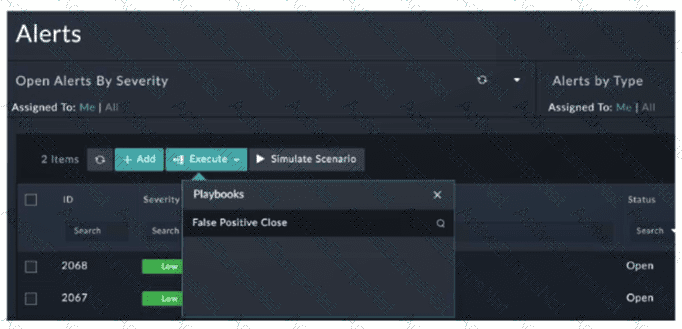
You configured a playbook named False Positive Close , and want to run it to verify if it works. However, when you click Execute and search for the playbook, you do not see it listed. Which two reasons could be the cause of the problem? (Choose two answers)
You are trying to create a playbook that creates a manual task showing a list of public IPv6 addresses. You were successful in extracting all IP addresses from a previous action into a variable called ip_list , which contains both private and public IPv4 and IPv6 addresses. You must now filter the results to display only public IPv6 addresses. Which two Jinja expressions can accomplish this task? (Choose two answers)
Refer to Exhibit:
A SOC analyst is designing a playbook to filter for a high severity event and attach the event information to an incident.
Which local connector action must the analyst use in this scenario?
A FortiSOAR playbook includes a Wait step that is configured to pause execution after initiating a reputation lookup on an indicator. Which two configurations of the Wait step are valid? Choose two answers.
Refer to the exhibit.
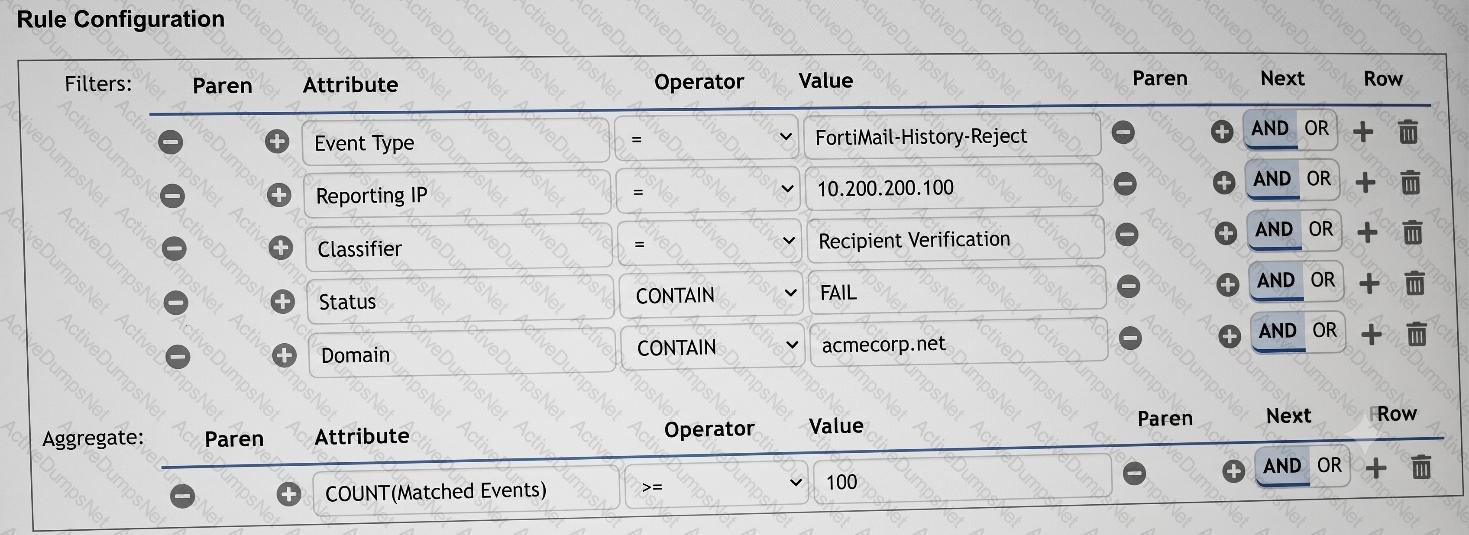
You want to configure a FortiSIEM rule that triggers when a FortiMail device reports at least 100 recipient verification failures for different email accounts in the domain acmecorp.net . What would you add or modify to accomplish this task? Choose one answer.
Which FortiAnalyzer feature uses the SIEM database for advance log analytics and monitoring?
Refer to the exhibits.
The Malicious File Detect playbook is configured to create an incident when an event handler generates a malicious file detection event.
Why did the Malicious File Detect playbook execution fail?
You need to create a nested query in FortiSIEM that satisfies the following conditions:
Find all devices discovered by any FortiSIEM Windows Agent.
From those devices, identify those that have generated Windows Login Failure events.
Which two query components should be used for this nested query? Choose two answers.
Refer to the exhibits.
The FortiMail Sender Blocklist playbook is configured to take manual input and add those entries to the FortiMail abc. com domain-level block list. The playbook is configured to use a FortiMail connector and the ADD_SENDER_TO_BLOCKLIST action.
Why is the FortiMail Sender Blocklist playbook execution failing7
Which three statements accurately describe step utilities in a playbook step? (Choose three answers)
An analyst prioritizes blocking IP addresses and domains from every phishing campaign. Based on the Pyramid of Pain model, which two statements accurately describe this approach? Choose two answers.
Refer to the exhibits.
You configured a custom event handler and an associated rule to generate events whenever FortiMail detects spam emails. However, you notice that the event handler is generating events for both spam emails and clean emails.
Which change must you make in the rule so that it detects only spam emails?
Review the incident report. A fake HR login page was sent to several employees through email. The page copied the company’s branding and captured usernames and passwords. The attacker later used the stolen credentials to sign in through the company’s web VPN. Which two MITRE ATT & CK tactics best characterize this report? Choose two answers.
Which three factors does the FortiSIEM rules engine use to determine the count when it evaluates the aggregate condition COUNT (Matched Events) on a specific subpattern? (Choose three answers)
Review the incident report:
An attacker identified employee names, roles, and email patterns from public press releases, which were then used to craft tailored emails.
The emails were directed to recipients to review an attached agenda using a link hosted off the corporate domain.
Which two MITRE ATT & CK tactics best fit this report? (Choose two answers)