Summer Sale Limited Time Flat 70% Discount offer - Ends in 0d 00h 00m 00s - Coupon code: 70spcl

Fortinet NSE6_FSM_AN-7.4 Fortinet NSE 6 - FortiSIEM 7.4 Analyst Exam Practice Test

Fortinet NSE 6 - FortiSIEM 7.4 Analyst Questions and Answers

Question 1

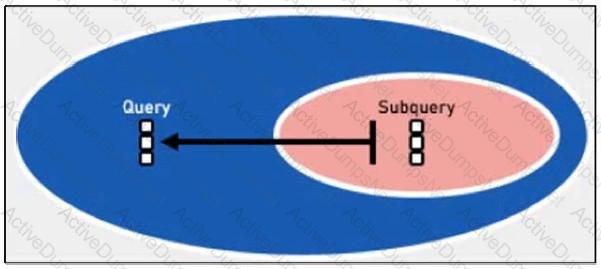
Refer to the exhibit.

Question # 1

Which statement about the time range settings defined in the nested query is accurate? (Choose one answer)

Options:

A.

FortiSIEM will list source IP addresses found in the last 10 minutes of events from each day in the Approved Devices report from the last 30 days.

B.

FortiSIEM will search in real time using 10-minute blocks for a source IP address that is not in the Approved Devices report from the last 30 days.

C.

FortiSIEM will search the last 30 days of events for a source IP address that is not in the Approved Devices report.

D.

FortiSIEM will search the last 10 minutes of events for a source IP address that is not in the Approved Devices report from the last 30 days.

Question 2

What can you use to send data to FortiSIEM for user and entity behavior analytics (UEBA)?

Options:

A.

FortiSIEM agent

B.

SSH

C.

SNMP

D.

FortiSIEM worker

Question 3

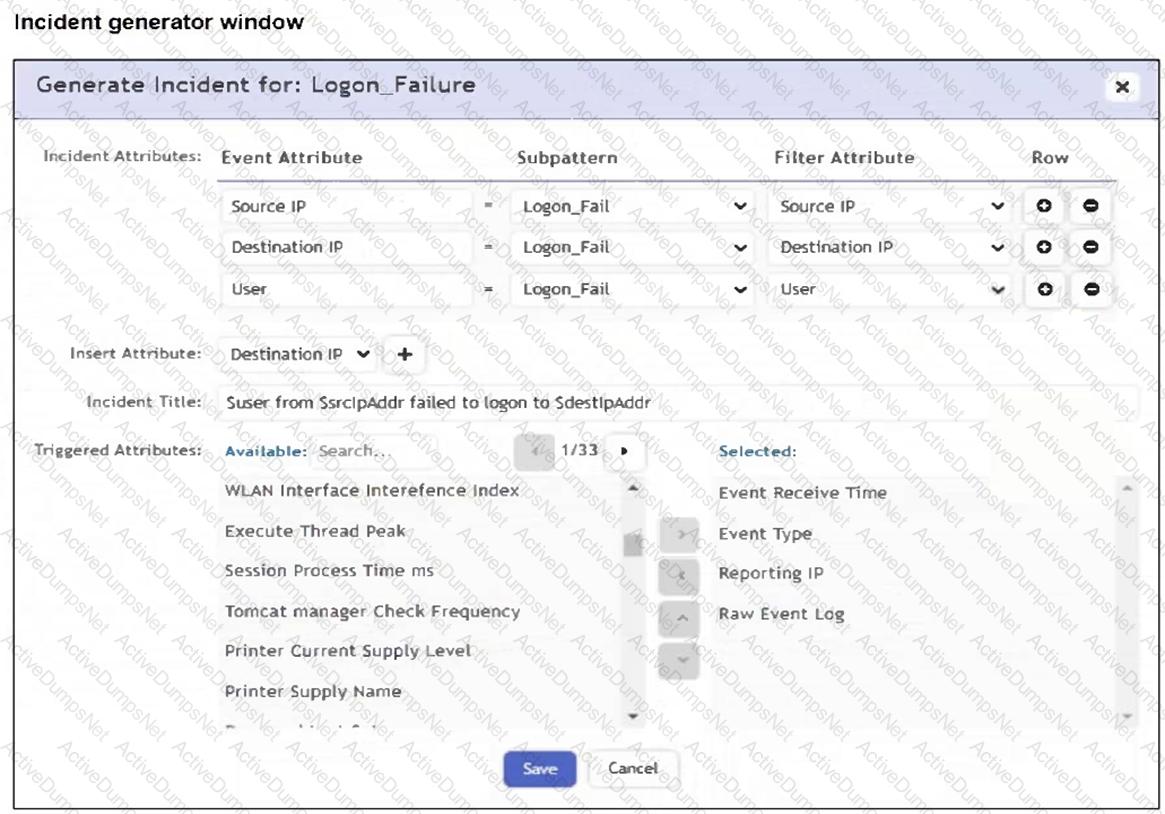
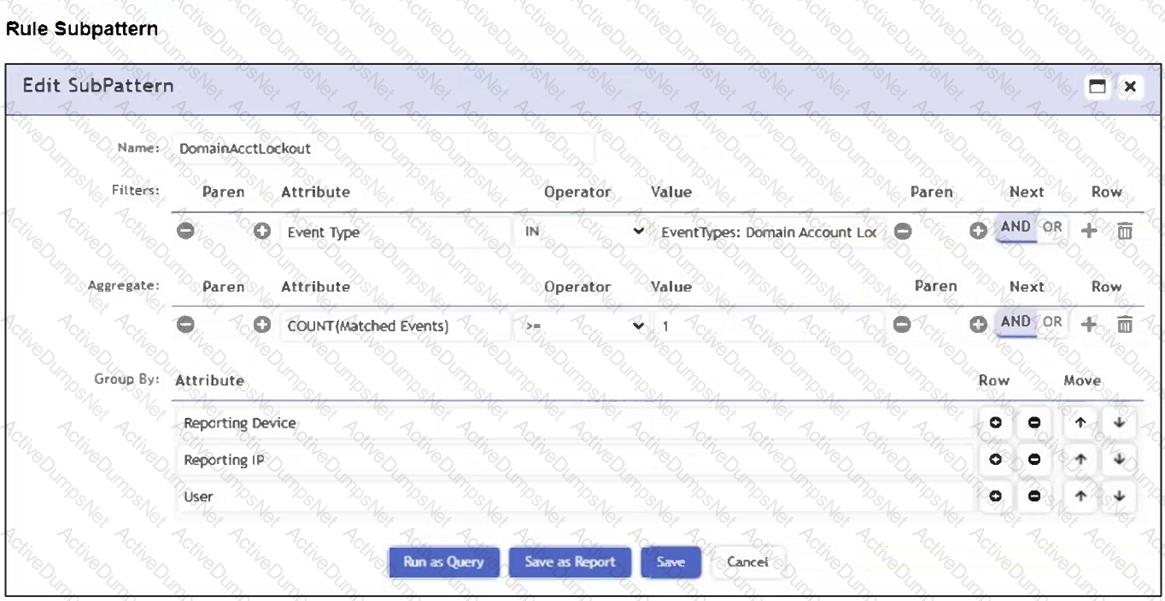
Refer to the exhibits.

Question # 3

You are troubleshooting why the rule shown in the exhibit is generating incidents for successful Remote Desktop Protocol (RDP) connections with correct logins. It should only be triggering when a person fails to log in three or more times to the target device when connecting with RDP.

What is causing the rule to be triggered by correct login events? (Choose one answer)

Options:

A.

The subpattern relationship RDP_Connection:User = Failed_Logon:User never matches.

B.

The Boolean between the subpatterns is incorrect.

C.

The attribute types in the subpatterns do not match.

D.

The RDP login is different from the login used to access the target device.

Question 4

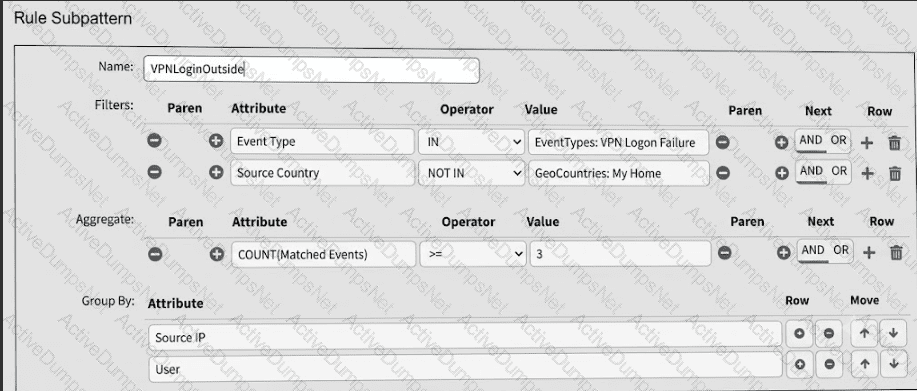
Refer to the exhibit.

Question # 4

What is this rule attempting to match? (Choose one answer)

Options:

A.

Failed VPN logon attempts from three or more different outside countries.

B.

Failed VPN logon events from a source outside the home country.

C.

Failed VPN logon attempts from three or more different sources inside the home country.

D.

Excessive VPN logon failures from a source inside the home country.

Question 5

Refer to the exhibit.

Question # 5

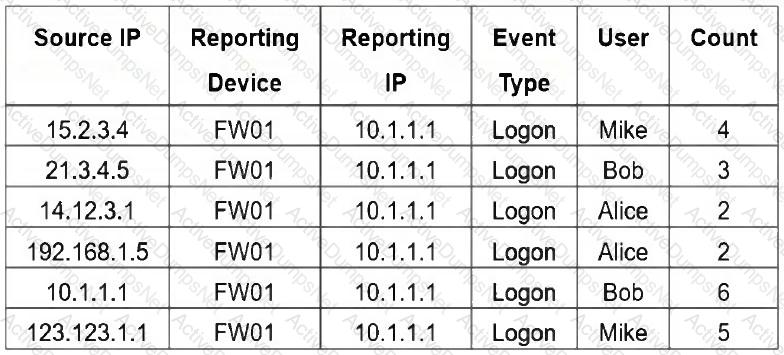
If you group the events by Reporting Device , Reporting IP , and Application Category , how many results will FortiSIEM display?

Options:

A.

Four

B.

Five

C.

One

D.

Six

E.

Two

Question 6

Refer to the exhibit.

Question # 6

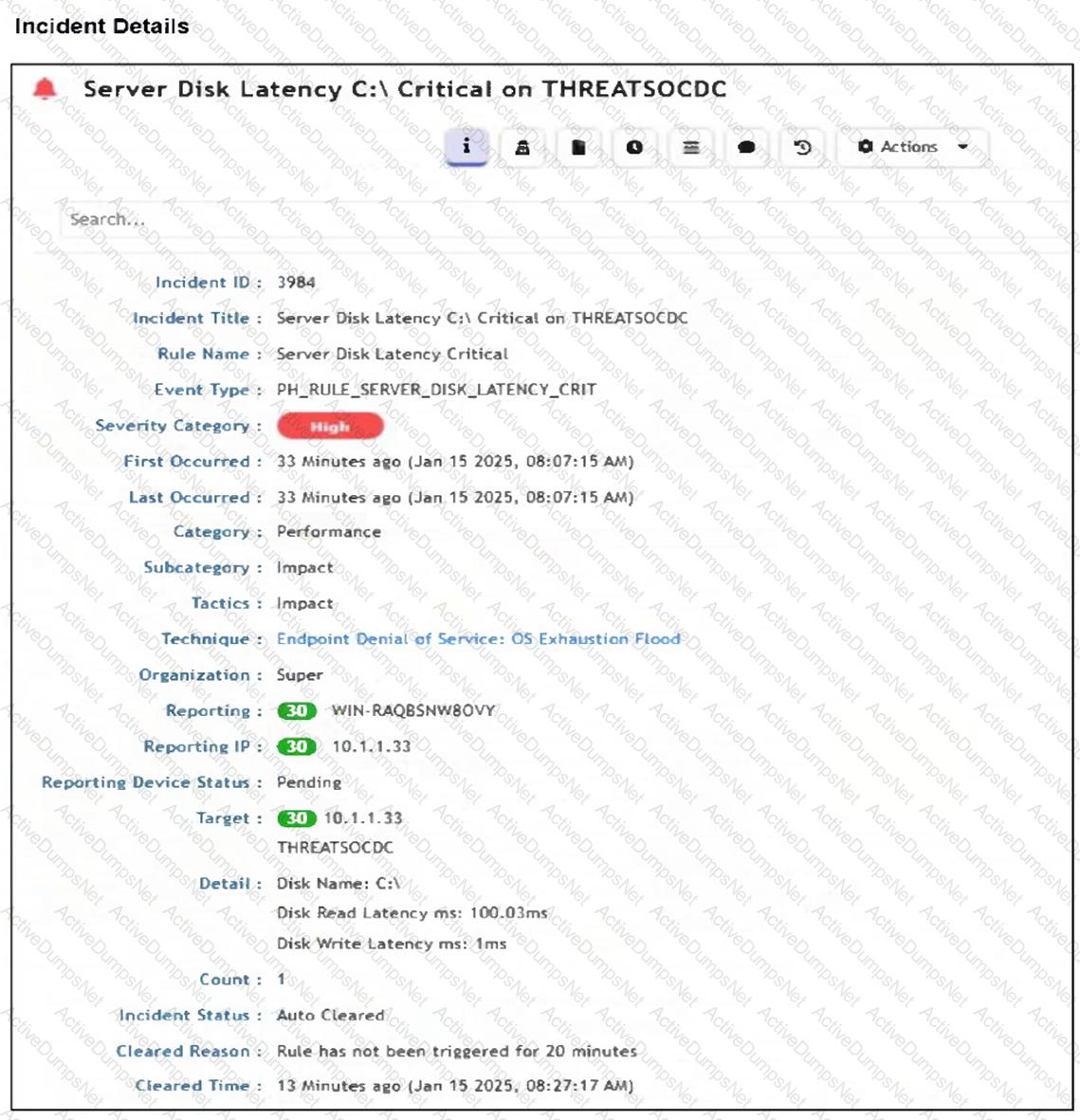
How was this incident cleared?

Options:

A.

The analyst manually cleared the incident from the incident table.

B.

FortiSIEM cleared the incident automatically after 24 hours.

C.

The incident was cleared automatically by the rule.

D.

The endpoint was rebooted and sent an all-clear signal to FortiSIEM.

Question 7

Refer to the exhibit.

Question # 7

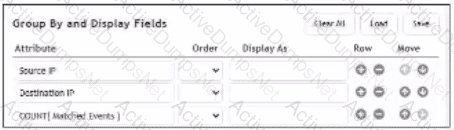
What will FortiSIEM display if you apply the Group By and Display Fields configuration to a list of allowed firewall connections?

Options:

A.

A list of connections ordered by destination IP address hit count

B.

A list of connections between unique source and destination IP addresses

C.

A running count of connections, regardless of source or destination

D.

A list of connections ordered by the number of unique connections started by each source IP address

Question 8

Refer to the exhibit.

Question # 8

An analyst is troubleshooting the rule shown in the exhibit. It is not generating any incidents, but the filter parameters are generating events on the Analytics tab.

What is wrong with the rule conditions?

Options:

A.

The Event Type refers to a CMDB lookup and should be an Event lookup.

B.

The Destination Host Name value is not fully qualified.

C.

The Group By attributes restricts which events are counted.

D.

The Aggregate attribute is too restrictive.

Question 9

You need to model for predicting a target based on other fields in the dataset and then trigger an anomaly if the value does not match the prediction.

Which machine learning algorithm will build this type of model?

Options:

A.

Classification

B.

Clustering

C.

Regression

D.

Forecasting

Question 10

Refer to the exhibit.

Question # 10

A FortiSIEM device is receiving syslog events from a FortiGate firewall. The FortiSIEM analyst is trying to search the raw event logs for the last two hours that contain the keyword " udp " . However, they are getting no results from the search, which they know should be available. Based on the filter shown in the exhibit, why are there no search results?

Options:

A.

The analyst selected AND in the Next column. This is the wrong Boolean operator.

B.

The Time Range value should be set to Real-Time.

C.

The keyword is case sensitive. Instead of typing udp in the Value field, the analyst should type UDP.

D.

The analyst selected = in the Operator column. That is the wrong operator.

Question 11

Refer to the exhibit.

Question # 11

What is the Group: FortiSIEM Analysts value referring to?

Options:

A.

FortiSIEM organization group

B.

LDAP user group

C.

CMDB user group

D.

Windows Active Directory user group

Question 12

An analyst wants to create a rule from a newly created analytics search.

What is the quickest method?

Options:

A.

On the Analytics tab, click Actions > Create Rule.

B.

Create a new rule under Resources > Rules and fill in the search details.

C.

On the Analytics tab, click the New button next to the Filter By box.

D.

On the upper menu bar on any tab, click the pencil icon.

Question 13

Which run mode takes the most time to perform machine learning tasks?

Options:

A.

Local Auto

B.

Local

C.

Forecasting

D.

Regression

Question 14

Refer to the exhibit.

Question # 14

An analyst is trying to identify an issue using an expression based on the Expression Builder settings shown in the exhibit; however, the error message shown in the exhibit indicates that the expression is invalid.

What is the correct syntax to create an expression that generates a total count of matched events?

Options:

A.

COUNT(Matched Events)

B.

(COUNT) Matched Events

C.

Matched Events (COUNT)

D.

Matched Events COUNT()