
- Home
- Fortinet
- NSE 6 Network Security Specialist
- NSE6_FNC_AD-7.6
- NSE6_FNC_AD-7.6 - Fortinet NSE 6 - FortiNAC-F 7.6 Administrator
Fortinet NSE6_FNC_AD-7.6 Fortinet NSE 6 - FortiNAC-F 7.6 Administrator Exam Practice Test
Fortinet NSE 6 - FortiNAC-F 7.6 Administrator Questions and Answers
Refer to the exhibit.
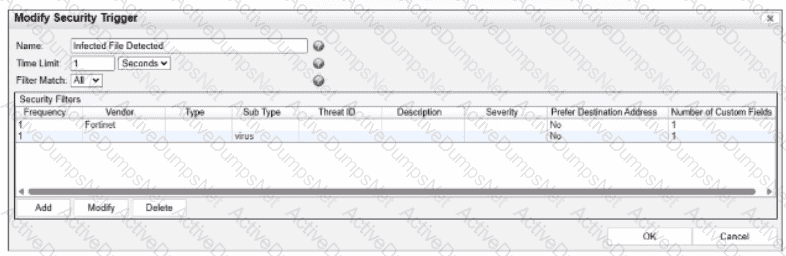
What would FortiNAC-F generate if only one of the security fitters is satisfied?
Options:
A normal alarm
A security event
A security alarm
A normal event
Answer:
DExplanation:
In FortiNAC-F,Security Triggersare used to identify specific security-related activities based on incoming data such as Syslog messages or SNMP traps from external security devices (like a FortiGate or an IDS). These triggers act as a filtering mechanism to determine if an incoming notification should be escalated from a standard system event to aSecurity Event.
According to theFortiNAC-F Administrator Guideand relevant training materials for versions 7.2 and 7.4, theFilter Matchsetting is the critical logic gate for this process. As seen in the exhibit, the " Filter Match " configuration is set to " All " . This means that for the Security Trigger named " Infected File Detected " to " fire " and generate a Security Event or a subsequent Security Alarm,every single filterlisted in the Security Filters table must be satisfied simultaneously by the incoming data.
In the provided exhibit, there are two filters: one looking for the Vendor " Fortinet " and another looking for the Sub Type " virus " . If only one of these filters is satisfied (for example, a message from Fortinet that does not contain the " virus " subtype), the logic for the Security Trigger is not met. Consequently, FortiNAC-F does not escalate the notification. Instead, it processes theincoming data as aNormal Event, which is recorded in the Event Log but does not trigger the automated security response workflows associated with security alarms.
" The Filter Match option defines the logic used when multiple filters are defined. If ' All ' is selected, then all filter criteria must be met in order for the trigger to fire and aSecurity Eventto be generated. If the criteria are not met, the incoming data is processed as anormal event. If ' Any ' is selected, the trigger fires if at least one of the filters matches. " —FortiNAC-F Administration Guide: Security Triggers Section.
When configuring isolation networks in the configuration wizard, why does a layer 3 network typo allow for mora than ono DHCP scope for each isolation network typo?
Options:
The layer 3 network type allows for one scope for each possible host status.
Configuring more than one DHCP scope allows for DHCP server redundancy
There can be more than one isolation network of each type
Any scopes beyond the first scope are used if the initial scope runs out of IP addresses.
Answer:
CExplanation:
In FortiNAC-F, theLayer 3 Network typeis specifically designed for deployments where the isolation networks—such as Registration, Remediation, and Dead End—are separated from the FortiNAC appliance ' s service interface (port2) by one or more routers. This architecture is common in large, distributed enterprise environments where endpoints in different physical locations or branches must be isolated into subnets that are local to their respective network equipment.
The reason the Configuration Wizard allows for more than one DHCP scope for a single isolation network type (state) is thatthere can be more than one isolation network of each typeacross the infrastructure. For instance, if an organization has three different sites, each site might require its own unique Layer 3 registration subnet to ensure efficient routing and to accommodate local IP address management. By allowing multiple scopes for the " Registration " state, FortiNAC can provide the appropriate IP address, gateway, and DNS settings to a rogue host regardless of which site ' s registration VLAN it is placed into.
When an endpoint is isolated, the network infrastructure (via DHCP Relay/IP Helper) directs the DHCP request to the FortiNAC service interface. FortiNAC then identifies which scope to use based on the incoming request ' s gateway information. This flexibility ensures that the system is not limited to a single flat subnet for each isolation state, supporting a scalable, multi-routed network topology.
" Multiple scopes are allowed for each isolation state (Registration, Remediation, Dead End, VPN, Authentication, Isolation, and Access Point Management). Within these scopes, multiple ranges in the lease pool are also permitted... This configWizard option is used when Isolation Networks are separated from the FortiNAC Appliance ' s port2 interface by a router. " —FortiNAC-F Configuration Wizard Reference Manual: Layer 3 Network Section.
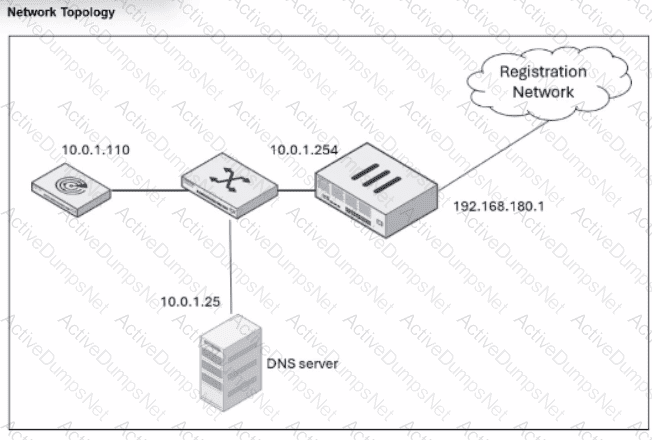
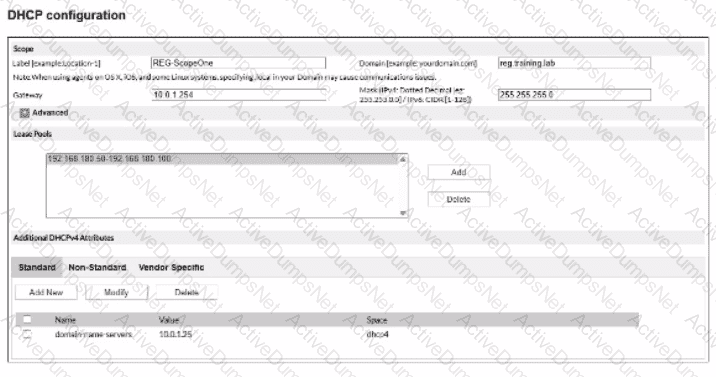
An administrator has configured the DHCP scope for a registration isolation network, but the isolation process isn ' t working.
What is the problem with the configuration?
Options:
The domain name server designation is incorrect.
The label uses a system-reserved value.
The lease pool does not contain a complete subnet.
The gateway defined for the scope is incorrect.
Answer:
DExplanation:
In a FortiNAC-F deployment, the configuration of theDHCP scopefor isolation networks (Registration, Remediation, etc.) must perfectly align with the underlying network infrastructure to ensure that isolated hosts can communicate with the FortiNAC appliance. In the provided exhibits, there is a clear discrepancy between theDHCP configurationand theNetwork Topology.
As shown in the " Network Topology " exhibit, theRegistration Networkresides on a router interface (or sub-interface) with the IP address192.168.180.1. This address represents the default gateway for any host placed into the Registration VLAN. However, the " DHCP configuration " exhibit shows the scope " REG-ScopeOne " configured with aGateway of 10.0.1.254. This 10.0.1.254 address belongs to the management/service network (port2 of FortiNAC), not the registration subnet. If a host in the Registration VLAN receives this incorrect gateway via DHCP, it will attempt to send all off-link traffic to an unreachable IP, preventing it from loading theCaptive Portalor communicating with the FortiNAC server.
According to theFortiNAC-F Configuration Wizard Reference, when defining a Layer 3 network scope, the " Gateway " field must contain the IP address of the router interface that acts as the gateway for that specific isolation VLAN. The FortiNAC appliance itself usually sits on a different subnet, and traffic is directed to it via the router ' s DHCP Relay (IP Helper) and DNS redirection.
" When configuring scopes for a Layer 3 network, theGatewayvalue must be the IP address of the router interface for that subnet. This allows the host to reach its local gateway to route traffic. If the gateway is misconfigured, the host will be unable to reach the FortiNAC eth1/port2 interface for registration... Ensure the Gateway matches the network topology for the isolation VLAN. " —FortiNAC-F Configuration Wizard Reference Manual: DHCP Scopes.
An organization wants to add a FortiNAC-F Manager to simplify their large FortiNAC-F deployment.
Which two policy types can be managed globally? (Choose two.)
Options:
Authentication
Endpoint Compliance
Supplicant EasyConnect
Network Access
Answer:
B, DExplanation:
TheFortiNAC-F Manageris designed to centralize the management of multiple Control and Application (CA) appliances, ensuring consistent security posture across a distributed enterprise. To achieve this, the Manager allows administrators to define and distribute specific types of policies globally rather than configuring them on each individual CA.
According to theFortiNAC Manager Guide, the two primary policy types that are managed globally are:
Network Access Policies (D):These policies define the " If-Then " logic for network entry. By managing these at the global level, an administrator can ensure that a " Contractor " receives the same restricted access regardless of which branch office or campus they connect to.
Endpoint Compliance Policies (B):Global management of compliance policies—which consist of scans and configurations—allows for a unified security baseline. For example, a global policy can mandate that all Windows devices across the entire organization must have a specific antivirus version installed and active before gaining access to the production network.
While the Manager provides visibility into authentication events and can synchronize directory data, the specificAuthentication(A) configurations (like local RADIUS secrets or specific LDAP server links) are often localized to the CA to account for site-specific infrastructure.Supplicant EasyConnect(C) is a feature set for onboarding, but the structural " Global Policy " engine focuses primarily on the Access and Compliance frameworks.
" The FortiNAC Manager enablesGlobal Policy Management, allowing for the creation and distribution of policies across all managed CA appliances. This includesNetwork Access Policies, which control VLAN and ACL assignment, andEndpoint Compliance Policies, which define the security requirements for hosts. Centralizing these policies ensures that security standards are enforced uniformly across the global network fabric. " —FortiNAC Manager Administration Guide: Global Policy Management Overview.
Where should you configure MAC notification traps on a supported switch?
Options:
Only on ports that generate linkup and linkdown traps
Only on ports defined as learned uplinks
On all ports on the switch
On all ports except uplink ports
Answer:
DExplanation:
In FortiNAC-F,MAC notification traps(also known as MAC Move or MAC Change traps) are essential for achieving real-time visibility of endpoint connections and disconnections. When a device connects to a switch port, the switch generates an SNMP trap that informs FortiNAC-F of the new MAC address on that specific interface. This allows FortiNAC-F to immediately initiate the profiling and policy evaluation process without waiting for the next scheduled L2 poll.
According to theFortiNAC-F Administration GuideandSwitch Integrationdocumentation, MAC notification traps should be configured onall ports except uplink ports. Uplink ports are the interfaces that connect one switch to another or to the core network. Because these ports see the MAC addresses of every device on the downstream switches, enabling MAC notification on uplinks would cause the switch to send a massive volume of redundant traps to FortiNAC-F every time any device anywhere in the downstream branch moves or reconnects. This can overwhelm the FortiNAC-F process queue and degrade system performance.
By only enabling these traps on " edge " or " access " ports—where individual endpoints like PCs, printers, and VoIP phones connect—FortiNAC-F receives precise data regarding exactly where a device is physically located. Uplinks should be identified in the FortiNAC-F inventory as " Uplink " or " Learned Uplink, " which tells the system to ignore MAC data seen on those specific ports.
" To ensure accurate host tracking and optimal system performance, SNMP MAC notification traps must be enabled on all access (downlink) ports.Do not enable MAC notification traps on uplink ports, as this will result in excessive and unnecessary trap processing. Uplink ports should be excluded to prevent the system from attempting to map multiple downstream MAC addresses to a single infrastructure interface. " —FortiNAC-F Administration Guide: SNMP Configuration for Network Devices.
Refer to the exhibit.
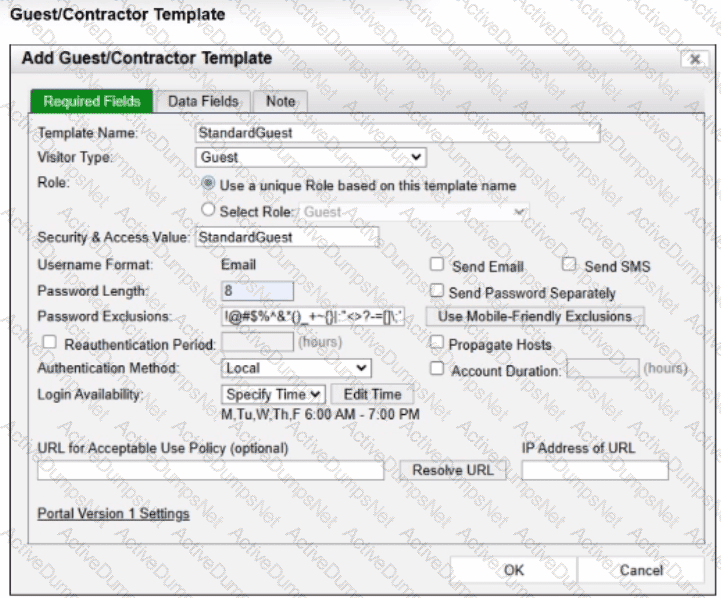
An administrator wants to ensure that guest accounts created from this template are not allowed network access outside of the designated times.
To achieve this, all necessary configurations must be made to force isolation of hosts in which state?
Options:
At-risk
Disabled
Non-authenticated
Rogue
Answer:
CExplanation:
The correct answer is C . The exhibit shows a guest template with Login Availability set to Specify Time , allowing login only Monday through Friday from 6:00 AM to 7:00 PM . The study guide explains that the Account Duration and Login Availability fields define when the account is deleted from the database or what days and times the account is enabled. Therefore, outside the allowed login window, the guest cannot authenticate successfully using that guest account.
To stop network access outside those permitted times, FortiNAC-F must isolate hosts that are in the Not Authenticated state. The guide maps the Authentication captive network to hosts in the Not Authenticated state, and the isolation logic table shows that hosts in the Not Authenticated state are moved to the Authentication network when the point of connection is in the Forced Authentication group.
Option A is wrong because At-risk hosts are isolated to remediation/quarantine due to compliance or security posture problems, not because a guest login is outside allowed hours. Option B is wrong because Disabled hosts are intentionally disabled and sent to the dead-end network; the account here is time-restricted, not necessarily disabled. Option D is wrong because Rogue applies to unregistered or unclassified devices, while this scenario is about a known guest account that is not allowed to authenticate outside its login schedule.
An administrator wants each department to create and manage its own contractor accounts but not be able to manage contractor accounts for other departments. What must the administrator configure to limit the sponsor ' s capabilities?
Options:
The contractor ' s template
The portal settings on the kiosk portal page
The user/host profile applied to the contractor
The sponsor ' s administrative profile
Answer:
DExplanation:
The correct answer is D . FortiNAC-F limits what a sponsor can create and manage through the administrator profile assigned to that sponsor. The study guide explains that sponsors can be restricted to specific guest or contractor templates and that the Manage Guests settings in the admin profile define whether the sponsor can manage all accounts, no accounts, or only accounts they created. It also states that allowed templates are defined in the admin profile, meaning each department can be given access only to its own contractor template.
The contractor template defines account fields, role values, authentication method, account duration, and related account properties, but it does not by itself restrict what a sponsor can manage. Portal settings control how users interact with the captive portal or kiosk page, not sponsor administrative scope. A user/host profile is used for matching users or hosts in policy decisions; it does not delegate sponsor permissions. For departmental separation, the administrator must create sponsor-specific administrative profiles that allow only the appropriate templates and account-management scope.
When managing multiple FortiNAC-F CAs with a FortiNAC-F Manager, how is endpoint information updated in the FortiNAC-F Manager database?
Options:
Endpoint information is pulled from the managed CAs by the FortiNAC-F Manager at a set interval.
Endpoint information is updated in real time when a host status changes.
Endpoint information is updated when an administrator synchronizes with each CA.
Endpoint information is pushed to the FortiNAC-F Manager based on an administratively configured scheduled task.
Answer:
AExplanation:
The correct answer is A . FortiNAC-F Manager provides global visibility by collecting user and endpoint visibility information from the FortiNAC-F devices it manages, creating a centralized repository of users, hosts, and adapters. The study guide describes this as a global visibility function where endpoint information received by the Manager includes the local FortiNAC-F device from which the information came, allowing administrators to search and filter endpoint records across managed systems.
The key point is that this is not a real-time host-status trigger. Fortinet’s FortiNAC-F Manager documentation states that FortiNAC Manager controls host and user record replication between managed FortiNAC CA servers and initiates synchronization every five minutes between servers. It also states that global object synchronization uses an interval-based process, not an administrator manually synchronizing each CA for endpoint visibility.
Option B is wrong because host status changes are not treated as immediate real-time updates to every managed FortiNAC-F database. Option C is wrong because manual synchronization applies to global/shared configuration objects, not routine endpoint visibility updates. Option D is wrong because the mechanism is not a CA-side scheduled push to the Manager; the Manager-controlled synchronization/collection process is what maintains the shared endpoint view.
An organization has FortiNAC-F deployed and is using Layer 3 isolation networks across multiple sites with firewalls. At a minimum, which three protocols must be allowed between the isolation networks and FortiNAC-F? (Choose three.)
Options:
DDNS
NTP
HTTP/HTTPS
DNS
DHCP
Answer:
C, D, EExplanation:
The correct answers are C, D, and E . In a Layer 3 captive or isolation network design, FortiNAC-F port2 acts as the captive network service interface. The study guide states that Layer 3 captive networks require DHCP traffic to be relayed to port2 from the captive networks, and that the FortiNAC-F interface provides DHCP, DNS, and captive portal services to hosts assigned to any captive network.
That means the firewall path between the isolation VLANs and FortiNAC-F must allow DHCP , so isolated endpoints can receive an IP address from the FortiNAC-F captive network scope; DNS , so the isolated endpoint uses FortiNAC-F as its DNS server and gets redirected correctly; and HTTP/HTTPS , so the endpoint can load the FortiNAC-F captive portal page. The guide’s browser-redirection flow confirms this sequence: the host is moved to the isolation VLAN, requests DHCP, receives FortiNAC-F as the DNS server, performs DNS lookup, and then Apache/Tomcat services present the portal content.
Option A , DDNS, is not required for captive portal operation. Option B , NTP, may be useful for endpoint time accuracy or certificate-related workflows, but it is not part of the minimum traffic required for FortiNAC-F isolation network operation.
Refer to the exhibit.

Which devices are automatically evaluated by these device profiling rules?
Options:
Rogue devices, only when they are initially added to the database
Known trusted devices, each time they connect
All hosts, each time they connect
Rogue devices, each time they change location
Answer:
AExplanation:
The correct answer is A . In FortiNAC-F, device profiling rules are used primarily to classify unknown or untrusted devices when they are first discovered. The study guide explains that when a device does not already exist in the database, FortiNAC-F adds it, treats it as a rogue, and evaluates it against enabled device profiling rules. It also states that devices are initially evaluated against device profiling rules only if they do not already exist in the database, because this avoids unnecessary repeated evaluation of known devices.
The exhibit also matters: the rules are enabled and set to Automatic registration, but Confirm Rule On Connect is not enabled and Confirm Rule Interval is set to None . That means FortiNAC-F will not automatically revalidate already-profiled or trusted devices every time they connect. Option B is wrong because trusted devices are not repeatedly evaluated unless rule confirmation is configured. Option C is too broad because all hosts are not processed through profiling rules on every connection. Option D is also wrong because changing location does not by itself force automatic device profiling; location can be used as a rule method, but the automatic evaluation described here applies when the rogue device is initially added to the database.
An administrator wants to build device profiling rules based on network traffic, but the network session view is not populated with any records.
Which two settings can be enabled to gather network session information? (Choose two.)
Options:
Network traffic polling on any modeled infrastructure device
Firewall session polling on modeled FortiGate devices
Netflow setting on the FortiNAC-F interfaces
Layer 3 polling on the infrastructure devices
Answer:
B, CExplanation:
In FortiNAC-F, theNetwork Sessionsview provides a real-time and historical log of traffic flows, including source/destination IP addresses, ports, and protocols. This data is essential for buildingDevice Profiling Rulesthat rely on " Traffic Patterns " or " Network Footprints " to identify devices (e.g., an IP camera communicating with its specific NVR). If the network session view is empty, the system is not receiving the necessary flow or session data from the network infrastructure.
According to theFortiNAC-F Administration Guide, there are two primary methods to populate this view:
NetFlow/sFlow/IPFIX (C):FortiNAC-F can act as a flow collector. By enablingNetFlowsettings on the FortiNAC-F service interface (port2/eth1) and configuring your switches or routers to export flow data to the FortiNAC IP, the system can parse these packets and record sessions.
Firewall Session Polling (B):For environments with FortiGate firewalls, FortiNAC-F can proactively poll the FortiGate via theREST APIto retrieve its current session table. This is particularly useful as it provides session visibility without requiring the overhead of configuring NetFlow on every access layer switch.
Settings likeLayer 3 Polling(D) only provide ARP table mappings (IP to MAC correlation) and do not provide the detailed flow information required for the session view.
" TheNetwork Sessionsview displays information regarding active and inactive network traffic sessions... To populate this view, FortiNAC must receive data through one of the following methods: •NetFlow/sFlow Support: Configure network devices to send flow data to the FortiNAC service interface. •Firewall Session Polling: Enable session polling on modeled FortiGate devices to retrieve session information via API. These records are then used by the Device Profiler to match rules based on traffic patterns. " —FortiNAC-F Administration Guide: Network Sessions and Flow Data Collection.
Which two requirements must be met to set up an N+1 HA cluster? (Choose two.)
Options:
A FortiNAC-F manager
A FortiNAC-F device designated as a secondary
A dedicated VLAN for primary and secondary synchronization
At least two FortiNAC-F devices designated as primary
Answer:
A, BExplanation:
TheN+1 High Availability (HA)architecture was introduced in FortiNAC-F version 7.6 to provide a more scalable and flexible redundancy model compared to the traditional 1+1 active/passive setup. In an N+1 configuration, a single secondary (standby) appliance can provide coverage for multiple primary (active) Control and Application (CA) appliances.
To set up an N+1 HA cluster, there are two fundamental structural requirements:
A FortiNAC-F Manager (FortiNAC-M):Unlike standard 1+1 HA, which can be configured directly between two CAs, N+1 management is centralized. The FortiNAC-M acts as the orchestrator that manages the failover groups, monitors the health of the primaries, and coordinates the promotion of the secondary server if a primary fails.
A FortiNAC-F device designated as a Secondary:The cluster must have one appliance explicitly configured with theSecondary failover role. This device remains in a standby state, receiving database replications from all N primaries in its group until it is called upon to take over the functions of a failed unit.
While a cluster can support multiple primaries (D), it does not strictly require " at least two " to function as an N+1 group; it simply requires N primaries (where N ≥ 1). Additionally, N+1 is typically a Layer 3 managed solution via the Manager, meaning it does not mandate a " dedicated VLAN " for synchronization like some Layer 2 HA deployments.
" In FortiNAC-F 7.6,FortiNAC-Mfunctions as a manager to manage the N+1 Failover Groups... enabling N+M high availability for CAs. To create an N+1 Failover group, you should add thesecondary CAto the FortiNAC-M first, then add the primary CAs. The secondary CA is designed to take over the functionality of any single failed primary component. " —FortiNAC-F 7.6.0 N+1 Failover Reference Manual.
In which three ways would deploying a FortiNAC-F Manager into a large environment consisting of several FortiNAC-F CAs simplify management? (Choose three.)
Options:
Global infrastructure device inventory
Global version control
Global authentication security policies
Pooled licenses
Global visibility
Answer:
B, D, EExplanation:
TheFortiNAC-F Manager (FortiNAC-M)is designed as a centralized management platform for large-scale distributed environments where multiple FortiNAC-F Control and Application (CA) appliances are deployed across different sites. According to theFortiNAC-F Manager Administration Guide, the deployment of a Manager simplifies administrative overhead in three specific ways:
First, it providesGlobal Version Control (B). The Manager serves as a central repository for firmware and software updates, allowing administrators to push specific versions to all managed CAs simultaneously, ensuring consistency across the entire fabric. Second, it enablesPooled Licenses (D). Instead of purchasing and managing individual licenses for every CA, licenses are centralized on the Manager. The Manager then distributes these licenses to the CAs as needed based on their host counts. This " floating " license model optimizes cost and prevents individual sites from running out of capacity while others have excess. Third, it offersGlobal Visibility (E). The Manager aggregates host and device data from every managed CA into a single console. This " single pane of glass " allows an administrator to search for a specific MAC address or user across the entire global organization without logging into individual servers.
While the Manager can assist with configuration templates, authentication security policies (C) and infrastructure modeling (A) are still predominantly managed at the local CA level to ensure site-specific logic and performance.
" The FortiNAC Manager provides a central management console for multiple FortiNAC-F servers (CAs). Key benefits include: •License Management: Licenses are pooled on the Manager and allocated to managed CAs as needed. •Software Management: Firmware updates can be centrally managed and pushed to all CAs from the Manager. •Centralized Monitoring: Provides a global view of all hosts, adapters, and events across the entire managed environment. " —FortiNAC-F Manager Administration Guide: Overview and Benefits.
An administrator is configuring FortiNAC-F to manage FortiGate VPN users. As part of this configuration, what is the purpose of the FortiGate firewall policy that applies to clients not yet authorized?
Options:
To allow access to only the production DNS server
To allow access to only the production DNS server
To allow access to only the FortiNAC-F VPN interface
To allow access to only the FortiGate VPN interface
Answer:
CExplanation:
The correct answer is C . The FortiNAC-F study guide explains that all VPN hosts are initially treated as unauthorized. For those unauthorized VPN hosts, the FortiGate firewall policy must allow traffic only to and from the FortiNAC-F VPN isolation interface and deny all other traffic. This forces the connecting VPN client into the FortiNAC-F validation process, including captive portal presentation and FortiNAC-F agent communication or download.
Options A and B are incorrect, and they appear duplicated in the question. The client is not supposed to be granted access only to the production DNS server while still unauthorized. FortiGate assigns DNS during VPN connection setup, with production DNS as primary and the FortiNAC-F VPN isolation interface as secondary, but the unauthorized firewall policy restricts useful access to FortiNAC-F so that validation can occur. Option D is wrong because the VPN client has already connected to the FortiGate VPN service; the authorization workflow requires access to the FortiNAC-F VPN isolation interface , not merely the FortiGate VPN interface.
Refer to the exhibit.
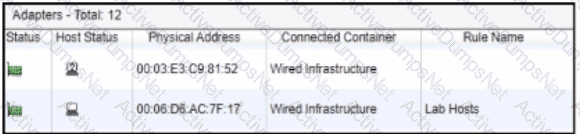
After a successful layer 2 poll, two hosts were learned on the same port The port is a member of the Role-Based Access and Forced Registration groups. The switch has been configured to leverage a single isolation VLAN.
How will FortiNAC-F manage this port?
Options:
The port will be provisioned to the isolation network
The port will be provisioned for the normal state host, but the second host will have access to only the isolation portal page.
The port will be provisioned as an uplink to a hub or unmanaged switch.
The port will be added to the Access Point Management group
Answer:
AExplanation:
The correct answer is A . The exhibit shows two adapters learned on the same wired port: one appears as a rogue/unknown host, and the other is associated with the Lab Hosts rule. The port is in both Role-Based Access and Forced Registration . FortiNAC-F state-based control takes precedence over policy-based provisioning, and the study guide states that when a rogue host connects to a port in the Forced Registration group, FortiNAC-F isolates that host by moving it into the registration captive network. The guide also explains that the Isolation network can be used as a single network for abnormal host states while still presenting state-specific portal pages.
Because this is a wired switch port using VLAN-based control, FortiNAC-F cannot put one host on the production VLAN and the other host on the isolation portal VLAN at the same time on the same access port. The VLAN change applies to the port, not independently to each MAC address behind that port. Therefore, the presence of the rogue host on a Forced Registration port causes the port to be provisioned to the isolation network. Option B is technically unrealistic for this access-port scenario. Option C is wrong because two MAC addresses alone do not make the port an uplink; FortiNAC-F uses uplink logic for infrastructure-device MACs, manually marked uplinks, or a threshold such as more than 20 MAC addresses. Option D is unrelated because Access Point Management is not triggered by learning two wired hosts on a port.
When preparing network infrastructure devices for visibility, what are the two main advantages of using MAC notification traps on supported devices instead of link-up and link-down traps? (Choose two.)
Options:
MAC notification traps include IP address information.
Overhead on FortiNAC-F and the infrastructure device is reduced.
Hosts connecting to downstream non-managed hubs are immediately learned.
Faster visibility updates with only a slight increase in processing.
Answer:
B, CExplanation:
Comprehensive and Detailed Explanation From Exact Extract of FortiNAC-F 7.6 Administrator Guide or Knowledge:
Exact Extract:
The FortiNAC-F study guide states that MAC notification traps are preferred because FortiNAC-F does not need to connect back to the infrastructure device every time a link-up or link-down trap is received. The required MAC and port information is already included in the MAC notification trap, which makes database updates faster and uses fewer resources. It also states that hosts and devices connected through hubs or IP phones are seen immediately, even when the downstream device cannot generate link-up or link-down traps.
Technical Deep Dive:
The correct answers are B and C . With link-up/link-down traps, the trap only tells FortiNAC-F that an interface changed state. FortiNAC-F then has to perform an L2 poll against the switch forwarding table to discover which MAC address appeared or disappeared. That means extra SNMP/CLI activity, more delay, and more processing on both FortiNAC-F and the switch. The guide confirms that link traps trigger FortiNAC-F to perform a Layer 2 poll, while MAC notification traps directly contain the learned or removed MAC address and associated port.
Option A is wrong because MAC notification traps are Layer 2 visibility events. They identify MAC address and port , not IP address. IP-to-MAC correlation comes from Layer 3 polling or DHCP fingerprinting, not MAC notification traps. Option D is badly worded and should not be selected: MAC notification traps do provide faster updates, but the processing overhead is reduced, not slightly increased.
Operationally, on supported switches you enable SNMP traps for MAC address-table changes and point the trap destination to FortiNAC-F. On Cisco-style infrastructure, this is usually done with commands such as snmp-server host < FortiNAC-IP > version 2c < community > plus MAC notification trap configuration. Do not enable MAC notification traps on uplinks, because uplinks learn many downstream MAC addresses and would create misleading endpoint-location data.
Refer to the exhibit.
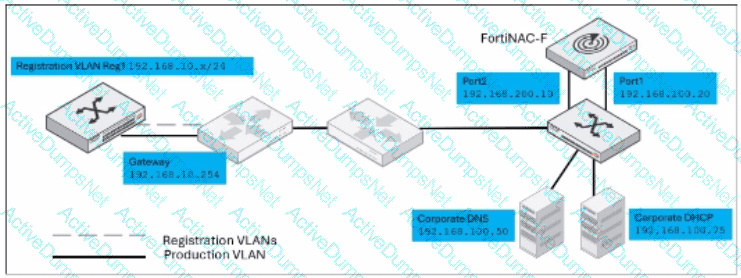
Given this topology, and a layer 3 registration network configuration, which IP address would be designated in the DHCP relay configuration for the registration network?
Options:
192.168.10.254
192.168.100 75
192.168.100.20
192.168.200.10
Answer:
DExplanation:
The correct answer is D . In a Layer 3 registration or isolation network design, DHCP requests from the isolated registration VLAN are not served locally on that VLAN by a normal production DHCP server. Instead, the registration VLAN’s DHCP relay must forward DHCP traffic to FortiNAC-F port2 , because port2 is the captive network service interface. The study guide states that in Layer 3 captive networks, DHCP traffic is relayed to port2 from the captive networks, and that the FortiNAC-F port2 interface provides DHCP, DNS, and captive portal services for hosts assigned to those captive networks.
In the exhibit, the registration VLAN is 192.168.10.x/24 , with gateway 192.168.10.254 . That gateway is where the DHCP relay would be configured, but it is not the relay destination. The relay destination must be the FortiNAC-F port2 address, shown as 192.168.200.10 . The corporate DHCP server 192.168.100.75 is for production network addressing, not registration isolation. The FortiNAC-F port1 address 192.168.100.20 is the administrative or production-facing interface, not the captive network service interface. Therefore, the DHCP relay should point to 192.168.200.10 .
Which two statements are true about integrating a third-party device using SNMP traps from that device as input to generate an event? (Choose two.)
Options:
The sending device must be modeled in the inventory topology.
The sending device must support SNMPv3.
set allowaccess snmp must be configured using the CLI on the FortiNAC-F receiving interface.
The IP address OID and MAC address OID must be configured in the trap MIB file.
Answer:
A, CExplanation:
The correct answers are A and C . Fortinet’s FortiNAC-F 7.6 documentation states that, to receive and interpret traps from devices or applications, those devices or applications must be modeled in FortiNAC and must have an associated IP address. That validates option A directly. The same Fortinet Trap MIB Files documentation also lists a FortiNAC-OS requirement: the snmp option must be included in the set allowaccess command. That validates option C .
Option B is wrong because Trap MIB integration is not limited to SNMPv3. Fortinet states that Trap MIB supports receiving SNMPv1 and SNMPv2 traps from external devices, while SNMPv3 is discussed separately for traps that populate host and user records.
Option D is the trap. The Fortinet documentation explicitly says IP address OID, MAC address OID, and user ID OID are not all required ; any one OID can be used to identify the host or user that triggered the trap. So the statement that both the IP address OID and MAC address OID must be configured is false.
Unlock NSE6_FNC_AD-7.6 Features
- NSE6_FNC_AD-7.6 All Real Exam Questions
- NSE6_FNC_AD-7.6 Exam easy to use and print PDF format
- Download Free NSE6_FNC_AD-7.6 Demo (Try before Buy)
- Free Frequent Updates
- 100% Passing Guarantee by Activedumpsnet
Questions & Answers PDF Demo
- NSE6_FNC_AD-7.6 All Real Exam Questions
- NSE6_FNC_AD-7.6 Exam easy to use and print PDF format
- Download Free NSE6_FNC_AD-7.6 Demo (Try before Buy)
- Free Frequent Updates
- 100% Passing Guarantee by Activedumpsnet