Weekend Special - 75% Discount Offer - Ends in 0d 00h 00m 00s - Coupon code: discactive

Fortinet NSE6_FMG_AD-7.6 Fortinet NSE 6 - FortiManager 7.6 Administrator Exam Practice Test

Fortinet NSE 6 - FortiManager 7.6 Administrator Questions and Answers

Question 1

Refer to the exhibits.

Question # 1

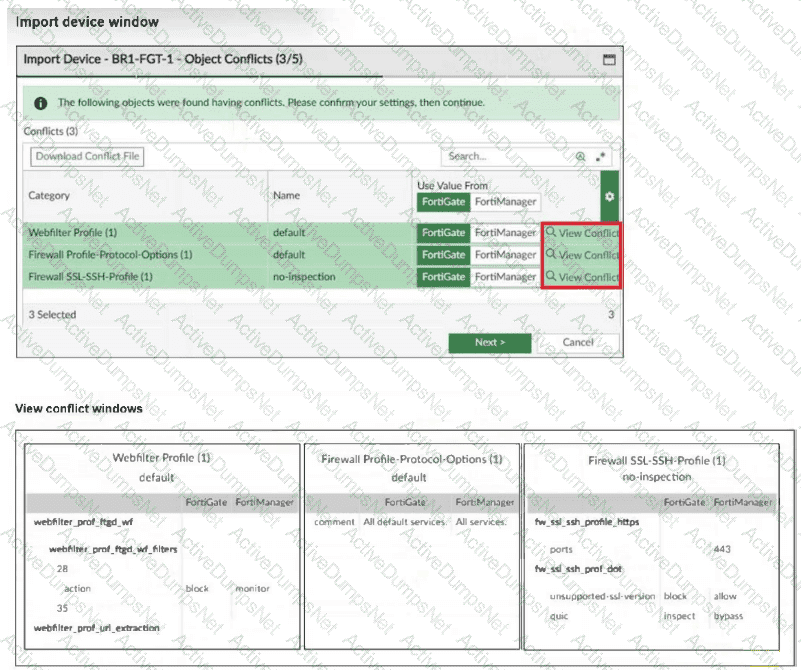
An administrator added BR1-FGT-1 to FortiManager and started importing the policy package. During the process, they saw that they need to choose values from FortiGate or FortiManager.

Which conclusion is most clearly supported by the exhibits?

Options:

A.

BR1-FGT-1 does not support the SSL/SSH profile with HTTPS on port 443.

B.

The administrator must match the FortiOS firmware version with the FortiManager ADOM firmware version to resolve the conflict status.

C.

The default Firewall Profile-Protocol-Options object is the only profile that does not significantly affect any configuration changes on either FortiManager or FortiGate.

D.

FortiManager has a different FortiGuard database compared to FortiGate BR1-FGT-1 for the QUIC protocol.

Question 2

Refer to the exhibit.

Question # 2

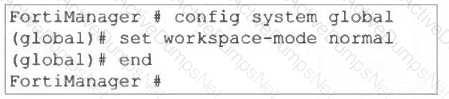
What are two results from the configuration shown in the exhibit? Choose two answers.

Options:

A.

The same administrator can lock more than one ADOM at the same time.

B.

Multiple administrators can lock and work on separate ADOMs at the same time.

C.

All changes must be approved before they can be installed on a device.

D.

Concurrent read-write access to an ADOM is disabled.

Question 3

Refer to the exhibit.

Question # 3

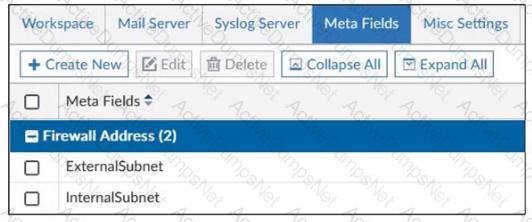
An administrator created two new meta fields in FortiManager.

Which operation can you perform with these parameters?

Options:

A.

You can add them to objects as custom attributes.

B.

You can export them to be used in other ADOMs.

C.

You can use them as variables in scripts.

D.

You can invoke them using the $ character.

Question 4

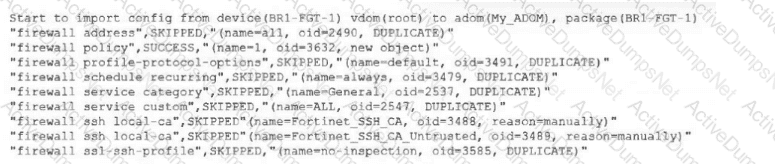
An administrator receives the import report after importing policies into the policy package layer.
Question # 4

Based on the import report, how did FortiManager handle the profile-protocol-options object named default?

Options:

A.

FortiManager deleted the duplicate value from its database.

B.

FortiManager created a new service category in its database.

C.

FortiManager did not update its database with the value.

D.

FortiManager updated the duplicate value in the FortiGate database.

Question 5

Refer to the exhibit.

Question # 5

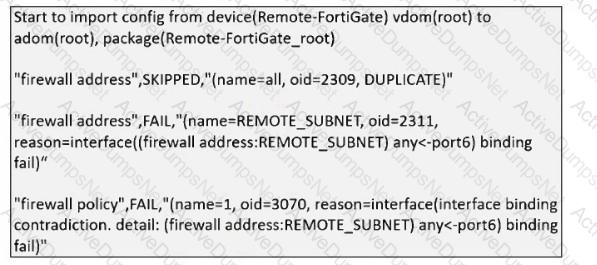
What can you conclude from the downloaded import report?

Options:

A.

FortiManager does not support per-device mapping for firewall addresses.

B.

The administrator will see a new policy package named Remote-FortiGate_root in the FortiManager ADOM database.

C.

FortiManager will change the configuration of REMOTE_SUBNET to match the interface mapping coming in from Remote-FortiGate.

D.

As a result of this policy import process, FortiManager will create a new firewall address called REMOTE_SUBNET in the ADOM database.

Question 6

Refer to the exhibit.

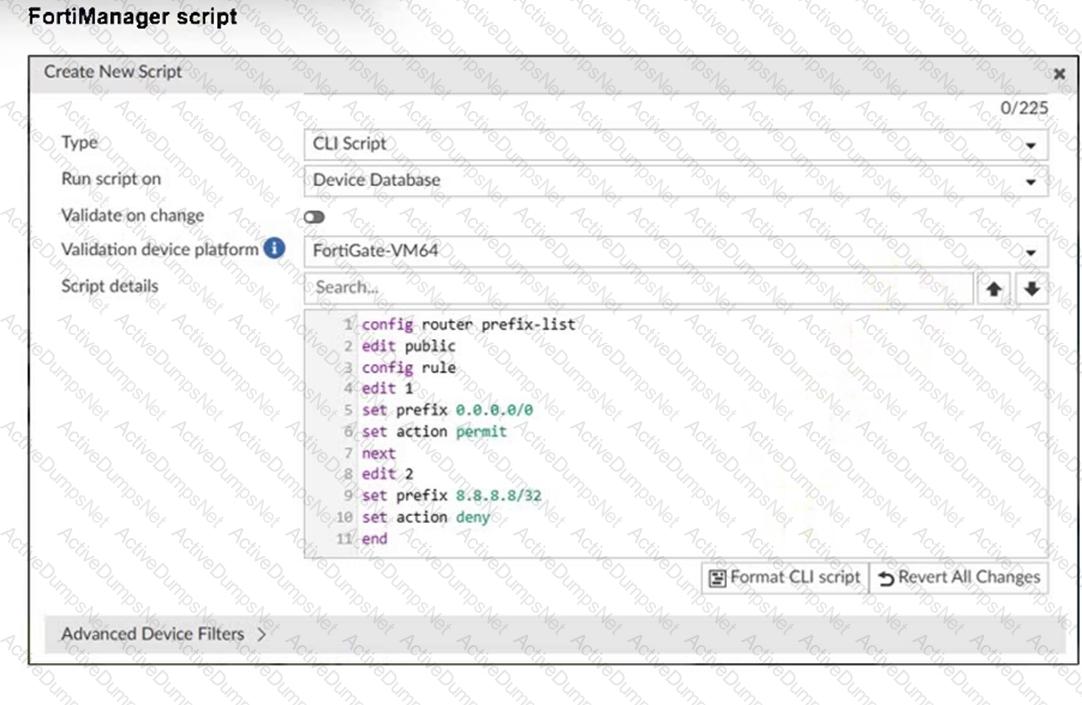
Question # 6

Which two results occur if you run the script using the Device Database option? (Choose two.)

Options:

A.

The device Config Status is tagged as Modified.

B.

The script history shows the successful installation of the script on the remote FortiGate.

C.

The successful execution of a script on the Device Database creates a new revision history.

D.

The administrator must install these changes on a managed device using the Install Wizard.

Question 7

What is the purpose of ADOM revisions?

Options:

A.

ADOM revisions find unused, duplicate, and unnecessary firewall policies and objects.

B.

ADOM revisions show specific changes in a policy package when it is installed.

C.

ADOM revisions compare previous snapshots of the Policy Package and ADOM-level objects with the device-level database.

D.

ADOM revisions save the current state of all policy packages and objects for an ADOM.

Question 8

Refer to the exhibit.

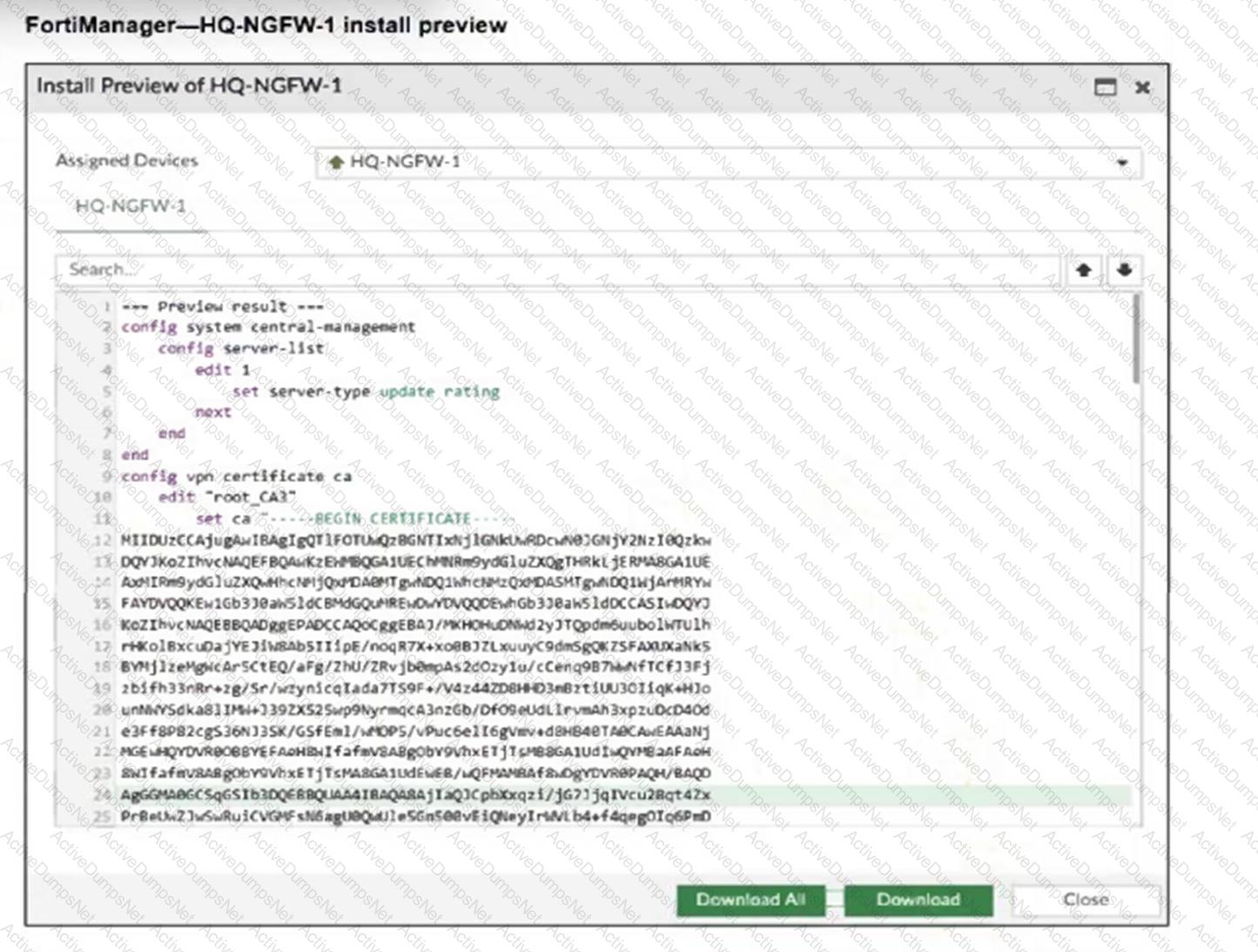
Question # 8

An administrator assigned a new policy package to FortiGate HQ-NGFW-1. In the installation preview, they noticed some settings they did not modify and are unsure about the changes.

Based on the exhibit, which two things will happen if they continue with the installation? (Choose two.)

Options:

A.

FortiGate HQ-NGFW-1 can use FortiManager firmware templates to upgrade firmware and ratings.

B.

FortiGate HQ-NGFW-1 can contact the FortiManager acting as FortiGuard Distribution Server (FDS) to download FortiGuard updates.

C.

FortiGate HQ-NGFW-1 will use the root_CA3 certificate in firewall address objects or policies.

D.

FortiManager will install the CA certificate named root_CA3 to authenticate FortiGate-to-FortiManager communication protocol (FGFM) tunnel connections with FortiGate HQ- NGFW-1.

Question 9

A service provider administrator has assigned a global policy package to a managed customer ADOM named My_ADOM. The customer administrator has access only to My_ADOM.

How can the customer administrator edit the global header policy of the global policy package?

Options:

A.

The customer administrator can edit the header policy by using workspace mode on the global ADOM.

B.

The customer administrator can edit the header policy by using workflow mode on the global ADOM and My_ADOM.

C.

The service provider administrator can unlock the global policy from the global ADOM to authorize changes to the customer administrator.

D.

The customer administrator cannot edit the global header policy; only the service provider administrator can make changes from the global ADOM.

Question 10

Refer to the exhibit.

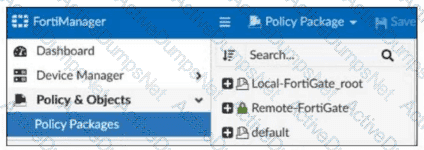
Question # 10

Which two statements about the configuration shown in the exhibit are true? Choose two answers.

Options:

A.

An administrator can lock the Local-FortiGate_root policy package.

B.

The administrator created a snapshot of the Remote-FortiGate policy package.

C.

The FortiManager ADOM workspace mode is set to normal.

D.

The FortiManager is in workflow mode.

Question 11

An administrator configures a new BGP peer in the FortiManager device-level database of FortiGate. They reinstall the policy package to the managed FortiGate device without any errors. However, when the administrator logs in to FortiGate, they do not see the BGP configuration changes.

What is the most likely reason why FortiManager did not push the BGP peer changes to FortiGate?

Options:

A.

The administrator must run a sanity check on FortiManager to make sure the database is not corrupted.

B.

Fortigate has a BGP template assigned on the FortiManager database.

C.

The administrator must use the Install Wizard and select Install device settings only to push BGP settings

D.

The FortiGate firmware version is different from the FortiManager ADOM version.

Question 12

Refer to Exhibit:

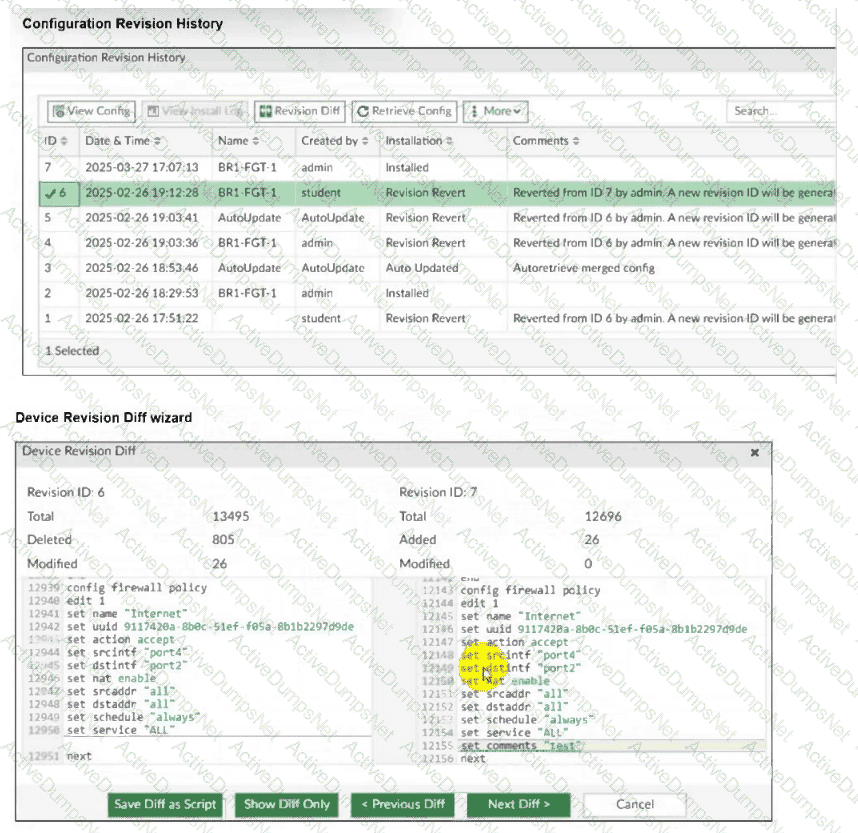
Question # 12

An administrator admin used the Configuration Revision History window to revert the FortiGate device configuration to revision ID 6. After running the reinstall policy package, the administrator noticed problems with the firewall policy- they could not see the unset comment on policy ID 1.

Why did FortiManager not remove the comment from policy ID 1 when the administrator ran reinstall policy package?

Options:

A.

Because the administrator student must install the configuration changes to correctly see the expected results.

B.

Because the administrator must import the firewall policies to update the firewall policy package.

C.

Because every time the administrator uses the revert config file, they must use the Install Wizard instead of running the reinstall policy package.

D.

Because the administrator used the Revision Diff view, which shows what changed, not what will be installed.

Question 13

An administrator has a FortiGate-HQ device with VDOMs—root, HR and Facilities, currently managed under the FortiManager ADOM—Site1. They try to move VDOM HR to the FortiManager ADOM—Site2, but it does not work.

Why is the administrator not able to move FortiGate-HQ VDOM HR to FortiManager ADOM—Site2?

Options:

A.

The FortiGate-HQ must be managed under the FortiManager ADOM—root to allow moving its VDOMs to different ADOMs.

B.

The administrator must have full access in the device layer of FortiGate-HQ VDOM-root before they can VDOMs to different ADOMs.

C.

FortiManager must be in ADOM normal mode, which does not allow VDOMs to be managed separately.

D.

The administrator must delete the FortiGate-HQ device from FortiManager and add it again using the Add Device wizard before moving the VDOM.

Question 14

Refer to the exhibit.

Question # 14

What are two results from the configuration shown in the exhibit? (Choose two.)

Options:

A.

Ungraceful closed sessions will keep the ADOM in a locked state until the administrator session times out.

B.

The administrator can lock policy blocks and FortiManager global ADOM.

C.

The same administrator can lock more than one ADOM at the same time.

D.

The administrator must have access to the ADOM to approve changes.

Question 15

What allows FortiManager to run CLI scripts on FortiGate devices without prompting for SSH authentication each time?

Options:

A.

FortiGate devices using the legacy login method.

B.

The secure management tunnel between FortiManager and FortiGate devices.

C.

The script using the Remote FortiGate Directly via CLI option.

D.

The script on the FortiManager device database.

Question 16

Refer to the exhibits.

Question # 16

Question # 16

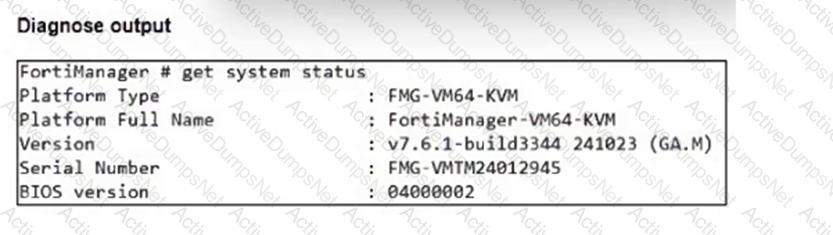
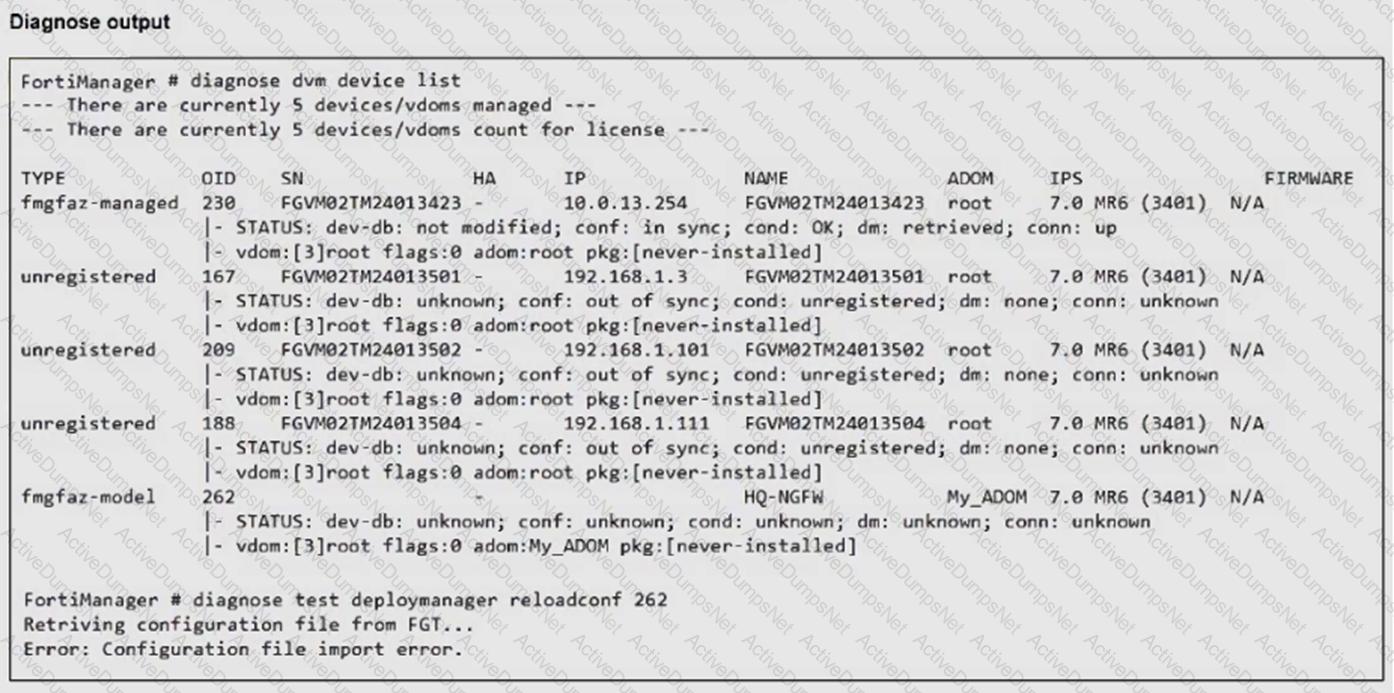
An administrator runs the reload failure command diagnose test deploymanager reloadconf 262 on FortiManager.

Why does the administrator receive an error message?

Options:

A.

The administrator must use the FortiGate name instead of the ID number.

B.

The administrator just recently added FortiGate HQ-NGFW as a model device.

C.

FortiManager requires the FortiGate serial number instead of the ID number.

D.

FortiManager does not support FortiOS version 7.0.

Question 17

Refer to the exhibits.

Question # 17

Question # 17

Question # 17

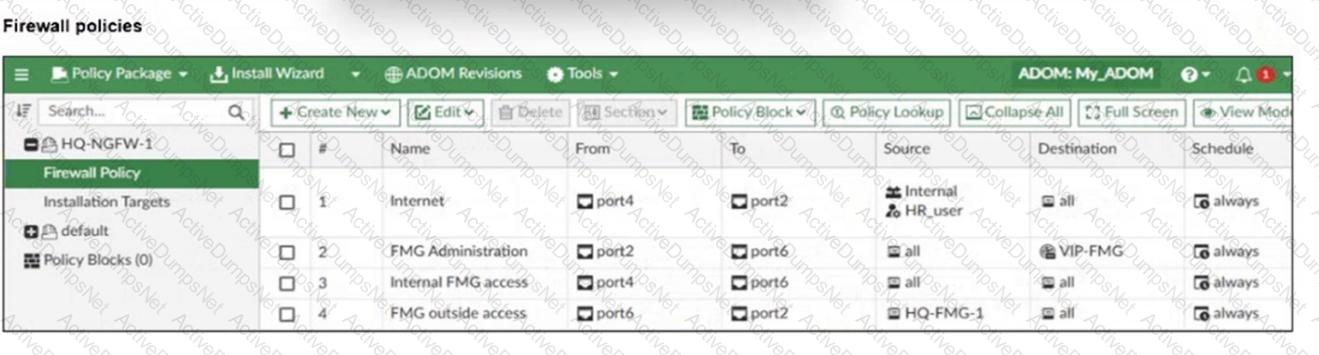
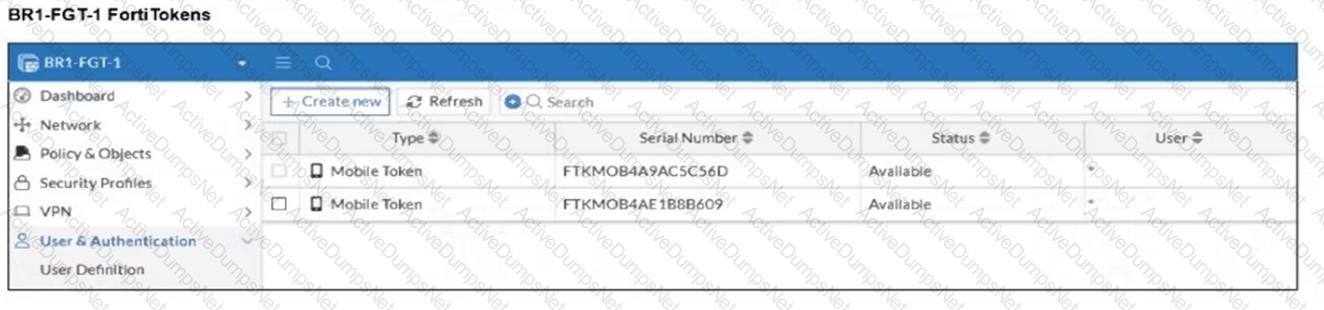
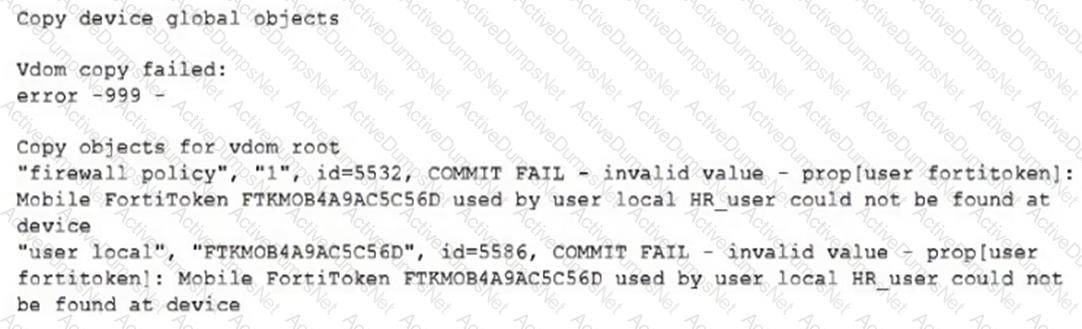
An administrator needs to push a FortiToken Mobile to assign it to HR_user in the HQ-NGFW-1.

However, when installing the policy package, they receive the following error message:
Question # 17

Why is the administrator not able to install the FortiToken on the HQ-NGFW-1 firewall?

Options:

A.

The administrator must use a user local meta field to assign FortiToken.

B.

The administrator must use a valid FortiToken that exists on HQ-NGFW-1.

C.

The administrator must use a metadata variable to assign the same FortiToken to multiple users in FortiManager.

D.

The administrator must use per-device mapping to assign the FortiToken to HQ-NGFW-1.

Question 18

Push updates are failing on a FortiGate device located behind a network address translation (NAT) device?

Which two settings should the administrator check to correct this problem? (Choose two.)

Options:

A.

Make sure the NAT device IP address and the correct ports are configured on FortiManager.

B.

Make sure FortiGuard updates and web service are enabled on the FortiGuard service interface.

C.

Make sure the virtual IP address and the correct ports are configured on the NAT device.

D.

Make sure the Bind to IP address option on the FortiGuard service interface is set to the virtual IP address from the NAT device.

Question 19

Which is recommended when you are managing a high volume of logs in your network?

Options:

A.

Store logs on FortiManager and use FortiView.

B.

Add and manage FortiAnalyzer from FortiManager.

C.

Enable advanced ADOM mode on FortiManager.

D.

Forward logs from FortiAnalyzer to FortiManager daily.