- Home
- Fortinet
- Fortinet Network Security Expert
- NSE5_SSE_AD-7.6
- NSE5_SSE_AD-7.6 - Fortinet NSE 5 - FortiSASE and SD-WAN 7.6 Core Administrator
Fortinet NSE5_SSE_AD-7.6 Fortinet NSE 5 - FortiSASE and SD-WAN 7.6 Core Administrator Exam Practice Test
Fortinet NSE 5 - FortiSASE and SD-WAN 7.6 Core Administrator Questions and Answers
You are configuring SD-WAN to load balance network traffic. Which two facts should you consider when setting up SD-WAN? (Choose two.)
Options:
When applicable, FortiGate load balances traffic through all members that meet the SLA target.
SD-WAN load balancing is possible only when using the manual and the best quality strategies.
Only the manual and lowest cost (SLA) strategies allow SD-WAN load balancing.
You can select the outsessions hash mode with all strategies that allow load balancing.
Answer:
A, DExplanation:
According to theSD-WAN 7.6 Core Administratorstudy guide and theFortiOS 7.6 Administration Guide, configuring load balancing within SD-WAN rules requires an understanding of how the engine selects and distributes sessions across multiple links.
SLA Target Logic (Option A): In FortiOS 7.6, theLowest Cost (SLA)strategy has been enhanced. When the load-balance option is enabled for this strategy, the FortiGate does not just pick a single "best" link; it identifiesall member interfaces that currently meet the configured SLA target(e.g., latency < 100ms). It then load balances the traffic across all those healthy links to maximize resource utilization.
Hash Modes (Option D): When an SD-WAN rule is configured for load balancing (valid forManualandLowest Cost (SLA)strategies in 7.6), the administrator must define ahash modeto determine how sessions are distributed. While "outsessions" in the question is a common exam-variant typo foroutbandwidth(or sessions-based hashing), the core principle remains: you can select the specific load-balancing algorithm (e.g., source-ip, round-robin, or bandwidth-based) forall strategieswhere load-balancing is enabled.
Why other options are incorrect:
Option B and C: These options are too restrictive. InFortiOS 7.6, load balancing is not limited to only "manual and best quality" or "manual and lowest cost" in a singular way. The documentation highlights thatManualandLowest Cost (SLA)are the primary strategies that support the explicit load-balance toggle to steer traffic through multiple healthy members simultaneously.
Refer to the exhibit.

Which two statements about the Vulnerability summary dashboard in FortiSASE are correct? (Choose two.)
Options:
The dashboard shows the vulnerability score for unknown applications.
Vulnerability scan is disabled in the endpoint profile.
The dashboard allows the administrator to drill down and view CVE data and severity classifications.
Automatic vulnerability patching can be enabled for supported applications.
Answer:
C, DExplanation:
Based on theFortiSASE 7.6 (and later 2025 versions)curriculum and administration guides, the Vulnerability summary dashboard is a key component of the endpoint security posture management.
Drill Down Capability (Option C): According to theFortiSASE Administration Guide, the Vulnerability summary widget on the Security dashboard is interactive. An administrator can click on specific risk categories (e.g., Critical, High) or application types (e.g., Operating System, Web Client) todrill down. This action opens a detailed pane showing the specific affected endpoints, associatedCVE identifiers, and severity classifications based on the CVSS standard.
Automatic Vulnerability Patching (Option D): In theFortiSASE 7.6/2025feature sets, the endpoint profile configuration (underEndpoint > Configuration > Profiles) includes an "Automatic Patching" section. This feature allows the system to automatically install security updates for supported third-party applications and the underlying operating system (Windows/macOS) when vulnerabilities are detected. Furthermore, administrators can schedule these patches directly from theVulnerability Summarywidget by selecting specific vulnerabilities.
Why other options are incorrect:
Option A: The dashboard categories (Operating System, Web Client, Microsoft Office, etc.) are based on known software signatures. While there is an "Other" category, the dashboard primarily provides scores for recognized applications where CVE data is available.
Option B: The exhibit shows active data (157 total vulnerabilities), which indicates that thevulnerability scan is enabledand currently reporting data from the endpoints. If it were disabled, the widget would be empty or show zeros.
Which FortiSASE feature monitors SaaS application performance and connectivity to points of presence (POPs)?
Options:
Operations widgets
FortiView dashboards
Event logs
Digital experience monitoring
Answer:
DExplanation:
According to theFortiSASE 7.6 Administration GuideandDigital Experience Monitoring (DEM)documentation, the feature specifically designed to monitor SaaS application performance and connectivity to PoPs isDigital Experience Monitoring (DEM).
SaaS and Path Visibility: DEM assists administrators in troubleshooting remote user connectivity issues by providing enhanced health check visibility forSaaS applications, endpoint devices, and the network path. It provides real-time insights into application performance and latency issues.
PoP Connectivity: It monitors the digital journey from the end-user device through theSecurity Points of Presence (POPs)to the final application, identifying hops where degraded service (packet loss, delay, or jitter) is detected.
Proactive Management: By establishing thresholds and simulating user activities throughSynthetic Transaction Monitoring (STM), DEM allows IT teams to identify performance problems before they impact the business.
Why other options are incorrect:
Option A: Operations widgets provide general status overviews but do not offer the granular per-hop path analysis or specific SaaS transaction monitoring found in DEM.
Option B: FortiView dashboards provide traffic visibility and session data but are not dedicated performance monitoring tools for end-to-end digital experience.
Option C: Event logs record system occurrences and security events but do not provide real-time performance metrics or health check probes for SaaS applications.
Which three factors about SLA targets and SD-WAN rules should you consider when configuring SD-WAN rules? (Choose three answers)
Options:
When configuring an SD-WAN rule, you can select multiple SLA targets from different performance SLAs.
SLA targets are used only by SD-WAN rules that are configured with a Lowest Cost (SLA) strategy.
Member metrics are measured only if a rule uses the SLA target.
SD-WAN rules can use SLA targets to check whether the preferred members meet the SLA requirements.
When configuring an SD-WAN rule, you can select multiple SLA targets if they are from the same performance SLA.
Answer:
B, D, EExplanation:
According to theSD-WAN 7.6 Core Administratorstudy guide and theFortinet Document Library, the interaction between SD-WAN rules and SLA targets is governed by specific selection and measurement logic:
Usage by Strategy (Option B): SLA targets are fundamentally used by theLowest Cost (SLA)strategy to determine which links are currently healthy enough to be considered for traffic steering. While other strategies likeBest Qualityuse a "Measured SLA" to monitor metrics, they do not typically use the "Required SLA Target" to disqualify links unless specifically configured in a hybrid mode. In most curriculum contexts, the "Required SLA Target" field is specifically associated with the Lowest Cost and Maximize Bandwidth strategies.
SLA Compliance Checking (Option D): SD-WAN rules utilize SLA targets as a "pass/fail" gatekeeper. The engine checks if thepreferred membersmeet the defined SLA requirements (latency, jitter, or packet loss thresholds). If a preferred member fails the SLA, the rule will move to the next member in the priority list that does meet the SLA.
Single SLA Binding (Option E): When configuring an SD-WAN rule, the GUI and CLI allow you to selectmultiple SLA targets, but they must all belong to thesame Performance SLAprofile. You cannot mix and match targets from different health checks (e.g., Target 1 from "Google_HC" and Target 2 from "Amazon_HC") within a single SD-WAN rule.
Why other options are incorrect:
Option A: This is incorrect because a single SD-WAN rule can only be associated with one specific Performance SLA profile at a time; therefore, you cannot select targets fromdifferentSLAs.
Option C: This is incorrect because member metrics (latency, jitter, packet loss) are measured by thePerformance SLAprobes regardless of whether an SD-WAN rule is currently using that SLA target for steering decisions. Measurement is a function of the health-check, not the rule matching process.
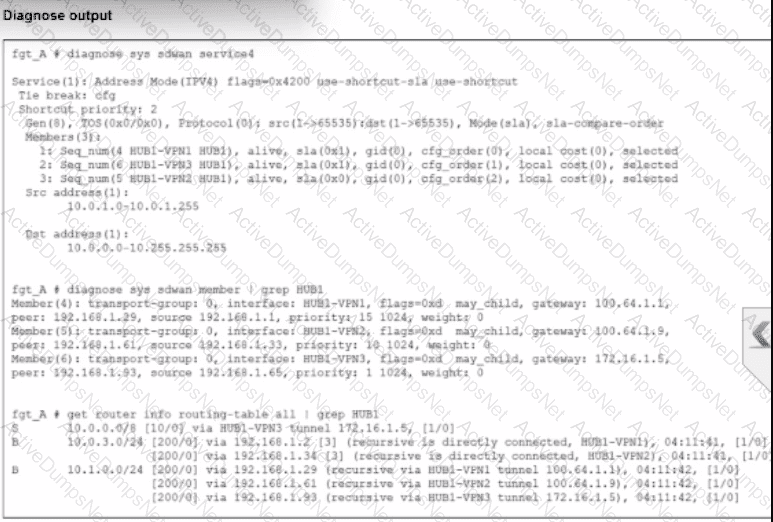
Refer to the exhibit.

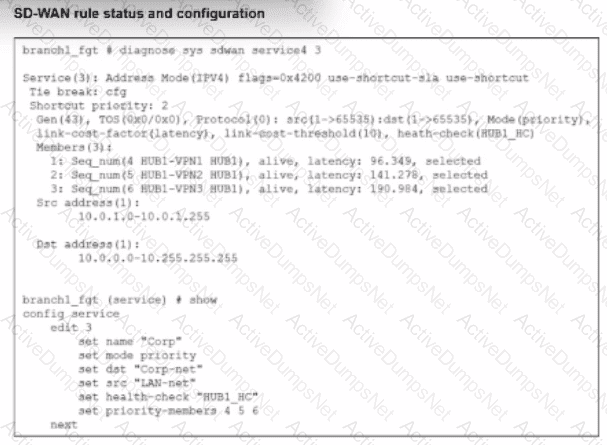
The SD-WAN rule status and configuration is shown. Based on the exhibit, which change in the measured latency will first make HUB1-VPN3 the new preferred member?
Options:
When HUB1-VPN3 has a latency of 80 ms
When HUB1-VPN3 has a lower latency than HUB1-VPN1 and HUB1-VPN2
When HUB1-VPN1 has a latency of 200 ms
When HUB1-VPN3 has a latency of 90 ms
Answer:
AExplanation:
According to theSD-WAN 7.6 Core Administratorstudy guide and theFortiOS 7.6 Administration Guide, the selection of a preferred member in aBest Quality (priority)rule is determined by the measured quality metric (latency, in this case) and thelink-cost-threshold.
Rule Logic (Best Quality): In the exhibit, the SD-WAN rule is configured with set mode priority, which corresponds to theBest Qualitystrategy. This strategy ranks members based on the link-cost-factor, which is set tolatency.
The Link-Cost-Threshold: The exhibit shows link-cost-threshold(10), which is the default 10% value. This threshold is designed to prevent "link flapping". To replace the current preferred member, a new member must not only have a better latency but must be better bymore than 10%.
The Calculation:
The current preferred member isHUB1-VPN1with a real latency of96.349 ms.
To calculate the "target" latency a lower-priority member must achieve to take over, we use the formula: $Target = \frac{Current\_Latency}{(1 + \frac{Threshold}{100})}$.
$\frac{96.349}{1.1} = \mathbf{87.59\text{ ms}}$.
Evaluating Options:
Option A (80 ms): Since 80 ms is lower than the required 87.59 ms target, HUB1-VPN3 successfully overcomes the 10% advantage of HUB1-VPN1 and becomes the new preferred member.
Option D (90 ms): While 90 ms is lower than 96.349 ms, it isnotlower than 87.59 ms. Therefore, the 10% threshold prevents a member switch, and HUB1-VPN1 remains preferred.
Option B: Incorrect because having a "lower" latency is not enough due to the 10% threshold.
Option C: If HUB1-VPN1 moved to 200 ms, HUB1-VPN2 (at 141.278 ms) would likely become the new preferred member before HUB1-VPN3 (at 190.984 ms).
An existing Fortinet SD-WAN customer who has recently deployed FortiSASE wants to have a comprehensive view of, and combined reports for, both SD-WAN branches and remote users. How can the customer achieve this?
Options:
Forward the logs from FortiSASE to Fortinet SOCaaS.
Forward the logs from FortiGate to FortiSASE.
Forward the logs from FortiSASE to the external FortiAnalyzer.
Forward the logs from the external SD-WAN FortiAnalyzer to FortiSASE.
Answer:
CExplanation:
For customers with hybrid environments (on-premises SD-WAN branches and remote FortiSASE users), theFortiOS 7.6andFortiSASEcurriculum recommends centralized log aggregation for unified visibility.
Centralized Reporting:The standard architectural best practice is toforward logs from FortiSASE to an external FortiAnalyzer (Option C).
Unified View:Since the customer's on-premises FortiGate SD-WAN branches are already sending logs to an existing FortiAnalyzer, adding the FortiSASE log stream to that sameFortiAnalyzerallows for the creation ofcombined reports.
Fabric Integration:This setup leverages theSecurity Fabric, enabling the FortiAnalyzer to provide a single pane of glass for monitoring security events, application usage, and SD-WAN performance metrics across the entire distributed network.
Why other options are incorrect:
Option A:SOCaaSis a managed service for threat monitoring, not a primary tool for an administrator to generate combined SD-WAN/SASE operational reports.
Option B:FortiSASE is not designed to act as a log collector or reporting hub for external on-premises FortiGates.
Option D:Data flows from the source (FortiSASE) to the collector (FortiAnalyzer), not the other way around.
Which statement is true about FortiSASE supported deployment?
Options:
FortiSASE supports VPN mode and Agentless mode, based on user requirements.
FortiSASE supports both Endpoint mode and SWG mode, depending on deployment.
FortiSASE operates only in SWG mode, where all traffic is forced through FortiSASE POPs.
FortiSASE relies on ZTNA-only mode, which replaces SWG and endpoint functions.
Answer:
BExplanation:
According to theFortiSASE 7.6 Administration Guideand theFCP - FortiSASE 24/25 Administratorcurriculum, FortiSASE is designed with a hybrid deployment architecture to support various user and device requirements. It primarily operates in two modes:
Endpoint Mode (Agent-based): This mode requires the installation ofFortiClienton the user's laptop or device. The agent establishes an "always-up" secure VPN tunnel to the nearest FortiSASE Point of Presence (PoP), providing full Secure Internet Access (SIA), Secure Private Access (SPA), and endpoint posture checks (ZTNA).
Secure Web Gateway (SWG) Mode (Agentless): This mode is used for users or devices where installing an agent is not feasible (e.g., unmanaged devices or Chromebooks). It relies on explicit web proxy settings or a PAC (Proxy Auto-Configuration) file to redirect web traffic (HTTP/HTTPS) to the SASE PoP for inspection.
Why other options are incorrect:
Option A: While it supports VPN, "VPN mode" is not the formal name of the deployment type; it is "Endpoint mode".
Option C: FortiSASE is not limited to SWG; it is a full SSE (Security Service Edge) solution including FWaaS and ZTNA.
Option D: ZTNA is a capability within the platform, not a replacement for the overall endpoint or SWG functions.
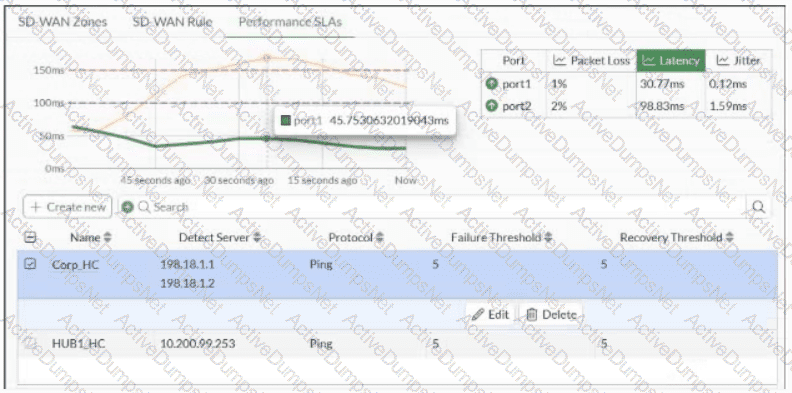
Refer to the exhibit.

You want the performance service-level agreement (SLA) to measure the jitter of each member. Which configuration change must you make to achieve this result?
Options:
No change is required.
Add an SLA target and define a jitter threshold.
Specify the participant members.
Set the protocol to HTTP.
Answer:
AExplanation:
According to theSD-WAN 7.6 Core Administratorstudy guide andFortiOS 7.6 Administration Guide, no configuration change is required to simplymeasurejitter.
Implicit Measurement: In FortiOS, once a Performance SLA (Health Check) is configured with anActiveprobe mode (as seen in the exhibit with Ping selected), the FortiGate automatically begins calculating three key quality metrics for every member interface:Latency,Jitter, andPacket Loss.
Visibility: Even without an SLA Target defined, these real-time measurements are visible in theSD-WAN Monitorand via the CLI command diagnose sys virtual-wan-link health-check
Active Probes: Because the probe mode is set toActiveusing thePingprotocol, the FortiGate sends synthetic packets at the definedCheck interval(500ms in the exhibit). It calculates jitter by measuring the variation in the round-trip time (RTT) between these consecutive probes.
Why other options are incorrect:
Option B: Adding anSLA targetand defining a jitter threshold is only necessary if you want the SD-WAN engine to makesteering decisionsbased on that metric (e.g., "remove this link from the pool if jitter exceeds 50ms"). It is not required just tomeasurethe jitter.
Option C: While you can specify participants, the current setting is "All SD-WAN Members," which means it is already measuring jitter for every member.
Option D:HTTPis an alternative probe protocol, butPing (ICMP)is perfectly capable of measuring jitter and is often preferred for its lower overhead.
Refer to the exhibit.

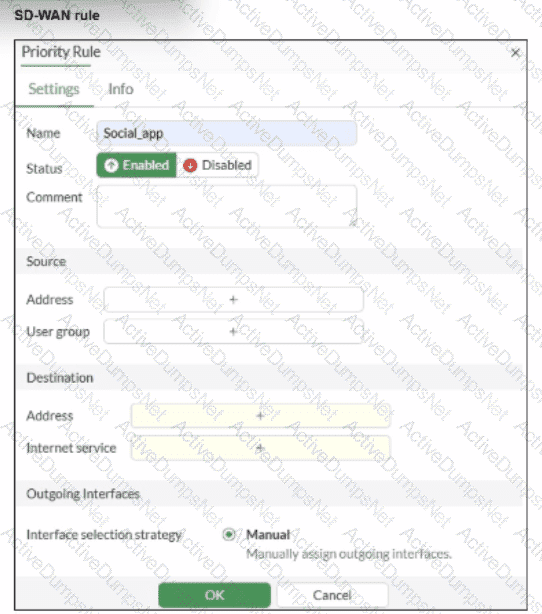
You configure SD-WAN on a standalone FortiGate device. You want to create an SD-WAN rule that steers traffic related to Facebook and LinkedIn through the less costly internet link. What must you do to set Facebook and LinkedIn applications as destinations from the GUI?
Options:
Install a license to allow applications as destinations of SD-WAN rules.
In the Internet service field, select Facebook and LinkedIn.
You cannot configure applications as destinations of an SD-WAN rule on a standalone FortiGate device.
Enable the visibility of the applications field as destinations of the SD-WAN rule.
Answer:
BExplanation:
According to theSD-WAN 7.6 Core Administratorcurriculum and theFortiOS 7.6 Administration Guide, setting common web-based services like Facebook and LinkedIn as destinations in an SD-WAN rule is primarily accomplished through theInternet Service Database (ISDB).
Internet Service vs. Application Control: In FortiOS, there is a distinction betweenInternet Services(which use a database of known IP addresses and ports to identify traffic at the first packet) andApplications(which require the IPS engine to inspect deeper into the packet flow to identify Layer 7 signatures).
SD-WAN Efficiency: Fortinet recommends using theInternet service fieldfor services like Facebook and LinkedIn in SD-WAN rules because it allows the FortiGate to steer the traffic immediately upon the first packet. If the "Application" signatures were used instead, the first session might be misrouted because the application is not identified until after the initial handshake.
GUI Configuration: As shown in the exhibit (image_b3a4c2.png), the "Destination" section of an SD-WAN rule includes anInternet servicefield by default. To steer Facebook and LinkedIn traffic, the administrator simply clicks the "+" icon in that field and selects the entries for Facebook and LinkedIn from the database.
Feature Visibility (Alternative): While youcanenable a specific "Application" field inSystem > Feature Visibility(by enabling "Application Detection Based SD-WAN"), this is typically used for less common applications that do not have dedicated ISDB entries. For the specific "applications" mentioned (Facebook and LinkedIn), they are natively available in theInternet servicefield, making Option B the most direct and common implementation.
Why other options are incorrect:
Option A: Licensing for application signatures is part of the standard FortiGuard services and is not a prerequisite specific only to "applications as destinations" in SD-WAN rules.
Option C: Standalone FortiGate devices fully support application-based and ISDB-based steering in SD-WAN rules.
Option D: While enabling feature visibility would add anadditionalfield for L7 applications, it is not a "must" for Facebook and LinkedIn, which are already accessible via the Internet Service field provided in the default GUI layout.
A FortiGate device is in production. To optimize WAN link use and improve redundancy, you enable and configure SD-WAN.
What must you do as part of this configuration update process? (Choose one answer)
Options:
Replace references to interfaces used as SD-WAN members in the firewall policies.
Replace references to interfaces used as SD-WAN members in the routing configuration.
Disable the interface that you want to use as an SD-WAN member.
Purchase and install the SD-WAN license, and reboot the FortiGate device.
Answer:
AExplanation:
According to theSD-WAN 7.6 Core Administratorstudy guide and theFortiOS 7.6 Administration Guide, when you are migrating a production FortiGate to use SD-WAN, the most critical step involves reconfiguring how traffic is permitted and routed.
Reference Removal Requirement: Before an interface (such as wan1 or wan2) can be added as anSD-WAN member, it must be "unreferenced" in most parts of the FortiGate configuration. Specifically, if an interface is currently being used in an activeFirewall Policy, the system will prevent you from adding it to the SD-WAN bundle.
Firewall Policy Migration (Option A): In a production environment, you mustreplace the references to the physical interfacesin your firewall policies with the newSD-WAN virtual interface(or an SD-WAN Zone). For example, if your previous policy allowed traffic from internal to wan1, you must update that policy so theOutgoing Interfaceis now SD-WAN. This allows the SD-WAN engine to take over the traffic and apply its steering rules.
Modern Tools: While this used to be a purely manual process, FortiOS 7.x includes anInterface Migration Wizard(found underNetwork > Interfaces). This tool automates the "search and replace" function, moving all existing policy and routing references from the physical port to the SD-WAN object to ensure minimal downtime.
Why other options are incorrect:
Option B: While you do need to update your routing (e.g., creating a static route for 0.0.0.0/0 pointing to the SD-WAN interface), the curriculum specifically emphasizes the replacement of references infirewall policiesas the primary administrative hurdle, as policies are often more numerous and complex than the single static route required for SD-WAN.
Option C: You donotneed to disable the interface. It must be up and configured, just removed from other configuration references so it can be "absorbed" into the SD-WAN bundle.
Option D: SD-WAN is abase featureof FortiOS and doesnot require a separate licenseor a reboot to enable.
Unlock NSE5_SSE_AD-7.6 Features
- NSE5_SSE_AD-7.6 All Real Exam Questions
- NSE5_SSE_AD-7.6 Exam easy to use and print PDF format
- Download Free NSE5_SSE_AD-7.6 Demo (Try before Buy)
- Free Frequent Updates
- 100% Passing Guarantee by Activedumpsnet
Questions & Answers PDF Demo
- NSE5_SSE_AD-7.6 All Real Exam Questions
- NSE5_SSE_AD-7.6 Exam easy to use and print PDF format
- Download Free NSE5_SSE_AD-7.6 Demo (Try before Buy)
- Free Frequent Updates
- 100% Passing Guarantee by Activedumpsnet