
- Home
- Fortinet
- Fortinet Network Security Expert
- NSE5_FNC_AD_7.6
- NSE5_FNC_AD_7.6 - Fortinet NSE 5 - FortiNAC-F 7.6 Administrator
Fortinet NSE5_FNC_AD_7.6 Fortinet NSE 5 - FortiNAC-F 7.6 Administrator Exam Practice Test
Fortinet NSE 5 - FortiNAC-F 7.6 Administrator Questions and Answers
When creating a device profiling rule, what is an advantage of modeling the endpoint as a device in the inventory view?
Options:
The device will have historic connection logs.
The devices can have scheduled connection status polling.
The devices will have connection logs.
The devices can be associated with a logged on user.
Answer:
BExplanation:
The correct answer is B . When a device profiling rule classifies an endpoint, the Register as setting can place the device in the host view, the topology/inventory view, or both. The study guide explains that if the profiled endpoint is registered into the topology view, the administrator must select a topology container.
The advantage of modeling the endpoint as a device in the inventory view is that it can be treated as a pingable device , where FortiNAC-F can use Contact Status settings. The guide explains that a modeled pingable device has contact status controls that allow polling to be enabled or disabled, the polling interval to be set, and the last successful and last attempted poll to be displayed.
Option A and option C are not the best answers because connection logs are associated with host connection tracking, not the key advantage of placing a profiled endpoint into inventory as a modeled device. Option D is wrong because user association applies more naturally to hosts or BYOD ownership workflows; it is not the main benefit of inventory modeling. The tested benefit is scheduled reachability monitoring through contact status polling.
During an evaluation of state-based enforcement, an administrator discovers that ports that should not be under enforcement have been added to enforcement groups.
In which view would the administrator be able to identify who added the ports to the groups?
(Selected)
Options:
The Admin Auditing view
The Event Management view
The Port Changes view
The Security Events view
Answer:
AExplanation:
In FortiNAC-F, accountability and forensic tracking of configuration changes are managed through theAdmin Auditingfunctionality. When an administrator performs an action that modifies the system state—such as creating a policy, changing a device ' s status, or adding a switch port to anEnforcement Group—the system generates an audit record. This record is essential for troubleshooting scenarios where unauthorized or accidental configuration changes have occurred, leading to unintended network behavior.
TheAdmin Auditingview (found underLogs > Admin Auditing) provides a comprehensive log of the " Who, What, and When " for every administrative session. Each entry includes the username of the administrator, the source IP address from which they accessed the FortiNAC-F console, a precise timestamp, and a detailed description of the modification. In the scenario described, where ports have been incorrectly added to enforcement groups, the Admin Auditing view allows a supervisor to filter by the specific " Port " or " Group " object to identify exactly which administrator executed the command.
In contrast, theEvent Managementview (B) is designed to monitor system and network events, such as RADIUS authentications, host connections, and SNMP trap arrivals. While it tracks system activity, it does not typically log the manual configuration changes performed by admins. ThePort Changesview (C) tracks the operational history of a port (such as VLAN assignment changes and host movements) but does not attribute the administrative assignment of the port to a group. Finally, theSecurity Eventsview (D) is dedicated to alerts triggered by security rules and external threat feeds.
" Admin Auditing displays a record of all modifications made to the FortiNAC-F system by an administrator. This view includes the administrator ' s name, the date and time of the change, and a description of the action taken. It is the primary resource for determining which administrative user performed a specific configuration change, such as modifying port group memberships or altering policy settings. " —FortiNAC-F Administration Guide: Logging and Auditing Section.
Refer to the exhibit.
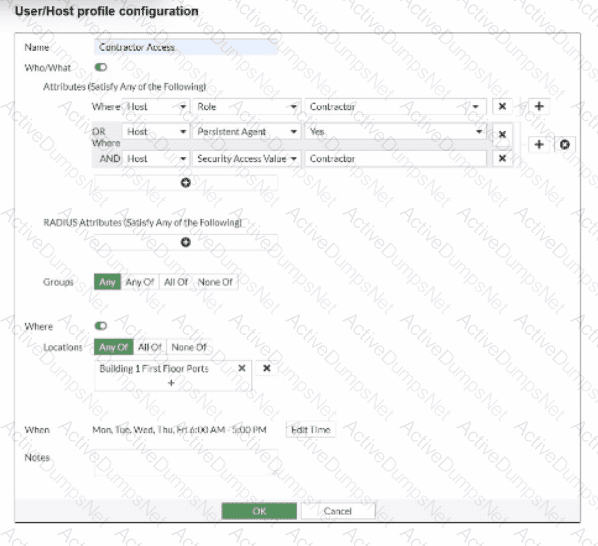
If a host is connected to a port in the Building 1 First Floor Ports group, what must also be true to match this user/host profile?
Options:
The host must have a role value of contractor, an installed persistent agent or a security access value of contractor, and be connected between 6 AM and 5 PM.
The host must have a role value of contractor or an installed persistent agent, a security access value of contractor, and be connected between 9 AM and 5 PM.
The host must have a role value of contractor or an installed persistent agent or a security access value of contractor, and be connected between 6 AM and 5 PM.
The host must have a role value of contractor or an installed persistent agent and a security access value of contractor, and be connected between 6 AM and 5 PM.
Answer:
DExplanation:
TheUser/Host Profilein FortiNAC-F is the fundamental logic engine used to categorize endpoints for policy assignment. As seen in the exhibit, the configuration uses a combination of Boolean logic operators (ORandAND) to define the " Who/What " attributes.
According to theFortiNAC-F Administrator Guide, attributes grouped together within the same bracket or connected by anORoperator require only one of those conditions to be met. In the exhibit, the first two attributes are " Host Role = Contractor " OR " Host Persistent Agent = Yes " . This forms a single logical block. This block is then joined to the third attribute ( " Host Security Access Value = Contractor " ) by anANDoperator. Consequently, a host must satisfyat least oneof the first two conditionsANDsatisfy the third condition to match the " Who/What " section.
Furthermore, the profile includesLocationandWhen(time) constraints. The exhibit shows the location is restricted to the " Building 1 First Floor Ports " group. The " When " schedule is explicitly set toMon-Fri 6:00 AM - 5:00 PM. For a profile to match,allenabled sections (Who/What, Locations, and When) must be satisfied simultaneously. Therefore, the host must meet the conditional contractor/agent criteria, possess the specific security access value, and connect during the defined 6 AM to 5 PM window.
" User/Host Profiles use a combination of attributes to identify a match. Attributes joined byORrequire any one to be true, while attributes joined byANDmust all be true. If aSchedule(When) is applied, the host must also connect within the specified timeframe for the profile to be considered a match. All criteria in the Who/What, Where, and When sections are cumulative. " —FortiNAC-F Administration Guide: User/Host Profile Configuration.
Which two requirements must be met to set up an N+1 HA cluster? (Choose two.)
Options:
A FortiNAC-F manager
A FortiNAC-F device designated as a secondary
A dedicated VLAN for primary and secondary synchronization
At least two FortiNAC-F devices designated as primary
Answer:
A, BExplanation:
TheN+1 High Availability (HA)architecture was introduced in FortiNAC-F version 7.6 to provide a more scalable and flexible redundancy model compared to the traditional 1+1 active/passive setup. In an N+1 configuration, a single secondary (standby) appliance can provide coverage for multiple primary (active) Control and Application (CA) appliances.
To set up an N+1 HA cluster, there are two fundamental structural requirements:
A FortiNAC-F Manager (FortiNAC-M):Unlike standard 1+1 HA, which can be configured directly between two CAs, N+1 management is centralized. The FortiNAC-M acts as the orchestrator that manages the failover groups, monitors the health of the primaries, and coordinates the promotion of the secondary server if a primary fails.
A FortiNAC-F device designated as a Secondary:The cluster must have one appliance explicitly configured with theSecondary failover role. This device remains in a standby state, receiving database replications from all N primaries in its group until it is called upon to take over the functions of a failed unit.
While a cluster can support multiple primaries (D), it does not strictly require " at least two " to function as an N+1 group; it simply requires N primaries (where N ≥ 1). Additionally, N+1 is typically a Layer 3 managed solution via the Manager, meaning it does not mandate a " dedicated VLAN " for synchronization like some Layer 2 HA deployments.
" In FortiNAC-F 7.6,FortiNAC-Mfunctions as a manager to manage the N+1 Failover Groups... enabling N+M high availability for CAs. To create an N+1 Failover group, you should add thesecondary CAto the FortiNAC-M first, then add the primary CAs. The secondary CA is designed to take over the functionality of any single failed primary component. " —FortiNAC-F 7.6.0 N+1 Failover Reference Manual.
In which three ways would deploying a FortiNAC-F Manager into a large environment consisting of several FortiNAC-F CAs simplify management? (Choose three.)
Options:
Global infrastructure device inventory
Global version control
Global authentication security policies
Pooled licenses
Global visibility
Answer:
B, D, EExplanation:
TheFortiNAC-F Manager (FortiNAC-M)is designed as a centralized management platform for large-scale distributed environments where multiple FortiNAC-F Control and Application (CA) appliances are deployed across different sites. According to theFortiNAC-F Manager Administration Guide, the deployment of a Manager simplifies administrative overhead in three specific ways:
First, it providesGlobal Version Control (B). The Manager serves as a central repository for firmware and software updates, allowing administrators to push specific versions to all managed CAs simultaneously, ensuring consistency across the entire fabric. Second, it enablesPooled Licenses (D). Instead of purchasing and managing individual licenses for every CA, licenses are centralized on the Manager. The Manager then distributes these licenses to the CAs as needed based on their host counts. This " floating " license model optimizes cost and prevents individual sites from running out of capacity while others have excess. Third, it offersGlobal Visibility (E). The Manager aggregates host and device data from every managed CA into a single console. This " single pane of glass " allows an administrator to search for a specific MAC address or user across the entire global organization without logging into individual servers.
While the Manager can assist with configuration templates, authentication security policies (C) and infrastructure modeling (A) are still predominantly managed at the local CA level to ensure site-specific logic and performance.
" The FortiNAC Manager provides a central management console for multiple FortiNAC-F servers (CAs). Key benefits include: •License Management: Licenses are pooled on the Manager and allocated to managed CAs as needed. •Software Management: Firmware updates can be centrally managed and pushed to all CAs from the Manager. •Centralized Monitoring: Provides a global view of all hosts, adapters, and events across the entire managed environment. " —FortiNAC-F Manager Administration Guide: Overview and Benefits.
An administrator wants FortiNAC-F to return a group of user-defined RADIUS attributes in RADIUS responses.
Which condition must be true to achieve this?
Options:
The requesting device must support RFC 5176.
Inbound RADIUS requests must contain the Calling-Station-ID attribute.
The device models in the inventory view must be configured for proxy-based authentication.
RADIUS accounting must be enabled on the FortiNAC-F RADIUS server configuration.
Answer:
BExplanation:
In FortiNAC-F, theRADIUS Attribute Groupsfeature allows administrators to return customized RADIUS attributes (such as specific VLAN IDs, filter IDs, or vendor-specific attributes) in anAccess-Acceptpacket sent back to a network device. This is particularly useful for supporting " Generic RADIUS " devices that are not natively supported but can be managed using standard AVPairs.
According to theFortiNAC-F Generic RADIUS Wired Cookbookand theRADIUS Attribute Groups sectionof the Administration Guide, there is one critical prerequisite for this feature to function: theinbound RADIUS request must contain the Calling-Station-ID attribute. The Calling-Station-ID typically contains theMAC addressof the connecting endpoint. Because FortiNAC-F is a host-centric system, it uses the MAC address as the unique identifier to look up the host record, evaluate the associated Network Access Policy, and determine which Logical Network (and thus which Attribute Group) should be applied. If the incoming request lacks this attribute, FortiNAC-F cannot reliably identify the host and, as a safety mechanism, willnot include any user-defined RADIUS attributesin the response. This ensures that unauthorized or unidentifiable devices do not receive privileged access through misapplied attributes.
" Configure a set of attributes that must be included in the RADIUS Access-Accept packet returned by FortiNAC...Requirement: Inbound RADIUS request must contain Calling-Station-Id. Otherwise, FortiNAC will not include the RADIUS attributes.This attribute is used to identify the host and its current state within the FortiNAC database. " —FortiNAC-F 7.6.0 Generic RADIUS Wired Cookbook: Configure RADIUS Attribute Groups.
Refer to the exhibit.
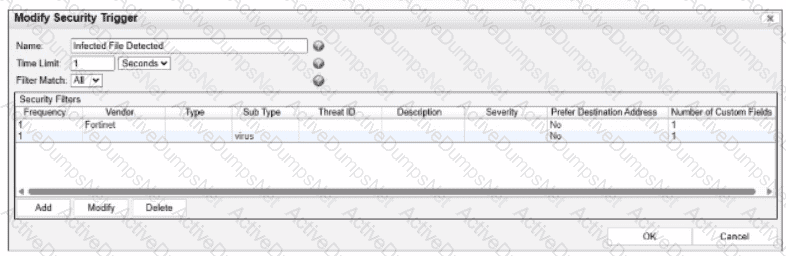
What would FortiNAC-F generate if only one of the security fitters is satisfied?
Options:
A normal alarm
A security event
A security alarm
A normal event
Answer:
DExplanation:
In FortiNAC-F,Security Triggersare used to identify specific security-related activities based on incoming data such as Syslog messages or SNMP traps from external security devices (like a FortiGate or an IDS). These triggers act as a filtering mechanism to determine if an incoming notification should be escalated from a standard system event to aSecurity Event.
According to theFortiNAC-F Administrator Guideand relevant training materials for versions 7.2 and 7.4, theFilter Matchsetting is the critical logic gate for this process. As seen in the exhibit, the " Filter Match " configuration is set to " All " . This means that for the Security Trigger named " Infected File Detected " to " fire " and generate a Security Event or a subsequent Security Alarm,every single filterlisted in the Security Filters table must be satisfied simultaneously by the incoming data.
In the provided exhibit, there are two filters: one looking for the Vendor " Fortinet " and another looking for the Sub Type " virus " . If only one of these filters is satisfied (for example, a message from Fortinet that does not contain the " virus " subtype), the logic for the Security Trigger is not met. Consequently, FortiNAC-F does not escalate the notification. Instead, it processes theincoming data as aNormal Event, which is recorded in the Event Log but does not trigger the automated security response workflows associated with security alarms.
" The Filter Match option defines the logic used when multiple filters are defined. If ' All ' is selected, then all filter criteria must be met in order for the trigger to fire and aSecurity Eventto be generated. If the criteria are not met, the incoming data is processed as anormal event. If ' Any ' is selected, the trigger fires if at least one of the filters matches. " —FortiNAC-F Administration Guide: Security Triggers Section.
As part of a company policy, all end stations must be scanned for compliance each day. The security administrators want to satisfy this requirement without any necessary interaction from the end user. Which two agents can provide that functionality? (Choose two.)
Options:
Dissolvable
Persistent
Passive
Mobile
Answer:
B, CExplanation:
The correct answers are B and C . The persistent agent is the strongest fit because it is installed and stays resident on the endpoint. The study guide states that after deployment, the persistent agent communicates back to FortiNAC-F every 15 minutes and performs scheduled scans in the background, transparent to the end user. That directly satisfies the requirement for recurring compliance scans without user involvement.
The passive agent can also scan Windows domain end stations without end-user interaction. The guide states that the passive agent is deployed through login/logoff scripts and administrative templates, and that passive agent registration can register and scan hosts associated with LDAP or Active Directory users. If enabled, the passive agent scans the host to verify compliance with the appropriate endpoint policy.
Option A is wrong because the dissolvable agent is a run-once agent that requires manual end-user interaction in the captive portal, then removes itself after reporting results. Option D is not the best answer for this requirement because the mobile agent is specifically for Android onboarding and is manually installed; it is not the general solution for daily compliance scanning of all end stations.
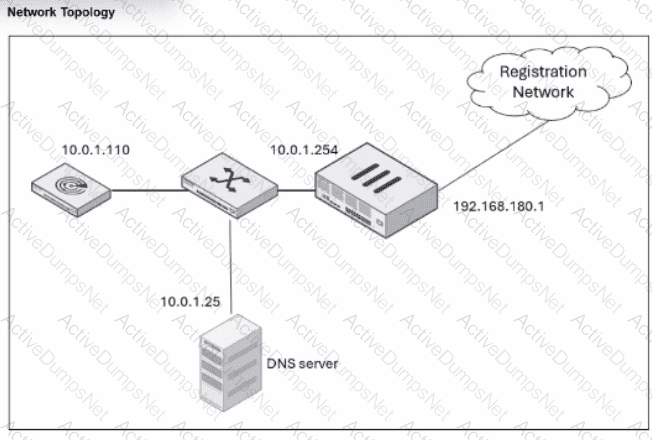
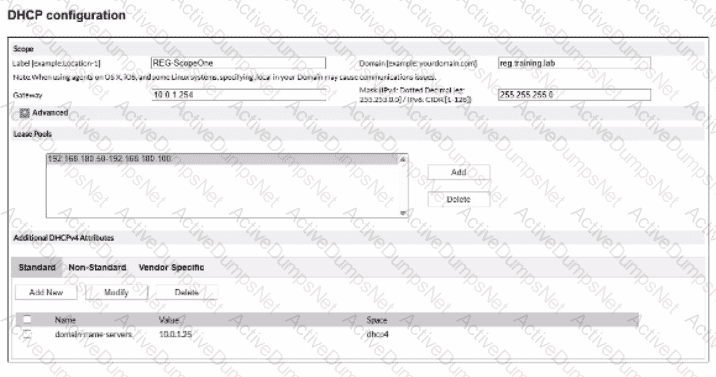
An administrator has configured the DHCP scope for a registration isolation network, but the isolation process isn ' t working.
What is the problem with the configuration?
Options:
The domain name server designation is incorrect.
The label uses a system-reserved value.
The lease pool does not contain a complete subnet.
The gateway defined for the scope is incorrect.
Answer:
DExplanation:
In a FortiNAC-F deployment, the configuration of theDHCP scopefor isolation networks (Registration, Remediation, etc.) must perfectly align with the underlying network infrastructure to ensure that isolated hosts can communicate with the FortiNAC appliance. In the provided exhibits, there is a clear discrepancy between theDHCP configurationand theNetwork Topology.
As shown in the " Network Topology " exhibit, theRegistration Networkresides on a router interface (or sub-interface) with the IP address192.168.180.1. This address represents the default gateway for any host placed into the Registration VLAN. However, the " DHCP configuration " exhibit shows the scope " REG-ScopeOne " configured with aGateway of 10.0.1.254. This 10.0.1.254 address belongs to the management/service network (port2 of FortiNAC), not the registration subnet. If a host in the Registration VLAN receives this incorrect gateway via DHCP, it will attempt to send all off-link traffic to an unreachable IP, preventing it from loading theCaptive Portalor communicating with the FortiNAC server.
According to theFortiNAC-F Configuration Wizard Reference, when defining a Layer 3 network scope, the " Gateway " field must contain the IP address of the router interface that acts as the gateway for that specific isolation VLAN. The FortiNAC appliance itself usually sits on a different subnet, and traffic is directed to it via the router ' s DHCP Relay (IP Helper) and DNS redirection.
" When configuring scopes for a Layer 3 network, theGatewayvalue must be the IP address of the router interface for that subnet. This allows the host to reach its local gateway to route traffic. If the gateway is misconfigured, the host will be unable to reach the FortiNAC eth1/port2 interface for registration... Ensure the Gateway matches the network topology for the isolation VLAN. " —FortiNAC-F Configuration Wizard Reference Manual: DHCP Scopes.
Refer to the exhibits.
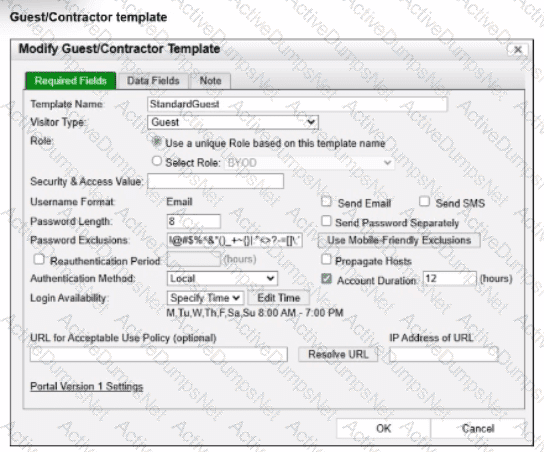
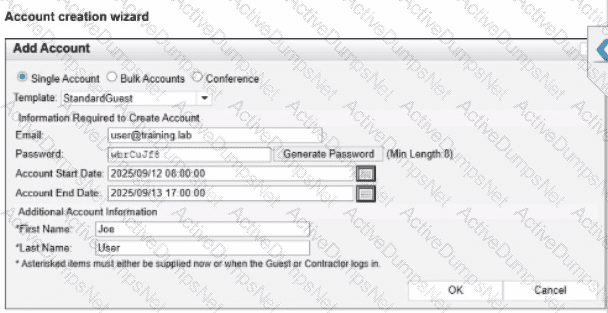
Based on the given configurations and settings, on which date and time would a guest account created at 8:00 AM on 2025/09/12 expire?
Options:
2025/09/12 at 8:00 PM
2025/09/12 at 7:00 PM
2025/09/12 at 17:00:00
2025/09/13 at 17:00:00
Answer:
DExplanation:
Questions no:22
Verified Answer: D
Comprehensive and Detailed 250 to 300 words each Explanation with Exact Matched Extract from FortiNAC-F Administrator library and documentation for current versions (including F 7.2, 7.4, and 7.6) documents:
In FortiNAC-F, the expiration of a guest or contractor account is determined by the configuration settings within theAccount Creation Wizardand the associatedGuest/Contractor Template. While a template can define a default " Account Duration " (as seen in the 12-hour setting in the second exhibit), theAccount Creation Wizardallows an administrator to manually specify or override the start and end parameters for a specific user session.
According to theFortiNAC-F Administration Guideregarding guest management, theAccount End Datefield in the creation wizard is the definitive timestamp for when the account object will be disabled or deleted from the system. In the provided exhibit (Account Creation Wizard), the administrator has explicitly set theAccount Start Dateto2025/09/12 08:00:00and theAccount End Dateto2025/09/13 17:00:00.
Even though the template indicates an " Account Duration " of 12 hours, this value typically serves as a pre-populated default. When a manual date and time are entered into the wizard, those specific values take precedence for that individual account. The account will remain active and valid until5:00 PM (17:00:00)on the following day,2025/09/13. It is also important to note the " Login Availability " from the template (8:00 AM - 7:00 PM); while the accountexistsuntil the 13th at 17:00:00, the user would only be able to authenticate during the active hours defined by the login schedule on both days.
" When creating an account, the administrator can select a template to provide default settings. However, specific values such as theAccount End Datecan be modified within theAccount Creation Wizard. The date and time specified in the ' Account End Date ' field determines the absolute expiration of the account. Once this time is reached, the account is moved to an expired state and the user ' s network access is revoked. " —FortiNAC-F Administration Guide: Guest and Contractor Account Management.
An administrator wants FortiNAC-F to pass firewall tags to FortiGate to leverage dynamic address groups used in firewall policies. On FortiNAC-F, what determines the values that are passed?
Options:
Model configuration
Device profiling rule
Security rule
RADIUS group attribute
Answer:
AExplanation:
The correct answer is A . FortiNAC-F passes firewall tags to FortiGate through Security Fabric integration so FortiGate can use those values as dynamic address groups in firewall policies. The study guide explains that firewall tags are administrator-defined string values and that FortiNAC-F dynamically assigns them based on a security policy or logical network. More specifically for network access enforcement, it states that the network access configuration defines the logical network , and the logical network defines the firewall tag through the device model configuration .
This is the same mechanism used in VPN and Fabric workflows: the FortiGate device model contains the mappings of logical networks to the actual tags or groups that FortiNAC-F sends to FortiGate. The guide states that FortiNAC-F network access policies and logical networks determine the group or tag information, while the FortiGate model configuration contains the mappings used for the values sent.
Option B is not the best answer because a device profiling rule can classify a device and may cause it to match a policy, but it does not directly define the FortiGate tag value sent for policy enforcement. Option C can apply firewall tags in security automation scenarios, but the standard FortiGate dynamic address group mapping is defined in model configuration. Option D is unrelated; RADIUS attributes are used in RADIUS access responses, not FortiGate Fabric tag propagation.
An administrator wants to create a conference manager administrator account but would like to limit the number of conference accounts that can be generated to 30.
Which statement about conference accounts is true?
Options:
In FortiNAC-F, conference accounts can be limited by multiples of 25, so the conference administrator could create 50 accounts.
The administrator can set a maximum of 30 conference accounts in the administrative profile for the conference manager.
The conference account limit is defined in the onboarding conference portal.
Conference account limits are defined in the conference guest and contractor template.
Answer:
BExplanation:
In FortiNAC-F, theConference Manageris a specialized administrative role designed for delegated administration, often used by receptionists or event organizers to create temporary guest accounts. To maintain security and prevent the over-provisioning of credentials, FortiNAC-F allows for granular restrictions on these accounts.
According to theFortiNAC-F Administration GuideregardingAdministrative Profiles, when an administrator creates a profile for a Conference Manager, they can define specific " Account Limits. " Under the profile settings (located inSystem > Settings > Admin Profiles), there is a field specifically for " Max Accounts. " By entering " 30 " into this field, the administrator ensures that any user assigned to this profile cannot exceed 30 active conference accounts at any given time.
This setting is distinct from the Portal configuration or the Guest templates. While templates define thetypeof account (e.g., duration and access level), theAdministrative Profiledefines thecapabilities and limitationsof the person creating those accounts. This ensures that even if a guest template allows for unlimited registrations, the specific administrator is physically restricted by the system from generating more than the allotted 30.
" Administrative Profiles define what an administrator can see and do within the system. For delegated administration roles like the Conference Manager, the ' Max Accounts ' field in the Administrative Profile is used to specify the maximum number of accounts the user is permitted to create. Once this limit is reached, the user will be unable to generate additional accounts until existing ones expire or are deleted. " —FortiNAC-F Administration Guide: Administrative Profiles and Delegated Administration.
When preparing network infrastructure devices for visibility, what are the two main advantages of using MAC notification traps on supported devices instead of link-up and link-down traps? (Choose two.)
Options:
MAC notification traps include IP address information.
Overhead on FortiNAC-F and the infrastructure device is reduced.
Hosts connecting to downstream non-managed hubs are immediately learned.
Faster visibility updates with only a slight increase in processing.
Answer:
B, CExplanation:
Comprehensive and Detailed Explanation From Exact Extract of FortiNAC-F 7.6 Administrator Guide or Knowledge:
Exact Extract:
The FortiNAC-F study guide states that MAC notification traps are preferred because FortiNAC-F does not need to connect back to the infrastructure device every time a link-up or link-down trap is received. The required MAC and port information is already included in the MAC notification trap, which makes database updates faster and uses fewer resources. It also states that hosts and devices connected through hubs or IP phones are seen immediately, even when the downstream device cannot generate link-up or link-down traps.
Technical Deep Dive:
The correct answers are B and C . With link-up/link-down traps, the trap only tells FortiNAC-F that an interface changed state. FortiNAC-F then has to perform an L2 poll against the switch forwarding table to discover which MAC address appeared or disappeared. That means extra SNMP/CLI activity, more delay, and more processing on both FortiNAC-F and the switch. The guide confirms that link traps trigger FortiNAC-F to perform a Layer 2 poll, while MAC notification traps directly contain the learned or removed MAC address and associated port.
Option A is wrong because MAC notification traps are Layer 2 visibility events. They identify MAC address and port , not IP address. IP-to-MAC correlation comes from Layer 3 polling or DHCP fingerprinting, not MAC notification traps. Option D is badly worded and should not be selected: MAC notification traps do provide faster updates, but the processing overhead is reduced, not slightly increased.
Operationally, on supported switches you enable SNMP traps for MAC address-table changes and point the trap destination to FortiNAC-F. On Cisco-style infrastructure, this is usually done with commands such as snmp-server host < FortiNAC-IP > version 2c < community > plus MAC notification trap configuration. Do not enable MAC notification traps on uplinks, because uplinks learn many downstream MAC addresses and would create misleading endpoint-location data.
When FortiNAC-F is managing VPN clients connecting through FortiGate, why must the clients run a FortiNAC-F agent?
Options:
To transparently update The client IP address upon successful authentication
To collect user authentication details
To collect the client IP address and MAC address
To validate the endpoint policy compliance
Answer:
CExplanation:
When FortiNAC-F manages VPN clients through a FortiGate, the agent plays a fundamental role in device identification that standard network protocols cannot provide on their own. In a standard VPN connection, the FortiGate establishes a Layer 3 tunnel and assigns a virtual IP address to the client. While the FortiGate sends a syslog message to FortiNAC-F containing the username and this assigned IP address, it typically does not provide the hardware (MAC) address of the remote endpoint ' s physical or virtual adapter.
FortiNAC-F relies on theMAC addressas the primary unique identifier for all host records in its database. Without the MAC address, FortiNAC-F cannot correlate the incoming VPN session with an existing host record to apply specific policies or track the device ' s history. By running either a Persistent or Dissolvable Agent, the endpoint retrieves its own MAC address and communicates it directly to the FortiNAC-F service interface. This allows the " IP to MAC " mapping to occur. Once FortiNAC-F has both the IP and the MAC, it can successfully identify the device, verify its status, and send the appropriateFSSO tagsor group information back to the FortiGate to lift network restrictions.
Furthermore, while the agent can also perform compliance checks (Option D), the architectural requirement for the agent in a managed VPN environment is primarily driven by the need for session data correlation—specifically the collection of the IP and MAC address pairing.
" Session Data Components: • User ID (collected via RADIUS, syslog and API from the FortiGate). • Remote IP address for the remote user connection (collected via syslog and API from the FortiGate and from the FortiNAC agent). •Device IP and MAC address (collected via FortiNAC agent).... The Agent is used to provide the MAC address of the connecting VPN user (IP to MAC). " —FortiNAC-F FortiGate VPN Integration Guide: How it Works Section.
During the testing of a newly modeled infrastructure switch, the administrator is not seeing hosts as they connect or move from one port to another. What would cause this issue?
Options:
MAC notification traps are misconfigured.
Layer 3 polling is failing.
The default scheduled polling is disabled.
Contact polling is not configured.
Answer:
AExplanation:
The correct answer is A . When FortiNAC-F needs near real-time Layer 2 visibility, it relies on link traps, MAC notification traps, RADIUS, or scheduled/manual Layer 2 polling. The study guide explains that MAC notification traps contain the MAC address learned or removed from the switch MAC address table and the associated port, allowing FortiNAC-F to update its database when hosts connect, disconnect, or move. It also states that MAC notification traps are the preferred method for learning and updating Layer 2 information.
If a newly modeled switch does not show hosts as they connect or move between ports, the likely problem is that MAC notification traps are not correctly configured or not reaching FortiNAC-F . Layer 3 polling failure would affect IP-to-MAC correlation, not the ability to learn which switch port a MAC address is connected to. Disabled scheduled polling could delay updates, but it would not be the best explanation when the expected behavior is immediate host detection during connection or movement testing. Contact polling only checks whether the device is reachable; it does not collect host MAC-to-port visibility.
A healthcare organization is integrating FortiNAC-F with its existing MDM. Communication is failing between the systems.
What could be a probable cause?
Options:
Security Fabric traffic is failing
SSH communication is failing
REST API communication is failing
SOAP API communication is failing
Answer:
CExplanation:
The integration between FortiNAC-F and Mobile Device Management (MDM) platforms (such as Microsoft Intune, VMware Workspace ONE, or Jamf) is a critical component for providing visibility into mobile assets that do not connect directly to the managed infrastructure via standard wired or wireless protocols.
According to theFortiNAC-F MDM Integration Guide, the communication between the FortiNAC-F appliance and the MDM server is handled throughREST APIcalls. FortiNAC-F acts as an API client, periodically polling the MDM server to retrieve device metadata, compliance status, and ownership information. If communication is failing, it is most likely because the API credentials (Client ID/Secret) are incorrect, the MDM ' s API endpoint is unreachable from the FortiNAC-F service port, or the SSL certificate presented by the MDM is not trusted by the FortiNAC-F root store.
While SSH (B) is used for switch CLI management and the Security Fabric (A) uses proprietary protocols for FortiGate synchronization, neither is the primary vehicle for MDM data exchange. SOAP API (D) is an older protocol that has been largely replaced by REST in modern FortiNAC integrations.
" FortiNAC integrates with MDM systems by utilizingREST APIcommunication to query the MDM database for device information. To establish this link, administrators must configure the MDM Service Connector with the appropriateAPI URLand authentication credentials. If the ' Test Connection ' fails, verify that the FortiNAC can reach the MDM provider via theREST APIport (usually HTTPS 443). " —FortiNAC-F Administration Guide: MDM Integration and Troubleshooting.
While deploying FortiNAC-F devices in a 1+1 HA configuration, the administrator has chosen to use the shared IP address option.
Which condition must be met for this type of deployment?
Options:
The isolation network type is layer 3.
There is a direct cable link between FortiNAC-F devices.
The primary and secondary administrative interfaces are on the same subnet.
The isolation network type is Layer 2.
Answer:
CExplanation:
In a1+1 High Availability (HA)deployment, FortiNAC-F supports two primary methods for management access: individual IP addresses or aShared IP Address(also known as a Virtual IP or VIP). The Shared IP option is part of aLayer 2 HAdesign, which simplifies administration by providing a single URL or IP that always points to whichever appliance is currently in the " Active " or " In Control " state.
For a Shared IP configuration to function correctly, thePrimary and Secondary administrative interfaces (port1) must be on the same subnet. This requirement exists because the Shared IP is a logical address that is dynamically assigned to the physical interface of the active unit. Since only one unit can own the IP at a time, both units must reside on the same broadcast domain (Layer 2) to ensure that ARP requests for the Shared IP are correctly answered and that the gateway remains reachable regardless of which unit is active. If the appliances were on different subnets (a Layer 3 HA design), a shared IP could not be used because it cannot " float " across different network segments; instead, administrators would need to manage each unit via its unique physical IP or use a FortiNAC Manager.
" For L2 HA configurations, click theUse Shared IP Addresscheckbox and enter the Shared IP Address information...If your Primary and Secondary Servers are not in the same subnet, do not use a shared IP address.The shared IP address moves between appliances during a failover and recovery and requires both units to reside on the same network. " —FortiNAC-F High Availability Reference Manual: Shared IP Configuration.
Unlock NSE5_FNC_AD_7.6 Features
- NSE5_FNC_AD_7.6 All Real Exam Questions
- NSE5_FNC_AD_7.6 Exam easy to use and print PDF format
- Download Free NSE5_FNC_AD_7.6 Demo (Try before Buy)
- Free Frequent Updates
- 100% Passing Guarantee by Activedumpsnet
Questions & Answers PDF Demo
- NSE5_FNC_AD_7.6 All Real Exam Questions
- NSE5_FNC_AD_7.6 Exam easy to use and print PDF format
- Download Free NSE5_FNC_AD_7.6 Demo (Try before Buy)
- Free Frequent Updates
- 100% Passing Guarantee by Activedumpsnet