
- Home
- Fortinet
- Fortinet Network Security Expert
- NSE4_FGT_AD-7.6
- NSE4_FGT_AD-7.6 - Fortinet NSE 4 - FortiOS 7.6 Administrator
Fortinet NSE4_FGT_AD-7.6 Fortinet NSE 4 - FortiOS 7.6 Administrator Exam Practice Test
Fortinet NSE 4 - FortiOS 7.6 Administrator Questions and Answers
Refer to the exhibits.
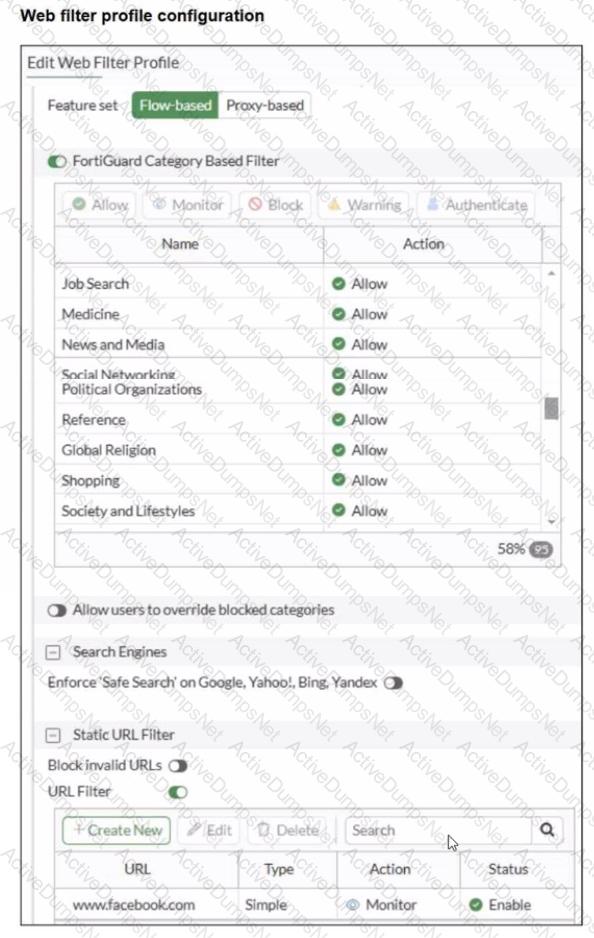
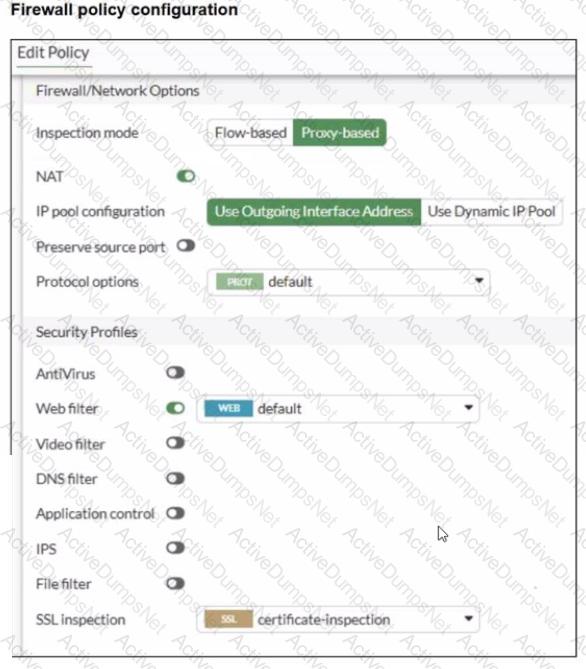
A web filter profile configuration and firewall policy configuration are shown.
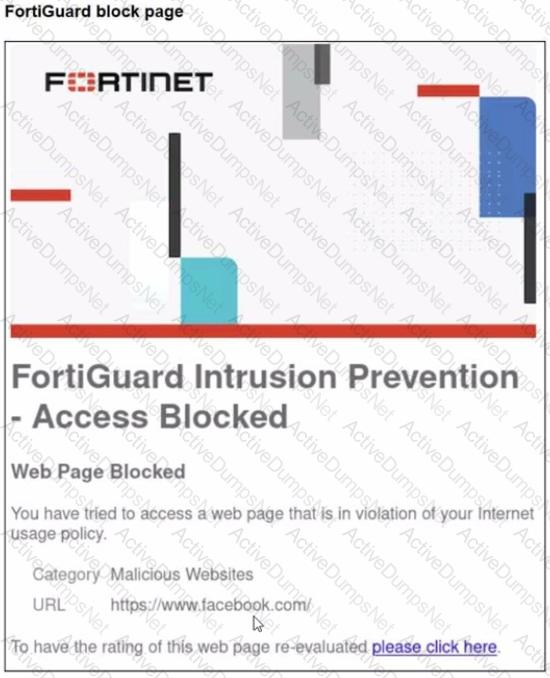
You are trying to access www. facebook.com, but you are redirected to a FortiGuard web filtering block page.
Based on the exhibits, what is the possible cause of the issue?
Options:
The web rating override configuration is incorrect.
The web filter profile feature set is configured incorrectly.
The firewall policy inspection mode is incorrect.
For www. facebook. com. the URL filter action is incorrect.
Answer:
CExplanation:
From the exhibits:
The Web Filter profile is configured with Feature set = Flow-based.
The Firewall policy is configured with Inspection mode = Proxy-based and has Web Filter enabled.
In FortiOS 7.6, security profiles that have a feature set selection (Flow-based vs Proxy-based) must match the inspection mode used by the firewall policy. If the profile’s feature set does not match the policy’s inspection mode, the profile behavior will not align with what the administrator expects (and in many cases FortiOS will prevent correct use/selection, or the feature behavior will not apply as intended).
That mismatch explains why the configured URL filter entry for www.facebook.com (set to Monitor) is not producing the expected result, and instead the session is being evaluated by category rating and blocked (shown as Malicious Websites on the FortiGuard block page).
Why the other options are not the best fit:
A: A web rating override is not shown in the exhibits, and nothing indicates an override misconfiguration.
C: While the policy inspection mode could be changed, the root cause shown is the profile feature set mismatch (profile is Flow-based).
D: The URL filter action shown is Monitor, which would not produce a block page by itself.
Refer to the exhibit.
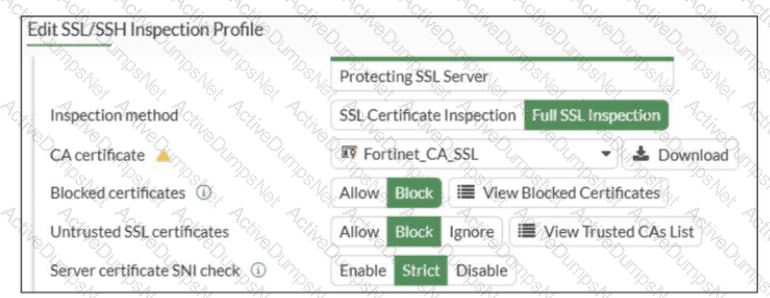
What would be the impact of these settings on the Server certificate SNI check configuration on FortiGate?
Options:
FortiGate will accept and use the CN in the server certificate for URL filtering if the SNI does not match the CN or SAN fields.
FortiGate will accept the connection with a warning if the SNI does not match the CN or SAN fields.
FortiGate will close the connection if the SNI does not match the CN or SAN fields.
FortiGate will close the connection if the SNI does not match the CN and SAN fields
Answer:
CExplanation:
Based on the exhibit and the FortiOS 7.6 SSL/SSH Inspection documentation, the correct answer is C.
Understanding the Exhibit Configuration
In the SSL/SSH Inspection Profile, the following settings are shown:
Inspection method: Full SSL Inspection
Server certificate SNI check: Strict
This setting directly controls how FortiGate validates the Server Name Indication (SNI) provided by the client during the TLS handshake.
FortiOS 7.6 Behavior of “Server certificate SNI check”
FortiOS supports three modes for Server certificate SNI check:
Disable
No validation between SNI and server certificate.
Enable
FortiGate checks SNI against the certificate.
If mismatch occurs, FortiGate may still allow the session with reduced validation.
Strict
FortiGate enforces a strict match.
The SNI must match either the CN (Common Name) or one of the SAN (Subject Alternative Name) entries in the server certificate.
If the SNI does not match either CN or SAN, the TLS session is immediately terminated.
The exhibit clearly shows Strict selected.
Why Option C is Correct
With Strict enabled, FortiGate rejects the TLS connection when:
The SNI does not match the CN, and
The SNI does not match any SAN entry
This results in the connection being closed, not allowed with warnings or fallback behavior.
Therefore:
C. FortiGate will close the connection if the SNI does not match the CN or SAN fields is exactly the documented behavior.
Why the Other Options Are Incorrect
A: FortiGate does not fall back to using the CN for URL filtering when Strict is enabled.
B: There is no “accept with warning” behavior in Strict mode.
D: Incorrect logical condition. FortiGate does not require mismatch with both CN and SAN simultaneously; a mismatch with either valid field set is sufficient to close the connection.
Refer to the exhibit.
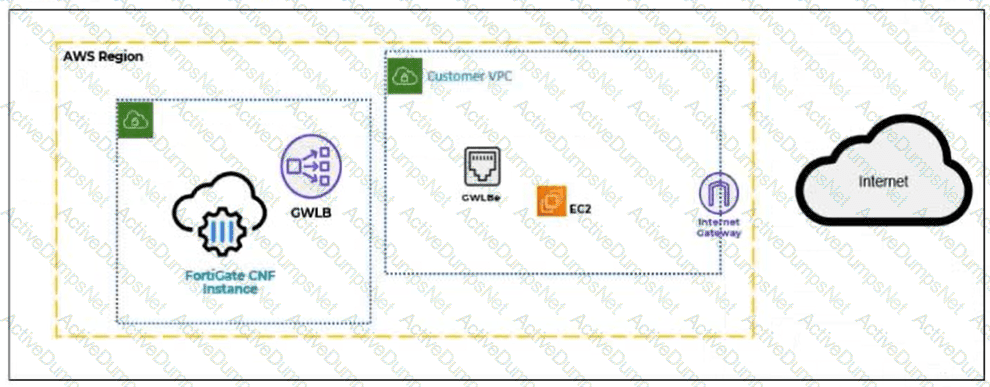
A partial cloud topology is shown.
You deployed a FortiGate Cloud-Native Firewall (CNF) in AWS for FortiGate CNF policy enforcement for EC2 instance traffic. Which path does the EC2 traffic take from the EC2 instance to the internet?
Options:
EC2 instance → GWLBe → FortiGate CNF → GWLBe → IGW → internet
EC2 instance → Internet Gateway (IGW) → Gateway Load Balancer (GWLB) → FortiGate CNF → internet
EC2 instance → FortiGate CNF → GWLB → GWLBe → IGW → internet
EC2 instance → GWLB endpoint (GWLBe) → FortiGate CNF → IGW → internet
Answer:
AExplanation:
FortiGate CNF in AWS uses a Gateway Load Balancer endpoint (GWLBe) in the protected VPC to steer workload traffic toward the FortiGate CNF service for inspection. The EC2 instance does not send traffic directly to the internet gateway first, and the CNF is not placed inline as a normal VM firewall inside the EC2 subnet. Instead, AWS routing sends the EC2 traffic to the relevant GWLBe. The traffic is then forwarded to FortiGate CNF, where security policies are evaluated and enforced. If the traffic is allowed, it is returned to the same GWLBe and then continues toward the internet gateway. Therefore, the correct traffic path is EC2 instance → GWLBe → FortiGate CNF → GWLBe → IGW → internet.
Which three methods are used by the collector agent for AD polling? (Choose three answers)
Options:
NetAPI
WMI
WinSecLog
DNS reverse lookup
FSSO REST API
Answer:
A, B, CExplanation:
“As previously stated, collector agent-based polling mode has three methods (or options) for collecting login information. The order on the slide from left to right shows most recommend to least recommended:
• WMI ...
• WinSecLog ...
• NetAPI ...”
Technical Deep Dive:
The correct three AD polling methods are WMI, WinSecLog, and NetAPI . These are the collector-agent polling options FortiGate FSSO uses against Windows domain controllers. WMI is generally the most efficient because the DC returns requested login events directly. WinSecLog polls Windows Security Event Logs and is typically more reliable than NetAPI for not missing recorded logons. NetAPI can be faster, but it is more prone to missing events under load because it depends on temporary session information rather than persistent security logs.
Why the other options are wrong:
DNS reverse lookup is not one of the three AD polling methods. DNS is used by FSSO to resolve workstation names to IP addresses and to track IP changes, but it is not itself a polling method for collecting AD logon events. FSSO REST API is also not one of the documented collector-agent AD polling methods in the study guide.
From an operational standpoint, FSSO login collection and workstation verification are separate functions. The collector agent may still rely on DNS and workstation checks after a login is learned, but the actual AD polling methods remain only WMI, WinSecLog, and NetAPI . On a FortiGate, when troubleshooting FSSO behavior, you would typically validate the collector feed and user cache with commands such as:
diagnose debug authd fsso list
diagnose debug authd fsso server-status
Those commands help confirm whether the users gathered by the collector through one of those three polling methods are reaching FortiGate correctly.
Which two statements are correct when FortiGate enters conserve mode? (Choose two answers)
Options:
FortiGate continues to run critical security actions, such as quarantine.
FortiGate refuses to accept configuration changes.
FortiGate halts complete system operation and requires a reboot to regain available resources.
FortiGate continues to transmit packets without IPS inspection when the fail-open global setting in IPS is enabled.
Answer:
B, DExplanation:
According to the FortiOS 7.6 Study Guide and technical documentation, conserve mode is a protective state triggered when memory utilization reaches the Extreme Threshold (typically 95% by default). When this occurs, the FortiGate implements several measures to prioritize system stability over new functionality. One of the primary restrictions is that the FortiGate refuses to accept configuration changes (Statement B). This prevents the system from initiating new processes or allocating additional memory that could lead to a total system crash.
Regarding traffic handling, the behavior is determined by specific " fail-open " settings. For the IPS engine, if the fail-open global setting is enabled, the FortiGate continues to transmit packets without IPS inspection (Statement D). This ensures that network connectivity is maintained even when the system lacks the memory resources to perform deep packet inspection. In contrast, Statement A is incorrect because the system may skip non-essential actions to save memory. Statement C is incorrect because conserve mode is designed to avoid a system halt; the device remains operational and will automatically exit conserve mode once memory usage drops below the Release Threshold (typically 82%).
Refer to the exhibit.
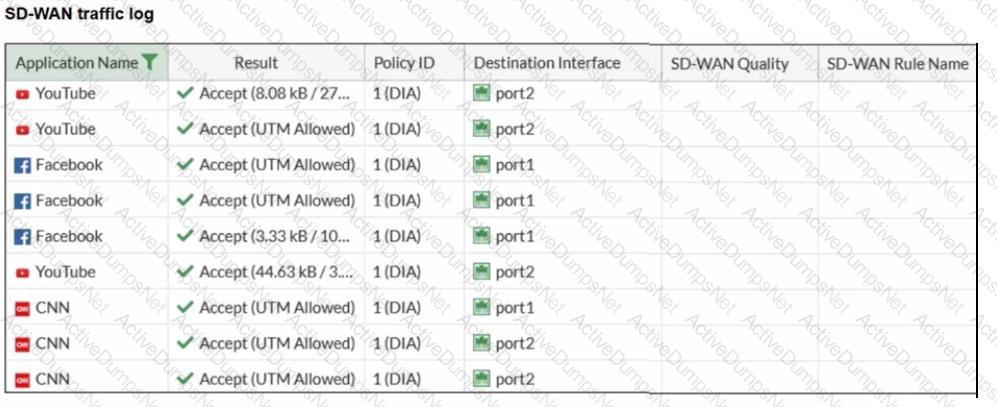
The administrator configured SD-WAN rules and set the FortiGate traffic log page to display SD-WAN-specific columns: SD-WAN Quality and SD-WAN Rule Name
FortiGate allows the traffic according to policy ID 1 placed at the top. This is the policy that allows SD-WAN traffic. Despite these settings, the traffic logs do not show the name of the SD-WAN rule used to steer those traffic flows
What could be the reason?
Options:
SD-WAN rule names do not appear immediately. The administrator must refresh the page.
There is no application control profile applied to the firewall policy.
Destinations in the SD-WAN rules are configured for each application, but feature visibility is not enabled.
FortiGate load balanced the traffic according to the implicit SD-WAN rule.
Answer:
DExplanation:
In FortiOS 7.6, SD-WAN steering decisions are recorded in traffic logs only when traffic matches an explicit SD-WAN rule (SD-WAN service rule). When no configured SD-WAN rule matches a session, FortiGate uses the implicit (default) SD-WAN rule/behavior to select a member (often resulting in load-balancing or default selection based on the configured SD-WAN algorithm).
In the exhibit, traffic is permitted by firewall policy ID 1, and the Destination Interface alternates between port1 and port2, but SD-WAN Rule Name remains empty. This is consistent with the sessions being forwarded by the implicit SD-WAN rule, which does not populate a named rule in the log columns.
Why the other options are not correct:
A: SD-WAN rule name logging is not a “delayed display” behavior requiring refresh; it is populated per-session when an explicit rule matches.
B: Application Control is not required for SD-WAN rule name to appear. Rule name logging depends on SD-WAN rule match, not on whether Application Control is enabled.
C: Feature visibility affects GUI display options, but the exhibit already shows the SD-WAN columns enabled; the issue is that no explicit SD-WAN rule is being hit.
Refer to the exhibit.
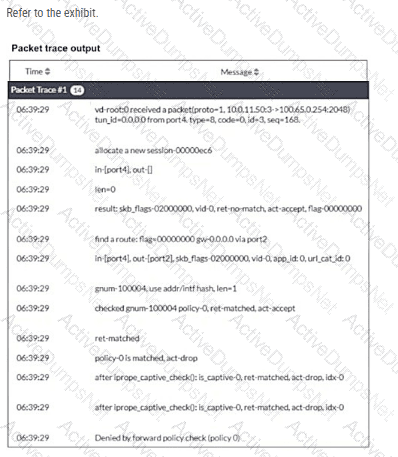
Why did the FortiGate device drop the packet?
Options:
It matched the default implicit firewall policy.
It failed the RPF check.
It matched an explicitly configured firewall policy with the action DENY.
It cannot reach the next-hop IP.
Answer:
AExplanation:
“FortiGate looks for the matching firewall policy from top-to-bottom and, if a match is found, the traffic is processed based on the firewall policy. If no match is found, the traffic is dropped by the default implicit deny firewall policy. ”
Technical Deep Dive:
The debug flow output clearly points to the implicit deny :
ret-no-match
policy-0 is matched, act-drop
Denied by forward policy check (policy 0)
On FortiGate, policy 0 is the internal representation of the default implicit deny firewall policy . That means the packet did not match any user-defined forward firewall policy, so FortiGate dropped it automatically.
Why the other options are wrong:
B is wrong because an RPF failure would show a reverse-path-related drop reason, not Denied by forward policy check (policy 0).
C is wrong because the trace does not show a matched explicit policy ID with deny action; it shows policy 0 , which is the implicit rule.
D is wrong because the trace actually shows a route lookup result: find a route: ... gw-0.0.0.0 via port2. So this is not a next-hop reachability failure.
In packet-flow troubleshooting, this pattern is one of the most important to recognize. If you see policy 0 in FortiGate debug flow, the first things to verify are:
diagnose debug flow filter addr < src_or_dst_ip >
diagnose debug flow show function-name enable
diagnose debug enable
Then review whether a firewall policy exists with the correct incoming interface, outgoing interface, source, destination, schedule, and service . If any one of those does not match, FortiGate falls through to policy 0 and drops the session.
Refer to the exhibit.
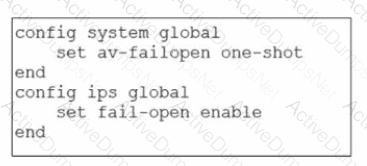
Based on this partial configuration, what are the two possible outcomes when FortiGate enters conserve mode? (Choose two.)
Options:
FortiGate drops new sessions requiring inspection.
Administrators must restart FortiGate to allow new sessions.
Administrators cannot change the configuration.
FortiGate skips quarantine actions.
Answer:
C, DRefer to the exhibit.
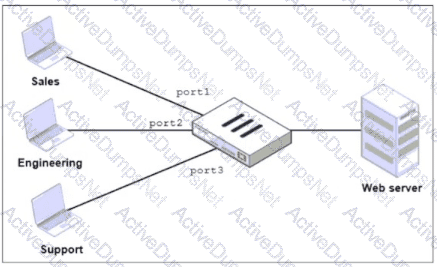
FortiGate has two separate firewall policies for Sales and Engineering to access the same web server with the same security profiles.
Which action must the administrator perform to consolidate the two policies into one?
Options:
Select port1 and port2 subnets in a single firewall policy.
Create an Aggregate interface that includes port1 and port2 to create a single firewall policy.
Replace port1 and port2 with the any interface in a single firewall policy.
Enable Multiple Interface Policies to select port1 and port2 in the same firewall policy.
Answer:
DExplanation:
“By default, you can select only a single interface as the incoming interface and a single interface as the outgoing interface. This is because the option to select multiple interfaces, or any interface in a firewall policy, is disabled on the GUI. However, you can enable the Multiple Interface Policies option on the Feature Visibility page to disable the single interface restriction.”
“You can also specify multiple interfaces, or use the any option, if you configure a firewall policy on the CLI, regardless of the default GUI setting.”
Technical Deep Dive:
The correct answer is D .
The policies are identical except for the incoming interface : one is for Sales and one is for Engineering . FortiGate GUI policy creation normally restricts you to one incoming interface per policy. To consolidate both into a single GUI policy, the administrator must enable Multiple Interface Policies so both port1 and port2 can be selected in the same rule.
Why the others are wrong:
A is not enough, because policy matching also includes the incoming interface , not just the source subnets.
B changes the network design and is unnecessary.
C would work too broadly by matching traffic from any interface, which is not the intended controlled consolidation.
A matching CLI-style concept would be:
config firewall policy
edit < id >
set srcintf " port1 " " port2 "
set dstintf " < server-interface > "
set srcaddr " Sales_Subnet " " Engineering_Subnet "
set dstaddr " < web-server > "
set service " HTTP " " HTTPS "
set action accept
next
end
That preserves a single policy while still being specific about which interfaces are allowed.
What are two features of collector agent advanced mode? (Choose two.)
Options:
In advanced mode, security profiles can be applied only to user groups, not individual users.
In advanced mode. FortiGate can be configured as an LDAP client and group filters can be configured on FortiGate.
Advanced mode uses the Windows convention—NetBios: Domain\Username.
Advanced mode supports nested or inherited groups.
Answer:
B, DExplanation:
" Also, advanced mode supports nested or inherited groups; that is, users can be members of subgroups that belong to monitored parent groups. " " In advanced mode, you can configure FortiGate as an LDAP client and configure the group filters on FortiGate. You can also configure group filters on the collector agent. "
Collector Agent Advanced Mode provides deeper integration between FortiGate, LDAP, and Active Directory, compared to standard mode.
Key features of Collector Agent Advanced Mode
B. FortiGate can be configured as an LDAP client and group filters can be configured on FortiGate.
Correct
In advanced mode:
FortiGate directly queries LDAP/AD
User group filters are configured on FortiGate, not only on the Collector Agent
This allows more flexible and scalable user/group-based policies
D. Advanced mode supports nested or inherited groups.
Correct
Advanced mode supports:
Nested AD groups
Inherited group memberships
This is one of the primary reasons advanced mode is used in complex AD environments
Why the other options are incorrect
A. Security profiles only to user groups
Incorrect.
Security profiles can be applied to users or groups, depending on policy configuration.
C. Uses NetBIOS Domain\Username format
Incorrect.
NetBIOS naming is associated with standard mode
Advanced mode typically uses LDAP DN-based identification
Which three statements explain a flow-based antivirus profile? (Choose three answers)
Options:
FortiGate buffers the whole file but transmits to the client at the same time.
Flow-based inspection uses a hybrid of the scanning modes available in proxy-based inspection.
If a virus is detected, the last packet is delivered to the client.
Flow-based inspection optimizes performance compared to proxy-based inspection.
The IPS engine handles the process as a standalone.
Answer:
A, B, DExplanation:
According to the FortiOS 7.6 Study Guide and Parallel Path Processing documentation, flow-based antivirus inspection is designed to provide security with minimal impact on performance.
First, a defining characteristic of modern flow-based AV (specifically in its " hybrid " mode) is that FortiGate buffers the whole file but transmits to the client at the same time (Statement A). This behavior allows the client to start receiving data immediately to prevent session timeouts, while the FortiGate reassembles the file in memory to perform a signature check before the final packet is released.
Second, starting with recent FortiOS versions including 7.6, flow-based inspection uses a hybrid of the scanning modes (Statement B). Previously, flow mode offered " Quick " or " Full " scans; now, it combines these techniques to offer a balance between the speed of stream-based scanning and the thoroughness of archive inspection.
Third, the primary motivation for selecting this mode is that flow-based inspection optimizes performance compared to proxy-based inspection (Statement D). It processes traffic in a single pass using the IPS engine, avoiding the overhead associated with the WAD (proxy) process. Statement C is incorrect because if a virus is detected, the last packet is withheld and the connection is reset to prevent the file from being completed. Statement E is less accurate as the IPS engine loads the AV engine to perform the task rather than acting as a " standalone " entity in the context of file scanning.
When configuring a FortiGate in a multi-WAN setup, why would an administrator enable session preservation on an interface? (Choose one answer)
Options:
To allow the FortiGate to dynamically change interfaces for all active sessions when a WAN link fails
To make sure all sessions without source NAT enabled always use the primary WAN link
To improve security by forcing users to authenticate again when the WAN link changes
To ensure that existing SSL VPN connections remain on the same interface even if route changes occur
Answer:
DExplanation:
A closely related routing principle from the guide is:
“For each session, FortiGate performs two route lookups... After completing these two lookups, FortiGate writes the routing information to its session table. Subsequent packets are routed according to the session table, not the routing table.”
Also, the guide notes an HA limitation that helps explain the same design principle for FortiGate-terminated sessions:
“Enabling session pickup allows active sessions to be seamlessly handed picked up by the new primary in the event of an HA failover... Note that there are some limitations to this – for example, any sessions that terminate at the FortiGate itself ( e.g. SSL VPN, proxy sessions ) cannot be handed off to another FortiGate and must be restarted on the new primary.”
Technical Deep Dive:
The correct answer is D .
In multi-WAN environments, session preservation is used so that traffic for sessions that are tightly bound to the FortiGate interface they terminate on—most notably SSL VPN and other FortiGate-terminated flows—does not suddenly switch to another egress interface just because the routing table changes. Those sessions are sensitive to interface consistency. If replies start leaving through a different WAN after a route recalculation, the remote peer may see an address/interface mismatch and the session can break.
That means:
A is the opposite of session preservation. Preservation is meant to avoid moving active sessions around.
B is not the purpose of the feature.
C is unrelated.
D correctly describes why an administrator would enable it.
Operationally, this matters most for SSL VPN , management-plane flows, and other sessions that terminate on the FortiGate itself , not just ordinary transit traffic. Transit sessions are generally tracked in the session table and can often survive normal routing behavior more gracefully, but FortiGate-terminated sessions are much more sensitive to WAN/interface changes.
Refer to the exhibit.
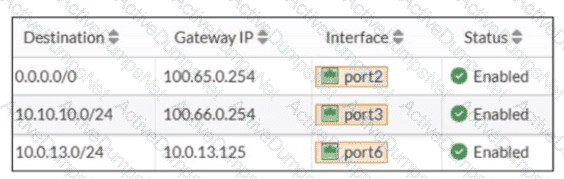
Based on the routing table shown in the exhibit, which two statements are true? (Choose two.)
Options:
A packet with the source IP address 10.0.13.10 arriving on port2 is allowed if strict RPF is disabled.
A packet with the source IP address 10.100.110.10 arriving on port2 is allowed if strict RPF is enabled.
A packet with the source IP address 10.100.110.10 arriving on port3 is allowed if strict RPF is disabled.
A packet with the source IP address 10.10.10.10 arriving on port2 is allowed if strict RPF is enabled.
Answer:
A, CRefer to the exhibits.
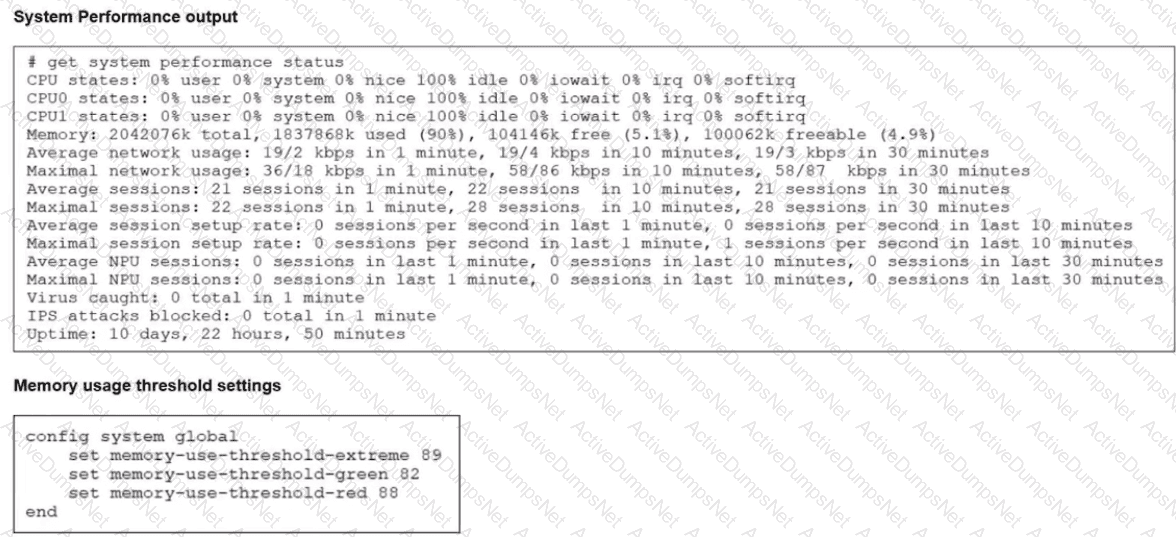
The system performance output and default configuration of high memory usage thresholds on a FortiGate device are shown.
Based on the system performance output, what are the two possible outcomes? (Choose two.)
Options:
Administrators can access FortiGate only through the console port.
FortiGate has entered conserve mode.
FortiGate drops new sessions.
Administrators can change the configuration.
Answer:
B, DExplanation:
From the exhibits:
System performance output
Memory used: 90%
Free memory: ~5%
Default memory thresholds (FortiOS 7.6)
memory-use-threshold-green 82%
memory-use-threshold-red 88%
memory-use-threshold-extreme 89%
Because memory usage (90%) exceeds the extreme threshold (89%), the FortiGate enters conserve mode.
Effects of conserve mode (FortiOS 7.6 – verified)
B. FortiGate has entered conserve mode.
Correct
When memory usage exceeds the red/extreme threshold, FortiGate automatically enters conserve mode.
This is exactly the condition shown in the system performance output.
D. Administrators can change the configuration.
Correct
Even in conserve mode:
Administrators can still log in (GUI, SSH, console)
Configuration changes are allowed
FortiGate does not lock configuration access during conserve mode.
This behavior is explicitly documented in the FortiOS 7.6 Conserve Mode section.
Why the other options are incorrect
A. Administrators can access FortiGate only through the console port.
Incorrect
Network access (GUI/SSH) is still available in conserve mode unless otherwise restricted.
Console-only access is not a conserve-mode requirement.
C. FortiGate drops new sessions.
Incorrect (as a general statement)
FortiGate may drop or bypass new inspection-required sessions depending on fail-open/fail-close settings.
It does not universally drop all new sessions, so this statement is not always true.
You have configured the FortiGate device for FSSO. A user is successful in log-in to Windows, but their access to the internet is denied. What should the administrator check first? (Choose one answer)
Options:
Whether the user is assigned to the correct AD group.
The FortiGate firewall policy settings for SSL decryption.
The FortiGate FSSO active users list for user ' s IP address.
The Windows event viewer for failed login attempts.
Answer:
CExplanation:
“FSSO is a software agent that enables FortiGate to identify network users for security policies or for VPN access, without asking for their username and password. When a user logs in to a directory service, the FSSO agent sends FortiGate the username, the IP address , and the list of groups that the user belongs to. FortiGate uses this information to maintain a local database of usernames, IP addresses , and group mappings.”
“To display the list of FSSO users that are currently logged in, use the CLI command diagnose debug authd fsso list . For each user, the user name, user group, IP address , and the name of the workstation from which they logged in shows.”
“You can monitor users who authenticate through your firewall policies using the Dashboard > Assets & Identities > Firewall Users page. It displays the user, user group, duration, IP address , traffic volume, and authentication method.”
Technical Deep Dive:
The first thing to verify is whether FortiGate has actually learned the user correctly in its FSSO active users table , especially the user-to-IP mapping . FSSO enforcement is identity-based, but the real-time match on live traffic still depends on FortiGate associating the traffic’s source IP with the authenticated Windows user. If that mapping is missing, stale, or tied to the wrong IP because of DHCP changes, DNS update lag, or collector-agent timing, the firewall policy match can fail even though the user successfully logged in to Windows.
That is why C is the best first check.
A may be the next thing to verify if the user is present but still denied, but first you must confirm the user is even present in the FSSO table with the correct IP.
B is unrelated to the initial FSSO identity-mapping problem.
D is less likely because the Windows logon already succeeded.
Useful checks:
diagnose debug authd fsso list
diagnose debug authd fsso server-status
execute fsso refresh
These commands confirm whether FortiGate has the user, group, and IP mapping needed for policy matching.
A network administrator is configuring an IPsec VPN tunnel for a sales employee travelling abroad.
Which VPN Wizard template must the administrator apply?
Options:
Remote Access
Hub-and-Spoke
Site-to-Site
Dial-up User
Answer:
AExplanation:
Exact Extract:
“If you want the wizard to configure the VPN for you, then select the template type Site to Site, Hub-and-Spoke, or Remote Access that best matches your VPN.”
“Use remote access VPNs when remote internet users need to securely connect to the office to access corporate resources. The remote user connects to a VPN server located on the corporate premises, such as FortiGate, to establish a secure tunnel.”
“A common use of the IPsec wizard is for configuring a remote access VPN for FortiClient users.”
Technical Deep Dive:
The correct answer is A. Remote Access .
A sales employee travelling abroad is a remote user , not another branch office or headquarters firewall. That means the tunnel type is a remote access VPN , where the user connects from an internet location back to the corporate FortiGate. In this design, the remote client typically uses FortiClient , and FortiGate acts as the VPN server.
Why the other options are incorrect:
Hub-and-Spoke is for multi-site branch connectivity through a central hub.
Site-to-Site is for connecting two fixed networks, such as branch office to headquarters.
Dial-up User describes the remote-user behavior conceptually, but it is not the IPsec Wizard template choice shown in the study guide. The wizard template to select is Remote Access .
So for a travelling sales employee, the administrator must choose the Remote Access VPN Wizard template.
An administrator has configured a dialup IPsec VPN on FortiGate with add-route enabled. However, the static route is not showing in the routing table. Which two statements about this scenario are correct? (Choose two.)
Options:
The administrator must use a policy route instead of a static route for add-route to work properly.
The administrator must ensure phase 2 is successfully established
The administrator must define the remote network correctly in the phase 2 selectors.
The administrator must enable a dynamic routing protocol on the dialup interface.
Answer:
B, CExplanation:
With a dialup IPsec VPN on FortiGate, when add-route is enabled, FortiGate will only install the corresponding route when it has enough negotiated information from the tunnel. In FortiOS 7.6, that means the route is tied to the Phase 2 (Quick Mode) selectors and is created dynamically when the IPsec SA is actually up.
B. The administrator must ensure phase 2 is successfully established
This is required. FortiGate does not install the add-route route just because Phase 1 exists or because the configuration is present. The route is added when the tunnel is effectively usable, which requires Phase 2 (IPsec SA) to be up. If Phase 2 is not established, there is no active SA and FortiGate will not inject the related route into the routing table.
So, if the static route is not showing, one correct explanation is that Phase 2 is not up.
C. The administrator must define the remote network correctly in the phase 2 selectors
This is also required. For dialup tunnels, FortiGate derives what route to add from the remote subnet(s) defined in the Phase 2 selector (proxy ID). If the remote network in Phase 2 is missing, incorrect, or too broad/too narrow in a way that prevents negotiation, the tunnel either won’t come up (so no route), or the route that would be installed won’t match what the administrator expects.
So, another correct explanation is that the Phase 2 remote network is not correctly defined, preventing the correct route from being created.
Why the other options are incorrect
A. Policy route instead of a static route
Add-route does not require policy routes. It is specifically a feature that injects a route (route-table entry) associated with the IPsec tunnel/SA and the Phase 2 selector networks.
D. Enable a dynamic routing protocol
Dynamic routing protocols (OSPF/BGP/RIP) are not required for add-route. Add-route is independent of dynamic routing and works by installing routes locally based on the negotiated selectors.
When configuring the connection between FortiGate and FortiAnalyzer, which option indicates that reliable traffic is enabled? (Choose one answer)
Options:
The connection status shows a green check icon
The interface status is set to up
A padlock icon appears in the connection settings
The logging mode is set to real-time
Answer:
CExplanation:
“When you enable reliable logging on FortiGate, the log transport delivery method changes from UDP to TCP. TCP provides reliable data transfer, guaranteeing that the transferred data remains intact and arrives in the same order in which it was sent.”
“Optionally, if using reliable logging, you can encrypt communications using SSL-encrypted OFTP traffic, so when a log message is generated, it is safely transmitted across an unsecured network.”
Technical Deep Dive:
The correct answer is C . The study guide explicitly ties reliable logging to TCP transport and optionally to SSL-encrypted OFTP . Among the choices, the padlock icon is the only one that meaningfully indicates secure, reliable log transport behavior. A green check icon usually indicates that the FortiGate–FortiAnalyzer connection is simply up , not specifically that reliable logging is enabled. Interface status being up is unrelated, and real-time logging mode describes delivery behavior, not the reliable transport indicator itself.
So, exam-wise, the best answer is C .
From the CLI perspective, reliable logging changes the transport from UDP to TCP, and with encryption enabled it uses SSL-protected OFTP. That is why the GUI indicator associated with secure transport is the most relevant visual clue here.
What are two characteristics of HA cluster heartbeat IP addresses in a FortiGate device? (Choose two.)
Options:
Heartbeat IP addresses are used to distinguish between cluster members.
The heartbeat interface of the primary device in the cluster is always assigned IP address 169.254.0.1.
A change in the heartbeat IP address happens when a FortiGate device joins or leaves the cluster.
Heartbeat interfaces have virtual IP addresses that are manually assigned.
Answer:
A, CExplanation:
In FortiOS 7.6, HA cluster heartbeat IP addresses are automatically managed by FortiGate and play a critical role in cluster communication and synchronization.
Correct statements
A. Heartbeat IP addresses are used to distinguish between cluster members.
Correct
FortiGate assigns unique heartbeat IP addresses (link-local addresses in the 169.254.0.0/16 range) to each HA member.
These addresses are used for:
Cluster member identification
Health checks
Synchronization traffic
This allows FortiGate units to uniquely identify and communicate with each other inside the HA cluster.
C. A change in the heartbeat IP address happens when a FortiGate device joins or leaves the cluster.
Correct
Heartbeat IPs are dynamically assigned.
When:
A new FortiGate joins the cluster, or
A member leaves or fails,
FortiGate may reassign heartbeat IP addresses to maintain unique identification among members.
This behavior is documented in the FortiOS HA operation and troubleshooting guides.
Why the other options are incorrect
B. The heartbeat interface of the primary device is always assigned IP address 169.254.0.1.
Incorrect
There is no fixed or guaranteed heartbeat IP (such as 169.254.0.1) for the primary unit.
Heartbeat IP assignment is dynamic, not role-based.
D. Heartbeat interfaces have virtual IP addresses that are manually assigned.
Incorrect
Heartbeat IP addresses are:
Automatically assigned
Link-local
Administrators do not manually configure heartbeat IP addresses.
An administrator manages a FortiGate model that supports NTurbo
How does NTurbo acceleration enhance antivirus performance?
Options:
For flow-based inspection. NTurbo establishes a dedicated data path to redirect traffic between the IPS engine and FortiGate ingress and egress interfaces.
For flow-based inspection. NTurbo creates two inspection sessions on the FortiGate device.
For proxy-based inspection. NTurbo offloads traffic to the content processor.
For proxy-based inspection. NTurbo buffers the whole file and then sends it to the antivirus engine.
Answer:
AExplanation:
According to the FortiOS 7.6 Administration Guide and Fortinet hardware acceleration (NTurbo) documentation, the correct answer is A.
What NTurbo Is (FortiOS 7.6 – Verified)
NTurbo is a hardware-based acceleration feature available on specific FortiGate models. It is designed to improve antivirus and IPS performance when operating in flow-based inspection mode.
NTurbo works by creating a fast, optimized data path between:
FortiGate ingress interface
IPS/AV engine
FortiGate egress interface
This minimizes CPU involvement and reduces packet traversal overhead.
Why Option A Is Correct
A. For flow-based inspection, NTurbo establishes a dedicated data path to redirect traffic between the IPS engine and FortiGate ingress and egress interfaces.
This is exactly how NTurbo works, as documented:
NTurbo applies to flow-based inspection only
It accelerates IPS and antivirus scanning
It creates a dedicated fast path that bypasses unnecessary processing steps
This significantly improves throughput and lowers latency
This description matches Fortinet’s official explanation of NTurbo.
Why the Other Options Are Incorrect
B. NTurbo creates two inspection sessions
Incorrect. NTurbo does not duplicate sessions; it optimizes the packet path.
C. NTurbo offloads traffic to the content processor (proxy-based)
Incorrect. NTurbo does not apply to proxy-based inspection and does not offload to content processors.
D. NTurbo buffers the whole file and then sends it to the antivirus engine
Incorrect. Buffering entire files is a proxy-based behavior, not NTurbo.
Refer to the exhibits.
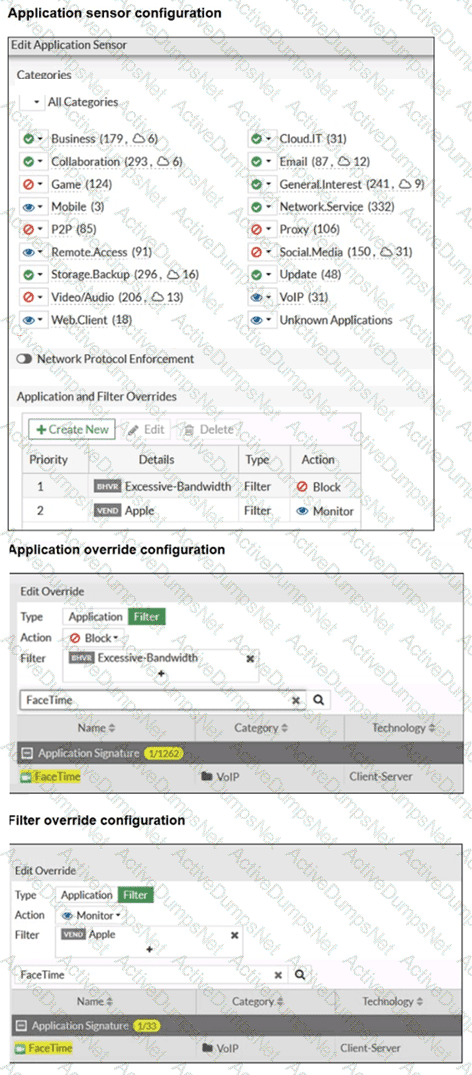
The exhibits show the application sensor configuration and the Excessive-Bandwidth and Apple filter details. Based on the configuration, what will happen to Apple FaceTime if there are only a few calls originating or incoming? (Choose one answer)
Options:
Apple FaceTime will be allowed, based on the Video/Audio category configuration.
Apple FaceTime will be blocked, based on the Excessive-Bandwidth filter configuration.
Apple FaceTime will be allowed, based on the Apple filter configuration.
Apple FaceTime will be allowed only if the Apple filter in Application and Filter Overrides is set to Allow.
Answer:
BExplanation:
According to the FortiOS 7.6 Administrator Study Guide, the Application Control engine processes traffic by evaluating the Application and Filter Overrides section first, using a top-down matching logic similar to firewall policies. In the provided exhibit, there are two override entries:
Priority 1 : A behavior-based filter for Excessive-Bandwidth with the action set to Block .
Priority 2 : A vendor-based filter for Apple with the action set to Monitor .
The exhibit titled " Application override configuration " explicitly shows that Apple FaceTime is one of the signatures included within the Excessive-Bandwidth behavior filter. When the FortiGate inspects FaceTime traffic, it matches the first entry (Priority 1) because the signature belongs to the " Excessive-Bandwidth " group. Since the action for this priority is Block , the traffic is dropped immediately.
The phrase " only a few calls " is a common exam distractor; in this context, the " Excessive-Bandwidth " filter refers to the classification of the application (as one that typically consumes high bandwidth) rather than a real-time measurement of the specific session ' s throughput. Because the engine stops searching once a match is found in the overrides, it never reaches the Priority 2 " Monitor " rule or the general Category settings.
Refer to the exhibit.
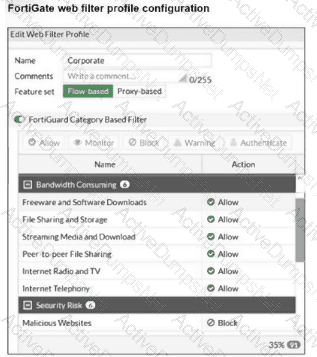
The exhibit shows the FortiGuard Category Based Filter section of a corporate web filter profile. An administrator must block access to download.com, which belongs to the Freeware and Software Downloads category. The administrator must also allow other websites in the same category. What are two solutions for satisfying the requirement? (Choose two answers)
Options:
Configure a static URL filter entry for download.com with Type and Action set to Wildcard and Block, respectively.
Configure a web override rating for download.com and select Malicious Websites as the subcategory.
Configure a separate firewall policy with action Deny and an FQDN address object for *.download.com as destination address.
Set the Freeware and Software Downloads category Action to Warning.
Answer:
A, BExplanation:
“In FortiOS, there are three main components of web filtering:
• Web content filtering...
• URL filtering: uses URLs and URL patterns to block or exempt web pages from specific sources ...
• FortiGuard Web Filtering service...”
“In the web filter profile, Fortiguard category filtering enhances the web filter features. Rather than block or allow websites individually, it looks at the category that a website has been rated with. Then, FortiGate takes action based on that category, not based on the URL.”
“If you consider that a particular URL does not have the correct category, you can ask to re-evaluate the rating in the Fortinet URL Rating Submission website. You can also override a web rating for an exceptional URL in the FortiGate configuration. ”
“Static URL filtering is another web filter feature, which provides more granularity. Configured URLs in the URL filter are checked from top to bottom against the visited websites. If FortiGate finds a match, it applies the configured action.”
“To find the exact match, URL filtering has three pattern types: Simple, Regular Expressions, and Wildcard .”
“So, with these different features, what is the inspection order? If you have enabled many of them, the inspection order flows as follows:
The local static URL filter
FortiGuard category filtering...”
Technical Deep Dive:
The correct answers are A and B .
A is correct because a static URL filter gives per-URL granularity. Since the category Freeware and Software Downloads is currently allowed in the profile, adding a local static URL filter entry for download.com with Block lets FortiGate deny only that site while continuing to allow the rest of the category. This also aligns with the documented inspection order, where the local static URL filter is checked before FortiGuard category filtering .
B is also correct because a web rating override can reclassify a specific exceptional URL. If download.com is re-rated into a blocked category such as Malicious Websites , it will be blocked by the profile while other sites in Freeware and Software Downloads remain allowed.
Why the others are wrong:
C is not the intended web-filter solution. A firewall policy with an FQDN object operates at policy/routing resolution level, not as a category-aware web filtering exception.
D is wrong because changing the whole category to Warning affects all sites in that category, not just download.com.
In production, the cleaner design is usually: keep the category allowed, then add a local URL-filter exception or a web-rating override for the specific site . For HTTPS traffic, remember FortiGate still needs enough SSL inspection visibility to identify the hostname correctly. A representative CLI approach for URL filtering is:
config webfilter urlfilter
edit 1
config entries
edit 1
set url " download.com "
set type wildcard
set action block
next
end
next
end
This is the most deterministic way to block one site without penalizing the rest of the category.
FortiGate is operating in NAT mode and has two physical interfaces connected to the LAN and DMZ networks respectively. Which two statements about the requirements of connected physical interfaces on FortiGate are true? (Choose two.)
Options:
Both interfaces must have DHCP enabled and interfaces set to LAN and DMZ roles assigned.
Both interfaces must have the interface role assigned.
Both interfaces must have directly connected routes on the routing table.
Both interfaces must have IP addresses assigned.
Answer:
C, DExplanation:
In FortiOS 7.6, when a FortiGate is operating in NAT mode, physical interfaces that participate in traffic forwarding (such as LAN and DMZ) must meet certain fundamental requirements.
Correct statements
D. Both interfaces must have IP addresses assigned.
Correct
In NAT mode, FortiGate operates as a Layer-3 device.
Every interface that forwards traffic must have an IP address.
Without an IP address:
The interface cannot participate in routing
Firewall policies cannot be applied correctly
This is a mandatory requirement.
C. Both interfaces must have directly connected routes on the routing table.
Correct
When an IP address is assigned to an interface, FortiGate automatically installs a connected route for that subnet in the routing table.
These connected routes are required so FortiGate:
Knows how to reach the locally attached networks
Can forward traffic between LAN and DMZ
While administrators do not manually create these routes, their presence is required for correct operation.
Why the other options are incorrect
A. Both interfaces must have DHCP enabled and roles assigned.
Incorrect
DHCP is optional; interfaces can use static IPs.
Interface roles (LAN, DMZ, WAN) are administrative/GUI aids, not functional requirements.
B. Both interfaces must have the interface role assigned.
Incorrect
Interface roles affect GUI grouping and some default behavior.
They are not required for NAT mode operation or traffic forwarding.
Refer to the exhibit.

Which two ways can you view the log messages shown in the exhibit? (Choose two.)
Options:
By right clicking the implicit deny policy
Using the FortiGate CLI command diagnose log test
By filtering by policy universally unique identifier (UUID) and application name in the log entry
In the Forward Traffic section
Answer:
C, DExplanation:
The exhibit shows a FortiGate UTM application control log with fields such as:
type= " utm "
subtype= " app-ctrl "
action= " block "
policyid=1
appid=30220
appcat= " Video/Audio "
service= " HTTP "
apprisk= " elevated "
This is a forward traffic security log, generated by Application Control applied to a firewall policy.
Why the correct answers are C and D
C. By filtering by policy universally unique identifier (UUID) and application name in the log entry
Correct.
FortiOS logs can be viewed and filtered in:
Log & Report → Forward Traffic
Administrators can filter logs using fields such as:
Policy ID / Policy UUID
Application name (app)
Application ID (appid)
The log entry clearly includes application-related fields, making filtering by policy and application a valid and documented way to view these logs.
D. In the Forward Traffic section
Correct.
The log is a UTM Application Control log for traffic passing through a firewall policy.
Such logs are displayed under:
Log & Report → Forward Traffic
This is the standard and correct location to view application control, web filter, IPS, and other security profile logs related to user traffic.
Why the other options are incorrect
A. By right clicking the implicit deny policy
Incorrect.
Implicit deny policies do not generate UTM forward traffic logs like the one shown.
Application control logs are generated only by explicit firewall policies with security profiles enabled.
B. Using the FortiGate CLI command diagnose log test
Incorrect.
diagnose log test is used to test log connectivity and log settings, not to view historical log entries.
It does not display traffic or UTM logs.
FortiGate is integrated with FortiAnalyzer and FortiManager.
When creating a firewall policy, which attribute must an administrator include to enhance functionality and enable log recording on FortiAnalyzer and FortiManager?
Options:
Universally Unique Identifier
Policy ID
Sequence ID
Log ID
Answer:
AExplanation:
In FortiOS 7.6, when FortiGate is integrated with FortiAnalyzer and FortiManager, firewall policies rely on a Universally Unique Identifier (UUID) to ensure proper policy tracking, synchronization, and log correlation across devices.
Why the UUID is required
Every firewall policy in FortiOS has a UUID.
FortiManager uses the UUID to:
Track policies across managed FortiGate devices
Maintain policy consistency during installs and revisions
FortiAnalyzer uses the UUID to:
Correlate logs accurately to the correct firewall policy
Preserve log association even if policy order or policy ID changes
Without a UUID:
Policy-to-log mapping can break
FortiManager cannot reliably manage or synchronize policies
FortiAnalyzer log analysis becomes inconsistent
This is explicitly documented in Fortinet administration and logging architecture references.
Why the other options are incorrect
B. Policy IDPolicy ID can change when policies are moved and is not reliable for long-term correlation across FortiManager and FortiAnalyzer.
C. Sequence IDSequence ID reflects GUI ordering only and has no role in log correlation.
D. Log IDLog ID is generated per log event, not per firewall policy.
Refer to the exhibit.
A RADIUS server configuration is shown.
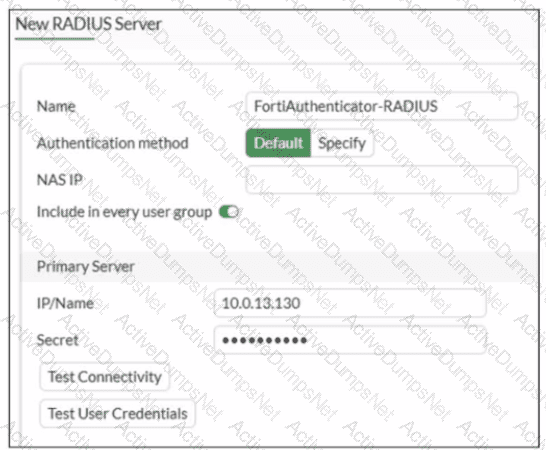
An administrator added a configuration for a new RADIUS server While configuring, the administrator enabled Include in every user group What is the impact of enabling Include in every user group in a RADIUS configuration?
Options:
This option places the RADIUS server, and all users who can authenticate against that server, into every FortiGate user group.
This option places all FortiGate users and groups required to authenticate into the RADIUS server, which, in this case, is FortiAuthenticator.
This option places the RADIUS server, and all users who can authenticate against that server, into every RADIUS group.
This option places all users into every RADIUS user group, including groups that are used for the LDAP server on FortiGate.
Answer:
AExplanation:
Based on the FortiOS 7.6 Authentication and User Group documentation, the correct answer is A.
Meaning of “Include in every user group” (FortiOS 7.6)
When configuring a RADIUS server on FortiGate, enabling Include in every user group has a very specific and documented effect:
The configured RADIUS server object is automatically added to all FortiGate user groups.
As a result, any user who successfully authenticates against that RADIUS server becomes a valid member of every FortiGate user group, unless additional group filtering (such as RADIUS attributes) is applied.
This simplifies configuration when the same external authentication source must be accepted across multiple firewall policies that reference different user groups.
This behavior is explicitly described in the FortiOS 7.6 Administrator Guide under RADIUS authentication servers and user groups.
Why Option A is Correct
FortiGate user groups can include:
Local users
LDAP servers
RADIUS servers
Enabling Include in every user group causes FortiGate to:
Insert the RADIUS server into all existing and future FortiGate user groups
Therefore, all users authenticating via this RADIUS server are implicitly allowed in every FortiGate user group.
This is exactly what option A describes.
Why the Other Options Are Incorrect
B: FortiGate does not push users or groups into the RADIUS server. Authentication is always initiated by FortiGate toward RADIUS.
C: FortiGate does not manage or modify RADIUS-side group definitions.
D: LDAP and RADIUS user groups are separate authentication mechanisms; this setting does not merge or affect LDAP groups.
You have implemented the application sensor and the corresponding firewall policy as shown in the exhibits.
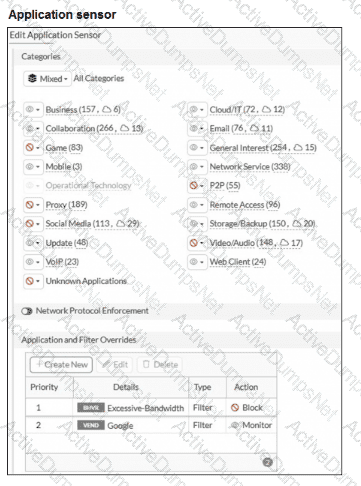
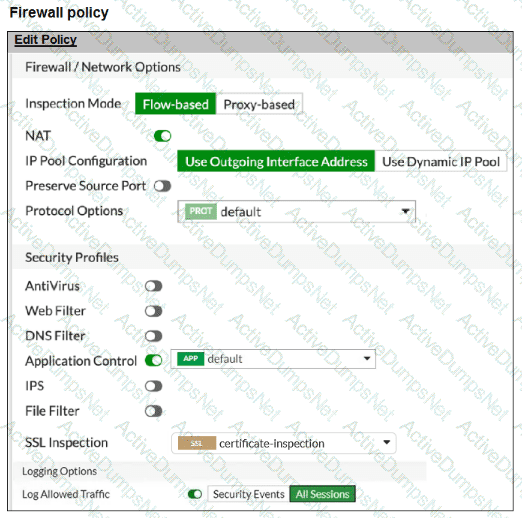
You cannot access any of the Google applications, but you are able to access www.fortinet.com .
What would you do to resolve this issue?
Options:
Change the Inspection mode to Proxy-based.
Set SSL inspection to deep-content-inspection.
Move up Google in the Application and Filter Overrides section to set its priority to 1.
Add Google .com to the URL category in the security profile.
Answer:
CExplanation:
“With these multiple filters, which one has the priority? After the IPS engine examines the traffic stream for a signature match, FortiGate scans packets for matches, in this order, for the application control profile:
1. Application and filter overrides ...”
“Next, the scan checks for application and filter overrides. Because a filter override is configured to block applications that use excessive bandwidth, it blocks all applications using excessive bandwidth , regardless of other categories that allow these applications.”
“In this scenario, the filter override (Excessive-Bandwidth) is blocked and, since Dailymotion falls under the excessive bandwidth category, Dailymotion is blocked even though it is set to Monitor in the Application and Filter Overrides section. The priority in which application and filter overrides are placed takes precedence. ”
“To allow web filtering, DNS filtering, or application control for HTTPS traffic , you must select an SSL inspection profile with certificate inspection or a deep inspection enabled.”
Technical Deep Dive:
The problem is not flow-based mode and not the SSL profile. Your firewall policy already has certificate-inspection , and the study guide explicitly says that application control for HTTPS traffic works with certificate inspection or deep inspection . So option B is unnecessary, and option A is unrelated.
The real issue is the override order inside the application sensor:
Priority 1: Filter = Excessive-Bandwidth , Action = Block
Priority 2: Vendor = Google , Action = Monitor
FortiGate evaluates overrides from top to bottom and applies the first match . Many Google applications match the Excessive-Bandwidth filter, so they are blocked before the later Google/Monitor override is ever reached. That is why Google apps fail while www.fortinet.com still works.
So the correct fix is to move the Google override above the Excessive-Bandwidth filter , making Google the first match.
A representative CLI-style logic would be:
config application list
edit " default "
config entries
edit 1
set vendor " Google "
set action monitor
next
edit 2
set filter " Excessive-Bandwidth "
set action block
next
end
next
end
That preserves the bandwidth block for other apps while allowing Google applications to match the higher-priority override first.
A network administrator enabled antivirus and selected an SSL inspection profile on a firewall policy. When downloading an EICAR test file through HTTP, FortiGate detects the virus and blocks the file. When downloading the same file through HTTPS, FortiGate does not detect the virus and does not block the file, allowing it to be downloaded. The administrator confirms that the traffic matches the configured firewall policy. What are two reasons for the failed virus detection by FortiGate? (Choose two answers)
Options:
The selected SSL inspection profile has certificate inspection enabled.
The website is exempted from SSL inspection.
The EICAR test file exceeds the protocol options oversize limit.
The browser does not trust the FortiGate self-signed CA certificate.
Answer:
A, BExplanation:
“The only security features you can apply using SSL certificate inspection mode are web filtering and application control... certificate inspection does not allow FortiGate to inspect the flow of encrypted data.”
“For antivirus or IPS control, you should use a deep-inspection profile.”
“Within the full SSL inspection profile, you can also specify which SSL sites, if any, you want to exempt from SSL inspection.”
Technical Deep Dive:
The correct answers are A and B .
A is correct because if the firewall policy uses certificate inspection , FortiGate can inspect certificate/SNI metadata only. It cannot decrypt the HTTPS payload, so the antivirus engine never sees the EICAR file contents. That means HTTPS malware scanning fails even though HTTP scanning works.
B is also correct because if the destination site is exempt from SSL inspection , FortiGate intentionally skips decryption for that HTTPS session. Again, no payload decryption means no antivirus content scan.
Why the others are wrong:
C is not the likely reason here, especially for EICAR, which is a very small test file.
D would usually cause browser certificate warnings or connection issues during deep inspection, not a clean download that bypasses AV inspection.
Operationally, HTTPS antivirus requires this chain to be true:
firewall policy match → SSL deep inspection active → site not exempted → AV profile applied .
If either certificate-inspection is used or the site is exempted, FortiGate cannot inspect the encrypted file body.
Unlock NSE4_FGT_AD-7.6 Features
- NSE4_FGT_AD-7.6 All Real Exam Questions
- NSE4_FGT_AD-7.6 Exam easy to use and print PDF format
- Download Free NSE4_FGT_AD-7.6 Demo (Try before Buy)
- Free Frequent Updates
- 100% Passing Guarantee by Activedumpsnet
Questions & Answers PDF Demo
- NSE4_FGT_AD-7.6 All Real Exam Questions
- NSE4_FGT_AD-7.6 Exam easy to use and print PDF format
- Download Free NSE4_FGT_AD-7.6 Demo (Try before Buy)
- Free Frequent Updates
- 100% Passing Guarantee by Activedumpsnet