- Home
- Fortinet
- Fortinet Certified Professional Security Operations
- FCP_FAZ_AN-7.6
- FCP_FAZ_AN-7.6 - Fortinet NSE 5 - FortiAnalyzer 7.6 Analyst
Fortinet FCP_FAZ_AN-7.6 Fortinet NSE 5 - FortiAnalyzer 7.6 Analyst Exam Practice Test
Fortinet NSE 5 - FortiAnalyzer 7.6 Analyst Questions and Answers
After generating a report, you notice the information you where expecting to see is not included in it. However, you confirm that the logs are there.
Options:
Check the time frame covered by thereport.
Disable auto-cache.
Increase the report utilization quota.
Test the dataset
Answer:
A, DExplanation:
When a generated report does not contain the expected information even though the logs are confirmed to be present, it typically indicates anissue with the report's configuration. There are a few common reasons this might happen:
Option A - Check the Time Frame Covered by the Report:
Reports are generated based on a specific time frame. If the report’s time frame does not cover the period when the relevant logs were collected, those logs won’t appear in the report output. Verifying and adjusting the time frame is essential to ensure the report includes all relevant data.
Conclusion:Correct.
Option B - Disable Auto-Cache:
Auto-cache is designed to improve report generation speed by using cached data. Disabling auto-cache would typically only be relevant if the report is pulling outdated data from cache, but it doesn’t directly affect whether specific logs are included in a report.
Conclusion:Incorrect.
Option C - Increase the Report Utilization Quota:
The report utilization quota is related to the resource limits for generating reports. It does not directly influence whether certain data appears in a report. Increasing this quota would help only if there are resource issues preventing the report from completing, not if specific logs are missing from the report.
Conclusion:Incorrect.
Option D - Test the Dataset:
Datasets determine which logs and data fields are pulled into the report. If a dataset is configured incorrectly or does not include the required log fields, it could lead to missing information. Testing the dataset allows you to verify that it’s correctly configured and pulling the expected data.
Conclusion:Correct.
Conclusion:
Correct Answer:A. Check the time frame covered by the reportandD. Test the dataset.
These steps directly address the issues that could lead to missing information in a report when logs are available but not displayed.
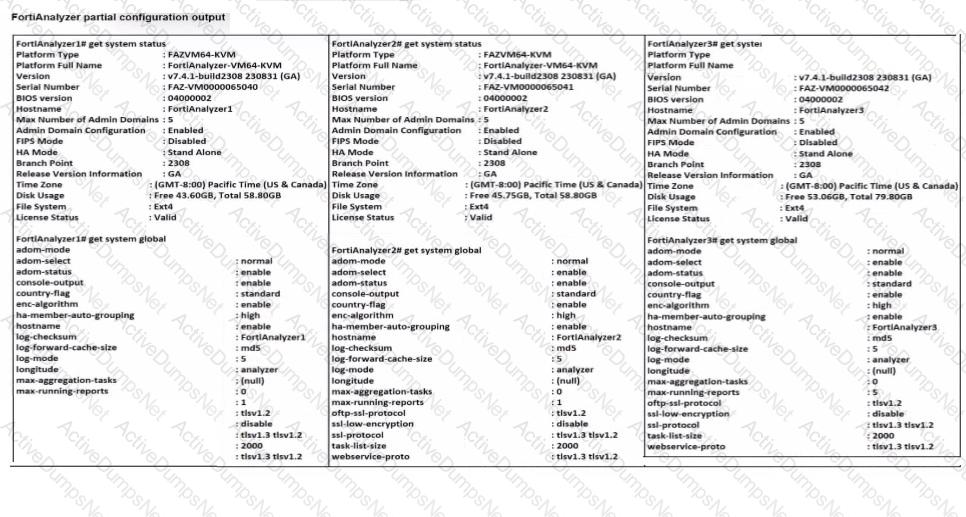
Exhibit.

Based on the partial outputs displayed, which devices can be members of a FotiAnalyzer Fabric?
Options:
FortiAnalayzer1 and FortiAnalyzer3
FortiAnalyzer1 and FortiAnalyzer2
FortiAnalyzer2 and FortiAnalyzer3
All devices listed can be members.
Answer:
DExplanation:
In a FortiAnalyzer Fabric, devices canparticipate in a cluster or grouping if they meet specific compatibility criteria. Based on the outputs provided, let’s evaluate these criteria:
Version Compatibility:
All three devices, FortiAnalyzer1, FortiAnalyzer2, and FortiAnalyzer3, are runningversion v7.4.1-build0238, which is the same across the board. This version alignment is crucial because FortiAnalyzer Fabric requires that devices run compatible firmware versions for seamless communication and management.
Platform Type and Configuration:
All three devices are configured asStandalonein the HA mode, which allows them to operate independently but does not restrict their participation in a FortiAnalyzer Fabric. Each device is also on theFAZVM64-KVMplatform type, ensuring hardware compatibility.
Global Settings:
Key settings such as adm-mode, adm-status, and adom-mode are consistent across all devices (adm-mode: normal, adm-status: enable, adom-mode: normal), which aligns with requirements for fabric integration and role assignment flexibility.
Each device also has thelog-forward-cache-sizeset, which is relevant for forwarding logs within a fabric environment.
Based on the above analysis,all devices(FortiAnalyzer1, FortiAnalyzer2, and FortiAnalyzer3) meet the requirements to be part of a FortiAnalyzer Fabric.
Exhibit.
What can you conclude about these search results? (Choose two.)
Options:
They can be downloaded to a file.
They are sortable by columns and customizable.
They are not available for analysis in FortiView.
They were searched by using textmode.
Answer:
A, DAfter a generated a repot, you notice the information you were expecting to see in not included in it. However, you confirm that the logs are there:
Which two actions should you perform? (Choose two.)
Options:
Check the time frame covered by the report.
Disable auto-cache.
Increase the report utilization quota.
Test the dataset.
Answer:
A, DExplanation:
When a generated report does not include the expected information despite the logs being present, there are several factors to check to ensure accurate datarepresentation in the report.
Option A - Check the Time Frame Covered by the Report:
Reports are generated based on a specified time frame. If the time frame does not encompass the period when the relevant logs were collected, those logs will not appear in the report. Ensuring the time frame is correctly set to cover the intended logs is crucial for accurate report content.
Conclusion:Correct.
Option B - Disable Auto-Cache:
Auto-cache is a feature in FortiAnalyzer that helps optimize report generation by using cached data for frequently used datasets. Disabling auto-cache is generally not necessary unless there is an issue with outdated data being used. In most cases, it does not directly impact whether certain logs are included in a report.
Conclusion:Incorrect.
Option C - Increase the Report Utilization Quota:
The report utilization quota controls the resource limits for generating reports. While insufficient quota might prevent a report from generating or completing, it does not typically cause specific log entries to be missing. Therefore, this option is not directly relevant to missing data within the report.
Conclusion:Incorrect.
Option D - Test the Dataset:
Datasets in FortiAnalyzer define which logs and fields are pulled into the report. If a dataset is misconfigured, it could exclude certain logs. Testing the dataset helps verify that the correct data is being pulled and that all required logs are included in the report parameters.
Conclusion:Correct.
Conclusion:
Correct Answer:A. Check the time frame covered by the reportandD. Test the dataset.
These actions directly address the issues that could cause missing information in a report when logs are available but not displayed.
Which statement about sending notifications with incident update is true?
Options:
You can send notifications to multiple external platforms.
Notifications can be sent only by email.
If you use multiple fabric connectors, all connectors must have the same settings.
Notifications can be sent only when an incident is updated or deleted.
Answer:
AExplanation:
In FortiOS and FortiAnalyzer,incident notificationscan be sent to multiple external platforms, not limited to a single method such as email. Fortinet's security fabric and integration capabilities allow notifications to be sent through various fabric connectors and third-party integrations. This flexibility is designed to ensure that incident updates reach relevant personnel or systems using preferred communication channels, such as email, Syslog, SNMP, or integration with SIEM platforms.
Let’s review each answer option for clarity:
Option A: You can send notifications to multiple external platforms
This is correct. Fortinet’s notification system is capable of sending updates to multiple platforms, thanks to its support for fabric connectors and external integrations. This includes options such as email, Syslog, SNMP, and others based on configured connectors.
Option B: Notifications can be sent only by email
This is incorrect. Although email is a common method, FortiOS and FortiAnalyzer support multiple notification methods through various connectors, allowing notifications to be directed to different platforms as per the organization’s setup.
Option C: If you use multiple fabric connectors, all connectors must have the same settings
This is incorrect. Each fabric connector can have its unique configuration, allowing different connectors to be tailored for specific notification and integration requirements.
Option D: Notifications can be sent only when an incident is updated or deleted
This is incorrect. Notifications can be sent upon the creation of incidents, as well as upon updates or deletion, depending on the configuration.
(An analyst is using FortiAI on FortiAnalyzer to simplify certain tasks but is worried about exceeding the monthly token limit. Which query will take the fewest FortiAI tokens? (Choose one answer))
Options:
Show logs for 192.168.1.10 (past week)
Show all logs from the past week
Can you show me all the log entries for the endpoint 192.168.1.10?
Show logs for 192.168.1.10
Answer:
AExplanation:
Comprehensive and Detailed Explanation From Exact Extract of knowledge of FortiAnalyzer 7.6 Study guide documents:
The study guide explains that FortiAI token usage includesboth the prompt (input) and the response (output), and that “generally, more text in the query and response results in using more tokens.” It provides two comparison examples and concludes that the more verbose request for “all the log entries” consumes more tokens because it hasmore textand also triggers alarger response; whereas limiting the query to a time range (for example, “(past week)”) reduces output volume and therefore token usage.
Applying that guidance to the options:
Cis the most verbose and explicitly requests “all the log entries,” which drives higher input and output token usage.
Brequests “all logs” for the week (broad scope), which typically increases output tokens.
Dis short, but it doesnotconstrain the time range, which can increase the response size (output tokens).
Ais concise and includes a time constraint “(past week),” matching the study guide’s example of a lower-token query pattern.
Whathappens when the indicator of compromise (IOC) engine on FortiAnalyzer finds web logs that match blacklisted IP addresses?
Options:
FortiAnalyzer flags the associated host for further analysis.
A new infected entry is added for the corresponding endpoint under Compromised Hosts.
The detection engine classifies those logs as Suspicious.
The endpoint is marked as Compromised and, optionally, can be put in quarantine.
Answer:
BIn firmware version 7.6, how does on-premises FortiAnalyzer store logs? (Choose one answer)
Options:
Uses ClickHouse database
Uses MySQL database
Uses Postgres SQL database
Uses ElasticSeach database
Answer:
AExplanation:
Comprehensive and Detailed Explanation From Exact Extract of knowledge of FortiAnalyzer 7.6 Study guide documents:
FortiAnalyzer 7.6 stores on-premises logs in aClickHouse SQL database(not MySQL, Postgres, or Elasticsearch). Fortinet’s FortiAnalyzer 7.6 SQL Query documentation explicitly states that log data is inserted into the SQL database and that“FortiAnalyzer uses a ClickHouse SQL database.”
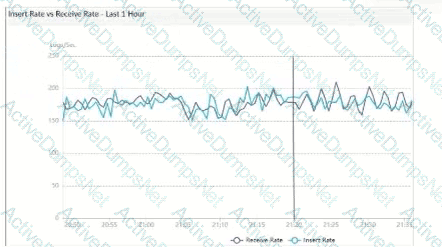
This is consistent with how the study guide describes the storage/analytics pipeline in 7.6: it explains that FortiAnalyzer indexes incoming raw logs (insert rate)“by the SQL database and the sqlplugind daemon.”This “SQL database” in 7.6 corresponds to the ClickHouse-backed log database described in the Fortinet documentation.
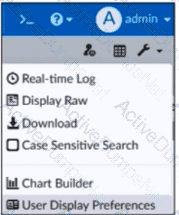
Exhibit.
What is the purpose of using the Chart Builder feature On FortiAnalyzer?
Options:
To build a chart automatically based on the top 100 log entries
To add charts directly to generatereports in the current ADOM.
To add a new chart under FortiView to be used in new reports
To build a dataset and chart based on the filtered search results
Answer:
DWhich log will generate an event with the status Unhandled?
Options:
An AV log with action=quarantine.
An IPS log with action=pass.
A WebFilter log willaction=dropped.
An AppControl log with action=blocked.
Answer:
BExplanation:
In FortiOS 7.4.1 and FortiAnalyzer 7.4.1, the "Unhandled" status in logs typically signifies that the FortiGate encountered a security event but did not take any specific action toblock or alter it. This usually occurs in the context of Intrusion Prevention System (IPS) logs.
IPS logs with action=pass:When the IPS engine inspects traffic and determines that it does not match any known attack signatures or violate any configured policies, it assigns the action "pass". Since no action is taken to block or modify this traffic, the status is logged as "Unhandled."
Let's look at why the other options are incorrect:
An AV log with action=quarantine:Antivirus (AV) logs with the action "quarantine" indicate that a file was detected as malicious and moved to quarantine. This is a definitive action, so the status wouldn't be "Unhandled."
A WebFilter log will action=dropped:WebFilter logs with the action "dropped" indicate that web traffic was blocked according to the configured web filtering policies. Again, this is a specific action taken, not an "Unhandled" event.
An AppControl log with action=blocked:Application Control logs with the action "blocked" mean that an application was denied access based on the defined application control rules. This is also a clear action, not "Unhandled."
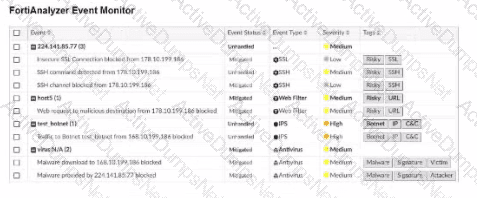
As part of your analysis, you discover that a Medium severity level incident is fully remediated.
You change the incident status to Closed:Remediated.
Which statement about your update is true?
Options:
The incident can no longer be deleted.
The corresponding event will be marked as Mitigated.
The incident dashboard will be updated.
The incident severity will be lowered.
Answer:
CWhen managing incidents on FortiAnlyzer, what must an analyst be aware of?
Options:
You can manually attach generated reports to incidents.
The status of the incident is always linked to the status of the attach event.
Severity incidents rated with the level High have an initial service-level agreement (SLA) response time of 1 hour.
Incidents must be acknowledged before they can be analyzed.
Answer:
AExplanation:
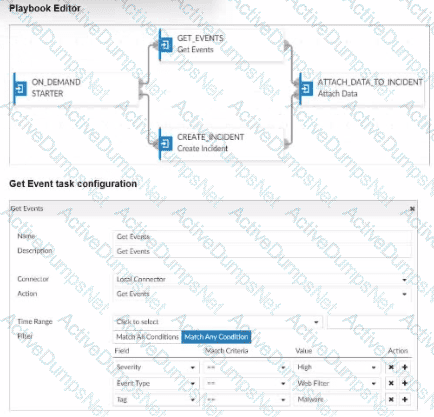
In FortiAnalyzer's incident management system, analysts have the option to manually manage incidents, which includes attaching relevant reports to an incident for further investigation and documentation. This feature allows analysts to consolidate information, such as detailed reports on suspicious activity, into an incident record, providing a comprehensive view for incident response.
Let's review the other options to clarify why they are incorrect:
Option A: You can manually attach generated reports to incidents
This is correct. FortiAnalyzer allows analysts to manually attach reports to incidents, which is beneficial for providing additional context, evidence, or analysis related to the incident. This functionality is part of the incident management process and helps streamline information for tracking and resolution.
Option B: The status of the incident is always linked to the status of the attached event
This is incorrect. The status of an incident on FortiAnalyzer is managed independently of the status of any attached events. An incident can contain multiple events, each with different statuses, but the incident itself is tracked separately.
Option C: Severity incidents rated with the level High have an initial service-level agreement (SLA) response time of 1 hour
This is incorrect. While incidents have severity levels, specific SLA response times are typically set according to the organization’s incident response policy, and FortiAnalyzer does not impose a default SLA response time of 1 hour for high-severity incidents.
Option D: Incidents must be acknowledged before they can be analyzed
This is incorrect. Incidents on FortiAnalyzer can be analyzed even if they are not yet acknowledged. Acknowledging an incident is often part of the workflow to mark it as being actively addressed, but it is not a prerequisite for analysis.
Refer to the exhibit.
What can you conclude about the output?
Options:
The low indexing values require investigation.
The output is not ADOM specific.
There are more event logs thantraffic logs.
The log rate higher than the message rate is not normal.
Answer:
DWhich statement about the FortiSOAR management extension is correct?
Options:
It requires a FortiManager configured to manage FortiGate.
It runs as a docker container on FortiAnalyzer.
It requires a dedicated FortiSOAR device or VM.
It does not include a limited trial by default.
Answer:
CExplanation:
The FortiSOAR management extension is designed as an independent security orchestration, automation, and response (SOAR) solution that integrates with other Fortinet products but requires its own dedicated device or virtual machine (VM) environment. FortiSOAR is not natively integrated as a container or service within FortiAnalyzer or FortiManager, and it operates separately to manage complex security workflows and incident responses across various platforms.
Let’s examine each option to determine the correct answer:
Option A: It requires a FortiManager configured to manage FortiGate
This is incorrect. FortiSOAR operates independently of FortiManager. While FortiSOAR can receive input or data from FortiGate (often managed by FortiManager), it does not require FortiManager to be part of its setup.
Option B: It runs as a docker container on FortiAnalyzer
This is incorrect. FortiSOAR does not run as a container within FortiAnalyzer. It requires its own dedicated environment, either as a physical device or a virtual machine, due to the resource requirements and specialized functions itperforms.
Option C: It requires a dedicated FortiSOAR device or VM
This is correct. FortiSOAR is deployed as a standalone device or VM, which enables it to handle the intensive processing needed for orchestrating security operations, integrating with third-party tools, and automating responses across an organization’s security infrastructure.
Option D: It does not include a limited trial by default
This is incorrect. FortiSOAR installations may come with trial options or demos in specific scenarios, especially for evaluation purposes. This depends on licensing and deployment policies.
Why must you wait for several minutes before you run a playbook that you just created?
Options:
FortiAnalyzer needs that time to parse the new playbook.
FortiAnalyzer needs that time to debug the new playbook.
FortiAnalyzer needs that time to back up the current playbooks.
FortiAnalyzer needs that time to ensure there are no other playbooks running.
Answer:
AExplanation:
When a new playbook is created on FortiAnalyzer, the system requires some time toparse and validatethe playbook before it can be executed. Parsing involves checking the playbook's structure, ensuring that all syntax and logic are correct, and preparing the playbook for execution within FortiAnalyzer’s automation engine. This initial parsing step is necessary for FortiAnalyzer to load the playbook into its operational environment correctly.
Here’s why the other options are incorrect:
Option A: FortiAnalyzer needs that time to parse the new playbook
This is correct. The delay is due to the parsing and setup process required to prepare the new playbook for execution. FortiAnalyzer’s automation engine checks for any issues or dependencies within the playbook, ensuring that it can run without errors.
Option B: FortiAnalyzer needs that time to debug the new playbook
This is incorrect.Debugging is not an automatic process that FortiAnalyzer undertakes after playbook creation. Debugging, if necessary, is a manual task performed by the administrator if there are issues with the playbook execution.
Option C: FortiAnalyzer needs that time to back up the current playbooks
This is incorrect. FortiAnalyzer does not automatically back up playbooks every time a new one is created. Backups of configuration and playbooks are typically scheduled as part of routine maintenance and are not triggered by playbook creation.
Option D: FortiAnalyzer needs that time to ensure there are no other playbooks running
This is incorrect. FortiAnalyzer can manage multiple playbooks running simultaneously, so it does not require waiting for other playbooks to finish before initiating a new one. The waiting time specifically relates to the parsing process of the newly created playbook.
(How does FortiAnalyzer block indicators? (Choose one answer))
Options:
It uses an automation script to update FortiGate with the block list.
It uses a FortiManager connector to send the block list.
It uses a FortiClient EMS connector to send the block list.
It uses a webhook to allow FortiGate to send the block list.
Answer:
BExplanation:
Comprehensive and Detailed Explanation From Exact Extract of knowledge of FortiAnalyzer 7.6 Study guide documents:
The FortiAnalyzer study guide states that blocking suspicious indicators is performed by integrating FortiAnalyzer withFortiManager(not by directly pushing a block list to FortiGate). Specifically:“To use this feature, you must set up an authorized FortiManager connector for the FortiAnalyzer on the Fabric Connector page of FortiAnalyzer.”
It then explains the backend mechanism:“In the back end, a playbook called Block_indicator runs every 5 minutes to send the information to FortiManager.”After a successful run,“the blocked indicator is pushed to the FortiManager External Resource list.”From there, FortiManager can create threat feeds/security profiles/policy blocks and push policies to FortiGate as needed—however, the study guide clarifies:“The Blocked status on FortiAnalyzer confirms that the list is updated on FortiManager, but it is not synced to FortiGate.”
Therefore, FortiAnalyzer blocks indicators by using aFortiManager connectorand sending the block information to FortiManager (Option B).
What is the purpose of running the command diagnose sql status sqlreportd?
Options:
To view a list of scheduled reports
To list the current SQL processes running
To display the SQL query connections and hcache status
To identify the database log insertion status
Answer:
CExplanation:
The command diagnose sql statussqlreportd is used in FortiAnalyzer to obtain specific information about the SQL reporting process and caching status. Here’s what this command accomplishes and an analysis of each option:
Command Functionality:
sqlreportd is the FortiAnalyzer daemon responsible for managing SQL-based reporting processes.
The diagnose sql status sqlreportd command provides information on active SQL query connections and thehcache(historical cache) status, which helps in monitoring and troubleshooting SQL report generation.
Option Analysis:
Option A - To View a List of Scheduled Reports:
This option is incorrect because the command does not list scheduled reports. Instead, it focuses on SQL reporting processes and cache details.
Option B - To List the Current SQL Processes Running:
While the command may show active SQL connections, its primary focus is not a detailed list of all SQL processes but rather the connections and cache status for reporting.
Option C - To Display the SQL Query Connections and hcache Status:
This is correct. The command specifically provides information on SQL query connections related to the reporting process (sqlreportd) and displays thehcachestatus.
Option D - To Identify the Database Log Insertion Status:
This is incorrect. The command does not provide details on log insertion status. Log insertion status is typically monitored through different diagnostic commands focused on database processes and log handling.
Conclusion:
Correct Answer:C. To display the SQL query connections and hcache status
This command is used to monitor SQL reporting activities and cache status, aiding in the analysis of report generation performance and connection health.
What is the purpose of using data selectors when configuring event handlers?
Options:
They filter the types of logs that FortiAnalyzer can accept from registered devices.
They download new filters can be used in event handlers.
They apply their filter criteria to the entire event handler so that you don’t have to configure the same criteria in the individual rules.
They are common filters that can be appliedsimultaneously to all event handlers.
Answer:
C(In a FortiAnalyzer Fabric deployment, which three modules from Fabric members are available for analysis on the supervisor? (Choose three answers))
Options:
Playbooks
Indicators
Logs
Events
Reports
Answer:
C, D, EExplanation:
Comprehensive and Detailed Explanation From Exact Extract of knowledge of FortiAnalyzer 7.6 Study guide documents:
The study guide explicitly describes what content fromFabric membersis visible/usable on theFabric supervisor:
Logs:“In the FortiAnalyzer Fabric supervisor,Log View displays logs collected on all FortiAnalyzer Fabric members.”
Reports:“For reports, the FortiAnalyzer Fabric supervisorcan fetch and aggregate data from multiple membersin the FortiAnalyzer Fabric.”
Events:“Events generated by event handlers on the FortiAnalyzer Fabric members are visible on the supervisor.”
By contrast, the study guide lists a key limitation that rules outPlaybooksas a supervisor capability over members: “You are not able to perform configuration changes or torun automation playbooks from the Fabric supervisor to members.”
Therefore, the three modules available for analysis on the supervisor areLogs, Events, and Reports(C, D, E).
Which statement about the FortiSIEM management extension is correct?
Options:
It allows you to manage the entire life cycle of a threat or breach.
It can be installed as a dedicated VM.
Its use of the available disk space is capped at 50%.
It requires a licensed FortiSIEM supervisor.
Answer:
DUnlock FCP_FAZ_AN-7.6 Features
- FCP_FAZ_AN-7.6 All Real Exam Questions
- FCP_FAZ_AN-7.6 Exam easy to use and print PDF format
- Download Free FCP_FAZ_AN-7.6 Demo (Try before Buy)
- Free Frequent Updates
- 100% Passing Guarantee by Activedumpsnet
Questions & Answers PDF Demo
- FCP_FAZ_AN-7.6 All Real Exam Questions
- FCP_FAZ_AN-7.6 Exam easy to use and print PDF format
- Download Free FCP_FAZ_AN-7.6 Demo (Try before Buy)
- Free Frequent Updates
- 100% Passing Guarantee by Activedumpsnet