
Pre-Summer Sale Limited Time Flat 70% Discount offer - Ends in 0d 00h 00m 00s - Coupon code: 70spcl

F5 F5CAB1 BIG-IP Administration Install, Initial Configuration, and Upgrade Exam Practice Test

Page: 1 / 5
Total 49 questions

BIG-IP Administration Install, Initial Configuration, and Upgrade Questions and Answers

Question 1

A BIG-IP Administrator plans to upgrade a BIG-IP device to the latest TMOS version.

Which two tools could the administrator leverage to verify known issues for the target versions? (Choose two.)

Options:

A.

F5 End User Diagnostics (EUD)

B.

F5 iHealth

C.

F5 University

D.

F5 Bug Tracker

E.

F5 Downloads

Question 2

When using the tmsh shell of a BIG-IP system, which command will display the management-ip address?

Options:

A.

run /util bash ifconfig mgmt

B.

list /sys management-ip

C.

show /sys management-ip

Question 3

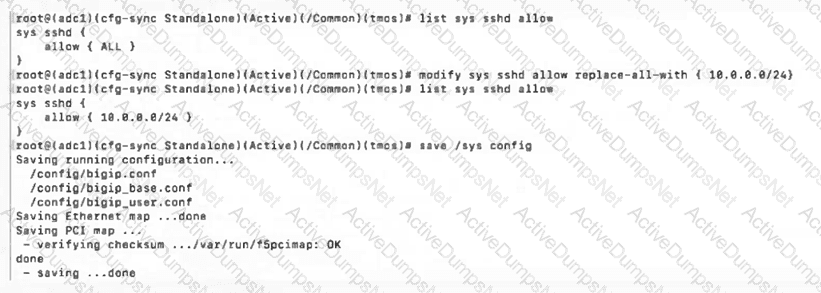
In order to configure allowed IP addresses for SSH access to a BIG-IP device, the BIG-IP Administrator has issued the commands shown in the exhibit.
Question # 3

Which IP addresses will have SSH access after issuing the shown commands?

(Choose two.)

Options:

A.

10.0.0.100

B.

10.0.0.254

C.

10.0.0.256

D.

100.0.1.10

E.

100.0.0.10

Question 4

The monitoring team reports that the SNMP server is unable to poll data from a BIG-IP device.

What information will help the BIG-IP Administrator determine whether the issue originates from the BIG-IP system?

Options:

A.

The “Port Lockdown” setting is preventing the SNMP server from polling data from the BIG-IP.

B.

The “Traffic Group” setting must use a floating Traffic Group.

C.

The “VLAN / Tunnel” setting must allow All Vlans.

D.

The configuration on the exhibit is correct and other options should be explored.

Question 5

The BIG-IP Administrator needs to update access to the Configuration Utility to include the 172.28.31.0/24 and 172.28.65.0/24 networks.

From the TMOS Shell (tmsh), which command should the BIG-IP Administrator use to complete this task?

Options:

A.

modify /sys httpd allow add { 172.28.31.0/255.255.255.0 172.28.65.0/255.255.255.0 }

B.

modify /sys httpd allow add { 172.28.31.0 172.28.65.0 }

C.

modify /sys httpd permit add { 172.28.31.0/255.255.255.0 172.28.65.0/255.255.255.0 }

Question 6

The BIG-IP Administrator uses Secure Copy Protocol (SCP) to upload a TMOS image to the /shared/images/ directory in preparation for an upgrade.

After the upload is complete, what will the system do before the image appears in the GUI under:

System » Software Management » Image List ?

Options:

A.

The system performs a reboot into the new partition

B.

The system verifies the internal checksum

C.

The system copies the image to /var/local/images/

Question 7

A new logging solution is being implemented on the network. Policy requires keeping management traffic sent from the BIG-IP out of the management interface . After configuring the BIG-IP to forward messages to the new Syslog server, the BIG-IP Administrator notices that packets are being sent from a numbered data-plane Self IP .

What should the BIG-IP Administrator change to send the traffic out of the correct interface ?

Options:

A.

Set the Management IP as the source address when configuring a Remote Syslog destination.

B.

Create a Management Route for the specific address/subnet of the syslog service via TMSH.

C.

Create a new Self IP in the same subnet as the management IP address using a route domain.

D.

Modify the port lockdown settings on the Self IP address to allow UDP port 514 traffic.

Question 8

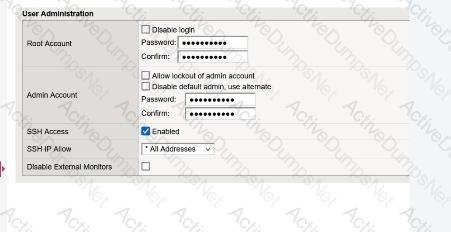
For security reasons, a BIG-IP Administrator needs to specify allowable IP ranges for access to the Configuration Utility (WebUI).

The exhibit shows the User Administration section of the Configuration Utility.
Question # 8

The administrator could not find any setting that explicitly restricts access to the Configuration Utility.

Which one of the following is a reason for that?

Options:

A.

Restricting access to the Configuration Utility can only be done from the Command Line Interface

B.

The administrator must restrict access by IP address for SSH, which will implicitly restrict access to the Configuration Utility

C.

To avoid locking out the administrator, recent versions of BIG-IP no longer allow restricting administrator access to the Configuration Utility by source IP address

D.

The administrator needs to switch to the “Advanced” view mode in order to display the relevant setting

Question 9

The BIG-IP Administrator received a ticket that an authorized user is attempting to connect to the Configuration Utility from a jump host and is being denied.

The HTTPD allow list is configured as:

sys httpd {

allow { 172.28.31.0/255.255.255.0 172.28.65.0/255.255.255.0 }

}

The jump host IP is 172.28.32.22 .

What command should the BIG-IP Administrator use to allow HTTPD access for this jump host?

Options:

A.

modify /sys httpd allow replace-all-with { 172.28.32.22 }

B.

modify /sys httpd allow delete { 172.28.31.0/255.255.255.0 172.28.65.0/255.255.255.0 }

C.

modify /sys httpd allow add { 172.28.32.22 }

Question 10

What are the two options for securing a BIG-IP’s management interface?

(Choose two.)

Options:

A.

Limiting network access through the management interface to a trusted/secured network VLAN.

B.

Block all management-interface administrative HTTPS and SSH service ports to prevent access.

C.

Use the BIG-IP’s Self-IP addresses for administrative access rather than the management interface.

D.

Restrict administrative HTTPS and SSH access to specific IP addresses or IP ranges.

Question 11

An F5 BIG-IP Administrator is asked to report which modules are provisioned on the BIG-IP.

In which two ways can this be done?

(Choose two.)

Options:

A.

Via the GUI at System → Resource Provisioning → Module Allocation

B.

Via TMSH with show /sys provision

C.

Via the GUI at Statistics → Module Statistics → System

D.

Via TMSH with list /sys provision

Question 12

A BIG-IP Administrator needs to verify the state of equipment in the data center.

A BIG-IP appliance has a solid yellow indicator on the status LED.

How should the administrator interpret this LED indicator?

Options:

A.

Appliance is halted or in End-User Diagnostic (EUD) mode

B.

Appliance is a standby member in a device group

C.

A warning-level alarm condition is present

D.

A power supply is NOT operating properly

Question 13

An F5 VE has been deployed into a VMware environment via an OVF file.

An administrator wants to configure the management IP address so the VE can be accessed for further setup.

Which two are valid methods for configuring the management-ip address? (Choose two.)

Options:

A.

Log into the remote console and configure the management IP by running the config executable.

B.

Log into the remote console and configure the management IP through TMSH using:

create sys management-ip < ip address > / < mask >

C.

Log into the remote console and configure the management IP through TMSH using:

create ltm management-ip < ip address > / < mask >

D.

Log into the remote console and configure the management IP by running the setup command.

Page: 1 / 5
Total 49 questions