Spring Sale Limited Time Flat 70% Discount offer - Ends in 0d 00h 00m 00s - Coupon code: 70spcl

CyberArk CPC-CDE-RECERT CyberArk CDE-CPC Recertification Exam Practice Test

CyberArk CDE-CPC Recertification Questions and Answers

Question 1

What is the purpose of the PSM Health Check hardening?

Options:

A.

Remove IIS settings which can be considered security vulnerabilities.

B.

Validate that the PSM is ready to be placed behind a load balancer.

C.

Confirm that the Windows Services for PSM are running on the server.

D.

Ensure that the AppLocker script does not have any syntax errors.

Question 2

On the CPM, you want to verify if DEP is disabled for the required executables According to best practices, which executables should be listed? (Choose 2.)

Options:

A.

Telnet.exe

B.

Plink.exe

C.

putty.exe

D.

mstsc.exe

Question 3

What is the correct CyberArk user to use when installing the Privilege Cloud Connector software?

Options:

A.

installeruser@

B.

Administrator

C.

_admin

D.

Installer

Question 4

Arrange the steps to complete CPM Hardening for out-of-Domain deployment in the correct sequence.
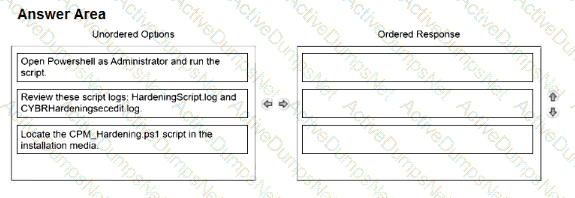
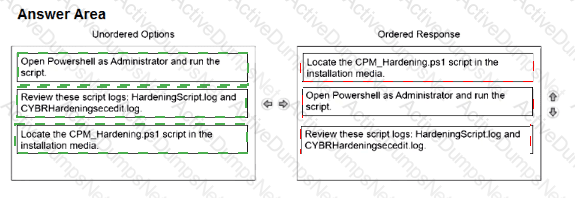
Question # 4

Options:

Question 5

What must be done before configuring directory mappings in the CyberArk Privilege Cloud Standard Portal for LDAP integration?

Options:

A.

Retrieve the LDAPS certificate and deliver it to CyberArk.

B.

Create a new domain in the Privilege Cloud Portal.

C.

Make sure HTTPS (443/tcp) is reachable over the Secure Tunnel.

D.

Ensure the user connecting to the domain has administrative privileges.

Question 6

What creating a new safe, what is the default number of password versions stored if using 'Save latest account versions' within version management settings?

Options:

A.

5

B.

10

C.

30

D.

90

Question 7

What must be specified when authenticating to Privilege Cloud during the Secure Tunnel install?

Options:

A.

Vault IP Address

B.

Subdomain or Customer ID

C.

Privilege Cloud URL

D.

CaseID

Question 8

Which option correctly describes the authentication differences between CyberArk Privilege Cloud and CyberArk PAM Self-Hosted?

Options:

A.

CyberArk Privilege Cloud only provides a username and password authentication without third-party IdP integration; CyberArk PAM Self-Hosted uses traditional on-premises methods such as Windows and LDAP. but lacks modern protocols such as SAML or OIDC.

B.

CyberArk Privilege Cloud uses cloud-based methods, integrating with CyberArk Identity for MFA. and supports SAML and OIDC; CyberArk PAM Self-Hosted depends on on-premises methods such as RADIUS and LDAP, but can adopt SAML or OIDC with additional setups.

C.

CyberArk Privilege Cloud requires on-premises components for all authentication and does not support other cloud-based authentication protocols; CyberArk PAM Self-Hosted offers a wide array of methods, including support for SAML. OIDC. and other modern protocols, without needing on-premises components.

D.

Both use the same authentication methods.

Question 9

What is recommended when applying GPO (Group Policy Object) hardening for in-domain PSM servers?

Options:

A.

Apply the GPO provided by CyberArk onto the servers after other GPOs.

B.

Apply the GPO hardening to all hosts that end-users will connect to through the PSM.

C.

After installation, remove the PSM servers from the domain to maximize security.

D.

Place the servers which have PSM installed into a dedicated organizational unit (OU).

Question 10

Which actions must be performed when manually hardening a SUSE server with PSM for SSH? (Choose two.)

Options:

A.

Update settings in the sshd_config file on the server.

B.

Add the PSM for SSH gateway user to the passwd file.

C.

Validate that the psmpgwuser.cred file has correct permissions.

D.

Remove all users and groups from the passwd file.

E.

Add the PSM gateway user to the wheel group.

Question 11

What are dependencies to update or change the CPM credential? (Choose 2.)

Options:

A.

APIKeyManager.exe

B.

CreateCredFile.exe

C.

CPM/nDomain_Hardening.ps1

D.

CyberArk.TPC.exe

E.

Data Execution Prevention

Question 12

Which external-facing IP addresses need to be provided to CyberArk when configuring Privilege Cloud so that they can be allowlisted?

Options:

A.

Cloud Connectors and Secrets Manager (if installed)

B.

All users that will be accessing Privilege Cloud

C.

On-premises backup servers

D.

All users who are Administrators in Privilege Cloud

Question 13

Which deployment criteria influences the CyberArk-provided hardening methods that need to be applied to CPM and PSM components?

Options:

A.

“In Domain” and “Out of Domain”

B.

“On Premises” and “On Cloud”

C.

“Windows” and “Linux”

D.

“Primary Privilege Cloud Connector” and “additional Privilege Cloud Connector”

Question 14

According to best practice, when considering the location of PSM Connector servers in Privilege Cloud environments, where should the PSM be placed?

Options:

A.

near the CPM servers

B.

near the target devices

C.

near the Vault (closer to the external internet connection)

D.

near the Users

Question 15

A CyberArk Privileged Cloud Shared Services customer asks you how to find recent failed login events for all users. Where can you do this without generating reports?

Options:

A.

Privileged Cloud Portal

B.

Identity Administration Portal

C both Identity Administration and Identity User Portals

C.

Identity User Portal

Question 16

In addition to CyberArk, which additional licensing implication does the PSM have?

Options:

A.

RDS CALs

B.

Microsoft Office

C.

GCP

D.

AWS

Question 17

Arrange the steps to install passive CPM using Connector Management in the correct sequence
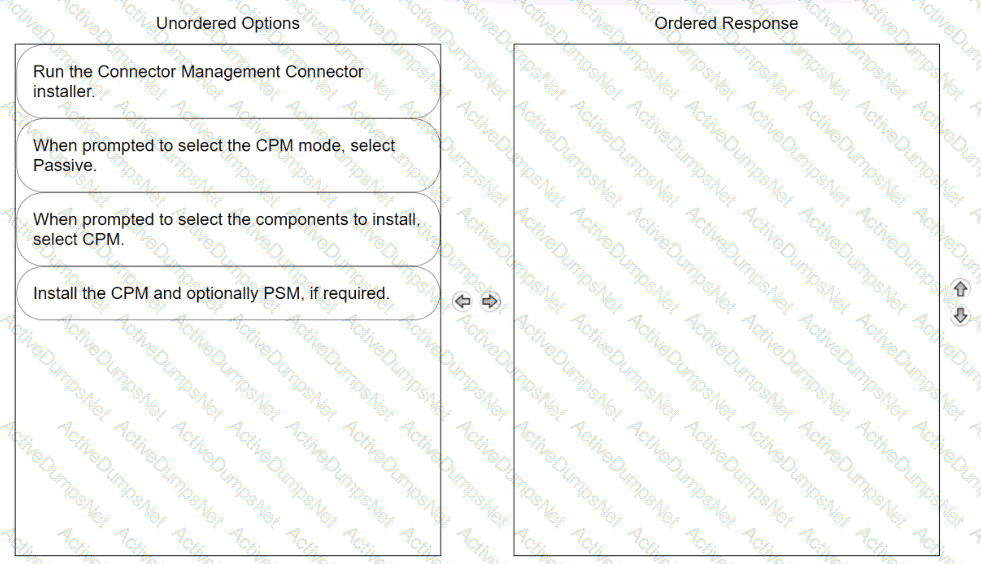
Question # 17

Options:

Question 18

The System Health page shows the status of all components related to Privilege Cloud. Which components can administrators monitor on this page? (Choose two.)

Options:

A.

Vault

B.

PTA

C.

PVWA

D.

CPM

E.

PSM

Question 19

Which file must you edit to ensure the PSM for SSH server is not hardened automatically after installation?

Options:

A.

vault.ini

B.

user.cred

C.

psmpparms

D.

psmgw.config

Question 20

Which prerequisites are required for installing PSM for SSH (Unix Connector)? (Choose two.)

Options:

A.

Create the PSM for SSH parameters file on the Unix server with InstallCyberArkSSHD = Integrated.

B.

Configure the root user to not authenticate to the Unix server remotely through SSH using a password.

C.

Verify that outbound traffic from the Unix server is always routed through the same public-facing IP.

D.

Create an administrative user on the Unix server for future maintenance tasks.

E.

Reset the default root account password before installing the PSM for SSH.

Question 21

Arrange the steps to install a passive CPM using the Privilege Cloud installer in the correct sequence.
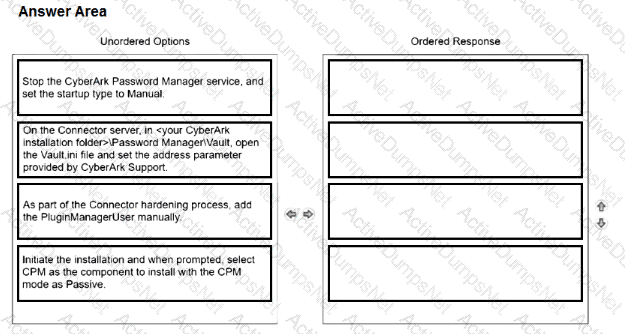
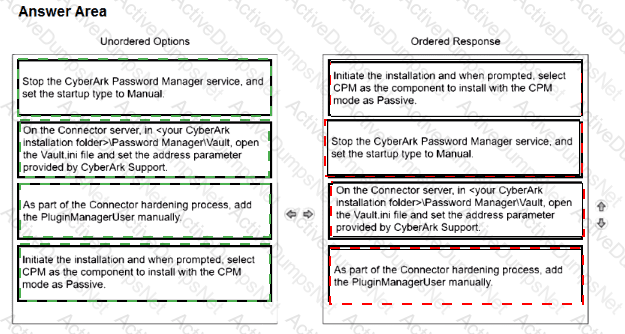
Question # 21

Options:

Question 22

You want to improve performance on the CPM by restricting accounts for the CYBRWINDAD platform to only the WINDEMEA and WINDEMEA_ADMIN Safes. How do you set this in CyberArk?

Options:

A.

In the CYBRWINDAD platform, under Automatic Password Management > General, configure AllowedSafes and set it to (WINDEMEA)|(WINDEMEA_ADMIN).

B.

In the settings for Configuration/CPM assigned to the WINDEMEA and WINDEMEAADMIN Safes, configure AllowedSafes and set it to (WINDEMEA)|(WINDEMEAADMIN).

C.

In the CYBRWINDAD platform, under UI & Workflows > Properties > Optional, configure AllowedSafes and set it to (WINDEMEA)|(WINDEMEA_ADMIN).

D.

Modify cpm.ini on the relevant CPM(s) and add AllowedSafesCYBRWINDAD and set it to (WINDEMEA)|(WINDEMEAADMIN).

Question 23

To use SAML authentication in Privilege Cloud Standard Services, users must first be defined in Privilege Cloud. What are correct methods for defining users? (Choose two.)

Options:

A.

Integrate Privilege Cloud with your LDAP server.

B.

Integrate Privilege Cloud with SIEM.

C.

Integrate Privilege Cloud with Email System.

D.

Create users in Privilege Cloud with details identical to those who access Privilege Cloud through SAML authentication.

E.

Create users in the CyberArk Privilege Cloud database using the CAVaultManager createuser command.

Question 24

Which statements are correct regarding enabling end users from multiple domains in the same forest to authenticate to CyberArk Privilege Cloud? (Choose two.)

Options:

A.

CyberArk does not permit end users from multiple domains to authenticate to CyberArk Privilege Cloud; it only allows users from multiple directory services, such as AD, Azure AD, CyberArk Cloud Directory, etc.

B.

This can be accomplished when the users' Active Directory accounts are in domains with domain controllers that have a two-way, transitive trust relationship with the domain controller to which the connector is connected.

C.

Configuring authentication for users in multiple domains in the same forest is not recommended due to potential performance issues.

D.

To enable authentication for users in multiple domains in the same forest, you should install separate CyberArk Identity Connectors for each independent domain.

E.

CyberArk recommends consolidating users from multiple domains in the same forest into the CyberArk Cloud Directory for this specific use case.

Question 25

Which group has only View Audit and View Safe permissions?

Options:

A.

Operators

B.

Auditors

C.

Privileged Cloud Admins

D.

Backup Users

Question 26

In which platform configuration section under Automatic Password Management is the AllowedSafes platform parameter found?

Options:

A.

Privileged Account Management

B.

Additional Policy Settings

C.

General

D.

CPM plugin

Question 27

When performing “In Domain” hardening of a PSM server, which steps are recommended? (Choose two.)

Options:

A.

Import CyberArk policy settings from the provided file into a new GPO.

B.

Apply advanced audit on the PSM server.

C.

Apply GPO to the CyberArk PSM servers.

D.

Import an INF file to the local machine.

E.

Configure AppLocker rules to block running unknown executables.

Question 28

You plan to install the Privilege Cloud Connector on Windows Server 2019 and must leverage your existing RDS Per-user licenses for PSM connections. What must you do?

Options:

A.

Add the UseRDSPerUser=Yes line to the basic_psm.ini parameters file.

B.

Install the RDS License Server Service on Windows 2016.

C.

Migrate the local PSMConnect users to Domain users.

D.

Modify the UseRDSPerUser parameter to Yes on every Windows-related platform.

Question 29

Which component supports the required communication to send audit logs from Privilege Cloud through the Syslog protocol to a SIEM application?

Options:

A.

CyberArk Syslog Writer

B.

Secure Tunnel

C.

Privilege Cloud Connector

D.

CyberArk Identity Connector