
- Home
- Adobe
- Adobe Workfront
- AD0-E902
- AD0-E902 - Adobe Workfront Fusion Professional
Adobe AD0-E902 Adobe Workfront Fusion Professional Exam Practice Test
Adobe Workfront Fusion Professional Questions and Answers
A Fusion scenario updates project conditions each night, and should set the project condition to At Risk if there are any high priority open issues on the project. The scenario retrieves all open projects and cycles through the projects. For each project with issues, it retrieves all associated open issues, iterates through them and sets the project condition to At Risk if the issue is high priority or On Target if it is not.
A user notices that Fusion is updating the progress condition multiple times, once for each issue in the project.
How can the developer ensure the project is updated only once?
Options:
Change the issue search module to result set of First Matching
Record Add an Ignore error directive as an error handler route for the update module
Create a separate scenario to update the overall project condition
Apply the Run Once flow control function
Answer:
CExplanation:
Step by Step Comprehensive Detailed Explanation:
Problem Summary:
The Fusion scenario updates the project condition multiple times, once for each high-priority issue.
The desired behavior is to update the project condition only once, based on the overall condition of all associated issues.
Option Analysis:
A. Change the issue search module to result set of First Matching:
This would limit the search to only the first issue. However, this does not account for all issues on the project, leading to incomplete logic for setting the project condition.
B. Add an Ignore error directive as an error handler route for the update module:
Ignoring errors does not prevent multiple updates; it only suppresses errors in the workflow.
C. Create a separate scenario to update the overall project condition:
Correct. By separating the project update logic into a different scenario, the developer can ensure the condition is updated only once after analyzing all issues. The project condition is calculated holistically, based on the state of all high-priority issues.
D. Apply the Run Once flow control function:
"Run Once" controls execution at the scenario level, not within a module's iteration. It cannot prevent multiple updates in this context.
Why Separate Scenario is Best:
Simplifies Logic: A separate scenario can be designed to run after all issues have been checked, ensuring only one update per project.
Avoids Redundancy: Prevents unnecessary API calls to update the same project multiple times.
Improves Performance: Reduces the number of operations and bundles processed in the main scenario.
Implementation:
Create a separate scenario triggered after the issue-checking scenario completes.
Use aggregate data (e.g., a data store or intermediate processing) to evaluate the overall project condition before performing a single update.
A Fusion scenario is making too many requests to a third-party API, which returns a 429 "Too Many Requests" error Which technique reduces the number of API requests?
Options:
Using a Search module to get record IDs and then read those IDs with a Read Record module to pull other data
Moving Search and GET modules earlier in the scenario instead of pulling more data about the same record multiple times
Adding a Retry error handling directive to the Fusion scenario
Answer:
BExplanation:
Understanding the Issue:
The scenario is making too many API requests, causing the third-party API to return a429 "Too Many Requests"error, which indicates that the rate limit has been exceeded.
The solution needs to reduce unnecessary or redundant API requests to prevent hitting the API limits.
Why Option B is Correct:
Avoid Redundant Requests:
PlacingSearchandGETmodules earlier in the scenario ensures that all required data is retrieved in one batch or in fewer requests, rather than repeatedly querying the same record later in the scenario.
This technique reduces the overall number of API requests sent to the third-party system.
Efficient Data Flow:
By structuring the scenario to retrieve all necessary data at the beginning, subsequent modules can reuse the retrieved data instead of making additional API calls.
Why the Other Options are Incorrect:
Option A ("Using a Search module and then a Read Record module"):
This approach can increase API requests, as theSearch moduleretrieves record IDs, and theRead Record modulemakes separate API requests for each record. This often results in more requests than necessary.
Option C ("Adding a Retry error handling directive"):
Adding aRetry directivedoes not reduce the number of requests. Instead, it retries failed requests, which could worsen the problem by increasing API traffic.
Best Practices to Reduce API Requests:
Consolidate data retrieval into a single module or a smaller number of requests.
Use caching or intermediate storage (like Fusion Data Stores) to avoid re-fetching the same data.
Limit the scope of Search modules by using filters or pagination to process smaller, relevant data sets.
References and Supporting Documentation:
Adobe Workfront Fusion Best Practices: Managing API Rate Limits
Workfront Community: Error 429 Solutions
What two module outputs does a user receive from this expression? (Choose two.)

Options:
Non-empty array
An empty field
Text value'No Type"
Collections comma separated
Answer:
A, CExplanation:
Understanding the Expression:
The provided expression uses the ifempty function:
ifempty(2.data:types[]; "No Type")
Structure of the Expression:
The first parameter, 2.data:types[], is an array being checked for content.
The second parameter, "No Type", is the fallback value returned if the array is empty or undefined.
Purpose of ifempty: This function checks if the given value is empty or undefined. If the value is not empty, it returns the value. If the value is empty, it returns the fallback text ("No Type").
Expected Module Outputs:
A. Non-empty array:
If 2.data:types[] is a non-empty array, the function returns the array as-is.
C. Text value 'No Type':
If 2.data:types[] is empty or undefined, the function returns the fallback text value "No Type".
Why the Other Options are Incorrect:
Option B ("An empty field"):
The ifempty function does not return an empty field. If the value is empty, it substitutes it with the fallback text ("No Type").
Option D ("Collections comma separated"):
The function operates on arrays, but it does not format the output as comma-separated collections. The raw array is returned if non-empty.
Key Use Cases:
This type of function is frequently used in Workfront Fusion to handle situations where data might be missing or incomplete, ensuring scenarios continue to run smoothly without errors caused by undefined or empty fields.
Example Outputs:
If 2.data:types[] = ["Type1", "Type2"]: The function returns ["Type1", "Type2"].
If 2.data:types[] = [] or undefined: The function returns "No Type".
References and Supporting Documentation:
Adobe Workfront Fusion Functions Reference
Workfront Community: Handling Empty Fields with ifempty
A Fusion scenario uses an HTTP module to create a new record.
Which response code indicates that the connection was successful?
Options:
GREEN
200
402
500
Answer:
BExplanation:
Understanding HTTP Response Codes:HTTP response codes are standardized codes that indicate the result of a request made to a server:
2xx (Success): Indicates that the request was successfully received, understood, and processed by the server.
200 OK: Specifically means that the request was successful, and the response contains the requested data or confirms the operation's success.
Response Code for Creating a Record:
When using an HTTP module in Fusion to create a new record, a response code of200confirms that the request to the server was successfully processed and the record creation was successful.
Why Not Other Options?
A. GREEN: This is not a valid HTTP response code. It might represent a status in some systems but is unrelated to HTTP standards.
C. 402: This code indicates a payment required error, meaning the request cannot be fulfilled until payment is made.
D. 500: This is a server-side error, indicating that something went wrong on the server during processing.
References:
HTTP Status Code Documentation: 200 Success Response
Adobe Workfront Fusion Documentation: HTTP Module and Response Codes
A Fusion designer discovers that an iteration is processing thousands of bundles, though it should not need to.
What should the designer do to reduce the number of bundles?
Options:
Configure the trigger module to reduce the maximum number of results that Fusion will process during one execution cycle
Configure the trigger module to filter out unnecessary records
Configure the scenario settings to reduce the number of cycles per execution
Answer:
BExplanation:
Step by Step Comprehensive Detailed Explanation:
Problem Summary:
A trigger module is causing excessive iteration processing thousands of bundles unnecessarily.
The goal is to optimize the scenario by reducing the number of processed bundles.
Option Analysis:
A. Configure the trigger module to reduce the maximum number of results:
Reducing the maximum number of results processed per cycle limits the number of bundles processed at a time, but it does not solve the root issue of processing unnecessary records.
B. Configure the trigger module to filter out unnecessary records:
Filtering at the trigger level ensures that only the required records are fetched for processing, addressing the root cause of excessive bundle processing. This is the correct answer.
C. Configure scenario settings to reduce cycles per execution:
Limiting execution cycles reduces the overall runtime but does not directly address the number of bundles being processed unnecessarily.
Why Filtering at the Trigger is Best:
Efficiency: By setting up filters directly in the trigger, you ensure that only relevant data is retrieved.
Performance: Reducing the number of unnecessary bundles improves processing speed and reduces resource usage.
Accuracy: Filtering ensures only actionable data enters the workflow, maintaining scenario integrity.
How to Implement:
Open the trigger module settings.
Add appropriate filters to exclude unnecessary records. For example:
Add conditions to filter out old data or irrelevant statuses.
Use fields like updatedDate, status, or any other criteria relevant to the workflow.
Test the trigger module to verify that only relevant bundles are retrieved.
References:These answers are based on Workfront Fusion best practices for optimizing scenarios, as outlined in the Fusion documentation. Proper use of mapping panel functions and trigger filters ensures scenarios are efficient and scalable.
To meet compliance standards, a user must include a process that tracks every Workfront project update created by Fusion.
What can they do to address this business requirement?
Options:
Use reporting on the Last Updated by ID and Last Update Date
Update the External Reference ID with User ID and Timestamp
Create a Note record related to the record updated
Answer:
CExplanation:
Step by Step Comprehensive Detailed Explanation:
Problem Summary:
The organization requires a process to track every project update made by Fusion to meet compliance standards.
This process must provide a clear audit trail of updates, including details like user and timestamp.
Option Analysis:
A. Use reporting on the Last Updated by ID and Last Update Date:
While this provides basic reporting, it only reflects the most recent update and does not maintain a comprehensive history of changes over time.
B. Update the External Reference ID with User ID and Timestamp:
Updating the External Reference ID could cause issues if this field is used for other purposes. It is not designed for logging multiple updates.
C. Create a Note record related to the record updated:
Correct. Creating a Note record for each update ensures that every change is logged with relevant details (e.g., user, timestamp, update reason). This approach creates a full audit trail that is easily accessible and reportable.
Why Note Records are Best:
Audit Trail: Notes provide a clear and searchable history of updates for each project.
Compliance: Ensures compliance by documenting who made what changes and when.
Flexibility: Notes can include custom details such as update reasons or additional context, making them more robust than standard fields.
Implementation:
In the Fusion scenario, add a module to create a Note record after each update.
Populate the Note with relevant details, such as:
User ID ({lastUpdatedBy})
Timestamp ({lastUpdateDate})
Description of the change.
A solution requested for a use case requires that the scenario is initiated with project updates.
Which Workfront app module will start the scenario immediately?
Options:
Watch Events
Watch Record
Watch Field
Search
Answer:
AExplanation:
Understanding the Question:
The scenario must begin as soon as a project update occurs in Adobe Workfront.
The correct Workfront module should continuously monitor for specific changes (in this case, project updates) and trigger the scenario immediately.
Why Option A ("Watch Events") is Correct:
Watch Events Module: This module in Adobe Workfront Fusion is specifically designed to monitor events, such as updates to projects, tasks, or issues, and trigger scenarios as soon as those events occur.
Real-Time Triggering: The "Watch Events" module listens to the Workfront event stream and ensures the scenario starts immediately upon detecting relevant updates.
Example Use Case: Monitoring updates to a project’s status, such as changes in "Completion" or "Progress," to trigger notifications or integrations with other systems.
Why the Other Options are Incorrect:
Option B ("Watch Record"): This module monitors specific Workfront records (e.g., projects, tasks, issues) for new additions or modifications, but it does not initiate scenarios immediately when updates occur. It works better for periodic checks rather than real-time events.
Option C ("Watch Field"): This module monitors changes to specific fields within a Workfront object, but it is not designed for broader event monitoring like project updates. It is more suited for field-specific tracking.
Option D ("Search"): This module performs queries to find specific data in Workfront (e.g., searching for projects based on criteria), but it is not an event-driven module and does not automatically trigger scenarios.
Steps to Configure the Watch Events Module in Workfront Fusion:
In the Fusion scenario editor, add theWatch Eventsmodule as the first step in your scenario.
Configure the module:
Select Workfront Connection: Choose the authorized Workfront account.
Event Object: Specify the object type (e.g., Project, Task, Issue) to monitor.
Event Type: Select the type of event to watch, such as "Update" or "Change."
Save and activate the scenario.
How This Solves the Problem:
Using the Watch Events module ensures the scenario is event-driven and starts automatically when the desired project update occurs. This approach is both efficient and timely, meeting the requirement for immediate initiation.
References and Supporting Documentation:
Adobe Workfront Fusion Official Documentation: Watch Events Module
Workfront Community Forum: Use Cases for Watch Events
A Fusion user notices that a third-party web service is sometimes returning a connection error -"
"service is not reachable". However, the module executes successfully a few minutes later in a new execution.
Which action increases the success rate of the executions?
Options:
Adding an error handler that will notify the system owner
Making use of the default error handling
Adding a Break directive to the module
Answer:
BExplanation:
When dealing with intermittent errors, such as "service is not reachable," the default error handling in Adobe Workfront Fusion is often sufficient to improve execution success rates.
Default Error Handling:
Fusion automatically retries operations when transient errors, such as network or connection issues, occur.
By leveraging this built-in functionality, the system will attempt to re-execute the failing module after a brief delay, which is often enough for the external service to become reachable again.
Why Not Other Options?
A. Adding an error handler that will notify the system owner: While notifying the owner can be useful for monitoring purposes, it does not directly address improving the success rate of executions.
C. Adding a Break directive to the module: Adding a Break directive will stop the execution entirely, which is counterproductive in this case, as the service typically becomes reachable again after a short time.
References:
Adobe Workfront Fusion Documentation: Default Error Handling Mechanisms
Experience League Community: Managing Intermittent API Errors in Fusion
A Fusion designer is unhappy with the high number of bundles passing through an instant Watch Events module that monitors Workfront project updates.
Which action reduces the number of bundles passing through the module?
Options:
Reducing the maximum number of returned events on the trigger
Reducing the maximum number of cycles in scenario setting
Changing the module type to Watch Record and applying criteria in the optional filter box
Answer:
CExplanation:
Understanding the Issue:
TheWatch Eventsmodule is generating a high number of bundles because it monitors a broad range of project updates in Workfront, resulting in an overwhelming amount of data passing through the scenario.
The goal is to reduce the number of bundles by narrowing the scope of monitored events.
Why Option C is Correct:
Switching to Watch Record:
TheWatch Recordmodule allows users to monitor specific records (e.g., projects, tasks) with additional filtering options in thecriteriaorfilter box.
By applying filters, the module can focus only on relevant updates, significantly reducing the number of bundles being processed.
Example: Filtering for specific project statuses, update types, or assigned users ensures that only relevant changes are captured.
Why the Other Options are Incorrect:
Option A ("Reducing the maximum number of returned events on the trigger"):
This limits the number of bundles processed per cycle but does not address the root cause, which is the broad monitoring scope of theWatch Eventsmodule.
Option B ("Reducing the maximum number of cycles in scenario settings"):
The number of cycles determines how many iterations the scenario performs in one run but does not reduce the number of bundles entering the scenario.
Steps to Use the Watch Record Module:
Replace theWatch Eventsmodule withWatch Record.
Specify the record type to monitor (e.g., Project).
Use the optional filter box to apply criteria, such as specific project fields, statuses, or other conditions.
Activate the scenario to test the refined data flow.
References and Supporting Documentation:
Adobe Workfront Fusion: Watch Record Module
Workfront Community: Managing High Bundle Volumes in Fusion
Which two features or modules can be used to create conditional or nested error handling when using Error Handling Directives? (Choose two.)
Options:
Text Parser
Filters
Workfront app
Routers
Answer:
B, DExplanation:
In Adobe Workfront Fusion, error handling directives are used to manage and respond to errors during scenario execution. These directives allow the implementation of conditional or nested error handling mechanisms, ensuring workflows can adapt and recover from unexpected issues efficiently. Among the features and modules provided by Fusion:
Filters:
Filters are essential components in Workfront Fusion. They allow you to define specific conditions to control the flow of data between modules.
They enable conditional processing by allowing or restricting the passage of data based on defined criteria, which is fundamental for creating dynamic and conditional workflows.
When used with error handling, filters can evaluate whether certain data meets criteria to determine alternative pathways, thus enabling conditional error handling.
Routers:
Routers split the execution of a scenario into multiple branches based on specific conditions.
Each branch can be configured to handle different error types or conditions, allowing nested error handling and custom error recovery paths.
They are particularly useful when you need to define distinct responses for various error cases within a single scenario.
Eliminated Options:
A. Text Parser: While text parsers process and extract data from strings, they are not directly involved in error handling within scenarios.
C. Workfront App: The Workfront app is primarily for interacting with Workfront features and functionalities, not directly related to error handling within Fusion scenarios.
References:
Adobe Workfront Fusion Documentation: Error Handling Directives Overview
Adobe Workfront Community: Filters and Routers in Conditional Logic Workflows
Experience League Documentation:https://experienceleague.adobe.com
Which module must a user select to upload a document into Workfront and attach it to a task?
Options:
Create Record for Document Version after Create Record for the document on the task
Upload Document while setting the related record
Create Record of Document type while setting the related record
Miscellaneous Action to attach document to a task
Answer:
BExplanation:
Understanding the Requirement:
The user wants to upload a document into Workfront and attach it to a specific task.
This action involves creating a document in Workfront and associating it with a task as a related record.
Why Option B is Correct:
TheUpload Documentmodule is specifically designed for uploading files into Workfront.
It includes the ability to set arelated record(e.g., a task, project, or issue) to which the document will be attached.
This ensures the document is uploaded and correctly linked to the task in a single operation.
Why the Other Options are Incorrect:
Option A ("Create Record for Document Version after Create Record for the document on the task"):
This involves multiple steps, which are unnecessary. TheUpload Documentmodule already handles both the upload and the attachment in one action.
Option C ("Create Record of Document type while setting the related record"):
TheCreate Recordmodule is not designed for file uploads. It only creates metadata records, not the actual document.
Option D ("Miscellaneous Action to attach document to a task"):
There is noMiscellaneous Actionspecifically for attaching a document to a task. TheUpload Documentmodule is the appropriate choice.
Steps to Upload a Document in Workfront Fusion:
Add theUpload Documentmodule to the scenario.
Specify the file to upload (e.g., from a previous module like Google Drive or an HTTP request).
Set therelated recordto the target task by providing its ID.
Run the scenario to upload and attach the document to the task.
References and Supporting Documentation:
Adobe Workfront Fusion: Upload Document Module
Workfront Community: Best Practices for Document Management in Fusion
The Upload Document module is the most efficient and accurate method for uploading and attaching a document to a task in Workfront.
A web service provides the following array named "Colors":
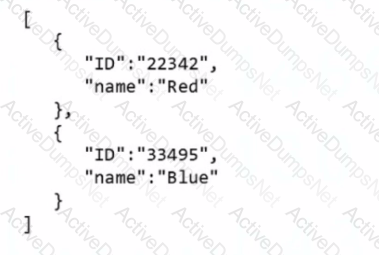
Which expression returns the first ID in the array?
Options:



Answer:
BExplanation:
Understanding the Array and the Task:
Input Array (Colors):
[
{ "ID": "22342", "name": "Red" },
{ "ID": "33495", "name": "Blue" }
]
Goal: Extract the first ID from the array, which is "22342".
Why Option B is Correct:
The expressionget(map(2.Colors; ID); 1):
map(2.Colors; ID): Iterates over the array 2.Colors and extracts the ID field from each object. This creates a new array containing just the IDs:["22342", "33495"].
get(...; 1): Retrieves the first element of the newly created array, which is "22342".
Why the Other Options are Incorrect:
Option A (map(2.Colors; ID; ID; 1)):
This syntax is invalid because the additional ID and 1 parameters are misplaced. The map function requires only two arguments: the array and the field to map.
Option C (map(get(2.Colors; ID); 1)):
This incorrectly attempts to use get inside map. The get function does not return a field for mapping, so the syntax is invalid.
How the Expression Works:
Step 1: map(2.Colors; ID)
Extracts the ID field from each object in the Colors array.
Output: ["22342", "33495"].
Step 2: get(...; 1)
Retrieves the first element of the mapped array.
Output: "22342".
Use Case in Workfront Fusion:
This approach is commonly used when processing arrays in Fusion scenarios, ensuring specific elements are accessed without additional looping or complex logic.
References and Supporting Documentation:
Adobe Workfront Fusion Functions Documentation
Workfront Community: Using Map and Get Functions
By combining map and get, this expression efficiently extracts the first ID from the array, ensuring correct and reliable results.
A query returns a partial list of possible values.
Which flow control module should be used to ensure all the possible results are queried?
Options:
Aggregator
Repeater
Iterator
Router
Answer:
BExplanation:
Understanding the Requirement:
The query returns only a partial list of possible values.
The task is to ensure that all results are processed by iterating through multiple queries or pages of data.
Why Option B ("Repeater") is Correct:
TheRepeatermodule is designed to repeat an operation a specified number of times or until a condition is met.
It is commonly used for querying paginated data or when a system limits the number of records returned in a single request.
In this case, the Repeater ensures all possible values are queried by making additional requests to retrieve subsequent pages or results.
Why the Other Options are Incorrect:
Option A ("Aggregator"):
The Aggregator combines multiple data bundles into a single output. It does not handle iterative queries or pagination.
Option C ("Iterator"):
The Iterator splits an array into individual items for processing. It does not handle querying for additional data or looping through requests.
Option D ("Router"):
The Router splits the flow of a scenario into multiple paths based on conditions. It is unrelated to iterative querying.
Steps to Configure the Repeater:
Add theRepeatermodule to your scenario.
Configure the number of repetitions or the condition to continue querying (e.g., based on the presence of additional data).
Link the Repeater to the module responsible for retrieving the data, ensuring it processes all available results.
How This Solves the Problem:
The Repeater module ensures that all possible results are queried by iteratively sending requests until no more data is available.
References and Supporting Documentation:
Adobe Workfront Fusion: Repeater Module Documentation
Workfront Community: Using Flow Control Modules
Which action makes it possible to see the exact API request and the response a module executes?
Options:
Using the Bundle Inspector
Using the execution history
Using the Fusion DevTool scenario debugger
Using the Fusion DevTool error evaluator
Answer:
BExplanation:
Understanding the Requirement:
The user needs to view the exactAPI requestand the correspondingresponsea module executes in Adobe Workfront Fusion.
This is critical for debugging, troubleshooting, or validating API operations within scenarios.
Why Option B is Correct:
Execution History:
Theexecution historylogs detailed information about every module that runs in a scenario.
It provides access to theAPI requestsent, including the headers, parameters, and body.
It also displays theAPI responsereceived, including HTTP status codes, returned data, and error messages (if applicable).
This feature is indispensable for debugging and verifying the behavior of modules.
Why the Other Options are Incorrect:
Option A ("Using the Bundle Inspector"):
The Bundle Inspector provides a view of processed data bundles but does not include API request/response details.
Option C ("Using the Fusion DevTool scenario debugger"):
Fusion does not have a specific "DevTool debugger." The execution history serves this purpose.
Option D ("Using the Fusion DevTool error evaluator"):
While error logs help evaluate issues, they do not directly show the API request/response unless an error occurs. Execution history is a more comprehensive source of this data.
Steps to View Execution History:
Run the scenario or inspect a previously executed scenario.
Navigate to theExecution Historytab for the scenario.
Select a specific module to view itsdetails.
Inspect theAPI request and response, which includes all relevant parameters and data.
References and Supporting Documentation:
Adobe Workfront Fusion Documentation: Execution History
Workfront Community: Debugging with Execution History
A user needs to find a fields options within a custom form field. The details for the request are shown in the image below:
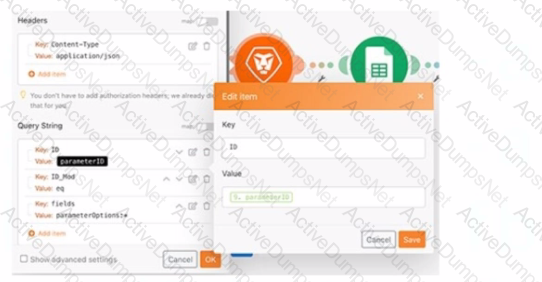
Which option is applicable for the URL text box?
Options:
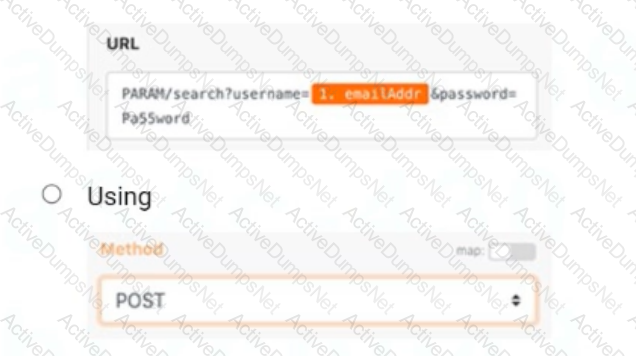
A screenshot of a computer
Description automatically generated
A screenshot of a web browser
Description automatically generated
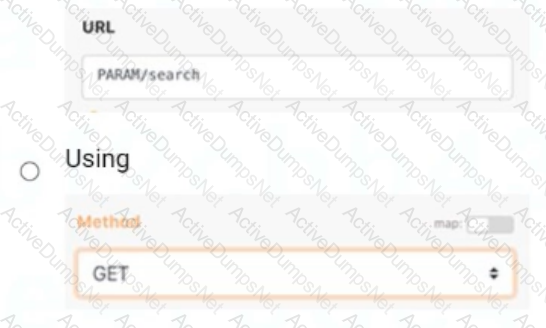
A screenshot of a web page
Description automatically generated
Answer:
BExplanation:
Step-by-Step Explanation
Purpose of the Query:
The task is to retrievefield optionsfrom acustom form field. This operation involves fetching data, not creating or modifying it, which requires a GET method.
Correct API Structure:
The URL must follow Workfront's API structure:
ruby
Copy
https://{your-workfront-domain}/attask/api/{version}/{endpoint}
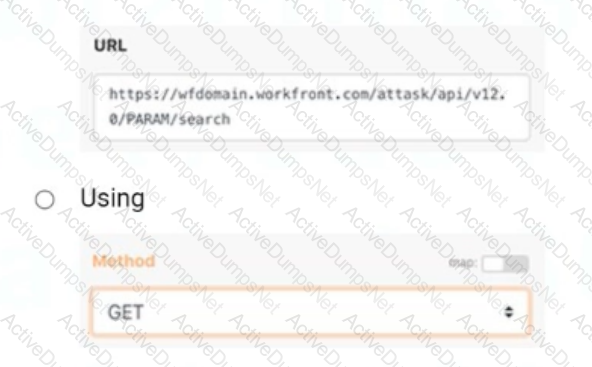
OptionBfollows this standard structure, where:
wfdomain.workfront.com is the placeholder for the Workfront instance.
/attask/api/v12.0 specifies the API version.
/PARAM/search is the endpoint to search for parameters or fields.
Why Not Other Options?
A: The use of POST is incorrect because it is meant for creating or updating resources, not retrieving data. Additionally, the URL structure is incorrect and includes unnecessary query strings (username, password) not relevant for this operation.
C: While the method GET is correct, the URL (PARAM/search) is incomplete and lacks the required Workfront API structure, making it invalid.
References
Workfront API Documentation: Querying and Retrieving Custom Form Field Data
Experience League Community: Best Practices for Using GET Methods in Workfront API=========================
Unlock AD0-E902 Features
- AD0-E902 All Real Exam Questions
- AD0-E902 Exam easy to use and print PDF format
- Download Free AD0-E902 Demo (Try before Buy)
- Free Frequent Updates
- 100% Passing Guarantee by Activedumpsnet
Questions & Answers PDF Demo
- AD0-E902 All Real Exam Questions
- AD0-E902 Exam easy to use and print PDF format
- Download Free AD0-E902 Demo (Try before Buy)
- Free Frequent Updates
- 100% Passing Guarantee by Activedumpsnet